
The best Shopify themes make it easier for customers to find the right product and understand what they are buying. A beautiful demo is nice, but it is not the same thing as a useful store.
If you sell high-ticket products, the customer may need specifications, dimensions, delivery details, warranty information, and a way to ask questions before placing an order. Your theme needs to make that information easy to use. A countdown timer does not answer whether a piece of equipment fits through the customer’s door.
At Ecommerce Paradise, I teach a focused approach to building stores. Go deep before you go wide. Start with the business, the products, and the buyer, then choose the design that supports the operation.
In this guide, I’m comparing five options: Dawn, Empire, Turbo, Booster, and Debutify. I’ll explain the jobs I would test, the costs to compare, and the reasons I would keep a free theme instead of buying a premium one. There is no universal winner for every catalog.
Affiliate disclosure: Some links in this article are affiliate links, and I may earn a commission if you buy through them at no extra cost to you. The Shopify link is a platform referral, not a paid Dawn theme purchase. This guide reviews published information checked October 10, 2026. It is not a claim that I personally benchmarked these themes or verified the vendors’ conversion claims.
Best Shopify themes: a practical shortlist
| Theme | Where I would start the comparison | Cost context | What to test first |
|---|---|---|---|
| Dawn on Shopify | A focused store that needs a clean starting point | Free theme; Shopify subscription and other costs separate | Your actual product information and mobile navigation |
| Empire from Pixel Union | A larger catalog with several collections | Pixel Union displayed $360 | Search, filters, and catalog organization |
| Turbo from Out of the Sandbox | A store comparing richer visual layouts | Reviewed collection displayed $425 USD | The layout you can build with your own content |
| Booster | A store considering built-in merchandising tools | Confirm current yearly or lifetime offer | Features you need, support term, and app overlap |
| Debutify | A store comparing free and paid feature tiers | Free option and paid subscriptions | Required widgets and sections on the selected tier |
Prices are the published offers reviewed October 10, 2026, not complete store-launch quotes. Confirm currency, taxes, licensing, optional services, and the final checkout terms. A one-time theme price and an annually billed subscription are different commitments.
Pick the niche before buying the theme. Use my high-ticket niches list to narrow the market you want to serve →
1. Dawn: my starting point when the store can stay simple
Dawn is a free theme made by Shopify. Its official listing describes a minimalist design with large product imagery and flexible customization. Listed features include product filtering, a mega menu, product videos, shipping information, and FAQ support.
If you are getting started with Shopify, I would evaluate Dawn before assuming you need a paid theme. The theme can be free while the platform, apps, content, and business setup still have costs.
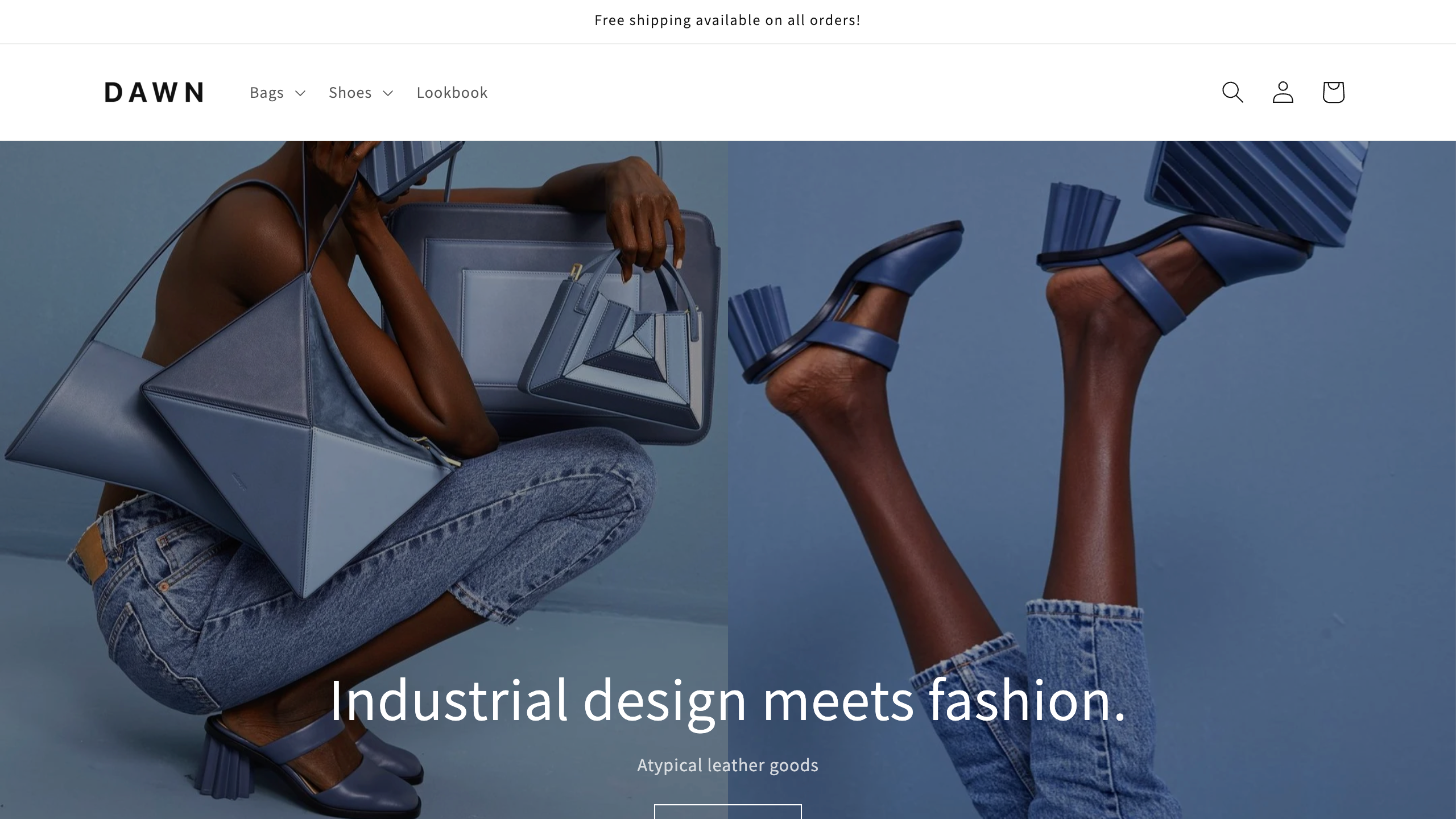
My first test would be a real product page. Add the actual title, images, options, dimensions, delivery information, warranty summary, and contact method. Then view it on a phone. Can a customer understand the product without hunting through five unrelated tabs?
Do the same with a collection. Use the names your buyers understand, not just the labels in a supplier spreadsheet. A clear menu and useful product information can do more for the shopping experience than a large homepage slideshow.
The limitation is not that a free theme is automatically bad. It is that your particular requirements may need something beyond the available settings. Write down that missing job before shopping for a premium replacement.
If Dawn already handles your essential pages, keep the launch moving. You can spend the time on supplier information, product content, and customer support instead of changing the entire design before you have a useful store.
2. Empire: compare it when product discovery is the hard part
Empire from Pixel Union is designed around larger catalogs. The official product page highlights navigation, collection filtering, live search, quick buy, and promotional tiles. Its listed price was $360 during this review.
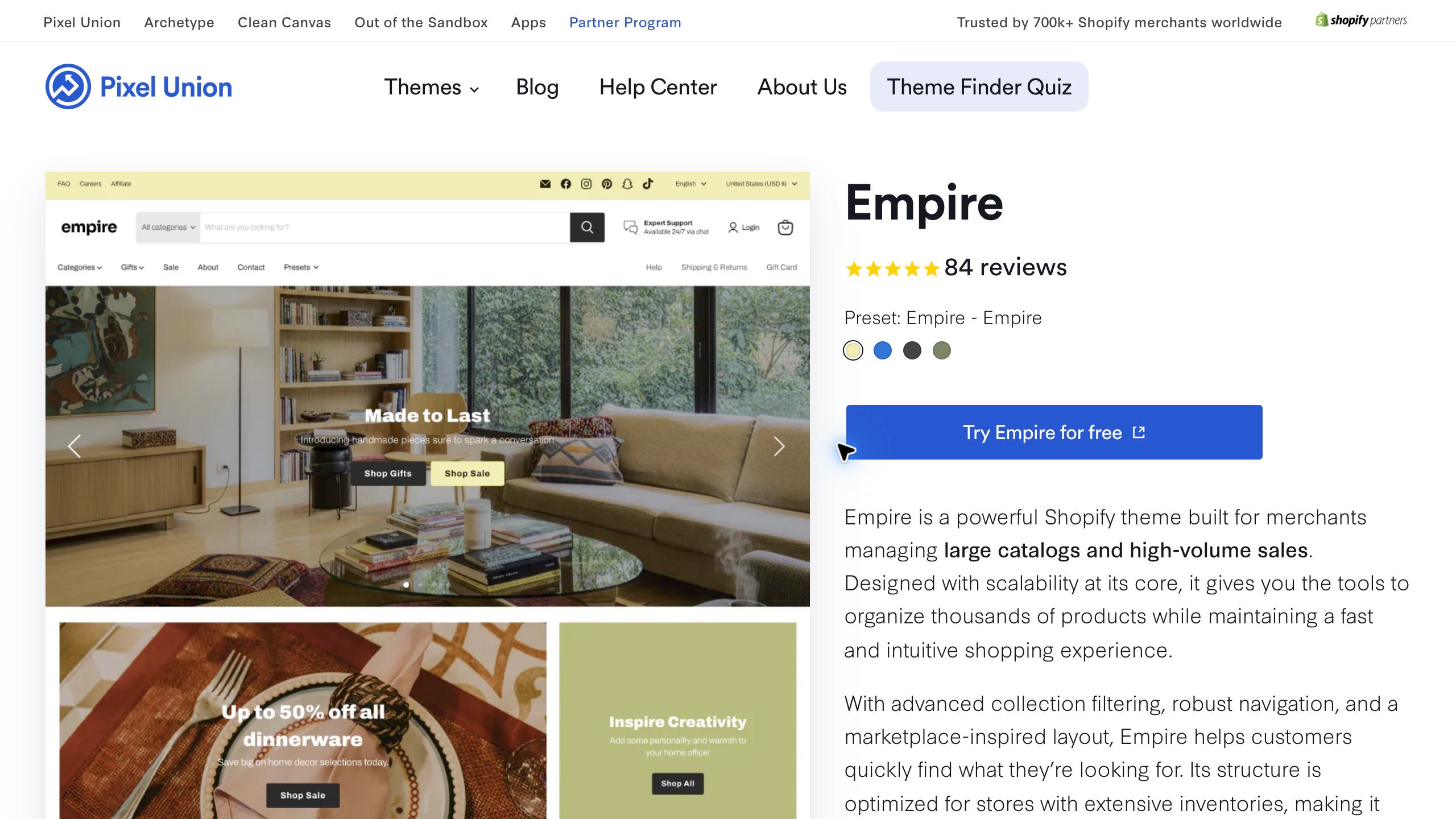
I would compare it when the customer needs help navigating several collections or a wide set of product choices. That is a different problem from making one product look attractive on a landing page.
Start with your collection structure. A hypothetical outdoor-living store might organize products by type, use, size, and material. The theme cannot create reliable product data for you. It needs accurate information behind the filters.
Test whether a buyer can move from a broad category to a short list. If the filters contain inconsistent values, fix the data before blaming the theme. “Outdoor” and “outdoors” should not become two separate customer choices simply because they appeared in different imports.
Then evaluate the product cards. Are the title, image, price context, and next step clear? A quick-buy option may be helpful for simple products, but a high-ticket purchase may need a full product page before the buyer can decide.
My caution is complexity. A bigger catalog layout only helps if you can maintain it. Do not buy a theme for a thousand-product future when the current store has twenty products and no settled navigation.
3. Turbo: compare the visual layouts with your own content
Turbo from Out of the Sandbox offers several presets and a broad set of sections. The reviewed collection listed seven presets, more than 25 sections, and a $425 USD price. The vendor emphasizes visuals, flexibility, and performance.
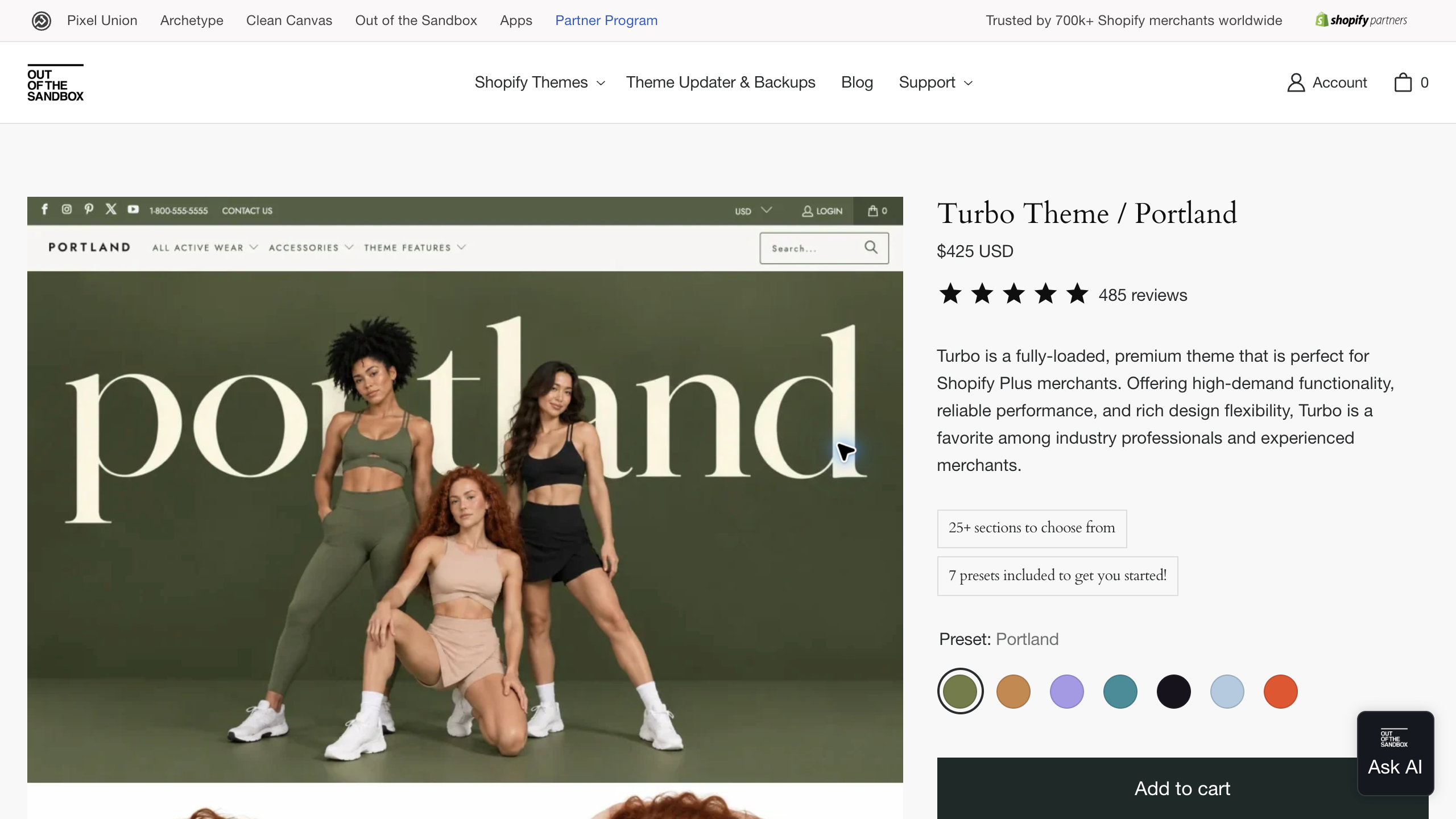
I would treat the performance language as a reason to test, not as proof that your finished store will be faster. Your images, apps, scripts, content, and configuration are part of the final result.
For the design comparison, replace the demo imagery with the material you actually have. A beautiful preset can depend on photography, spacing, and short copy that do not match your products. A technical equipment store might need a very different amount of information.
Build a representative homepage, collection, and product layout. Ask whether the available sections help tell the customer what matters. A gallery is useful when the pictures explain the product. It is less useful when it simply pushes the important details farther down the page.
I would also test routine editing. Can you change a promotion, swap an image, and adjust a product section without contacting a developer each time? The answer matters when somebody else on the team will maintain the site.
My caution is buying visual flexibility without a plan. Choose the sections you need and leave the rest alone. You are building a store, not trying to use every feature in the settings menu.
Build around the customer and supplier relationship. Read my high-ticket dropshipping guide before planning the store →
4. Booster: compare built-in tools without accepting the hype
Booster promotes a Shopify theme with built-in merchandising features such as product tabs, related offers, a shipping bar, and sticky add-to-cart. Its published FAQ distinguishes yearly and lifetime licensing, with support conditions that differ.
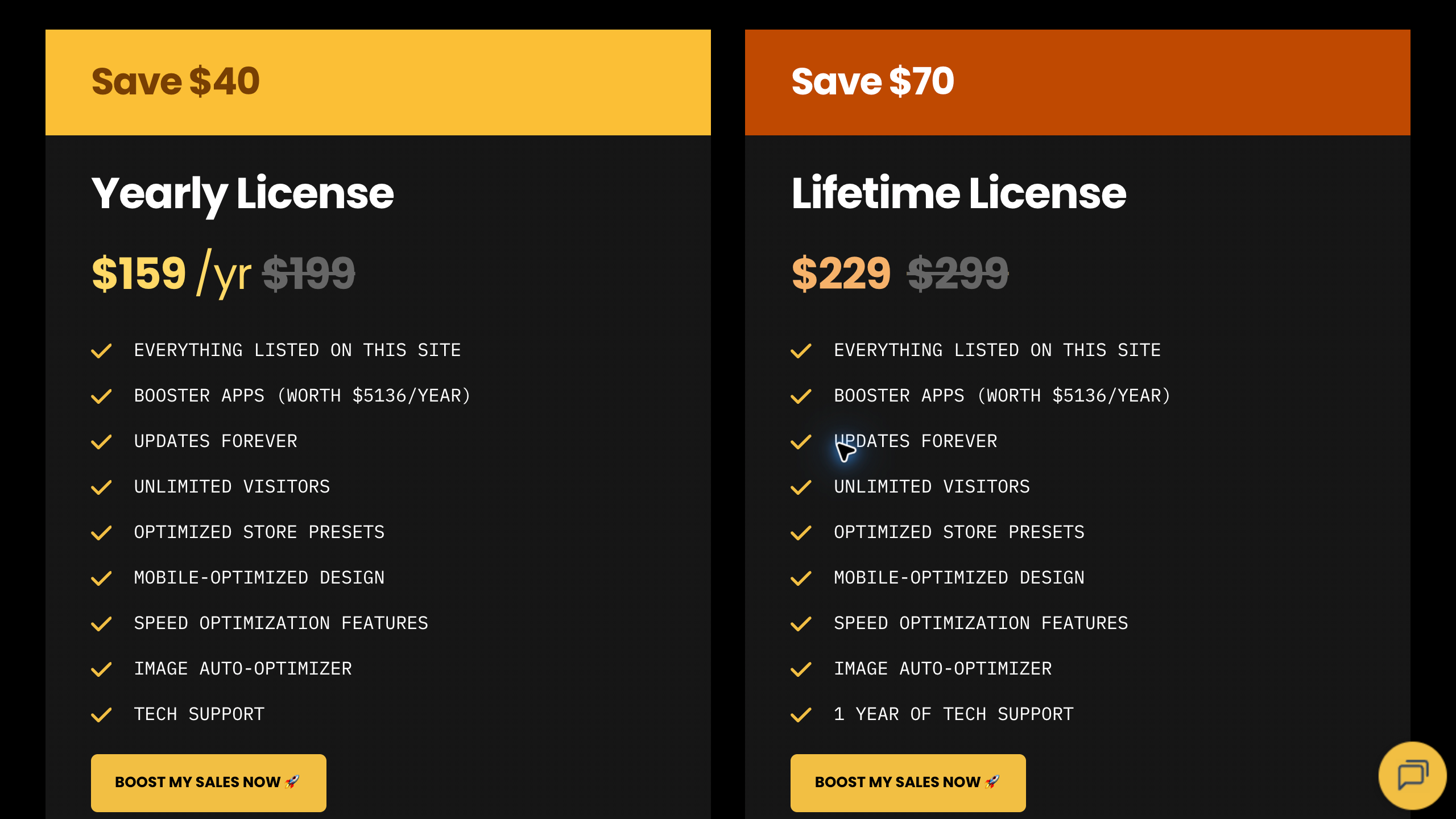
The reviewed pricing page displayed an October promotion of $159 per year, compared with $199, and $229 for a lifetime license, compared with $299. The lifetime card listed one year of technical support. Treat those promotional prices as dated offers and confirm the current renewal and support terms before paying.
The site makes strong conversion and speed claims. I would not turn those claims into a promise for your store. Test the finished customer experience and compare the actual features you need.
Start by listing the apps you currently use. Which job does each app perform? If the theme provides a similar feature, check whether it covers the same workflow and preserves the information you need before removing anything.
A basic recommendation block is not automatically equivalent to a separate app with detailed rules, reporting, or integrations. The useful question is whether the feature solves your job, not whether both products use the same label.
Keep urgency honest. A real delivery cutoff or promotion end date can help a buyer decide. An invented countdown or stock claim damages trust, especially when the product requires a serious conversation before purchase.
My caution is ongoing support. Confirm what the chosen license includes now and later. A lifetime theme license does not necessarily mean every future support service is included forever. Get clarity before paying for the offer.
5. Debutify: choose the feature tier before the subscription
Debutify offers a free theme option and paid plans with additional widgets, sections, and support provisions. The reviewed annual pricing page displayed Growth at $327.60 per year, Professional at $747.60, and Enterprise at $1,335.60, alongside discounts and monthly alternatives.
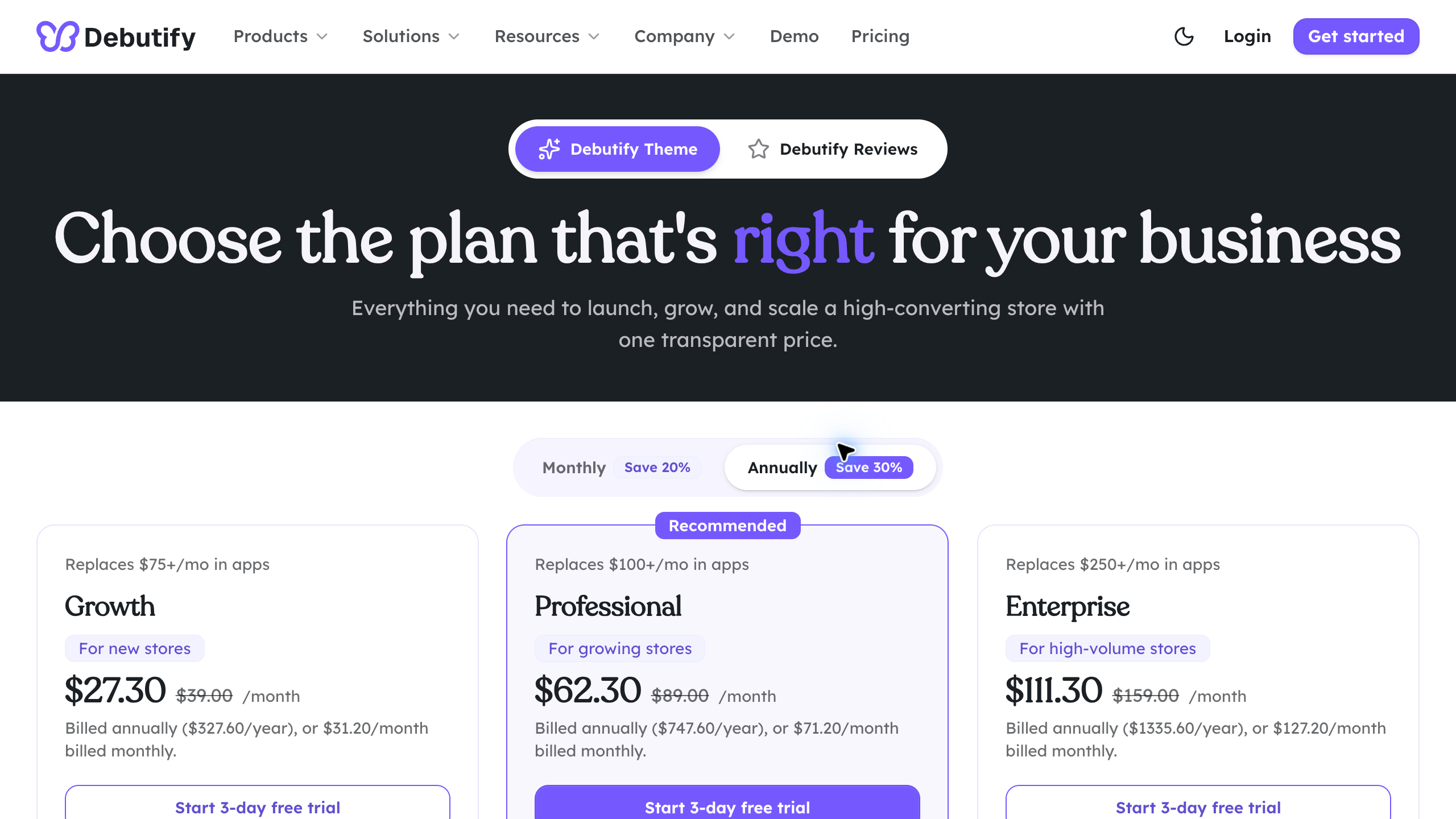
Those are displayed offers, not guaranteed renewal prices. Confirm which features are included in the selected plan and whether the current discount applies to your purchase. Keep the total annual charge visible in your comparison.
I would begin with a small feature list. Perhaps you need a useful product information layout, a clear menu, and a specific merchandising section. Test those jobs first instead of choosing a plan from the largest advertised widget count.
Then look at what happens if you downgrade or cancel. Ask the provider which paid features stop working and what remains in the store. You do not want to discover that a key part of the customer experience depends on a subscription you did not budget for.
Also separate the theme decision from any other products sold under the brand. A review app, AI builder, or email tool is a different purchase. This guide compares the theme, not a recommendation to buy the entire product range.
My caution is feature overload. Add the functions that answer a real customer need. A store with fewer, well-configured elements can be easier to understand than a page packed with every available widget.
Get accurate product information from the source. Use my supplier sourcing guide to organize the questions that shape your product pages →
How I would test the best Shopify themes for a high-ticket store
Choose three representative products before testing a theme. Include a straightforward item, a product with several options, and something with important delivery or installation information. That gives you a more useful test than reviewing only the demo homepage.
Start on a phone. Find a product through the menu, inspect the images, change a variant, and locate the information needed before purchase. Check whether the contact method is easy to find without covering the page with floating buttons.
For a hypothetical $3,000 item, ask what would stop a customer from ordering. Maybe the concern is dimensions, freight delivery, assembly, power requirements, or warranty coverage. The page needs a clear place for that information.
Test the collection path too. A shopper who does not know the exact model should be able to understand the categories and compare options. Use clear labels and accurate data before adding more visual decoration.
Finally, test the maintenance work. Change a heading, update a promotion, replace an image, and edit a product-information section. The person who will run the store should be able to complete the routine tasks.
Compare the full cost of using the theme
The purchase price is only one part of the budget. Include any subscription, support renewal, required app, customization work, and the time needed to build and maintain the design.
A hypothetical $400 theme plus $600 of initial customization would be a $1,000 setup expense before other charges. Those are example inputs, not a quote for any theme in this guide. A free theme can also require paid help if you want a layout outside its settings.
For subscriptions, compare the complete first-year and later-year commitment. Record the current discount separately from the regular price. If support renews separately, include that line too.
I would not count every advertised app-saving amount as money saved. An app you were never going to buy is not an avoided expense. Compare the features you truly need and the actual subscriptions they would replace.
Check licensing and support terms for the specific purchase route. Do not assume a theme can be reused across several stores or that a demo trial gives permission to publish a paid design. Confirm the provider’s current terms before committing.
What a theme cannot fix
A theme cannot make inaccurate supplier information reliable. If the dimensions, stock status, delivery terms, or warranty summary are wrong, a prettier product page still leaves the customer with the wrong answer.
It cannot create a supplier relationship either. Use Supplier Paradise to build a research shortlist, then verify dealer requirements and current terms directly with each company. Directory entries are research leads, not guaranteed approvals.
It cannot make confusing policies helpful just by placing them in an accordion. Write the policy in plain language, confirm what applies to your products, and make it available where the buyer needs it.
And it cannot fix an unfocused store. My high-ticket niches list can help you choose categories to investigate, but you still need to understand the buyer and the products. The design comes after that work.
Organize the business behind the storefront. Work through my business formation checklist before launch →
A simple theme-change checklist
Keep a recoverable copy of the current theme and document the settings that matter. Record the existing menus, templates, app integrations, contact methods, and important customer information before making changes.
Build the replacement separately and use preview links to inspect it. Do not publish a new theme just to see what breaks. A live store deserves a complete check before the design changes.
Review the homepage, collections, product pages, cart, search, policy links, forms, and mobile navigation. Check a few representative products rather than assuming one good page proves every template works.
Include the apps the store actually depends on. If an app needs setup in the new theme, complete and verify that setup. A feature working in the old theme does not prove it will appear in the new one.
Make the change when someone can check the live result and respond to problems. Then confirm the important paths again. Theme work is finished when the store works for customers, not when the publish button has been clicked.
Shopify theme FAQs
Should a new store buy a premium theme immediately?
Not automatically. I would evaluate a free option such as Dawn against the essential requirements first. Buy a premium theme when you can name the specific job it handles better and the cost fits your launch budget.
Does a premium theme guarantee better conversions?
No. The product, price, traffic, trust, information, delivery, and customer experience all matter. Treat vendor claims as marketing claims unless you have evidence that applies to your finished store. A theme is one part of the operation.
Can a theme replace all my Shopify apps?
Do not assume it can. Compare each required workflow, not just a feature name. Some built-in functions may replace simple apps. Others may not provide the integrations, rules, data, or reporting you need.
What matters most for a high-ticket product page?
The buyer needs a clear explanation of the product and the information required to choose confidently. That often includes specifications, options, delivery, warranty, and a useful contact method. Test whether your actual content fits the layout.
How do I avoid constantly changing themes?
Choose from a written requirements list and test representative pages before committing. Keep the design focused and learn the routine editing process. Change themes when there is a real limitation, not whenever another demo looks attractive.
My recommendation: keep the store useful and manageable
I would start simple. Evaluate Dawn on Shopify, then compare a premium option only when the store has a clear requirement it does not meet. Free is not automatically best, but expensive is not automatically better.
For a larger catalog, compare Empire through Pixel Union. For richer visual layouts, investigate Turbo with your own product content rather than judging only the preset photography.
Compare Booster and Debutify when their built-in features solve a real job. Check the support, billing, and maintenance commitment. Then configure the functions you need and leave the unnecessary extras alone.
If you want help deciding what the store should do, review my private coaching. Bring the niche, products, and requirements so we can work on the decision that matters.
Research checked October 10, 2026 using the official Shopify Dawn listing, Pixel Union Empire page, Out of the Sandbox Turbo collection, Booster product information, and Debutify theme and pricing pages. This is a published-feature comparison, not an independent speed or conversion benchmark.
Related guides
Read the high-ticket dropshipping overview before designing the store. Use the niches list to focus the research.
Continue with the supplier sourcing guide and confirm current supplier terms. Keep the business formation checklist alongside your launch plan.
Want help building the complete store? Review the Ecommerce Paradise done-for-you store service →

Trevor Fenner is the founder of Ecommerce Paradise. His main projects are Ecommerce Paradise, Supplier Paradise, and Review Paradise, which is currently in development. TrevorFenner.com publishes research-based reviews and practical guides to online business tools and remote-work services, with clear affiliate disclosures.