
The best online course platforms make it easier to deliver a useful learning experience. They do not decide what you should teach, find your customers, or turn a pile of videos into a course people can actually use.
I would start with the course itself. Who is the student, what are they trying to do, and what should they be able to complete by the end? Once that is clear, choosing the software gets a lot easier.
At Ecommerce Paradise, I teach entrepreneurs to work through concrete business decisions. The same principle applies to a course: give the student a clear next action instead of making the classroom bigger just to look impressive.
This guide compares three options: Teachable, LearnWorlds, and LifterLMS. The first two are hosted platforms. LifterLMS adds a learning system to a WordPress website. That difference matters because it changes the maintenance work behind the course.
I’ll explain the pricing details that are easy to miss, the student journey I would test, and how I would choose a platform for a first course. This is a focused shortlist, not a claim that these are the only options or that one product wins for every business.
Affiliate disclosure: I may earn a commission if you sign up through the affiliate links in this article, at no extra cost to you. Product information was reviewed October 10, 2026. This is a research-based comparison, not a claim that I personally tested every feature or verified the vendors’ revenue claims.
Best online course platforms: quick comparison
| Platform | Where I would compare it | Reviewed cost context | What to check first |
|---|---|---|---|
| Teachable | A hosted course and digital-product business | Starter $39 monthly; 7.5% platform transaction fee | Product limits, payment eligibility, and total fees |
| LearnWorlds | A hosted school with structured learning requirements | Starter displayed $29 monthly plus $5 per paid enrollment | Learning features, active-learner limits, billing currency, and fees |
| LifterLMS | A WordPress-based course site | Free core plugin; paid bundles and separate website costs | Payment add-ons, hosting, maintenance, and renewal pricing |
These are selected published prices, not complete operating budgets. Teachable and LifterLMS identify their pricing as USD. LearnWorlds displayed dollar amounts on the reviewed page; confirm the billing currency and final terms for your account. Payment processing, taxes, optional services, and other charges may be separate.
Start with a business you understand. Read my high-ticket dropshipping guide to see how I organize a practical business model →
1. Teachable: compare a hosted selling and teaching setup
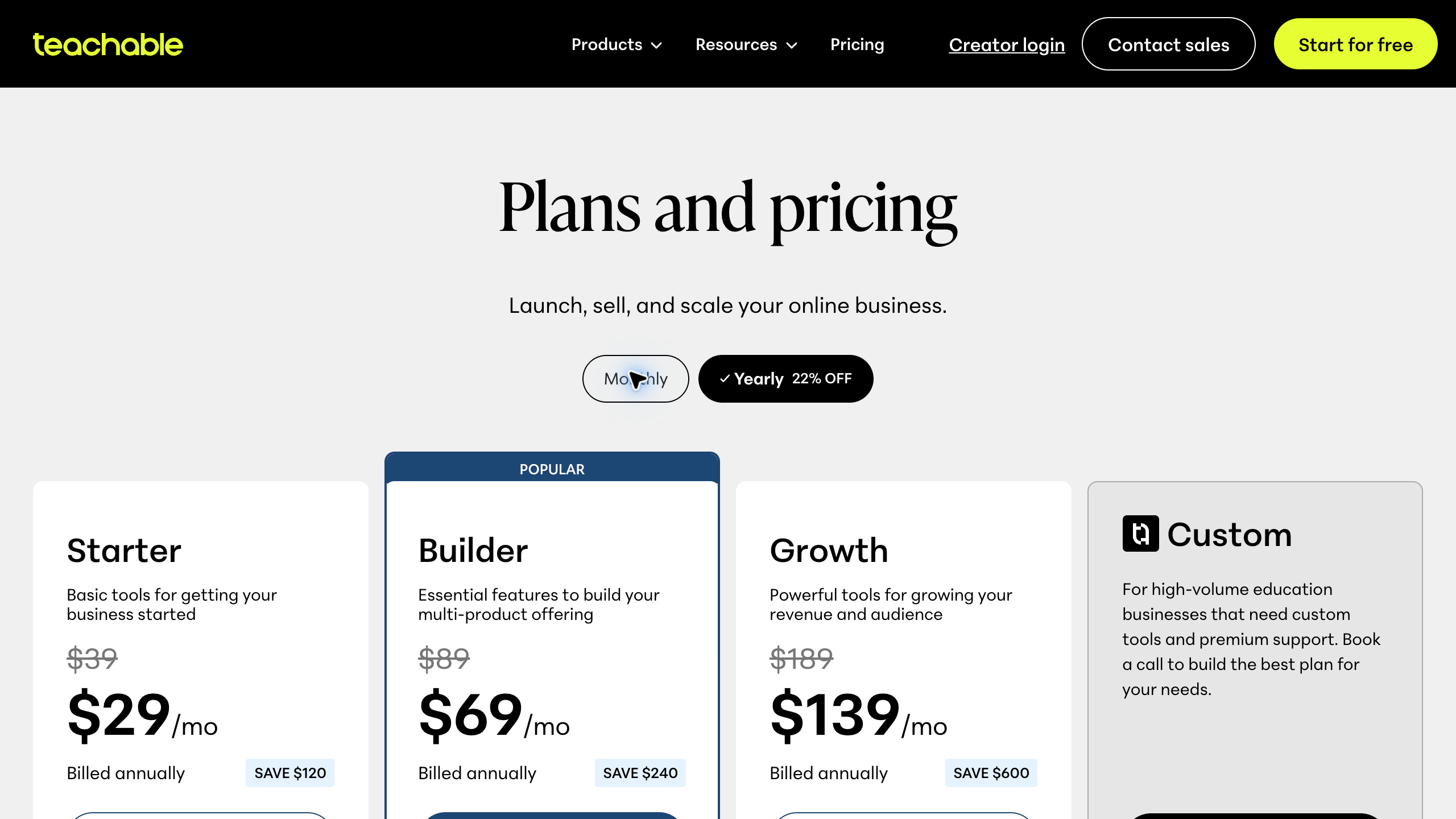
Teachable supports selling courses, digital downloads, memberships, and coaching. Its reviewed monthly plans were Starter at $39, Builder at $89, and Growth at $189, with published product limits of five, ten, and fifty respectively.
Starter lists a 7.5% platform transaction fee. Higher plans advertise zero platform transaction fees when using Teachable Payments, but payment processing and optional services can still cost money. Annual billing has different monthly equivalents.
My first test would be one small course, not the entire future catalog. Build a lesson with a video, a clear explanation, and a useful download. Then look at it as a student. Does the next step make sense without you standing beside them?
Next, test the path from the course description to enrollment and the first lesson. Find out what the student sees after purchase, how they return to the course, and where they ask for help.
I would also check the meaning of a product limit against the offer I intend to sell. A course, a coaching product, and a digital download are different items to plan. Do not assume that a plan name tells you how your entire catalog will be counted.
My caution is looking only at the subscription. A lower fixed price can have a higher variable cost as sales grow. Compare the full fee structure and the payment options available to your business before choosing a plan.
2. LearnWorlds: compare the learning requirements, not just the storefront
LearnWorlds is a hosted platform for course businesses and training schools. Its published plan comparison includes assessments, learning paths, certificates, and interactive-video features with different levels of access.
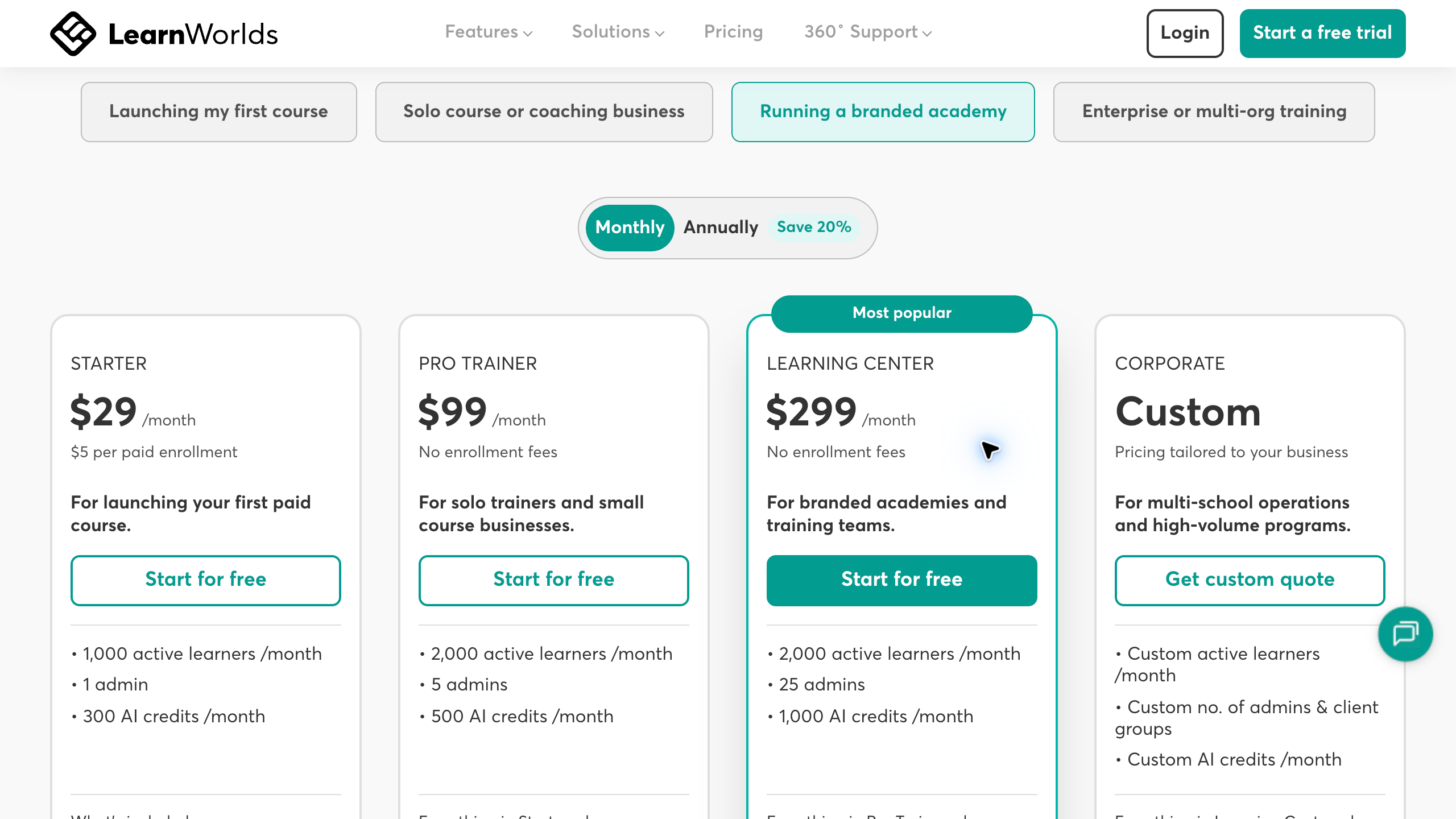
The reviewed page displayed monthly Starter, Pro Trainer, and Learning Center prices of $29, $99, and $299. Annual equivalents were $24, $79, and $249. Starter lists $5 per paid enrollment; higher tiers list no enrollment fee. Payment-gateway charges remain a separate consideration.
I would begin by describing what the student must do. A straightforward video course may need a different setup from a program that includes assignments, a sequence of activities, or a completion certificate. Test the required learning features on the exact tier you are considering.
For a hypothetical supplier-research course, a student might need to complete a shortlist and compare a few companies. I would ask whether the classroom helps them move through that task and receive useful feedback. More interactive features are only helpful if the course needs them.
Also check the limits that affect the operation. Active learners and administrator seats are not necessarily the same as total registered accounts. Ask how the provider defines the limits that matter to your planned school.
My caution is buying an academy-sized plan before you have a clear course. Start with the student outcome, identify the necessary features, and compare the tier that supports them. Leave the extra complexity for a real requirement.
Choose a focused subject instead of teaching everything. Use my high-ticket niches list as an example of narrowing a broad market into categories to research →
3. LifterLMS: compare it when you want a WordPress-based school
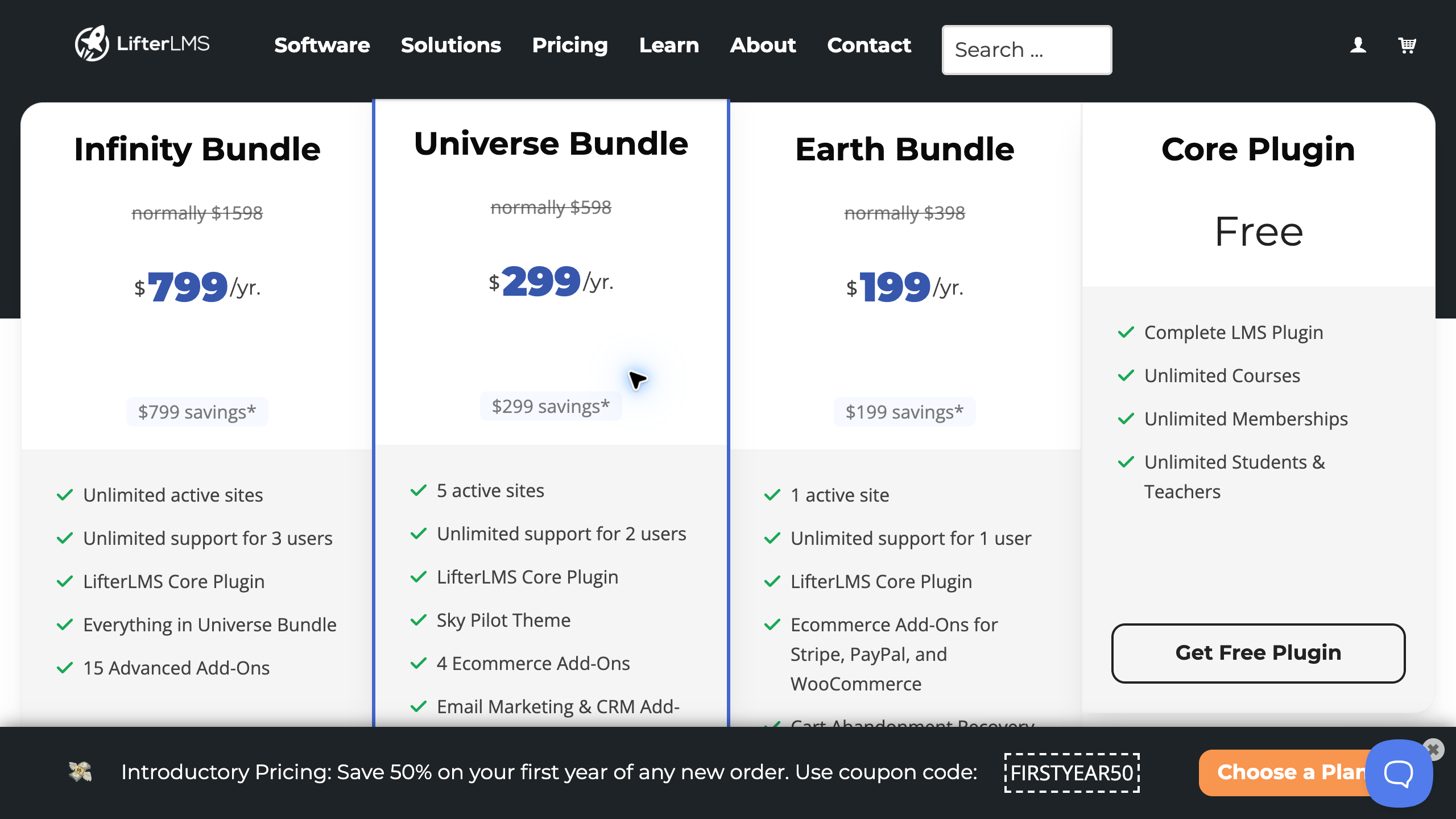
LifterLMS is a WordPress learning-management plugin. Its free core supports courses, memberships, students, and teachers. Paid bundles add capabilities, including ecommerce options, according to the selected package.
The reviewed page showed first-year Earth, Universe, and Infinity bundle prices of $199, $299, and $799 per year. Listed full prices were $398, $598, and $1,598, and the page states that renewals are at full price. Hosting and the rest of the website stack are separate.
I would compare this path when I have a clear reason to run the school on WordPress and a plan for maintaining it. A free plugin does not mean the complete website has no costs or technical responsibilities.
Work through the whole setup. Who manages hosting, updates, backups, payment configuration, and plugin compatibility? If the answer is you, budget the time. If the answer is someone else, confirm the support arrangement.
Test a small course on the actual site configuration you intend to use. A plugin working by itself does not prove that the theme, payment tools, email delivery, and other parts of the website work together.
My caution is comparing a plugin license with a hosted-platform subscription as if they were the same package. Compare the complete operating setup. Choose WordPress because it fits the business and the team, not simply because the core plugin is free.
Hosted platform or WordPress: decide who handles the technology
This is the first major decision I would make. A hosted platform and a WordPress learning site can both deliver courses, but they divide the technical work differently.
For a hosted option, investigate the platform’s included services, limits, support, and export options. You still have work to do, including the course content, student support, sales pages, and account configuration.
For a WordPress option, investigate the complete website setup and who keeps it working. Make sure routine updates, backups, and recovery have a clear owner. Do not leave those jobs until a student cannot access a lesson.
Think about your own priorities. If the course is a small part of an existing business, reducing technical work may matter more than having every customization option. If the website requires a specific integrated setup, a WordPress approach may be worth comparing.
Write down the reason for the choice. “I need this particular website capability and have someone to maintain it” is useful. “I heard self-hosted is always better” is not enough to choose the operating model.
Compare subscription, transaction, and renewal costs
Build a simple budget with separate lines for the platform, payment processing, transaction or enrollment fees, hosting where needed, paid add-ons, and support. Keep first-year promotions separate from later-year costs.
Here is a hypothetical example using Teachable’s reviewed monthly offers. At $1,000 of course sales subject to the listed 7.5% Starter platform fee, that fee would be $75. Adding the $39 subscription would produce $114 before processing and other charges. A $89 Builder subscription with no applicable platform fee would have a different total.
That example is not a sales forecast or a complete checkout quote. It only shows why a subscription price by itself can be misleading. Your payment eligibility, actual sales, fee conditions, and required features determine the useful comparison.
Enrollment-based fees work differently from percentages. Record how the selected provider counts a paid enrollment, then estimate a few realistic sales scenarios. Do not assume that every fee model responds the same way to a higher-priced course.
For a paid WordPress bundle, put the renewal amount on the calendar and budget. A first-year discount can help at launch, but it does not make the recurring full-price charge disappear.
Finally, read the current billing and cancellation terms before entering payment details. Trial access, a paid annual commitment, and a refund policy are different things. Know which one you are agreeing to.
Give students a concrete research task. My supplier sourcing guide shows how I break a broad topic into practical next steps →
Test the student journey before buying a larger plan
Build one representative lesson and follow the experience from beginning to end. Include a short video, written instructions, and a useful exercise or download. Use sample information instead of real customer or student records.
Start with the course page. Does it explain who the course is for, what the student will work on, and what is included? Make the promise specific enough that the right person can decide whether it fits.
Then test enrollment and access using the provider’s appropriate test process. Confirm what happens after payment, where the student signs in, and whether the first lesson is easy to find.
Check a phone as well as a computer. Read the instructions, play the lesson, find the download, and move to the next activity. If the useful part of the lesson depends on a desktop spreadsheet, tell the student that rather than pretending every task is mobile-friendly.
Test the support path too. A student should know where to ask a course question and where to report an access problem. Keep those routes clear so the issue reaches the person who can solve it.
I would do this before loading a huge course library. It is easier to fix the structure when you have one lesson than after you have repeated a confusing setup across fifty videos.
Create a first course that is worth maintaining
Start with one student and one clear outcome. A first course should help that person do something they care about. The platform should support that result rather than becoming the reason the course exists.
For an online-business topic, that might be organizing supplier research or understanding the steps in a store launch. Use accurate information, show the limits of the advice, and make the exercises practical.
Do not pad the course with extra modules just to advertise a larger lesson count. A useful explanation and a clear exercise can be more valuable than another hour of material that does not change what the student can do.
Also decide how you will update it. Software interfaces, supplier processes, and prices change. Keep source notes and a review schedule so students are not following instructions that stopped working months ago.
If a lesson involves supplier research, Supplier Paradise can provide a research starting point. Make it clear that a directory lead still needs direct verification and that buying access does not guarantee approval from a company.
Keep content and business records outside the platform
Keep your original videos, written lessons, downloads, and source notes in an organized location you control. You should be able to identify the current version of a lesson without searching through several exports.
Before choosing a platform, ask what you can export and in what format. Content files, student information, completion records, payment details, and community discussions can have different export arrangements.
Do not assume that every account or payment arrangement can be moved to another service without work. Confirm the current migration process and any limitations with the provider before making a decision that depends on portability.
Give access carefully. A course assistant may need to upload lessons without having the same permissions as the business owner. Test the roles you need on the selected plan rather than assuming all team access is included.
For the business setup behind the course, work through my business formation checklist where it is relevant. Confirm the requirements for your own business, payments, and customer terms with appropriate professional guidance.
Want help organizing the bigger business decision? Review my private coaching options →
Common mistakes when choosing course software
Choosing the platform before choosing the course. Write down the student, the outcome, and the learning activities first. You will make a clearer software decision when the requirements are real.
Comparing only the opening subscription price. Include the variable fees, required add-ons, website costs, and renewal amount. A small first payment is not the same thing as a low ongoing operating cost.
Buying features you will not use. Certificates, advanced assessments, and team permissions may be valuable, but only when the course or business needs them. Choose the tier for the actual requirement.
Forgetting the support work. Somebody needs to answer questions, correct mistakes, handle access problems, and maintain the material. A software subscription does not take ownership of the course for you.
Promising results you cannot support. Be clear about what the course teaches and what the student must do. Do not turn a provider’s customer story into your own earnings claim or a guarantee for your students.
Online course platform FAQs
Which platform would I compare for a first course?
I would begin with the operating model. Compare Teachable or LearnWorlds when a hosted setup fits your requirements. Compare LifterLMS when you have a clear reason to use WordPress and a plan for maintaining the complete site.
Does zero transaction fee mean payments are free?
No. A platform transaction fee and payment-processing charges are different costs. Check the selected payment system, fee conditions, taxes, and any optional services before calculating the total.
Is a free WordPress plugin the cheapest option?
Not necessarily. Include hosting, payment capabilities, add-ons, support, and maintenance. Compare the complete setup with a hosted platform rather than comparing only the plugin license with a subscription.
Should I pay annually immediately?
I would first test a representative course and confirm the required features. An annual price may reduce the monthly equivalent, but it creates a larger commitment. Review the current billing, cancellation, and refund terms before choosing it.
Do I need an app or a large course library to launch?
Start with the student experience you need to deliver. A useful first course does not automatically require a custom app or dozens of modules. Test access, readability, lessons, exercises, and support before expanding the scope.
My recommendation: choose the platform you can run consistently
Compare Teachable for a hosted course-selling setup, then check the product limits and applicable fees against your offer. A first course deserves a practical test, not an assumption based on the plan name.
Compare LearnWorlds when the learning structure and school features are central to the decision. Confirm the exact tier that supports those requirements.
Compare LifterLMS when WordPress is the right operating choice and you understand the maintenance commitment. Budget the whole site, including later-year pricing.
The course still comes first. Teach something useful, make the next step clear, and choose the software that supports that experience. Then keep the content and the support process in good shape.
Published pricing and feature information reviewed October 10, 2026 using the official Teachable, LearnWorlds, and LifterLMS pricing pages. Terms can change. This comparison does not establish independent performance, student outcomes, or earnings results.
Related guides
Read the high-ticket dropshipping overview for the business model. Use the niches list to focus a market before building around it.
Continue with the supplier sourcing guide and keep the business formation checklist beside the plan.
Want help building the business behind the content? Review the Ecommerce Paradise done-for-you store service →

Trevor Fenner is the founder of Ecommerce Paradise. His main projects are Ecommerce Paradise, Supplier Paradise, and Review Paradise, which is currently in development. TrevorFenner.com publishes research-based reviews and practical guides to online business tools and remote-work services, with clear affiliate disclosures.