
The best AI tools for content creation are the ones that do one specific production job well. Someone reviewing recorded explanations needs a different tool than someone turning verified notes into slides. So pick the job first, then decide whether you need another subscription.
I started Ecommerce Paradise in 2015 to teach people how to build online businesses, and one rule still holds. Start with real source material: an explanation you recorded, an authorized customer question or a verified product document. Software helps you organize that material, but a generated paragraph never proves a claim is true.
At Ecommerce Paradise, I focus on practical business education. Explain the decision, show the evidence and give the reader a specific action. Hold any AI-assisted article or presentation to that same standard.
This shortlist compares Otter for spoken source notes and Gamma for visual explanations. They solve 2 separate tasks. This is not a ranking of every AI platform or a claim that I personally tested paid features.
You’ll learn how to define the question before you open a tool, keep source notes apart from approved facts, run a small evaluation of each tool, budget for accepted work and keep private information out of public examples. If you sell products, this matters even more in the high-ticket dropshipping model I teach, where buyers expect accurate specs before they spend real money.
The public Free-plan screenshots were captured October 15, 2026. Their selected currency and billing views document the provider pages on that date. Confirm current limits and purchase terms for your own account instead of treating the images as universal offers.
Disclosure: qualifying purchases through affiliate links earn me a commission at no extra cost to you. I own Ecommerce Paradise and Supplier Paradise. Public provider screenshots do not show personal software testing, content performance or business results.
Compare the production task
| Tool | Task | Starting option | Check before choosing |
|---|---|---|---|
| Otter.ai | Spoken source notes | Basic free with limits | Minutes, imports, consent and source accuracy |
| Gamma | Visual explanations from reviewed notes | Free with initial credits | Seats, usage, source accuracy and exported layout |
Otter for reviewing spoken source material
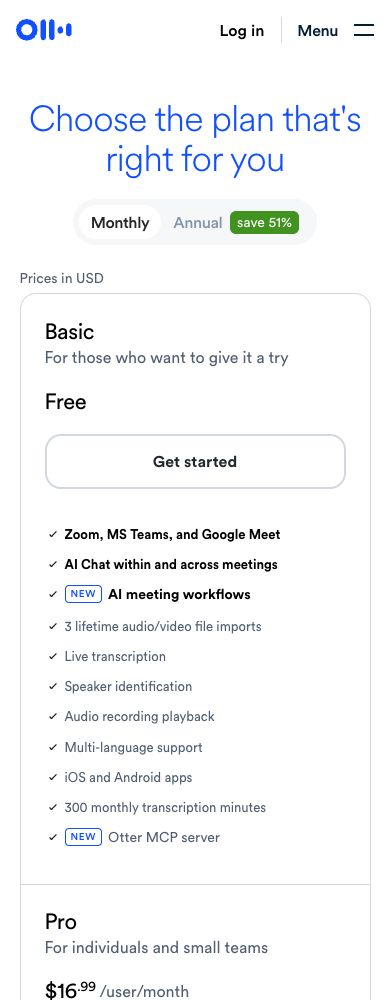
Otter.ai handles transcription and searchable source notes. I’d look at it when your recorded explanations contain useful material that needs review. No transcript accuracy experiment was performed for this comparison.
The current Basic description lists 300 monthly transcription minutes, 3 lifetime audio or video imports and a 30-minute conversation limit. Otter’s help page on Basic plan limits confirms the 3 imports are per account, not per month. Check those limits against how often you actually record.
Pro lists 1,200 monthly minutes in a shared transcription pool, 10 monthly imports and 90 minutes per conversation. Business separates unlimited meetings and in-app recordings from a 6,000-minute imported-file allowance. Unlimited file counts do not mean unlimited imported duration.
Displayed standard monthly USD prices are $16.99 per user for Pro and $30 for Business. Discounted offers come with their own eligibility conditions. Read the selected billing arrangement and renewal terms before you treat a lower number as the ongoing price.
Keep the original recording next to the transcript while you edit. Check the speaker, wording, measurements and context before you quote anything. A searchable document is useful working material, not independent proof of accurate transcription.
Gamma for arranging a reviewed visual explanation
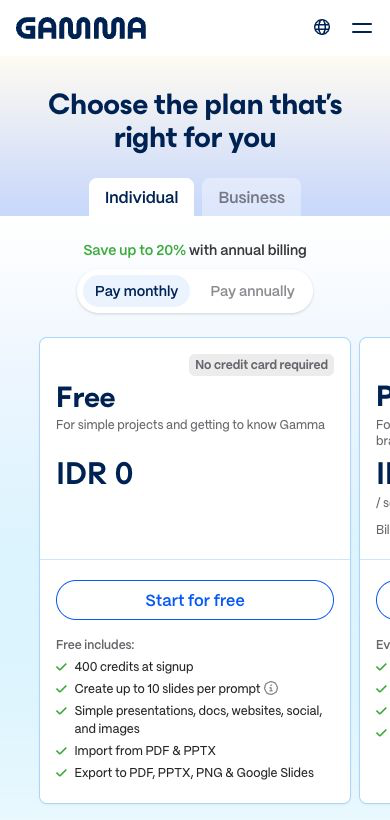
Gamma offers tools for presentations and other visual content. I’d look at it after you’ve edited the factual brief. Its useful job is arranging an explanation, not filling in missing product facts.
Its current Free plan lists 10 slides per prompt, PDF and PowerPoint imports, and exports to PDF, PowerPoint, PNG and Google Slides. Gamma’s help article on how credits work describes 400 initial credits with no automatic Free-plan refresh. A credit allowance doesn’t guarantee any particular number of usable finished files.
The current help page lists 1,000 monthly credits for Plus, 4,000 for Pro and 20,000 for Ultra. Plus removes Gamma branding, and Pro adds customization, analytics and API access. Confirm the plan you pick instead of assuming every advertised feature comes with Free.
Subscriptions are per user. An annual displayed monthly equivalent is different from the full-year upfront charge. The current Free-plan screenshot shows the regional IDR view, not a paid-plan quote, so paid amounts aren’t quoted here without a matching verified billing view.
Review the exported file at the size your audience will actually see it. Check the wording, table layout, image meaning and source consistency. No paid workspace, generated presentation or export-quality test was performed for this article.
Define the question before opening the tool
Write down the question your content needs to answer. A guide on preparing for freight delivery has a much clearer purpose than a request for general ecommerce content. Identify the reader and the decision the finished piece should help them make.
Spell out the information the answer needs. A delivery guide needs the actual service conditions, access requirements and appointment process. Get the supplier’s current documents instead of asking a model to fill gaps with familiar-sounding instructions.
Write down what you don’t know. An unconfirmed delivery date stays unconfirmed until the responsible business gives you the answer. A confident draft doesn’t fix a missing source.
Here’s what I’d do. Keep the first brief narrow enough to review properly, with one question, a useful answer and a defined audience. Expanding the topic before the source material is ready just creates more unsupported material you’ll have to correct.
Keep source notes separate from approved facts
A recorded explanation gives you ideas, context and questions. Product documentation gives you specifications and conditions. Both need review before they become public claims, and the editor needs to know which source supports each statement.
Use the transcript to find relevant passages, then check the original recording. Confirm who spoke, what was said and the conditions around it. A summary should never quietly turn a possibility into a commitment.
For a product comparison, check model numbers, dimensions and selected variants against current documentation. A conversation about one version says nothing about the specs of another. Keep the exact product identified throughout the draft.
Keep the source date and relevant conditions next to your working notes. When an offer changes, the editor needs a clear record to update. Memory is a weak substitute for the document behind the original claim.
Edit the explanation before arranging the visuals
Review the source notes and pick the points that answer the reader’s question. Spoken explanations are full of repetition and tangents. Cut those passages instead of asking software to polish every sentence into a longer article.
Explain one decision per paragraph. Name the condition, describe the practical choice and give the next action. A paragraph that only offers broad encouragement needs a specific example, or it needs to go.
For example, checking transcript model numbers before writing a product guide is a concrete editing task. A claim about general efficiency gives the reader much less to work with. Show where the error comes from and which source fixes it.
Read the draft out loud before you publish. Replace any language you wouldn’t use when answering a real question. Keep the necessary qualifications, but cut inflated claims and repetitive transitions.
An editor also needs the authority to reject material. A generated section with no useful evidence shouldn’t survive just because it looks polished. Keep the finished explanation grounded in the source instead of saving every generated passage.
Evaluate one representative recording
For an authorized evaluation of Otter, pick a short recording that looks like your real work. Use material you have permission to process. Skip private customer records when a fictional explanation works just as well.
Note the speaker conditions, audio quality and specialized terms before you review the transcript. Check the original audio against the text. Track errors that change meaning separately from minor punctuation edits.
Measure review time if saving time is why you’re buying. The comparison that matters is the work needed to produce accepted notes, not how fast the software shows a transcript. Include correction and source checking in the evaluation.
Keep the conclusion narrow. One recording doesn’t prove accuracy across every accent, noise level, language or subject. This guide did not run that recording evaluation, and the process here is a proposed buyer check.
Evaluate the finished presentation file
For an authorized evaluation of Gamma, start with an edited outline, not an unfinished transcript. Give it the reader’s question, the verified sequence and the facts that must be preserved exactly.
Compare the resulting structure with your outline. A slide should explain one specific point without adding unsupported steps or results. If the visual sequence changes the meaning, fix the content before you decide whether the design is useful.
Open the exported file in the destination app. Check headings, line breaks, tables and image placement at normal viewing size. The editing canvas and the delivered presentation are 2 separate things to review.
Think about your audience’s access needs. Tiny labels, unreadable diagrams and crowded slides need fixing before delivery. An impressive preview doesn’t mean the explanation works on the reader’s device.
Record the plan, export format and limitations you saw in your own evaluation. Don’t generalize one output to every subscription or format. No generated deck or export-quality experiment was performed for this article.
Use real evidence for product claims
A big product purchase depends on correct specs and clear operating conditions. A generated illustration doesn’t prove dimensions, warranty coverage or delivery handling. Use the manufacturer’s actual documents and authorized images for those claims.
Separate a conceptual graphic from a product demonstration. Label creative illustrations clearly and keep the exact product evidence separate. Never present a generated interface as a feature you actually used.
Check your rights to the source material before you process or publish it. Permission to generate a visual doesn’t give you rights to someone else’s photography, logo or likeness. Get the proper authorization instead of assuming tool access equals permission.
Keep outcomes separate from explanations too. A fictional campaign or sample presentation is not proof of sales, traffic or customer satisfaction. The FTC’s Endorsement Guides FAQ says endorsements must reflect the honest opinions or experiences of the endorser, so describe the work you did without inventing performance evidence or testimonials.
Make a small content package from approved material
Only repurpose the explanation after you’ve checked the article’s facts. A short slide sequence, an email intro and a video outline are different formats. Keep the core information consistent while you change the structure for each one.
The email needs a clear reason to read and a relevant next step. A video outline needs a sequence backed by real materials. Neither one needs a copy of the full article pasted in.
Pick a manageable package instead of a big queue of unchecked outputs. If your review time covers 2 pieces, finish those 2. Generating more drafts without review is not publishing progress.
Give the final approval an owner. Record the source version and every destination that uses the material. When a product condition changes, the update should reach every affected explanation, not just the original blog post.
Budget for accepted work
Compare the cost of finished, accepted content. Include subscription fees, extra usage and review time. A cheap tool is a bad deal when fixing its output takes more work than writing the explanation yourself.
For a hypothetical calculation, a $20 monthly subscription that supports 4 accepted pieces costs $5 per piece before labor. If only 1 piece gets finished, the software cost is $20 for that piece. These figures illustrate budgeting, not either provider’s price or measured performance.
Track rejected outputs and why you rejected them. Missing facts, an unclear brief and a broken export each need a different fix. A bigger allowance won’t fix a weak source or a missing approval process.
Check seat billing and renewal terms alongside usage limits. An annual monthly equivalent usually comes with an upfront yearly payment. Budget the actual arrangement instead of mixing currencies, temporary discounts and billing periods into an imaginary total.
Keep private information out of public examples
Only use recordings you’re authorized to make and process. Get appropriate participant consent and professional guidance on the rules for your situation. An AI-tool tutorial does not give you legal permission to record someone.
A fictional example usually gives enough context for a general article. Don’t upload payment details, ID documents or private account information just to explain a process. Label the example instead of implying a real customer interaction happened.
Review the provider’s current sharing, retention and privacy settings before you use sensitive material. Check who gets access and which settings apply to your account. A generic security claim is not a review of your specific setup.
Keep an editable working file with the approved wording and source context. Store confidential supporting material according to your authorized business process. Keep the public explanation limited to information that’s approved for publication.
Keep revisions traceable
Save the approved source version next to the edited draft. Note who’s responsible for checking changed facts and the date of the review. A later editor needs to understand why a statement was approved, not just see the final wording.
When a provider changes a price or allowance, update the comparison and the caption context. Keep a dated screenshot as historical provider material when it makes sense. Never quietly present an older promotional screen as proof of current purchase terms.
Review every destination that uses the same explanation. An article, slide deck and email from one source all need the same corrections. Assign updates to a named owner so an old claim doesn’t linger in another format.
Connect content to the business decision
Content should describe your actual offer and operating responsibilities, not promise a result the business hasn’t earned. I’ve built more than 20 websites over the years and plenty of them closed down. The lesson I took from that is simple: content can’t rescue a business that doesn’t have a real offer and real suppliers behind it.
Use the niches list to research a focused category. A defined audience gives you useful questions to research. A list of products doesn’t prove demand or supplier access.
The supplier sourcing guide covers how to verify commercial relationships. Confirm authorization, delivery terms, returns and warranty handling before you describe any of them in public content.
Supplier Paradise is a research resource I own. Directory leads support your research, not automatic approval or profit. Keep unverified supplier information out of recommendation claims.
My business foundation checklist frames the broader setup. Content tools don’t replace professional guidance or the records and permissions you need to run the business.
For help with the business decisions, take a look at my private coaching. It’s separate from either software subscription and doesn’t come with content performance guarantees.
Choose one production task to improve
I’d look at Otter’s current plans when reviewing spoken material is the job in front of you. Match the import and duration limits to your recordings, then judge it on accepted notes and correction work.
For a reviewed brief that needs visual structure, look at Gamma’s starting option. Evaluate one finished file before you commit to paid capacity.
Neither tool is required for every creator. A manual process that works is a perfectly valid choice. Buy a subscription for a defined task, not because you think a professional is supposed to own a certain number of tools.
Frequently asked questions
Does a transcript establish an accurate quotation? Check the original recording, speaker and context before you publish the quote.
Are Free-plan allowances unlimited? Review each provider’s current limits. Otter separates minutes from import counts, and Gamma’s initial Free credits don’t automatically refresh.
Should an AI draft go live without editing? Review claims, dates, source rights and instructions before publishing. The business is still responsible for the explanation.
Is an annual monthly equivalent a monthly charge? Check the billing arrangement. A displayed equivalent is different from an upfront yearly payment.
Do these tools guarantee traffic or sales? Production features don’t guarantee business outcomes. Measure accepted work and reader response separately.
My take: source first, tools second
So with that said, here’s the recap. Pick one production job, start with real source material and keep source notes separate from approved facts. An AI tool helps you organize and present the truth, but it can’t create it for you.
Otter fits when you’re reviewing spoken material, as long as its minute and import limits match how you record. Gamma fits when you already have a reviewed brief that needs visual structure, and you should judge it on the exported file. Either way, budget for accepted work, not raw output.
Keep private information out of examples, keep revisions traceable and never invent results or testimonials. It’s a pain in the butt to fix bad facts after they’ve spread across an article, a deck and an email, so get them right once.
If you want to put this into practice on a real store, start with my free high-ticket dropshipping mini course. It walks you through the model so your content has a real offer behind it. Go check that out.
Related guides
Read the dropshipping explainer for the wider retail model.
The niche ideas guide supports category research.
My supplier research guide covers commercial verification.
Use the business foundation guide for broader setup decisions.
The Supplier Paradise research guide covers a separate supplier-selection task.

Trevor Fenner is the founder of Ecommerce Paradise. His main projects are Ecommerce Paradise, Supplier Paradise, and Review Paradise, which is currently in development. TrevorFenner.com publishes research-based reviews and practical guides to online business tools and remote-work services, with clear affiliate disclosures.