

Here’s the honest way to pick an online course platform. The best one fits the course you plan to teach and the business you’re ready to run. So start with the student experience, your payment needs and how much of the technology you’re willing to be responsible for.
A hosted school and a WordPress learning site are very different amounts of work. Choose around your actual requirements, not a long feature list or a discounted annual price. That one decision saves you a lot of pain later.
This comparison covers Teachable, LearnWorlds and LifterLMS. Three focused provider captures from October 15, 2026 show selected entry-level offers at readable size, and each covers one plan, not the full tier comparison. Current plan details and billing conditions are reviewed separately below.
No school was launched, student enrolled or payment processed for this article. The evaluation uses public provider information, not an invented teaching, checkout or migration test. Keep that in mind as you read.
I started Ecommerce Paradise in 2015 to help people reach location independence, so I connect learning with practical business tasks. A course deserves a specific purpose and a maintainable delivery process before you commit to software. If your course will teach ecommerce, my guide on what high-ticket dropshipping is shows the kind of operating detail students actually need.
Disclosure: I receive compensation when a qualifying affiliate referral earns a commission, without adding to your purchase price. I own Ecommerce Paradise and Supplier Paradise.
Compare the work you need the platform to do
| Platform | Delivery arrangement | Check first | Separate cost decision |
|---|---|---|---|
| Teachable | Hosted course-selling platform | Published products, admin access and payment eligibility | Billing interval, platform fee and processing |
| LearnWorlds | Hosted online school | Active learners, assessment requirements and plan features | Paid-enrollment fee, add-ons and billing period |
| LifterLMS | WordPress learning plugin | Site maintenance, required add-ons and live-site licenses | Hosting, first-year bundle and full-price renewal |
Make a short list of required tasks before you compare tiers. A missing essential workflow matters more than several optional features you’ll never use. Go deep before you go wide.
1. Teachable for a hosted selling workflow
Teachable is the hosted option on this list for selling and delivering a course. Check the actual product limit and payment arrangement instead of assuming all tiers work the same. Read the details below carefully before deciding.
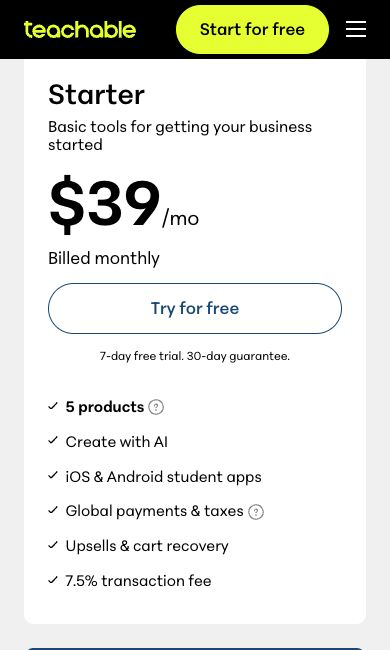
Current USD monthly prices are $39 for Starter, $89 for Builder and $189 for Growth. Annual billing displays monthly equivalents of $29, $69 and $139. Published product allowances are 5, 10 and 50.
Starter lists a 7.5% platform transaction fee. Builder, Growth and Custom list 0% when using Teachable Payments, but standard payment processing is separate. Confirm eligibility and the fees that apply to your school’s actual payment route.
A published course, coaching offer or digital download counts as a product under the current definition. Memberships, bundles and unpublished drafts do not. Read the definition before you treat every lesson as a separate product.
The focused capture shows Starter with monthly billing selected on October 15. No checkout, payout or tax-handling test was performed. If you look at this option, choose a tier only after confirming the published offering and the admin access you need.
2. LearnWorlds for a defined school workflow
LearnWorlds deserves a look when your course needs particular learning activities and school administration. I like that its plans spell out learner and admin limits, so you can match the tier to real needs. Confirm the exact tier includes your activities before you pay for a general school-building promise.
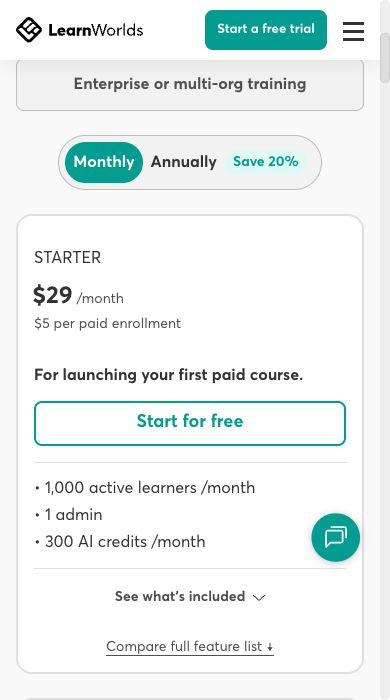
The current pricing page lists Starter at $29 monthly or $24 per month billed annually, plus $5 per paid enrollment. Pro Trainer lists $99 monthly or $79 annually. Learning Center lists $299 monthly or $249 annually, and Corporate uses custom pricing.
When I rechecked the LearnWorlds pricing page on October 20, 2026, those same prices and the $5 per paid enrollment fee on Starter were still listed. Starter lists 1,000 monthly active learners and 1 admin. Pro Trainer lists 2,000 and 5 admins, and Learning Center lists 2,000 and 25 admins.
These are plan allowances, not evidence of your school’s capacity or measured performance. Pro Trainer lists up to 20 SCORM uploads, and Learning Center has a different advanced-feature scope. A branded mobile app is an add-on, payment-gateway charges are separate from the enrollment fee, and prices exclude applicable VAT.
The focused Starter screenshot documents the monthly subscription, paid-enrollment fee and selected allowances on October 15, not a student-experience test. My choice would depend on the required assessment, administration and delivery process. That’s the real deciding factor.
3. LifterLMS for a WordPress-based school
LifterLMS takes a different approach as a WordPress learning plugin. Your site still needs hosting and ongoing maintenance. A free core plugin does not mean a complete, cost-free selling system.
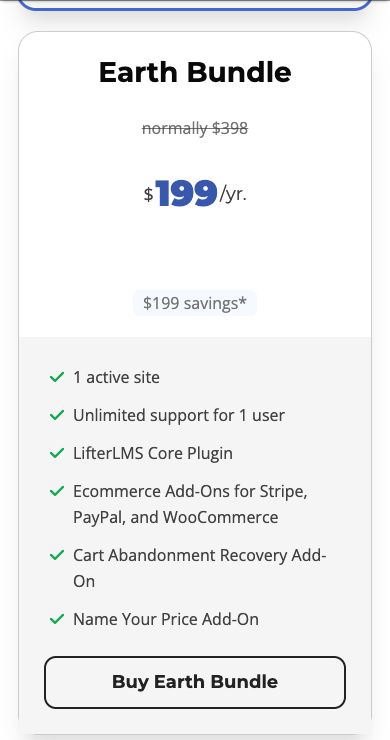
Current first-year USD bundle prices are Earth $199, Universe $299 and Infinity $799. Full-price annual renewals are $398, $598 and $1,598. The listed live-site allowances are 1, 5 and unlimited.
The official LifterLMS pricing page still showed those first-year prices and states that all renewals are at full price when I checked on October 20, 2026. Budget for year 2, not just year 1. That renewal jump is easy to miss.
The free core includes quizzes, certificates and achievement badges. Advanced quizzes, assignments and continuing-education tracking are advanced add-ons included in Infinity. Match your actual requirement to the right add-on instead of assuming every assessment feature comes with the core.
LifterLMS says the site keeps functioning after a license lapses, but add-on updates and support access stop. Continued operation is a different question from keeping your software current. Hosting stays a separate purchase and responsibility.
If you go the WordPress route, SiteGround is one host to compare because it’s a managed WordPress host with clear plan pages. Check the renewal price and resources against your expected student activity. A host recommendation is not a compatibility test for your exact plugin stack.
The focused Earth Bundle image documents the introductory annual offer on October 15. Full-price renewal and separate hosting costs still belong in the budget. No plugin installation, compatibility, checkout or site-maintenance test was completed here, and I’d only go this way with a clear owner for the WordPress work.
My pick if you want a course and a community: Skool
I’ll be straight with you. None of these three is what I use for my own teaching. I run Ecommerce Paradise Academy on Skool because it keeps the course, the community and member billing in one simple place.
On Skool’s official pricing page, Hobby is $9 a month with a 10% transaction fee. Pro is $99 a month with a 2.9% transaction fee, and the page advertises a 14-day free trial. Those figures were checked on November 3, 2026, so confirm them before you sign up.
If a course plus an active community is what you want, start your own Skool group and launch one small course first. Pick Teachable, LearnWorlds or LifterLMS instead when you specifically need their selling setup or a WordPress-based school.
Start with one course and one student need
Define the student, the task they need to complete and the knowledge they bring. A first course needs a narrower purpose than teaching everything you know about a subject. Narrow beats broad here.
Write the intended result in concrete terms. Preparing a supplier-research spreadsheet is a different outcome from promising business income. Teach the process you have evidence to explain, and keep commercial results separate from finishing a lesson.
List the material you need for the first version. Video lessons, written instructions, worksheets and feedback each involve different production work. Choose the format around the task instead of recording a long video for every topic.
Spell out the prerequisites and exclusions. If a lesson assumes access to a paid tool, tell students before they enroll. If the course does not include individual advice or ongoing support, keep those boundaries clear on the sales page.
A useful pilot is a complete small course, not an unfinished catalog of future promises. Decide who updates the material and how students get corrections. The software choice follows this operating plan.
Assign responsibility for the technical work
For a hosted platform, confirm the features in your actual subscription and how support works. Hosted delivery does not remove your responsibility for the course, student communications or the accuracy of the sales page.
For WordPress, name the person responsible for hosting, updates, backups and troubleshooting. A plugin license is just one part of the setup. Keep the theme, payment connection and other extensions in the same maintenance plan.
Before you change software, test your process on a staging or test setup through the right service. Confirm compatibility for the actual versions you use. A public pricing page does not prove your site’s checkout will work.
Keep a record of the components and account owners. Separate routine teaching access from permission to change billing or site settings. A contractor needs the access required for the agreed task, not unrestricted control by default.
If nobody owns the technical work, include the cost of qualified help in the comparison. Choosing a more flexible system without the resources to maintain it creates an operational problem, not a feature advantage. Be honest with yourself about that part.
Compare total cost before choosing annual billing
Write down the subscription, billing period, renewal amount and payment-processing costs. Add required extensions, hosting and the services you expect to use. Leave optional features out of the base comparison until you have a real reason to buy them.
A monthly equivalent on an annual offer is a budgeting description. The full annual charge still needs a spending decision. Record the commitment and renewal date instead of comparing a yearly-equivalent figure with a true monthly subscription.
Here’s an original hypothetical example, not a provider quote. A $300 annual platform expense spread across 30 paid enrollments equals $10 per enrollment before processing, production and support. With 10 enrollments, the same expense equals $30 each.
This calculation does not predict sales. Use your own volume assumptions and check a lower-volume case too. A software discount does not create demand for the course or remove the work of teaching and supporting students.
Platform transaction fees and processor fees answer different questions. Review the actual checkout route, accepted payment methods and country eligibility. A zero platform-fee headline does not mean zero total selling costs.
For introductory bundle offers, compare the full-price renewal alongside year 1. A course you plan to maintain needs an ongoing budget. Don’t treat an introductory discount as a permanent operating cost.
Evaluate the student journey yourself
Build a test lesson through an authorized trial or demo arrangement. Review the journey from the sales page to the course navigation. This article did not run that test, so your requirements need their own evaluation.
Check the phone experience as well as desktop. Read the lesson, inspect captions and try the worksheet format. A clean admin dashboard does not prove a comfortable student experience.
Review how students find the next lesson and return to earlier material. Confirm the behavior you need for prerequisites, scheduled content or progress tracking. A feature being listed is different from how it actually behaves in your chosen plan.
For an assessment, define the question type and grading process before you compare platforms. Multiple-choice checks, written assignments and instructor feedback need different workflows. Don’t pay for an advanced assessment feature you have no plan to maintain.
A completion certificate should describe what the course actually establishes. Finishing lessons does not automatically prove professional competence or outside accreditation. Keep the certificate wording tied to the real program and evidence.
Record the problems you find and the conditions for moving forward. If a required workflow is missing, fix it before you accept student payments. A longer subscription does not repair a delivery process you haven’t checked.
Provide a text alternative for important spoken instructions and review generated captions against the recording. The W3C’s guidance on captions says automatic captions need to be edited and checked for accuracy before you rely on them. Check the reading order of worksheets too, and never put essential instructions only inside an image.
Keep the sales page consistent with delivery
State the course content, access period, prerequisites and support arrangement clearly. If live sessions or individual feedback are included, define the actual schedule and limits. Avoid words like lifetime or unlimited without a precise explanation of the commitment.
Keep your refund policy separate from the platform’s own subscription policy. Your student’s purchase and your software purchase are different transactions. Get proper guidance for the obligations that apply to your actual offer.
Use truthful evidence when describing yourself and the course. Don’t borrow a platform’s customer results as proof of your program’s results. A tool that hosts successful schools says nothing about the value of your lesson.
Keep testimonials tied to their actual source and scope. The FTC’s endorsement guidance says endorsements have to reflect honest experience. If an example uses hypothetical numbers, label it, because a course sales page needs accurate expectations, not an income claim based on a software comparison.
For public presentation, see my landing page builders comparison. The page-building tool is separate from the accuracy of the offer and the quality of the course.
Plan support, records and updates
Give students a clear place to ask course questions and report access issues. Define who responds and which questions fall outside the course’s scope. Teaching content and account troubleshooting need different owners once your team grows.
Keep source files and course outlines outside the platform. Record the current version and the date of each material correction. Keeping your own files makes future updates easier without assuming every provider exports everything.
Before switching systems, inspect the actual export options. Lessons, customer records, progress, subscriptions and payment arrangements are different migration questions. Don’t assume an export file recreates the whole school somewhere else.
Review permissions and the student information involved in each integration. Share only what the defined task needs and follow the handling obligations that apply. A feature labeled secure does not replace a review of your own workflow.
Schedule content reviews around the subject. Software tutorials need attention after interface changes, and a business-process lesson needs current supporting requirements. Assign a revision owner instead of expecting the platform to keep the teaching accurate.
For recording and delivery decisions, my course video hosting comparison covers a separate part of the workflow. Extra hosting deserves a decision based on your real requirements, not an assumption that every school needs another subscription.
Connect ecommerce teaching with real operating tasks
If your course covers online retail, start with my high-ticket dropshipping overview. Teach who sells the product, who fulfills the order and which responsibilities stay with the retailer. Keep those roles separate from the course platform’s features.
Use my high-ticket niches list as a product-category research resource. A lesson about niche selection should teach the evidence to investigate, not declare a category profitable from a broad list.
Follow my high-ticket supplier research guide for dealer-recruiting tasks. Separate supplier leads, applications and actual authorization. A completed worksheet does not mean a signed dealer agreement.
Supplier Paradise is a research resource I own. Verify each lead’s terms, fulfillment process and warranty ownership before using the relationship as an operating example. A directory entry does not prove approval of a particular retailer.
My business formation guide adds setup context. Legal and tax questions need current advice for each student’s actual circumstances. Don’t treat finishing a recorded lesson as a professional review.
For help defining your next business task, check out Ecommerce Paradise coaching. Confirm the service’s actual scope before you buy. The coaching decision is separate from choosing software to host a course.
Choose the smallest plan meeting the actual requirements
Start with the required course format, student workflow and admin needs. Compare the exact tier that supports those tasks. A lower price loses its value when the essential assessment or payment arrangement is missing.
Don’t buy a big plan just for a projected catalog. Define the condition for upgrading, like another required admin or a specific assessment workflow. Keep the spending decision tied to actual work, not an imagined growth story.
For Teachable, check the published product allowance and payment route. For LearnWorlds, check learner and admin limits alongside the required activities. For LifterLMS, check who owns site maintenance and the exact add-ons you need.
My online courses comparison covers learning as a student instead of selling a school. Choose the guide that matches your current decision, since buying instruction and hosting instruction are different tasks.
If your program includes scheduled sessions, read my webinar platforms comparison. Confirm the actual session and attendee requirements before you treat a webinar service as another required course expense.
My WordPress membership plugins guide adds context for recurring access. A membership, a course purchase and a software subscription involve different access promises. Keep each arrangement clear before you collect payments.
My take on choosing a course platform
So with that said, here’s the recap. Define one course and one student need, then match the platform to the work: hosted delivery, a defined school workflow, or a WordPress site you’re ready to maintain. Compare the full cost including renewals, fees, hosting and your own time.
This comparison uses current public pricing and feature information with three actual dated provider captures. No course, checkout, enrollment, payment, plugin installation or migration test was performed. Use the evidence here to build your shortlist, then evaluate the specific student journey before you commit.
If you want to see how I run a paid learning community on a hosted platform, check out Ecommerce Paradise Academy on Skool. It has a 7 day free trial and then it’s a paid membership. Go check that out if you want a real example before you build your own.

Trevor Fenner is the founder of Ecommerce Paradise. His main projects are Ecommerce Paradise, Supplier Paradise, and Review Paradise, which is currently in development. TrevorFenner.com publishes research-based reviews and practical guides to online business tools and remote-work services, with clear affiliate disclosures.