
Looking for the best landing page builder? Here’s the honest answer. The right one depends on what you want the visitor to do and what happens after the click.
For a sales conversation, focus on the contact record and who follows up. For an email signup, focus on consent and the subscriber journey. For a purchase, look hard at checkout and fulfillment.
My shortlist is simple. HubSpot for lead capture tied to a CRM, GetResponse for landing pages with email follow-up, and Funnelish for ecommerce funnels. Pick the workflow first, because how a template looks is a secondary decision.
I started Ecommerce Paradise in 2015, and I’ve built 20+ websites over the years. Plenty of them closed down, and I treat those as lessons. The biggest lesson is that a page needs an accurate offer and a real person responsible for the response. Software alone gives you neither.
That’s also why I teach a real store operating model. If you’re new to it, my guide to how high-ticket dropshipping works explains the retail model behind the pages I build. In this article you’ll get the 3 builders compared, plus how to define the offer, the form, the handoff, mobile checks, checkout, costs and measurement.
Research date: October 13, 2026. This comparison uses public product, pricing and support information. I have not built test pages, connected private accounts, submitted leads or measured conversion rates for this guide.
Disclosure: some links here are affiliate links, and qualifying purchases earn me a commission at no extra cost to you. I own Ecommerce Paradise and Supplier Paradise. The provider referrals reached their documented destinations during research, and their promotional claims are not performance results from my testing.
Best landing page builders by workflow
| Builder | Choose for | Follow-up | Check before buying |
|---|---|---|---|
| HubSpot | Lead capture with CRM context | Assigned sales conversation | Content Hub tier, branding and publishing domain |
| GetResponse | Signup pages with email follow-up | Permissioned subscriber sequence | Contacts, automation workflows and visitor allowance |
| Funnelish | Ecommerce funnels | Checkout and fulfillment | Traffic, domains, payment integration and available features |
A form submission, a subscriber signup and a purchase all need different information. Don’t buy the biggest package before you define the page’s purpose. Compare the plan that covers your required workflow, including the work that happens outside the builder.
HubSpot: a page feeding a sales process
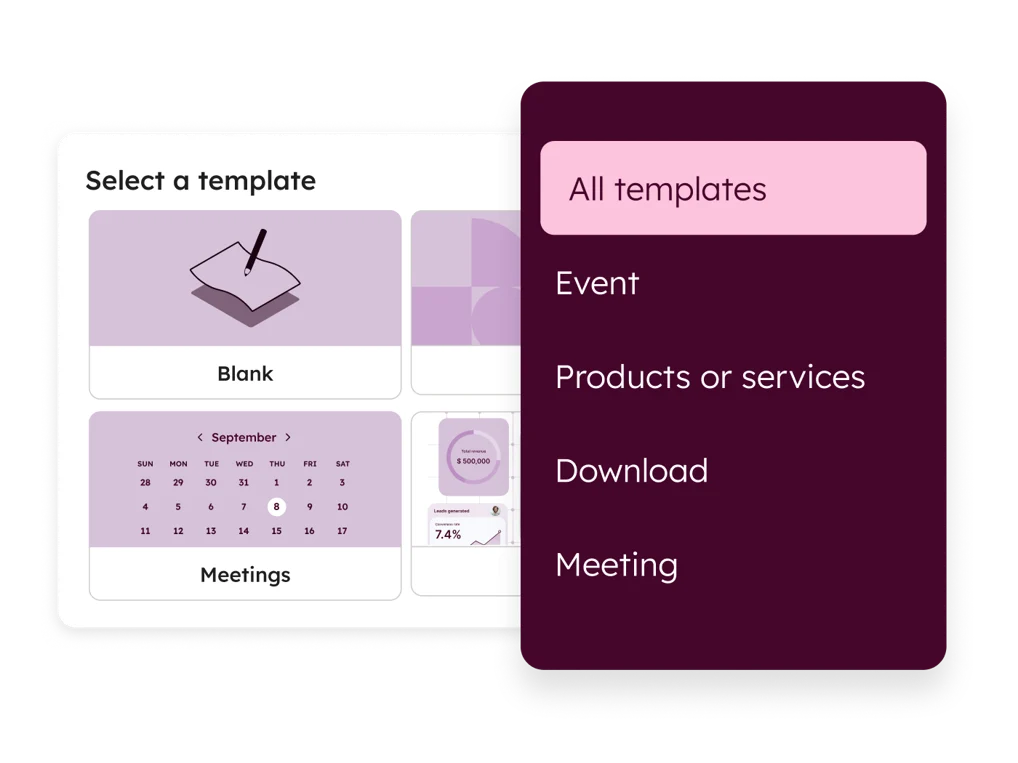
HubSpot is where I’d look first for a landing page tied to CRM follow-up. I like it for this because the page and the contact record live in the same system. Its public Content Hub material describes page creation, templates and conversion analysis.
Current page creation documentation gives Content Hub Starter up to 30 landing pages. Removing HubSpot branding requires Starter or above. Free tools use a HubSpot-branded publishing domain, and that matters for a branded campaign.
Keep in mind the allowance applies to Starter, not every free account or every HubSpot subscription. Confirm the right hub and plan before you treat a bundle’s feature list as your page allowance.
Here’s the move. Assign every new contact to a responsible person and agree on the next action and the information needed for the conversation. A record in a CRM with no owner just leaves the visitor waiting.
GetResponse: a page leading into email
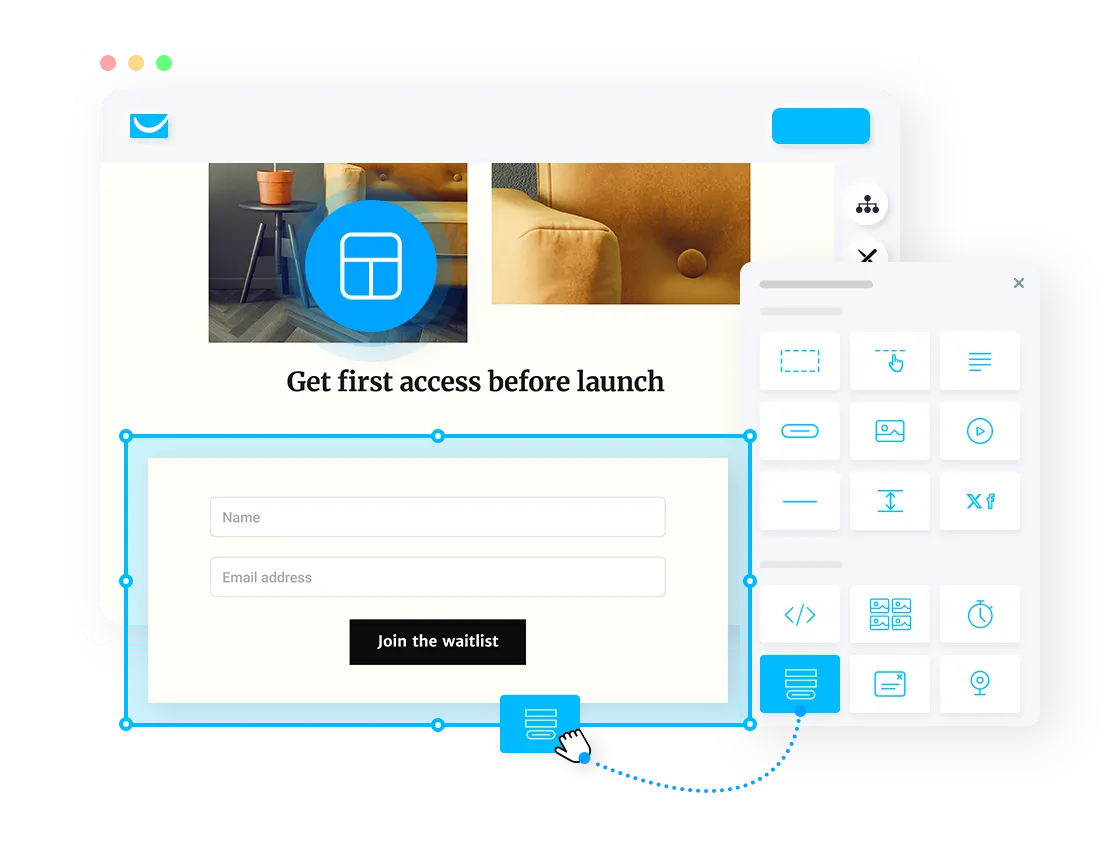
Look closer at GetResponse when the signup and the email sequence belong in one workflow. I like it for that because you don’t have to stitch a page tool to a separate email tool. Its landing page creator describes drag-and-drop editing, templates, forms and AI assistance.
The inspected price selection used 1,000 contacts and annual billing. On the GetResponse pricing page, Starter displayed $15.58 per month paid annually, with a $19 monthly reference. Prices were net of applicable taxes, and list size and plan choice change the quote.
Starter listed one custom automation workflow. Higher plans described wider automation access. So match your planned sequence to the allowance before you budget for several campaigns.
The pricing FAQ separated a Free account allowance of 1,000 unique landing page visitors per month from paid traffic and testing features. Unlimited page creation does not mean unlimited free visits. Confirm the current signup, trial and post-trial terms.
Funnelish: a page leading into checkout
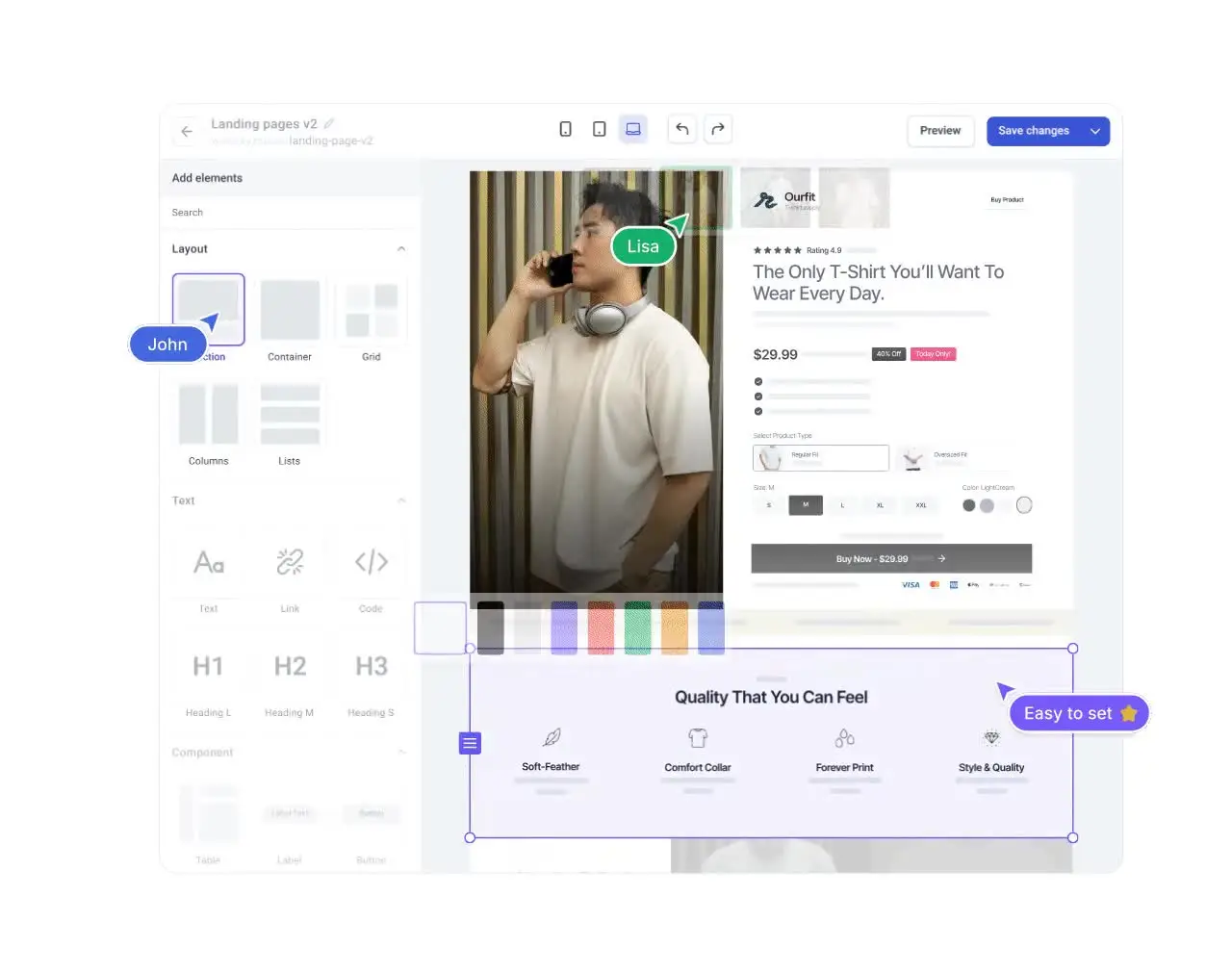
Funnelish is a different kind of tool. It focuses on ecommerce pages, checkouts, upsells and confirmation steps, which is why I’d look at it when the goal is a sale and not a contact form. Start with your payment and store requirements.
The inspected Monthly Basic card showed $49, 20 funnels, one custom domain and up to 20,000 visitors per month. Other tiers had different limits. Several public sections showed inconsistent values, so use the selected current card and written terms instead of mixing figures from separate sections.
Store and customer portal features were marked coming soon. Leave those features out of your launch requirements until availability is confirmed. A broad platform description does not prove every part is ready.
Separate platform commissions from payment processing charges. No store connection, order, payment or upsell test was completed for this comparison.
Define the offer before designing the page
Write the action you want in one sentence. Include the audience and what happens after a successful submission. A quote request needs a different explanation than a newsletter signup. A product checkout needs accurate buying information, including the relevant cost and delivery terms.
Take a hypothetical service page. The action is requesting a conversation about a specific project. The page should explain the scope of the service and what information you need to review the request, because a broad promise to help with everything leaves visitors guessing.
For a newsletter, name the subject and what people should expect to receive. For an event, state the date, format and registration setup. Keep the published explanation in line with what the business is actually ready to deliver.
Give the page one main route. Supporting details belong around the offer, but unrelated buttons force a visitor to choose before they understand the first option. Save secondary links for useful context, not another competing campaign.
Check every claim against the offer. Remove unsupported revenue figures, copied testimonials and fake urgency. The FTC’s CAN-SPAM compliance guide for business is also worth reading if the page feeds commercial email, since it covers honest subject lines and opt-outs.
Save the approved message separately from test versions. Label each version and record why it changed. When someone asks which terms were displayed, the team should have a clear answer.
Decide what the form needs to collect
Ask only for the information you need for the next action. Start with a short form and explain any unfamiliar fields. If a sales team wants extra details, it should explain how each answer helps review the request.
A fictional quote form might ask for a business email, project type and a short description. Those fields serve a different purpose than a newsletter signup asking for an email address. Neither example is a form I built or tested.
For the fictional quote workflow, list where each answer goes before you configure anything. The email goes in the contact field, the project type goes in the agreed classification field, and the description goes in a readable record the assigned reviewer can see. Check that your connector supports this mapping instead of assuming matching labels mean matching behavior. Only add a field when the reviewer needs another answer.
Spell out the notification contents too. A subject line that says new project request is more useful than a generic alert. The recipient needs a route to the authorized record and enough context to recognize the task. Keep private details out of notification previews, and record the intended recipient plus the backup person before you turn on automated messages.
Tell a delivery failure apart from an unsuitable request. A missing record means you investigate the handoff. A complete record outside your service scope needs a proper response. Lumping both into one rejection bucket hides the difference.
Keep the agreed reason and next action in your team’s process. Separate required fields from optional ones. Show a clear error message when something is missing, and keep useful input during corrections instead of making someone retype the whole form.
Decide where the submission goes and who gets notified. Record the expected fields in the destination system. A builder naming an integration does not prove your account receives every answer in the right format.
Review consent and privacy handling for your audience with proper professional help. This is not legal advice. Delivering a requested resource and sending ongoing promotional messages are separate purposes, so don’t treat every contact form as permission for every campaign.
Use fictional data for setup checks. You don’t need real customer records for a basic demo. This article did not upload a contact list, grant account access or inspect a private CRM.
Specify the handoff after submission
Write the confirmation message and the internal next step before you send any traffic. Tell the visitor what happens after they submit. Give the responsible person what they need to act.
For a sales request, decide who reviews the record, how the team logs a response and how work gets handed over when someone is out. Agree on a realistic response time instead of a reassuring deadline the team will miss.
For an email signup, document the first message and the subscriber segment. Review your automation allowance. Several distinct offers might need separate workflows instead of one sequence covering unrelated audiences.
For an event, check the path from registration to attendance instructions. Confirm which system owns reminders and changes. Two disconnected reminder tools just create another process to maintain, and that’s a pain in the butt.
Keep duplicate submissions and repeat contacts in view. Decide how the team handles an existing record instead of assuming every submission is a new customer. A form count alone does not prove qualified demand.
Build a recovery route for failed notifications or missing records. Pick the person who investigates and the evidence needed to trace a submission. A saved spec helps you tell a broken handoff from a misunderstood requirement.
Review the published page on a phone
Check the page inside the final website, with the real theme and approved content. A builder preview and a published page are different things. Compare the headline, offer, form and confirmation route.
Read the smallest important text at its real size. Keep essential terms visible. Don’t shrink a long headline until the page looks tidy but the headline is hard to read.
Look at the fields, labels and error messages. Visitors should understand the required input without zooming in again and again or scrolling sideways. Leave enough space around buttons and fields for easy tapping on a touch screen.
Check keyboard access, focus and descriptive labels for your setup. The W3C’s WCAG accessibility standards overview is the official reference here. Don’t use a decorative image as the only explanation of a field, and remember a responsive template is a starting point, not proof of an accessible setup.
Review image proportions and file size. Use relevant visuals instead of a pile of large illustrations above the form. Confirm the final assets load and the main action is still easy to spot.
The checks in this section describe your own authorized setup work. They are not claims of device testing done for this provider comparison.
Check checkout requirements before accepting orders
A sales form and an ecommerce checkout need separate evaluations. With an ecommerce funnel, identify the payment gateway, store connection, product information and fulfillment handoff before you commit to the builder.
Compare the advertised platform fee with processor charges and other costs. A zero platform commission statement does not remove the cost of collecting a payment.
Review how prices, shipping and optional purchases are shown. The customer should understand the order before agreeing to pay. An upsell should describe an extra offer, not hide the original total.
Keep availability and delivery claims tied to confirmed product information. A template’s sample countdown or shipping promise is not evidence for your store’s offer. With high-ticket products like e-bikes, a wrong delivery promise turns into a support headache fast.
For your own setup, follow the authorized testing process before you process real orders. Review the confirmation and the fulfillment record as well as the first checkout screen. This comparison did not authorize a payment, create an order or verify fulfillment.
My guide to finding high-ticket suppliers covers the commercial checks behind an offer. Supplier Paradise, my supplier directory, gives you research leads, not proof of an approved brand relationship or delivery commitment.
Best landing page builders: compare plan limits and costs
Count the resources your campaign needs. Pages, visitors, contacts, domains, users and automation workflows are separate allowances. A generous limit in one column does not remove restrictions somewhere else.
Compare the full billing commitment. A monthly equivalent under annual billing is different from paying month to month. Separate introductory offers from renewal terms and confirm the currency and taxes.
Write down the one feature the campaign can’t work without. Branding removal, a custom domain, branching automation or a specific checkout integration might set the minimum plan you need. Don’t pay for a broad bundle before you’ve named that feature.
Leadpages’ inspected public pages had conflicting statements about publishing tiers, A/B testing and trial billing. I left out a specific purchase recommendation until those terms are reconciled. Groove’s official transition to Scale.gg also separates qualifying legacy access from new projects, and old offers and tracking arrangements do not carry over to the successor product.
Include preparation, assets, setup, traffic and follow-up work in the campaign budget. A hypothetical $50 software allowance, $200 preparation cost and $500 traffic budget totals $750 before other expenses. The example is a budget illustration, not a provider quote or a measured campaign.
Check export and migration options before you commit to a long-term project. Keep the approved copy and relevant records. Moving content to another builder does not guarantee the layout, integrations or account permissions come with it.
Measure a defined action
Decide whether the campaign measures submissions, signups, qualified sales requests or purchases. Keep those events separate. A page that produces lots of submissions still needs a review of the contacts it brings in.
In a hypothetical example, 20 completed actions from 1,000 measured visits gives a 2% action rate. That figure does not prove qualified customer demand or that the page caused revenue. Neither the campaign nor the rate was measured for this guide.
Check your measurement method before comparing versions. Look for duplicate submissions, missing records and tracking gaps. Be clear on whether the event means the button click, a successful submission or a later business outcome.
For an A/B test, record the element you changed and what you’re comparing. Don’t change copy, price, audience and follow-up all at once and then credit every difference to one headline.
Use an evaluation method that fits the campaign’s traffic and uncertainty. A few random visits do not prove a winner. A provider offering an experiment feature does not guarantee a reliable result from your setup.
Look at the quality of the next conversation alongside the volume. A clearer page sometimes filters out bad-fit requests, and it is what it is. Keep the offer honest instead of widening the promise to make a dashboard number bigger.
Connect the page to a store you are prepared to operate
So with that said, let’s bring it back to the business behind the page. A builder does not create the catalog, the supplier agreement or the customer service process. Those are on you, and they matter more than any template.
If you’re still choosing a market, my high-ticket niches list gives you categories to research. Define the audience and the offer before you turn a category into a sales claim. Go deep before you go wide.
My business formation checklist for high-ticket dropshipping covers ownership and admin basics. Keep form setup separate from the legal and operational responsibilities of the business.
For your first page, pick one offer with a documented handoff. Assign an owner for content updates, records and follow-up. Review the dependencies before you add another campaign.
The key takeaways are simple. Match the builder to the next step, keep the form short, write the handoff before traffic arrives, and measure one defined action. No builder guarantees leads or sales, so keep your expectations realistic and your offer honest.
Before you scale any campaign, review the store plan behind it. If you want hands-on help with the high-ticket retail operating model, check out my private Ecommerce Paradise coaching.
Frequently asked questions
Which builder should I investigate first?
Choose HubSpot for lead capture tied to a CRM, GetResponse for signup and email workflows, or Funnelish for an ecommerce funnel. Then verify the required plan and setup.
Does a free plan include branding removal?
Check the provider’s current terms. HubSpot’s documentation requires Content Hub Starter or above for branding removal.
Does unlimited page creation mean unlimited traffic?
No. Pages, visitors, contacts, domains and users have separate limits.
Does software guarantee leads or sales?
No. The audience, offer, page and follow-up still need work. This comparison includes no measured conversion claim.
What needs review before launch?
Check the published message, phone layout, submission or checkout, destination records and assigned follow-up owner through your authorized setup.
Related guides
- CRM software for ecommerce
- Email software for affiliate marketing
- Domain registrars
- AI content tools
- Webinar platforms

Trevor Fenner is the founder of Ecommerce Paradise. His main projects are Ecommerce Paradise, Supplier Paradise, and Review Paradise, which is currently in development. TrevorFenner.com publishes research-based reviews and practical guides to online business tools and remote-work services, with clear affiliate disclosures.