

If you want the best email marketing software for affiliate marketing, start with the provider’s content rules, not the feature list. That’s the part most people skip. A newsletter with occasional recommendations is a very different thing from a business that only sends third-party offers.
So define your audience, your subscription promise and your planned content before you compare automation features. Permission to join a list does not override a platform’s acceptable-use rules. Keep that in mind the whole way through this guide.
At Ecommerce Paradise, I connect tools to the actual business process. I’ve been selling online since 2005, and a software choice only works when it supports the message and audience you actually plan to serve.
This shortlist looks at AWeber and a conditional Kit creator-business route. Neither recommendation means approval for every affiliate topic, so review your exact offers and content mix against current policies. You’ll also learn how to write a clear signup promise, build a welcome sequence, budget sends, measure real results and migrate safely.
The two real provider images keep their October 11, 2026 dates and selected subscriber counts. No campaign send, account approval, authentication change or deliverability test was completed for this comparison. If you’re building an ecommerce business that email will support, my guide to how high-ticket dropshipping works is a good place to start.
Disclosure: qualifying purchases through affiliate links earn me compensation at no additional cost to you. I own Ecommerce Paradise and Supplier Paradise. A referral link does not establish account eligibility or inbox placement.
Compare the newsletter scope
| Provider | Route to investigate | First check |
|---|---|---|
| AWeber | Permission-based newsletter with relevant recommendations | Actual content and list collection rules |
| Kit | Compatible original creator business | Affiliate topic restrictions and content scope |
Use this table to pick which route to investigate first. Then read each provider’s own rules for your exact content. The table is a starting point, not an approval.
AWeber for a permission-based newsletter investigation
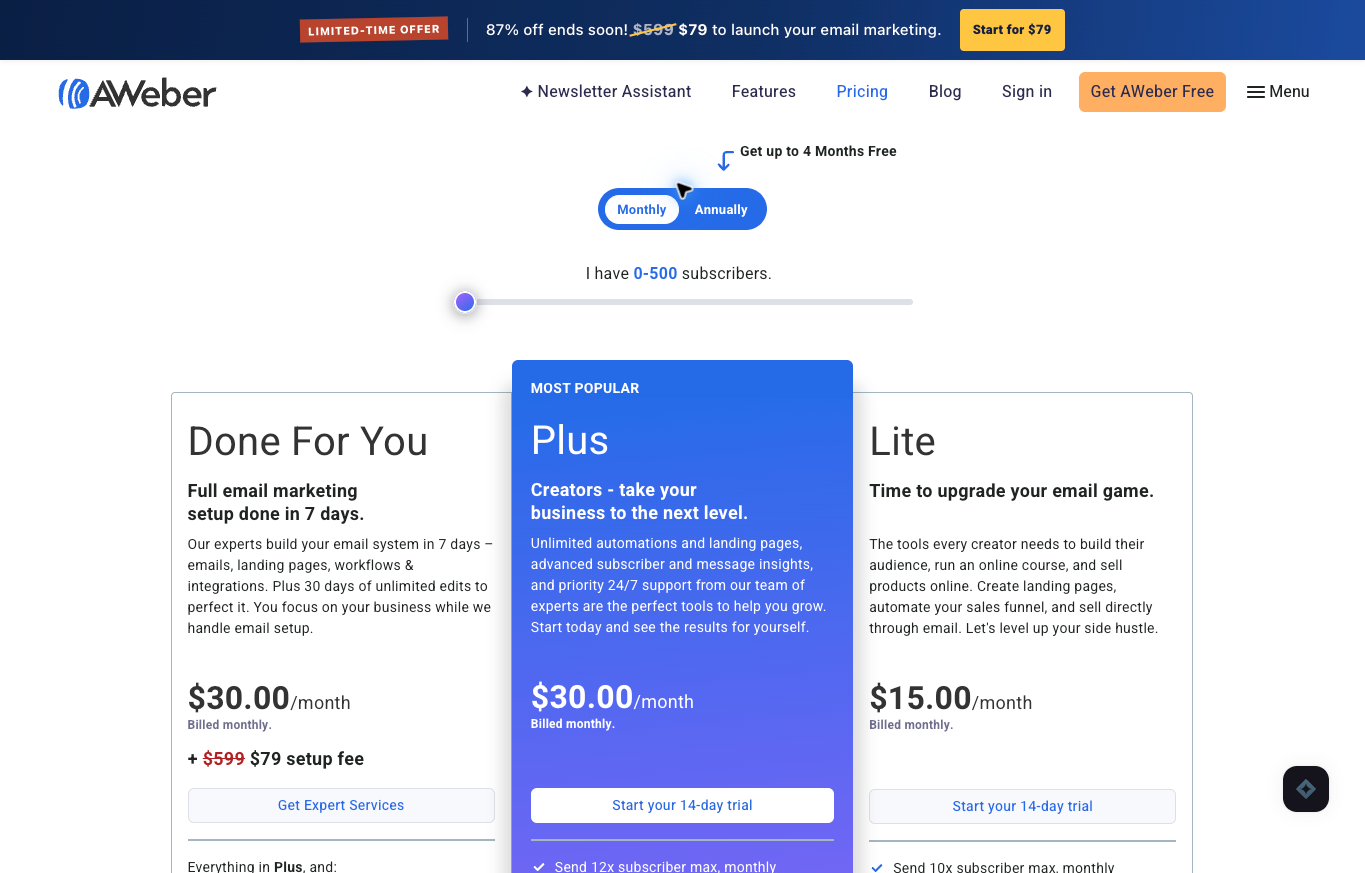
Here’s how I’d approach AWeber. Describe the actual subscription promise and affiliate content first, then investigate. Permission-based list collection is a separate requirement from the product you recommend.
AWeber’s official affiliate-tools guide describes including affiliate links in marketing emails. That supports investigating the route, not blanket approval for every offer or list. Its anti-spam policy prohibits purchased or rented lists and sending information people did not specifically request.
Current public pricing describes Free access for up to 500 subscribers and 3,000 monthly sends, with paid Lite and Plus starting at $15 and $30 monthly. Your actual subscriber count and plan affect the charges. When I rechecked the AWeber pricing page on October 20, 2026, it still showed $15 and $30 monthly for 500 subscribers on Lite and Plus.
AWeber’s pricing page lists monthly sending limits of 10 times the subscriber count for Lite and 12 times for Plus. A bigger list and more frequent campaigns need their own cost calculation. A free label does not mean unlimited sending.
The preserved October 11 figure shows monthly billing and 0 to 500 subscribers. No current account approval, newsletter send or inbox-placement test was performed here. Confirm your exact content against current sending policies before you import a list.
Kit only for a compatible creator business
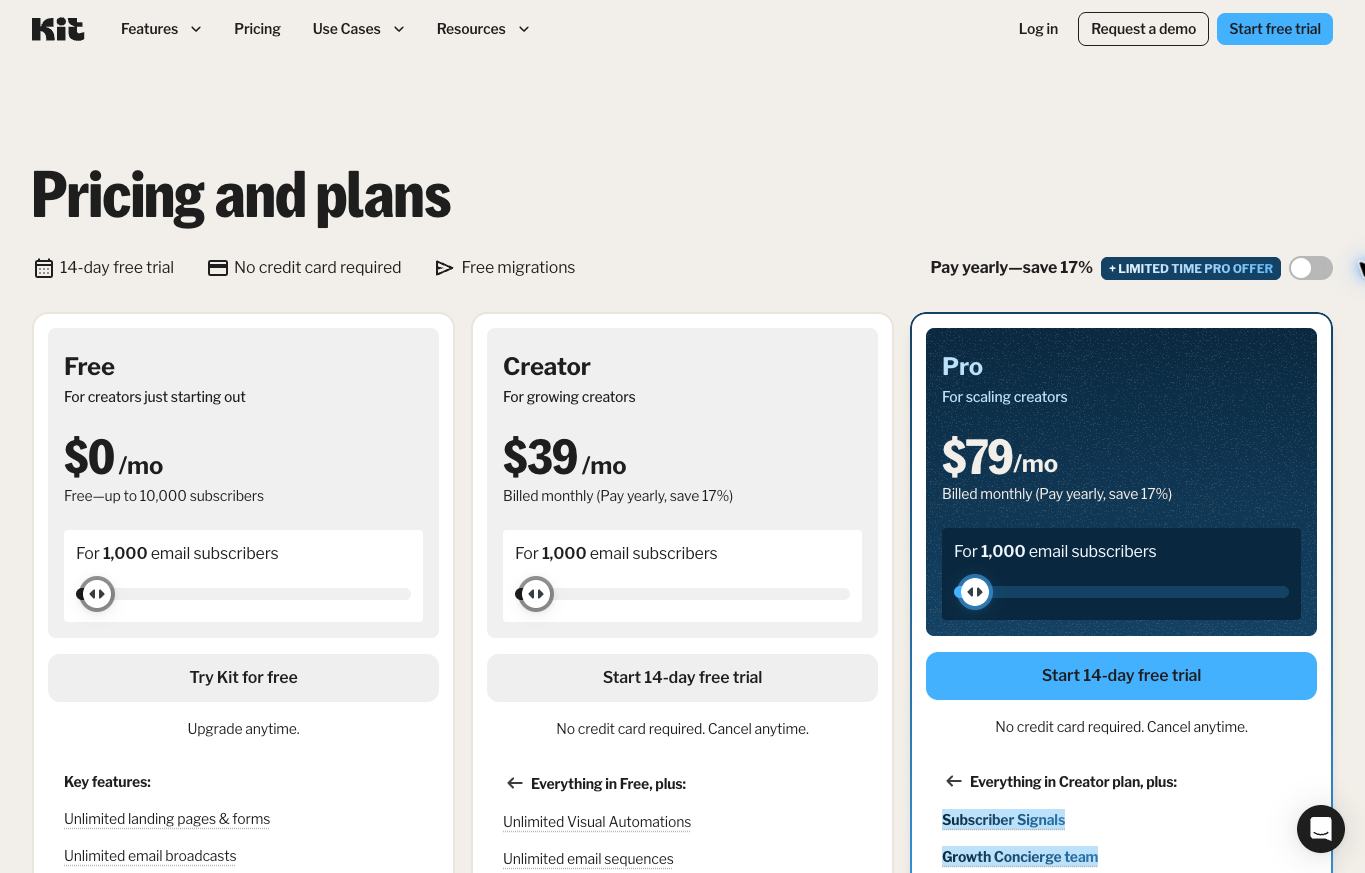
Kit is a conditional creator-business option, not a universal affiliate newsletter platform. Its official guidance requires a business or content outside affiliate marketing. Affiliate recommendations have to be clearly identified within your own material.
The guidance gives an illustrative mix of 70 to 80 percent your own content and 20 to 30 percent affiliate content. Restricted affiliate topics include education, loans, online pharmacies and get-rich-quick software. A creator-facing product description does not override those restrictions.
Current pricing at 1,000 subscribers displays annual billing and a first-year Pro promotion, and the Kit pricing page still showed yearly pricing with a first-year Pro discount when I checked on October 20, 2026. The preserved October 11 screenshot shows monthly Creator at $39 and Pro at $79. Keep those dated billing contexts separate and confirm the current charge and renewal before you buy.
No account eligibility or policy exception was approved for this comparison. If your offers include affiliate educational or make-money content, get clarification for your actual material. Don’t assume a compliant content ratio makes a restricted topic okay.
Check the actual offer against the content policy
Describe the proposed newsletter and the products you’ll recommend. A general statement about affiliate links is incomplete evidence. The provider needs to tell occasional recommendations apart from content devoted entirely to third-party offers.
Review topic restrictions separately from the content mix. A percentage of original material does not make a prohibited affiliate category acceptable. Kit’s restricted educational offers show why a creator platform deserves a conditional recommendation.
Keep the current policy and any account-specific clarification in your planning record. An affiliate program approving you to refer customers is different from the email service approving your sending activity. You need both.
No provider exception or account approval was obtained for this article. Public feature and pricing pages do not establish eligibility. Resolve uncertain content categories before you import subscribers or build a campaign.
Give the subscriber a clear promise
Write the signup promise before you choose the software. For example: “Get one weekly email about choosing a niche, checking suppliers and building an online store, with occasional paid tool recommendations.” Use this sample only if the schedule and subjects match your planned newsletter.
A daily discount email needs a different description, even when the same person runs both lists. The promise sets expectations. Break it and people leave.
Keep the source and date of consent in the right record. Someone requesting an order update has not necessarily asked for a marketing newsletter. Don’t treat every contact address as permission to send promotions.
A purchased or rented list conflicts with AWeber’s stated anti-spam rules. Directory contacts and supplier leads are not automatically newsletter subscribers. Keep prospect research separate from your permission-based email audience.
Review consent and advertising requirements for your audience and jurisdiction with proper guidance. In the US, the FTC’s CAN-SPAM compliance guide for business explains basics like a clear opt-out and honoring it within 10 business days. This guide does not certify legal compliance, and your actual collection process and messages need their own review.
Build a useful welcome sequence
Start by confirming the promised resource and explaining what the newsletter is for. Give the reader a useful next action tied to the topic. An introduction should not immediately swap the signup promise for unrelated offers.
Follow with a practical explanation of a decision the subscriber needs to make. Compare the requirements and limitations before you recommend a tool. An affiliate link belongs inside an answer, not as the whole reason for the email.
Keep any paid recommendation and compensation relationship clear. The FTC’s endorsement guidance says affiliate commissions are a material connection that should be disclosed clearly. Explain the relevant price and commitment using current evidence, because a product description copied from a merchant is not proof it suits your reader.
Here’s a hypothetical 3-email sequence. Deliver the requested niche checklist first, then a supplier-screening exercise, then a store setup checklist with a relevant tool recommendation and disclosure. Give each email one task the reader can do without buying anything, and choose the intervals around the signup promise.
Review the complete sequence before you schedule it. That’s the move. One read-through catches most problems.
Organize interests without inventing preferences
Use interests the subscriber supplied or behavior you’re authorized to review. A clicked link sometimes shows curiosity, not purchase intent. Don’t treat every interaction as permission for another unrelated campaign.
Keep segments tied to the subscription promise. Store-launch questions, supplier research and creator newsletters are different topics. Explain the difference before you use a label to change the messages someone gets.
Record how a person changes preferences and stops receiving marketing. The unsubscribe route has to work in your actual setup. A visible footer label does not prove suppression is handled correctly.
Start with a preference the reader picks, like “researching a niche” or “already running a store.” Keep that choice separate from purchase history and newsletter permission. Someone selecting supplier research has shown interest in suppliers, not consent to unrelated financial offers.
Offer a clear way to change preferences. Collect no sensitive details just to divide the audience. Less data is less risk.
Separate mailbox setup from newsletter sending
A working personal or outreach mailbox is different from a newsletter service’s sender configuration. Google Workspace access does not mean the ESP has the required authentication and identity setup. They’re two separate systems.
Use the current provider instructions for your own approved configuration. Identify the sending domain and required records before you request a change. Don’t repurpose an existing record without understanding the other services that depend on the domain.
Keep the responsible technical owner and the review result visible. A successful settings save is not the same as verified authentication. Avoid making security or DNS changes based on a generic article alone.
No authentication record, permission or mailbox setting was changed for this guide. The article does not claim a deliverability improvement. Your actual account configuration needs its own authorized verification.
Review the message before scheduling
Check the recipient group, subject and approved content together. The right draft sent to the wrong audience still breaks the subscription promise. Record the approved version and who releases the campaign.
Verify the destination and the compensation disclosure near each recommendation. Use the documented affiliate route exactly. An example tracking ID from a help page is not your approved attribution.
Review important prices, dates and qualifications against current sources. A screenshot or promotion sometimes describes an earlier offer. Keep the billing context explicit instead of presenting an annual equivalent as a monthly payment.
Check the actual mobile and desktop presentation during your own authorized review. No preview send or campaign publication was completed here. A template screenshot does not prove a delivered email renders correctly.
Measure evidence rather than assumed income
Separate delivered messages, opens, relevant clicks and qualified conversions. They describe different events. An email dashboard click is not proof a merchant approved an affiliate commission.
Record the reporting period and available evidence before you compare campaigns. A short promotion and an evergreen welcome email serve different purposes. Keep the context visible instead of ranking them from one isolated number.
Use the affiliate program’s reporting rules for commission attribution. Pending, locked and paid actions can differ. A spreadsheet estimate should not be presented as received income.
Here’s a hypothetical report to keep the stages separate. If the email service records 40 clicks and the merchant records 2 pending commissions of $25 each, the pending total is $50. Paid income is still unverified until the program reports payment.
Those figures explain the calculation only. They are not an expected click rate, conversion rate or earnings result. Never promise anyone income from a list.
Budget for subscriber count and sending frequency
Count billable subscribers under your provider’s rules. A small introductory price needs its actual threshold. List growth can change the subscription even before your content process changes.
Here’s a hypothetical monthly budget. Four broadcasts to 500 recipients use 2,000 sends, and a 3-email welcome sequence reaching 100 people adds 300 more for a planned total of 2,300. Against the stated 3,000-send Free allowance, 700 sends remain before any other messages covered by the allowance.
Check how the provider counts resends and automations before you rely on that budget. Those details add up. It’s a pain in the butt to discover the limit halfway through a launch.
Separate the annual charge, the renewal and any first-year promotion. A monthly equivalent is not a month-to-month commitment. Include required features and extra charges before you compare the two platforms.
No subscription was purchased or upgraded for this comparison. Get the current quote for your account before you pay. The preserved images describe their dates and subscriber settings, not guaranteed future charges.
Plan migration before canceling the old service
Record the lists, forms, automations and suppression information your current workflow depends on. A contact export alone does not prove the whole process moved. Identify the evidence you need before you change service.
Keep consent and unsubscribe status intact during the migration. A previously suppressed address should never become an active recipient just because another tool received the file. Ask both providers how the actual records are handled.
Review the destination’s policy before you import affiliate content. A working sequence on another service does not mean the new provider approves it. Resolve the business model and offer restrictions first.
Write an inventory with one row for each signup form, welcome sequence and suppression source. Assign a destination and a verification step to every row. For example, a form on your niche guide needs the right audience, promised resource and unsubscribe behavior after the move.
Leave the cancellation decision open until the records and workflows pass your authorized checks. Don’t rush this part. A clean migration protects your list.
Keep policy questions and answers documented
Describe your actual newsletter instead of asking whether all affiliate marketing is allowed. Include the content type and proposed offer categories without exposing private subscribers. A useful answer needs enough context to address your real use.
Separate a public policy from an account-specific clarification. Keep the date and source of every response. An informal assumption is not the same as the provider confirming your material fits.
If your content changes, review the restrictions again. A new affiliate category can change suitability even when the software features stay the same. The original answer should not become universal permission for later offers.
Prepare a specific question for the provider: “My weekly newsletter teaches store setup and includes affiliate recommendations for software and paid educational offers. Do your current rules permit these categories and this business model?” Describe both categories honestly and include a sample if they ask. An answer permitting software recommendations does not mean permission for educational offers.
Keep unresolved categories out of the launch decision until they’re clarified. It is what it is. Some offers just won’t fit some platforms.
Connect the newsletter with the operating business
My high-ticket dropshipping guide explains supplier-dependent responsibilities. Educational email should help readers understand the work before presenting a paid tool.
My niches list supports category research. Use your audience’s actual questions to organize useful material instead of rotating unrelated offers.
My supplier sourcing guide covers commercial verification. Email copy should never turn an unconfirmed stock or approval statement into a customer promise.
Supplier Paradise is my own research resource. Directory access gives you leads, not guaranteed dealer relationships or margins to advertise.
Use my business foundation checklist for the admin side. Newsletter software does not resolve your readers’ individual legal, tax or account requirements.
Choose the policy-compatible route first
Investigate AWeber’s current service scope for a permission-based newsletter with relevant affiliate recommendations. Confirm your actual content and audience meet the applicable rules before you rely on the pricing comparison.
Compare Kit only if your creator business and offer categories fit its restrictions. Original-content percentages do not override prohibited affiliate topics.
Keep a different provider or workflow open for investigation if a policy excludes your material. Do not disguise the business or remove required disclosures to get access. A platform mismatch needs a truthful alternative.
My private coaching is my own paid offer for broader business decisions. Its scope is not email-account approval, legal certification or a promise of deliverability and affiliate income.
Maintain the consent and content record
Keep the accepted subscription description and the current message scope together. Another person should be able to see what the audience asked for. Every later campaign has to stay within that permission and the provider’s rules.
Record corrections to offers and claims before another sequence repeats the old copy. A changed price or an ended program affects more than the latest broadcast. Identify which automated messages also need review.
Keep the actual sending status visible when a campaign is paused. A saved draft is not a delivered message, and a queued campaign is not proof of receipt. Check the provider’s evidence before you report completion.
Assign an owner for the recurring policy and content review. Software access does not maintain itself. A useful operating record names the next check and the person responsible for it.
Keep a campaign decision record
Record the intended audience, the reason for the message and the approved offer before scheduling. A good review separates a subscriber request from a convenient chance to promote another program. Keep the source and relevant policy next to each claim so the next person understands why the message fits.
When a requirement is unresolved, name the fact you need and the responsible owner. Don’t turn uncertainty into permission because a campaign date is coming up. The provider’s actual answer, the current consent record and the approved content are different evidence.
Review each requirement before release. One successful settings check does not resolve the whole newsletter process. Keep the actual send authorization with the approved version, because a reviewed draft alone does not authorize releasing a campaign.
Affiliate email questions
Does an affiliate program approve newsletter content?
Referral-program acceptance is different from the email provider’s sending-policy approval. Review both arrangements.
Is Kit suitable for every affiliate newsletter?
Its policy requires compatible original creator content and restricts specific affiliate categories. The recommendation is conditional.
Does a working outreach mailbox establish newsletter authentication?
The ESP’s sender setup is separate. No authentication changes were made for this article.
Does a tracked click prove commission income?
Check the affiliate program’s qualified and paid events. No payout records were reviewed here.
My take on affiliate email software
So with that said, here’s the short version. Write your subscriber promise, check your exact content against each provider’s rules, and only then compare prices and features. AWeber is the broader permission-based route to investigate, and Kit is conditional on a compatible creator business.
Build a welcome sequence that helps people before it sells anything. Measure real events, not assumed income. Keep consent, disclosures and policy answers documented.
If you want to build the ecommerce business behind the newsletter, start with my free high-ticket dropshipping mini course. It’s a quick way to see if the model fits you before you spend money on tools.
Related guides
My dropshipping overview explains the operation.
My niches list supports category research.
My supplier sourcing guide covers commercial facts.
Use my business foundation checklist for administration.
My affiliate-programs guide explains referral qualifications and compensation periods.

Trevor Fenner is the founder of Ecommerce Paradise. His main projects are Ecommerce Paradise, Supplier Paradise, and Review Paradise, which is currently in development. TrevorFenner.com publishes research-based reviews and practical guides to online business tools and remote-work services, with clear affiliate disclosures.