
Here’s the thing most people miss about the best web hosting for Shopify. Your Shopify storefront already includes hosting. A domain registration or a business mailbox is a separate service, not another server you need to run the store.
So before you buy any hosting bundle, decide which job actually needs solving. Connecting a domain, sending email from your business address and running a separate WordPress website are different purchases with different responsibilities.
This guide compares Shopify for the storefront, Namecheap for domain registration and Google Workspace for business email. They do different jobs, so this is not a ranking of interchangeable hosting plans.
The three public provider images were captured on October 15, 2026. No store, domain, DNS, mailbox or performance test was completed for this comparison. Regional pages and intro offers need their own current review.
At Ecommerce Paradise, I focus on the work it takes to run a retail business, and my team builds client stores on Shopify. Buying a hosting account you don’t need adds a bill without answering a single product, supplier or customer service question. If you’re new to the model I teach, my high-ticket dropshipping overview is the place to start.
Disclosure: I receive compensation when a qualifying affiliate referral earns a commission, without adding to your purchase price. I own Ecommerce Paradise and Supplier Paradise.
Choose the service for the actual task
| Service | Job in this comparison | Separate question |
|---|---|---|
| Shopify | Store platform with included storefront hosting | Which commerce plan fits the operation |
| Namecheap | Domain registration and management | Registration, renewal, ownership and DNS management |
| Google Workspace | Business email and collaboration | User licenses, commitment and mailbox workflow |
Keep these three jobs separate when you compare prices. A registrar’s hosting upsell does not create an extra requirement for your Shopify storefront.
1. Shopify for the store and its included hosting

Shopify includes commerce hosting with its store plans, which is a big reason I like it for store owners who don’t want to babysit servers. The Shopify pricing page also describes unlimited bandwidth and a TLS/SSL certificate for domains added to Shopify.
You do not need a separate general-purpose hosting account for a standard Shopify storefront. Choose the commerce plan around your actual features, users and payment setup instead of paying for another server to host the same store.
Domain registration is a separate decision. Shopify describes using a domain you already own, buying a new one or using the provided myshopify.com address. Custom domain support does not mean every custom domain’s registration cost is included.
The hosting page image was captured in the Indonesia regional view. It documents the included hosting explanation, not a checkout, uptime or speed test. My take is to start with the smallest commerce plan that meets your real store requirements.
2. Namecheap for a domain-registration comparison
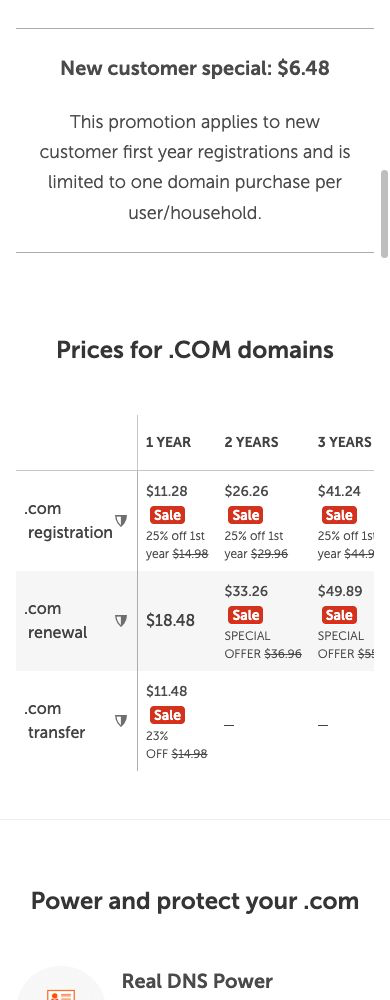
Namecheap is the domain registration option in this guide, and its public table shows renewal prices up front, which makes budgeting easier. Buying a domain there does not mean you need a Namecheap hosting package to run your Shopify store.
Compare registration, renewal and transfer separately. The current public domain page shows distinct sale and renewal figures, with extension-specific conditions. Promotional first-year pricing is not the ongoing cost of keeping the domain.
Namecheap’s public disclosures describe extra ICANN charges for some domains and privacy exclusions for certain extensions. Confirm the actual extension, registration period, eligibility and final order terms. Don’t treat one advertised price as universal.
The one-year table records Namecheap’s public .com price categories on October 15. No domain was searched for purchase, registered or transferred during this research. I’d factor in the renewal and admin process alongside the first-year price.
3. Google Workspace for a business mailbox
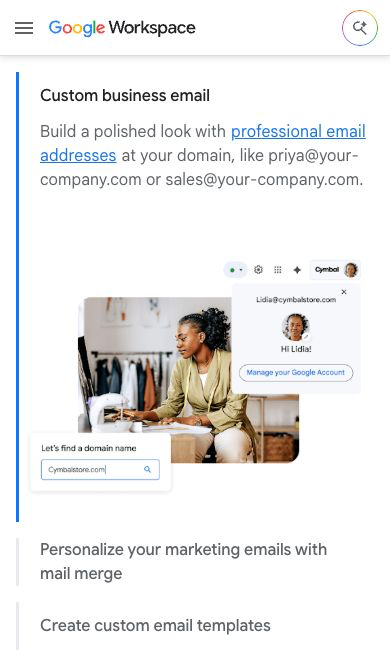
Google Workspace belongs in a different purchase decision. It’s for sending and receiving business email through Gmail with your custom domain, and the Google Workspace pricing page lists custom business email in each of its business plans.
Shopify’s help page on email forwarding and hosting says Shopify doesn’t offer email hosting. Shopify separates email forwarding from a third-party hosted mailbox and describes connecting services such as Google Workspace.
A forwarding address routes incoming messages somewhere else. A hosted mailbox gives you a real sending and receiving setup. Pick the workflow you actually need instead of assuming forwarding fully replaces a business inbox.
Review Workspace user licenses, storage and billing commitment for the business tier you pick. The dated account illustration is Google’s public demo, not my inbox or a delivery test. No email account or domain settings were changed for this article.
Separate the storefront, domain and mailbox records
Write down which provider runs each service. The store platform delivers the commerce site, and the registrar manages the domain registration. The DNS manager points the relevant services, and the mail provider handles the mailbox.
Those roles sometimes belong to one company and sometimes to several. Record the real arrangement instead of assuming your website host owns every related account. A clear service map makes future changes much easier to plan.
Keep renewal dates and account ownership with the records. A domain expiring is a different problem from a Shopify subscription charge or a mailbox license. Assign one person to review each bill and notice.
Don’t open another account just because an onboarding page lists a bunch of optional products. Identify the required job and check what you already have. A working setup deserves a reasoned change decision, not a new bundle bought out of habit.
For the broader store platform choice, read my ecommerce platform selection guide. Decide the commerce setup first, then compare the supporting services.
Connecting a domain and transferring a domain are different
Shopify’s current documentation separates connecting a third-party domain from transferring its registration. Connecting keeps domain management and renewal with your existing provider. A transfer moves domain management to Shopify, subject to the applicable eligibility and process.
Neither choice is the same as moving the store’s products, pages or order records. A domain connection changes how visitors reach the site. A store migration involves the commerce content and workflows too.
Choose the arrangement around ownership, administration and existing services. If the domain supports other websites or email, list those dependencies before you change anything. Instructions for a new unused domain are different from a working business setup.
Follow the current official instructions for your actual registrar and store. Don’t copy a DNS example from an unrelated setup without reviewing your existing records. Domain and mail changes need an approved plan and a responsible admin.
Keep the accepted renewal terms with the domain record. Switching management providers does not remove the need to maintain the registration. A convenient dashboard is one factor, alongside the real cost and support arrangement.
A separate website needs a separate hosting decision
A WordPress publication, a custom app or another independently run website has its own platform requirements. Using Shopify for your store doesn’t mean every other project should use Shopify.
Define the separate site’s purpose before you pick hosting. A personal blog and a custom business app have different maintenance and resource needs. Choose the service around the real project instead of tacking another hosting bill onto the storefront by default.
If that project is a WordPress site, SiteGround is a managed WordPress host I’d look at, since it handles the server side for you. It’s still a separate bill from your Shopify plan, so only add it when the separate site actually exists.
For WordPress, name the person handling updates, backups and troubleshooting. Managed service descriptions still need their real scope checked. An included plugin or backup feature doesn’t mean your whole publishing process is maintained.
Decide which public address belongs to each project. A root domain and a subdomain are different site locations. Confirm the actual architecture with whoever implements it before promising a setup works with every provider.
Keep the visitor journey clear between the publication and the store. Link to relevant pages on purpose, and don’t create duplicate versions of the same offer just to fill another website.
Compare the full cost of the arrangement
List the store subscription, domain renewal, mailbox licenses and required apps. Add a separate site’s hosting only when that separate site is in the plan. Keep optional services out of the base comparison until there’s a defined need.
Separate billing frequency from commitment. Monthly payment under an annual agreement is different from a month-to-month subscription. Record the renewal amount and cancellation conditions instead of comparing a headline monthly equivalent with an unrelated intro offer.
Here’s an original hypothetical example, not a provider quote. A $35 monthly store expense costs $420 over 12 months. Two mailbox seats at $8 each per month cost $192 a year.
Add a $20 annual domain renewal and you get $212 in additional costs and a $632 total before tax and other expenses. The calculation shows separate spending categories. The numbers don’t describe a particular Shopify or Workspace plan, and they leave out payment processing, paid apps, production and marketing.
Look at year 2 alongside year 1. A promotional registration or hosting rate often comes with a different renewal amount. If a service isn’t needed for the project, a discount is not a reason to keep paying for it.
For a required app, define the workflow and cost before installing. A free starting tier does not mean every needed feature stays included forever. My free Shopify apps comparison covers that separate decision.
Keep working email intact during website changes
List the current inboxes, forwarding addresses and sending services before any domain or DNS change. Identify which business conversations and notifications depend on the existing setup.
A website change should never accidentally replace the mail configuration. Keep the current records and approved change plan in front of the person doing the work. A new storefront doesn’t mean you need a new mailbox provider.
Shopify’s email hosting instructions note that changes to MX records affect forwarding configured through Shopify. Review your actual provider’s process and what it means for existing addresses before you make a change.
After an authorized change, verify representative incoming and outgoing messages, aliases and notifications yourself. Completing a domain verification step does not prove every email route works. This comparison performed no account or routing tests.
My business email providers guide compares the inbox decision. Keep mailbox storage, shared storage and website disk space separate when you look at allowances.
Write down what a proposed change must preserve
Before changing anything, list the public pages and business functions that work today. Include the store address, product links, checkout route, contact form and mail addresses. Use your real business setup, not an assumed standard configuration.
For a domain-only change, define the intended address and which services must stay where they are. For a store migration, add products, variants, stock records, customer access and order handling to the review. Those are different scopes with different acceptance checks.
Keep the current account owners and approved change instructions together. Name the person who reviews the result and the plan for an unexpected failure. A successful connection notice is one checkpoint, not proof that every existing business function survived.
Inspect a representative product page and the relevant navigation after an authorized change. Confirm where existing public links go and how the store presents shipping and payment information. Review customer and supplier contact routes separately from the storefront.
Don’t run a payment or send private customer information just to fill a checklist. Choose an authorized test method that fits the task and record exactly what you checked. A visual page review is not a processed transaction, and a test-domain connection does not prove a live account migration.
Keep unresolved items visible before you call the move finished. If the storefront works but mail is unverified, report those as two separate states. That stops one successful technical step from turning into an unsupported claim about the whole setup.
Assign the support problem to the right service
Describe the problem you see before changing providers. A registrar renewal, a website error and a failed email involve different records and support teams. Send the relevant facts to the responsible provider through an authorized process.
Note the affected address, the time and the visible error. Tell an intermittent page issue apart from a complete outage. A slow page does not mean the registrar or mail provider caused it.
For a storefront issue, review the actual page and recent changes. Theme code, media, apps and third-party scripts are all different parts of the visitor experience. Buying another unrelated hosting account won’t fix every possible cause.
My Shopify themes comparison covers theme selection. Evaluate the actual theme and required features instead of treating a premium theme as a measured speed improvement.
No page speed, uptime or incident test was run for this article. Provider hosting descriptions support the service comparison, not a promise about your store’s performance.
Choose the plan around the retail work
Write down the payment methods, staff access, reporting and order workflows you need. Compare those requirements with the exact store plan. A hosting feature alone does not cover every commerce function your business needs.
Put the product and supplier work ahead of extra infrastructure purchases. Use the high-ticket niches list to organize category research. Check the customer need and real supplier access before you grow the software list.
Included hosting is one platform feature. It is completely separate from getting an authorized supplier relationship and handling customer orders, which is where the real work lives.
Follow my high-ticket supplier research guide for dealer recruiting tasks. Record the actual authorization, shipping and warranty terms instead of assuming a finished website means you’re approved.
Supplier Paradise is a research resource I own. Verify each lead’s operating arrangement before you rely on the relationship for a public customer promise.
Use the business formation guide for setup questions. I run my business through a Wyoming LLC, but your situation may differ, so keep account ownership and commercial responsibilities with the right business records and get appropriate advice.
For help defining your next task, check out Ecommerce Paradise coaching. Confirm the actual service scope before you buy. Coaching is a separate decision from a hosting subscription or a technical configuration.
Keep the setup maintainable when the team changes
Record the current account owners and the approved recovery process. A contractor handling routine website work does not need to become the business’s permanent account owner.
Define the access each task needs and review the provider’s available roles. Keep billing, domain ownership and routine editing responsibilities clear. Don’t treat a shared password as a long-term team process.
Before someone leaves the project, reassign outstanding work and review access through the approved account process. Keep the business records you need for continuity instead of deleting an account without a plan.
For delegated work, my virtual assistant websites guide adds hiring context. If you hire through OnlineJobs.ph, a job board for Filipino remote workers, give the assistant their own access instead of your main login. Define the deliverable and boundaries before assigning responsibility for a domain or store.
Make the purchase decision from the actual requirements
For a standard Shopify store, compare Shopify’s commerce plans and included hosting. For a custom domain, compare the registrar and renewal. For business email, compare the mailbox and user setup. Add a separate website host only for a separate project that needs one.
Don’t cancel a working service until you understand the job it performs. A hosting charge tied to another website or email setup deserves its own review, not a blanket conclusion that every host is unnecessary.
Keep the domain, store and mailbox records together and review the setup before each renewal. The simplest setup is the one that meets your real requirements with clear ownership and no mystery subscriptions.
So with that said, here’s my bottom line. Shopify already hosts your store, a registrar handles the domain and a mailbox provider handles email. Keep those three jobs separate, track the renewals and spend your energy on products, suppliers and customers instead of extra servers.
If you’d rather skip the setup headaches entirely, my team builds done-for-you high-ticket stores on Shopify. Or grab my free mini course and go deep before you go wide on one niche.

Trevor Fenner is the founder of Ecommerce Paradise. His main projects are Ecommerce Paradise, Supplier Paradise, and Review Paradise, which is currently in development. TrevorFenner.com publishes research-based reviews and practical guides to online business tools and remote-work services, with clear affiliate disclosures.