
The best free Shopify apps solve one specific job without adding a surprise bill or another process to babysit. That’s it. Start with the work your store actually needs, then compare the current free tier.
This shortlist covers Judge.me Product Reviews, Omnisend, Yotpo Reviews and UpPromote. Judge.me and Yotpo are alternative review systems, so you’d pick one. Omnisend handles email, while UpPromote is for running your store’s own affiliate program.
Let me be real with you. You don’t need all four to run a store. If your product pages aren’t finished yet, finish them before you add a pile of marketing tools.
My team builds client stores on Shopify, and I’ve built 20+ websites over the years. Plenty of those closed down, and the lesson stuck with me. At Ecommerce Paradise, I focus on the actual retail operation, because an app supports a process but you still own the product information, customer expectations and follow-through.
If you’re still figuring out the model behind the store, start with my guide on how high-ticket dropshipping works. Then come back here when you’re ready to pick tools for specific jobs.
The four real public provider captures were taken on October 15, 2026. No app was installed, review imported, campaign sent or referral transaction tested for this article. Current allowances are checked separately from the dated images.
Disclosure: I earn compensation when a qualifying affiliate referral earns a commission, at no extra cost to you. I own Ecommerce Paradise and Supplier Paradise.
Match the app to the job
| App | Job to evaluate | Free plan question |
|---|---|---|
| Judge.me Product Reviews | Collecting and displaying genuine product reviews | Required widget and request features versus Awesome features |
| Omnisend | Permission-based email marketing | 500 monthly emails and up to 250 contacts |
| Yotpo Reviews | An alternative review workflow | Limited tier for up to 50 monthly orders |
| UpPromote | Managing your store’s affiliate referrals | One program and review of $3,000 referral sales monthly |
Keep the process and the limit together. A tool with a bunch of shiny paid features is a different purchase than the free tier you plan to use.
1. Judge.me for a straightforward review setup
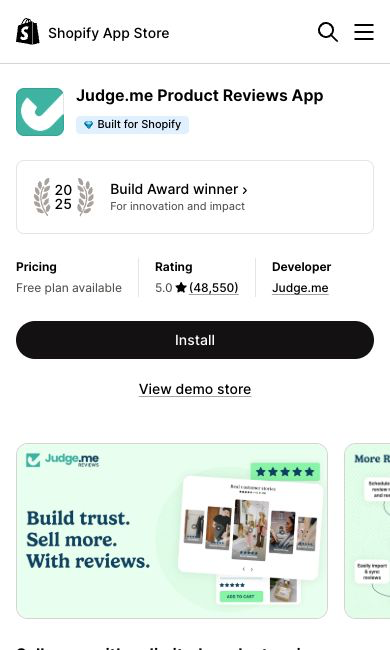
Judge.me Product Reviews earns its spot when you need a simple way to request and display reviews. I like it as a first look because the free tier covers the core review job. Compare the actual Reviews product, and don’t assume a separate Judge.me Email offer belongs to the same plan.
Current official help lists unlimited review requests, the Review Widget, Star Rating Badge, basic customization, CSV importing and photo or video requests in Free. Awesome is $15 USD monthly, with currency conversion through your store’s billing setup where it applies.
A paid trial and the Free plan are separate decisions. Judge.me’s current guidance says its 15-day Awesome trial turns into paid billing unless you downgrade before the trial ends. Read the actual approval screen instead of treating a trial as permanent free access.
Here’s what I’d do. Start with the review workflow you’ll actually keep up with. A list of advanced features doesn’t mean your store needs the paid tier, and no app creates genuine customer experiences on demand.
2. Omnisend for a small email program
Omnisend does a different job than displaying reviews. I like it for small stores because it’s built for ecommerce email and has a real free tier to start with. Look at your actual audience, permission records and the messages you plan to send.
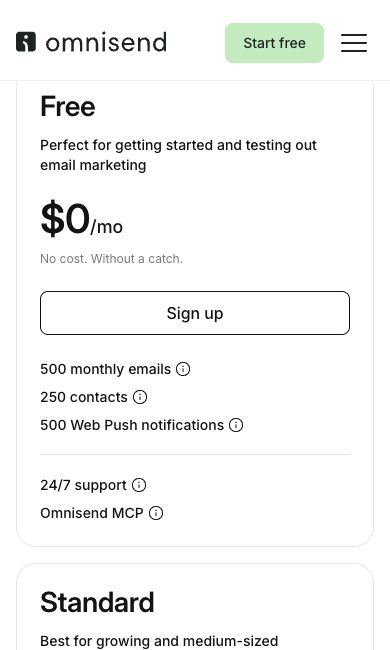
The current Free plan lists 500 monthly emails to a maximum of 250 unique contacts, and the Omnisend pricing page still shows that allowance. Omnisend’s help page separately allows unlimited contact uploads, but a campaign needs a segment of 250 contacts or fewer. Importing more addresses does not expand the Free sending allowance, so count automations and campaigns against the send total before scheduling.
The new screenshot shows the Free card, not a discounted paid subscription. For a paid plan, separate any introductory offer from the ongoing rate and upfront commitment. SMS and other channels need their own cost and eligibility review, so don’t assume every message is free.
My starting point would be a small, clearly defined email workflow with a monitored reply address and proper suppression handling. No campaign, automation or inbox placement test was run for this comparison.
3. Yotpo Reviews as an alternative
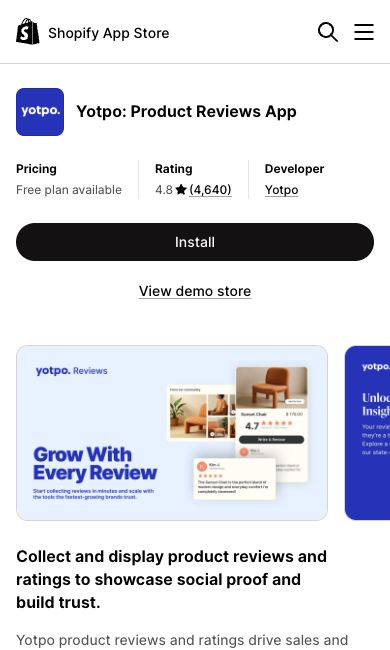
Yotpo Reviews is the other review system option. It’s worth comparing if you expect your order volume to grow, since its paid pricing scales with orders. Compare the actual Reviews product instead of borrowing allowances from Yotpo Loyalty or another Yotpo product.
Yotpo’s official Free and Starter FAQ describes automatic review requests for up to 50 orders monthly, with up to 500 outgoing emails including follow-ups and multi-product purchases. Review requests are capped after the order limit. Paid Reviews pricing depends on monthly order volume, so compare your own quote, not a price shown for a different store size.
The public product image is provider marketing. An illustrated feature doesn’t prove the Free tier includes it. Check the selected product and tier before you plan the request, display or media workflow.
Choose between review systems based on your real requirements. Installing Judge.me and Yotpo together by default adds overlapping work and another customer-facing process to manage.
4. UpPromote for your store’s affiliate program
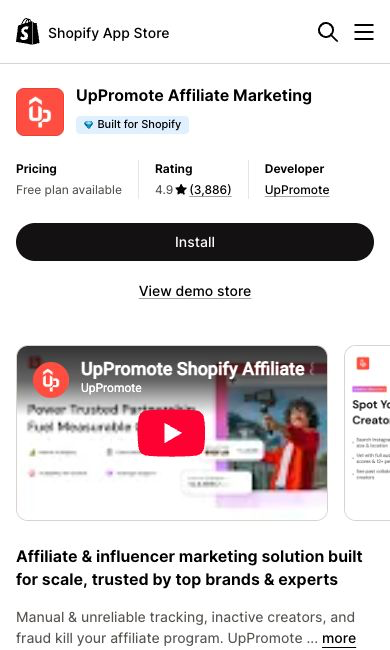
UpPromote is worth a look when your store is ready to recruit and manage its own affiliate partners. I like that the free tier lets you set up one program before paying anything. Keep in mind program software does not bring you qualified partners or sales on its own.
The current Free description lists one affiliate program, link and coupon tracking, and review of up to $3,000 in referral sales per month. That’s an app allowance, not a revenue forecast or a promise you’ll earn $3,000.
The Free pricing table lists no performance fee. Growth lists $29.99 monthly plus 2% of successful referral sales. Those software charges are separate from the commission you agree to pay your affiliates.
Creator Discovery is an optional add-on billed separately. Confirm the actual plan, allowance and approval conditions before you rely on the workflow. No referral attribution, commission approval, fraud detection or payout was tested here.
Read the pricing category before installing
A free plan, free installation and a paid trial are three different things. Read the selected tier and any usage charges before you accept an install or billing screen.
Write down the allowance, the excluded features and the condition that forces another plan. An app staying installed doesn’t mean every feature stays free. Keep the actual limit right next to the task you plan to do.
For a trial, record the end date and the billing setup you accepted. Use the provider’s real cancellation process if you don’t want to continue. Deleting a bookmark or ignoring a reminder email does not stop billing.
Don’t trust an unlimited headline until you check what it covers. Unlimited review requests and a limited email send quota measure different things. Neither one means unlimited storage, recipients or access across every product.
The subscription is only one part of the cost. Include the time you spend configuring, reviewing data and handling exceptions. A zero subscription price doesn’t make an unnecessary workflow useful.
Finish the store foundation first
Make sure your product pages describe the actual item, included parts and delivery terms. A review widget won’t fix wrong specs or missing warranty info.
Make the contact route and support ownership clear. Somebody has to answer questions and order issues. Adding another form creates a responsibility, not a replacement for the person handling the conversation.
Check the navigation and product selection on a phone. Confirm the important information is readable and the key buttons are easy to tap. Do this on your real pages, because a polished app demo doesn’t prove your store’s layout works.
My Shopify themes comparison covers the theme decision. Check what your theme already does before you buy an app to copy a feature you already have.
For the platform and supporting services, read my Shopify hosting guide. A standard Shopify storefront includes hosting, while a domain and a business mailbox are separate decisions.
Choose one review process you will maintain
Decide who requests reviews, when the request goes out and who handles responses. A review request needs a real customer experience behind it. Asking before the product arrives is a very different interaction than asking after the customer has used it.
Keep product identifiers clear when you import existing reviews. Confirm each review belongs to the actual product and keep the source and permissions. Don’t import a convenient pile of reviews just to fill an empty widget.
Use authentic reviews and present them accurately. The FTC’s current guidance prohibits buying consumer reviews conditioned on a particular positive or negative sentiment, and its Q&A on the Consumer Reviews and Testimonials Rule explains the details. Review incentives also involve disclosure and the platform’s own policy.
Respond to problems with the actual customer facts. Don’t make removing a truthful complaint your default fix. A review tool gives you a collection and display process, not permission to misrepresent customer opinion.
For a deeper software comparison, use my review management guide. Keep product reviews, business reputation and your actual customer service process separate.
Budget the email workflow against the quota
Count the messages your planned workflow will produce. Campaigns and automations are different triggers, but both use real sends. Keep the allowance in view before you add several automated messages.
Here’s an original planning example, not a campaign test. Two messages sent to 200 recipients produce 400 sends before other activity. Under a 500 email allowance, that leaves 100 sends in this simple example.
The math doesn’t prove permission, inbox placement or how the provider treats every contact status. Review the actual billing and suppression rules. A small list still needs correct records and a clear reason people are getting your messages.
Preview the content and recipient selection before any authorized send. Check the sender, monitored reply address, links and unsubscribe process. The FTC’s CAN-SPAM compliance guide for business covers honest sender details and opt-outs, and a successful preview is still separate from a delivered campaign or a sale.
My affiliate email marketing comparison covers content policy differences. Check the provider’s acceptable use rules before you build messages around affiliate offers.
Choose the workflow around what your audience actually expects. A template library or automation feature doesn’t make a message relevant. Keep one person responsible for reviewing factual claims and changes to the audience.
Prepare the affiliate program before recruiting
Define the offer, the allowed promotion methods and the commission agreement. Decide which products belong in the program and how returns or cancellations affect approval. Get the terms clear before you ask anyone to promote your store.
Program software records a process. You still need partner selection, communication and a review of referred orders. Don’t assume a dashboard proves every transaction is valid or every coupon belongs to the right partner.
Separate the commission you owe a partner from the app’s subscription and performance charges. Include any payment costs in the budget. A free software tier doesn’t cancel the compensation agreement you made.
For an original hypothetical example, a 10% partner commission on an eligible $200 sale is $20 before other expenses. These numbers show the agreement’s math, not a real program rate or an earnings forecast.
Record the approval decision and who pays it. Don’t automate a payout just because a referral shows up in a report. Use the agreed verification and approval process for your program.
Evaluate one store change at a time
Define the problem and the pass check before you install anything. A review display needs the right product association and a readable layout. An email form needs the intended submission and recipient process, and an affiliate workflow needs the agreed tracking and approval rules.
Use an authorized test setup that fits the task. Save your current theme version and record the change. A public app screenshot doesn’t prove compatibility with your theme, checkout or other apps.
Check desktop and mobile after the change. Look at the product page, key navigation and the customer-facing element itself. An app showing up in your admin list doesn’t prove the storefront piece works.
Don’t install several competing apps at once and then credit every result to one provider. Record the change, the conditions and what you saw. A short test does not prove a lasting lift in conversion or revenue.
To be clear, no installs or store tests were done for this article. These steps are for your own authorized review, and your conclusions should stay limited to the evidence you collect.
Check whether your review app and email platform are asking the same customer for the same feedback. Overlapping workflows create duplicate messages and a messier response process. Assign the request to one agreed process and review the schedule before turning on another automation.
When you see an improvement, record the date, affected pages and any other changes in the same period. A jump in submissions after a new form doesn’t isolate the app’s effect if traffic, offers or layout also changed. Keep the observation separate from any claim of measured business impact.
Look at support questions next to the numbers. A widget that confuses people or hides key product info needs attention even if the dashboard shows more clicks. Confirm the customer’s real task got easier instead of treating every click as progress.
Review access and the exit process
Read the permissions each app requests and compare them with the job you defined. Identify which customer, order or product information flows into the workflow. A broad feature description doesn’t explain how your store’s data is handled.
Assign the account owner and the person who reviews operational errors. A contractor setting up a tool needs a clear deliverable and access limits. Keep billing and ongoing admin with the business.
Before you remove a tool, review the export and retention options. Reviews, subscriber records, suppression states and affiliate agreements each raise different questions. Don’t assume every piece of the workflow moves together.
After an authorized removal, check the affected pages and business process. A removed app icon does not prove every storefront element, scheduled action or separately billed service has stopped. Honestly, cleaning up leftover app code is a pain in the butt, so keep notes from day one.
Connect the app decision with the retail work
Go back to my high-ticket dropshipping overview to keep the business model in focus. A marketing app is one tool, separate from your responsibility for orders and customer communication.
My high-ticket niches list helps with category research. Choose a focused customer need and check real supplier access before you treat an app stack as a business plan. Go deep before you go wide.
Follow my high-ticket supplier research guide for dealer recruiting work. Confirm authorization, product data, shipping and warranty terms with the actual supplier.
Supplier Paradise is my own supplier research resource. Verify each lead before you use the relationship to back a customer promise or a marketing claim.
Use my business formation guide for setup questions. Keep account ownership and operating responsibilities clear alongside your other business records.
If you need help deciding what to work on next, look at Ecommerce Paradise coaching. Confirm the actual service scope before you buy. Coaching is separate from an app subscription or a store setup.
Pay for a defined requirement, not a general upgrade
So with that said, here’s how to wrap this up. Record the free tier’s current limit and the exact feature that would require payment. Compare the ongoing subscription, usage charges and the work involved, and give any promotion a renewal review instead of assuming the intro price lasts forever.
Judge.me and Yotpo are review alternatives. Omnisend supports a separately planned email workflow, and UpPromote belongs in a defined affiliate program. Pick the smallest useful combination and give each process a clear owner.
A paid feature is worth considering once the requirement is real. Neither a free tier nor a premium badge proves an app will produce sales for your store. Keep the buying decision tied to the task and the evidence from your own testing.
Apps are the easy part. The hard part is picking the right products and suppliers, and that’s where your time pays off. If you want to learn that side step by step, go check out my free high-ticket dropshipping mini course.

Trevor Fenner is the founder of Ecommerce Paradise. His main projects are Ecommerce Paradise, Supplier Paradise, and Review Paradise, which is currently in development. TrevorFenner.com publishes research-based reviews and practical guides to online business tools and remote-work services, with clear affiliate disclosures.