
The best Shopify themes fit your catalog, your product information and your support workflow. That’s it. A polished demo does not tell you the right layout for your actual store, so don’t let a pretty homepage make the decision for you.
Start with the customer’s decision. Product specs, variants, delivery details and contact options all need a clear spot on the page. Pick the theme after you know what information your buyer needs.
At Ecommerce Paradise, I connect storefront decisions with the operating model behind the store. My team builds done-for-you Shopify stores for clients, so theme choices are part of my everyday work. A theme should support the store’s verified offer, not hide missing product or supplier facts. If you’re new to the model, read my high-ticket dropshipping guide first.
This shortlist compares Dawn, Empire, Turbo, Booster and Debutify. Free themes, paid licenses and subscriptions all carry different costs. Confirm the actual purchase, support and renewal terms for whichever route you pick.
The real provider images keep their October 10, 2026 dates. Vendor demos are illustrations, not my storefront or measured performance. No theme installation, checkout, speed benchmark or conversion experiment was completed for this comparison.
Disclosure: qualifying purchases through affiliate links earn me compensation at no additional cost to you. I own Ecommerce Paradise and Supplier Paradise. Dawn is a free theme, and the Shopify platform subscription is separate from theme pricing.
Compare the storefront requirement
| Theme | Route to investigate | Required check |
|---|---|---|
| Dawn | Straightforward free theme | Your product data, navigation and separate Shopify subscription costs |
| Empire | Large-catalog discovery | Category and filter data, plus compatibility with required apps |
| Turbo | Product-presentation layouts | Store license, ZIP-file setup and maintenance scope |
| Booster | Built-in features and license route | Yearly versus lifetime access, technical support period and renewal |
| Debutify | Widgets and subscription tier | Required widget tier, billing interval and supported theme version |
Dawn for a straightforward starting point
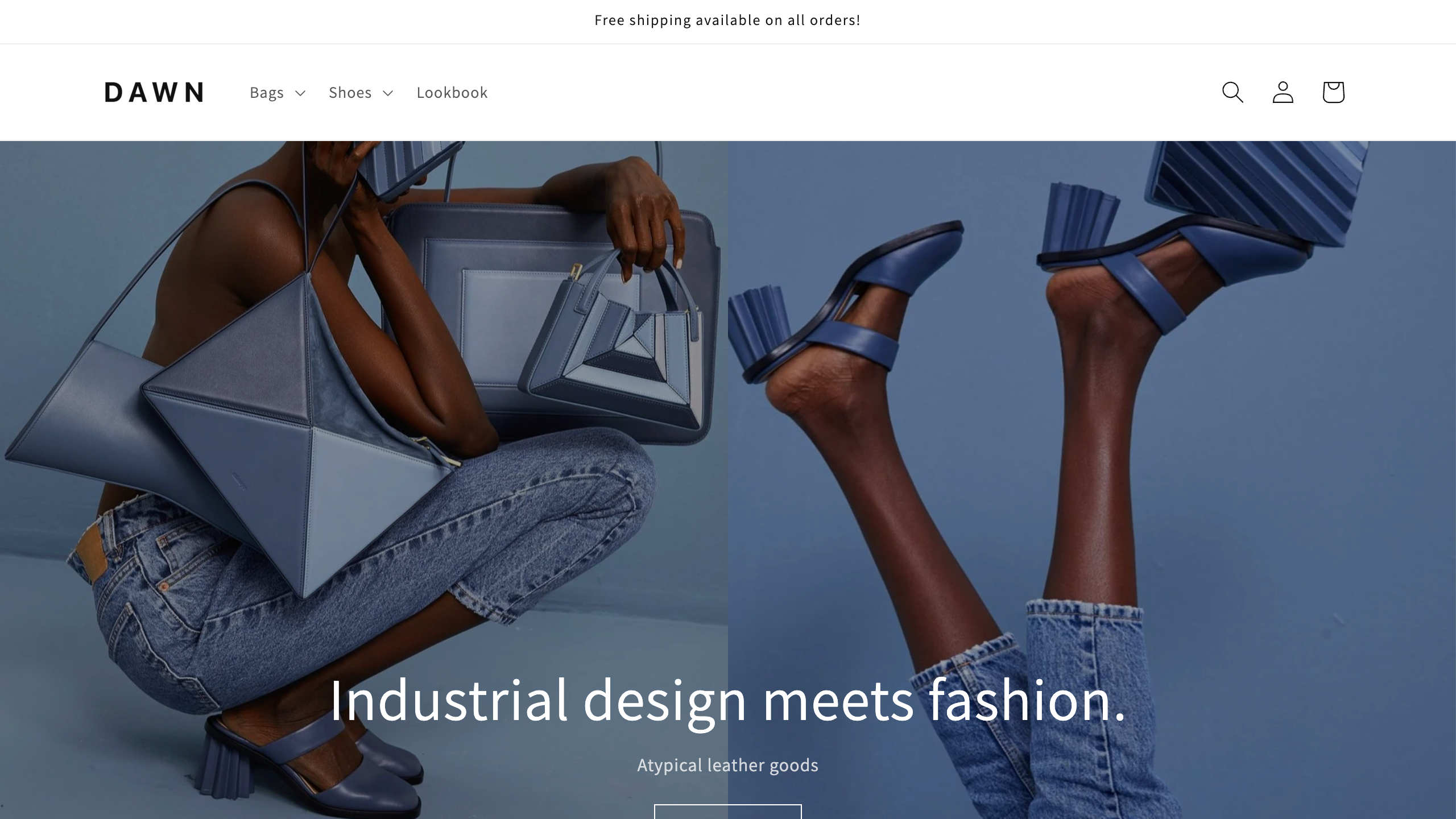
Here’s what I’d do first. Look at Dawn through Shopify when the layout your store needs is straightforward, because it costs nothing to try. Dawn is free, but the platform subscription and other operating costs are separate.
The official Dawn listing describes a minimalist, media-focused theme with product options, image galleries and shipping information. It also lists product filtering and sorting, enhanced search and a mega menu. Review the actual settings against your own catalog.
A free theme does not remove the product data or setup work. The preserved public demo shows layout, not my store. No installation, speed or conversion test was done for this guide.
Empire for catalog navigation
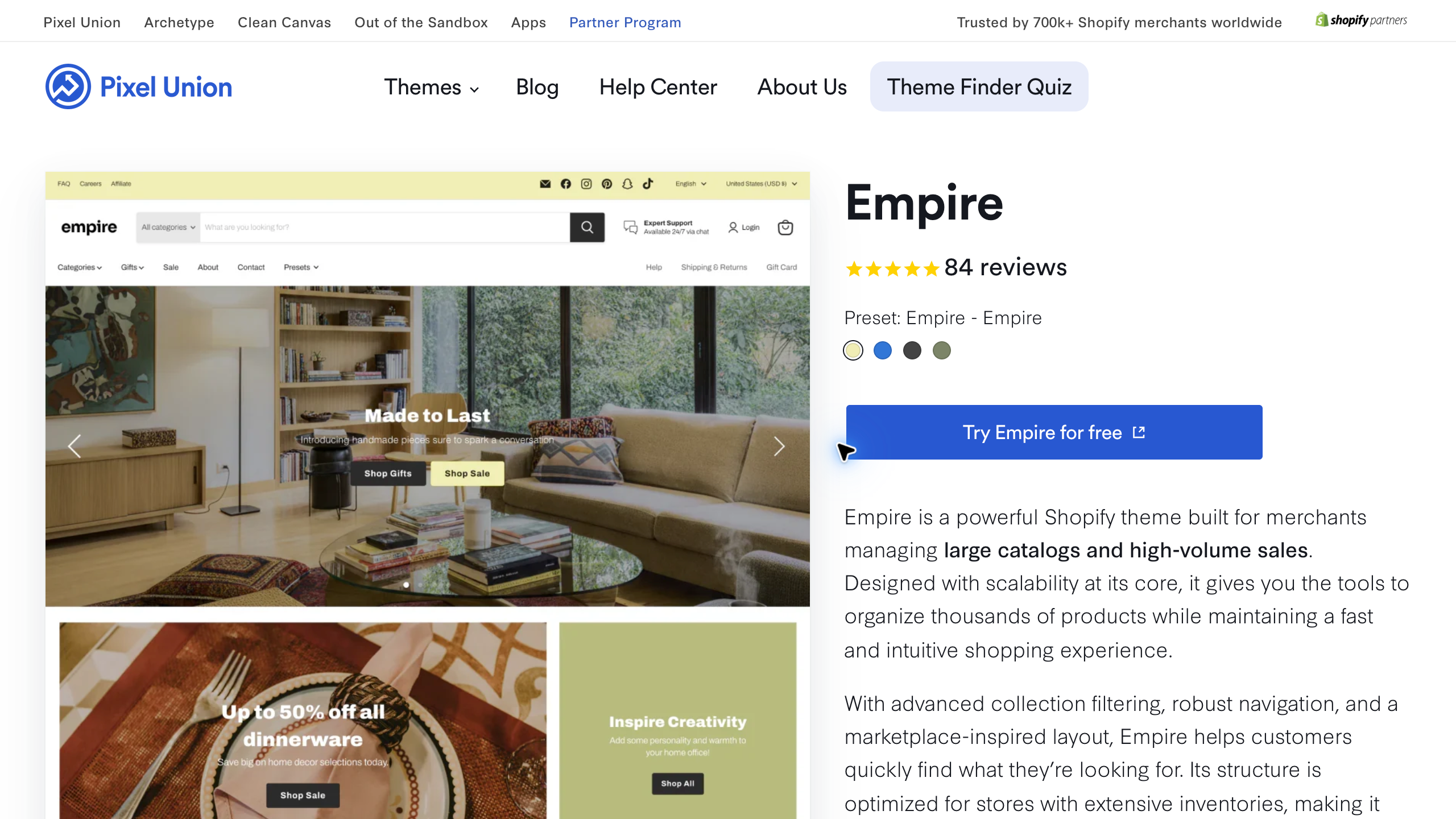
Pixel Union’s Empire deserves a look when product discovery is a central requirement, since its official page is built around large catalogs. Define your categories and comparison information before you choose the design.
The current official page positions Empire around large catalogs and product discovery. Its theme family includes Empire, Depot, Forma and Circuit presets. Switching presets gives you a different presentation, not a different verified operating result.
Confirm the current purchase route, license and support scope before paying. A catalog-focused description doesn’t prove every filter works with your data. No storefront configuration or shopping task was tested here.
Turbo for flexible product presentation
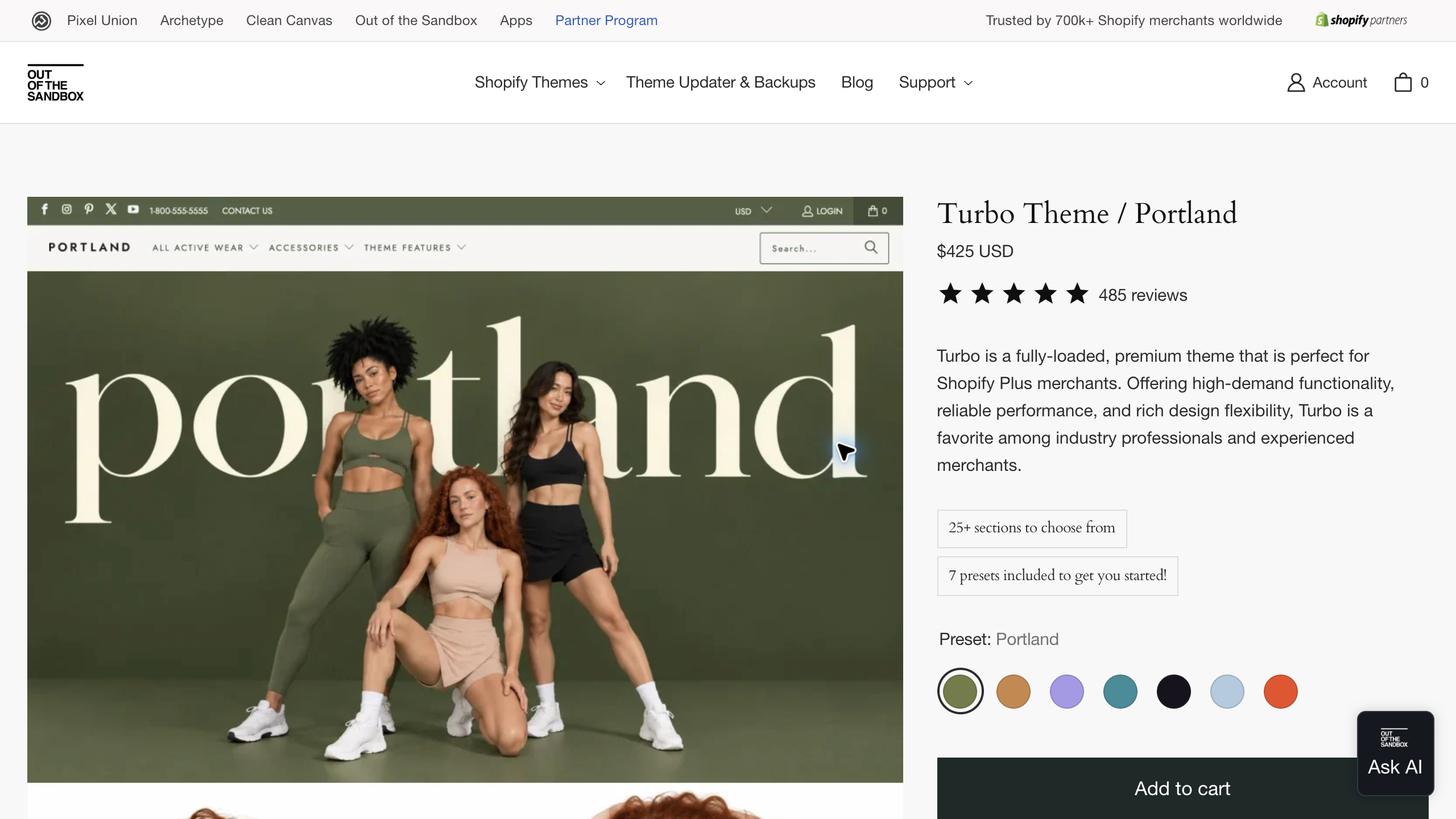
I’d compare Out of the Sandbox’s Turbo when the store needs a wider set of layouts, because it ships with lots of sections and presets to work with. Judge the presentation using your actual product information.
The current official Portland product page lists $425 USD, more than 25 sections and included presets. Purchase details describe delivery as a ZIP file containing the built-in styles. The preset you choose sets the starting visual style.
The vendor’s performance descriptions are not benchmarks from this comparison. Confirm licensing, current support and any separately priced maintenance tool. No purchase, download or installation was completed for this guide.
Booster with support terms checked separately
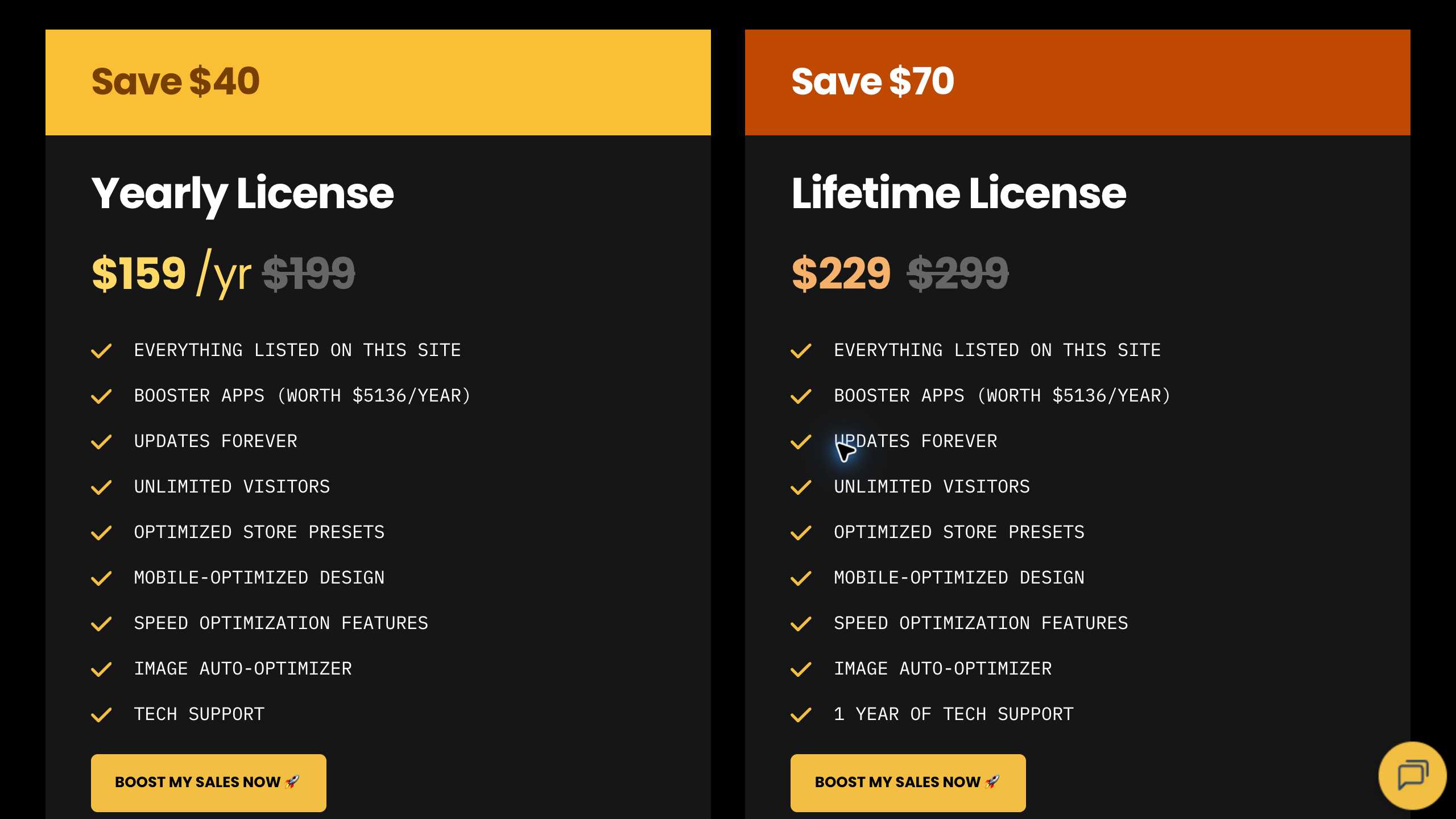
Booster offers yearly and lifetime license routes, which gives you a choice between paying over time and paying once. Compare the features you actually need instead of treating the vendor’s app-value or conversion claims as measured savings.
The official pages show several promotional and comparison prices. Those don’t establish one permanent price. Confirm the current charge and the license you pick before committing.
The support FAQ says yearly support continues with an active license. Lifetime access includes 1 year of technical support, and a renewed support plan is required after that. Customization is described as a separate service.
Keep that in mind: lifetime theme access is not the same as unlimited lifetime support. The dated pricing figure documents the old display. No speed, checkout or sales experiment was done here.
Debutify with the feature tier selected first
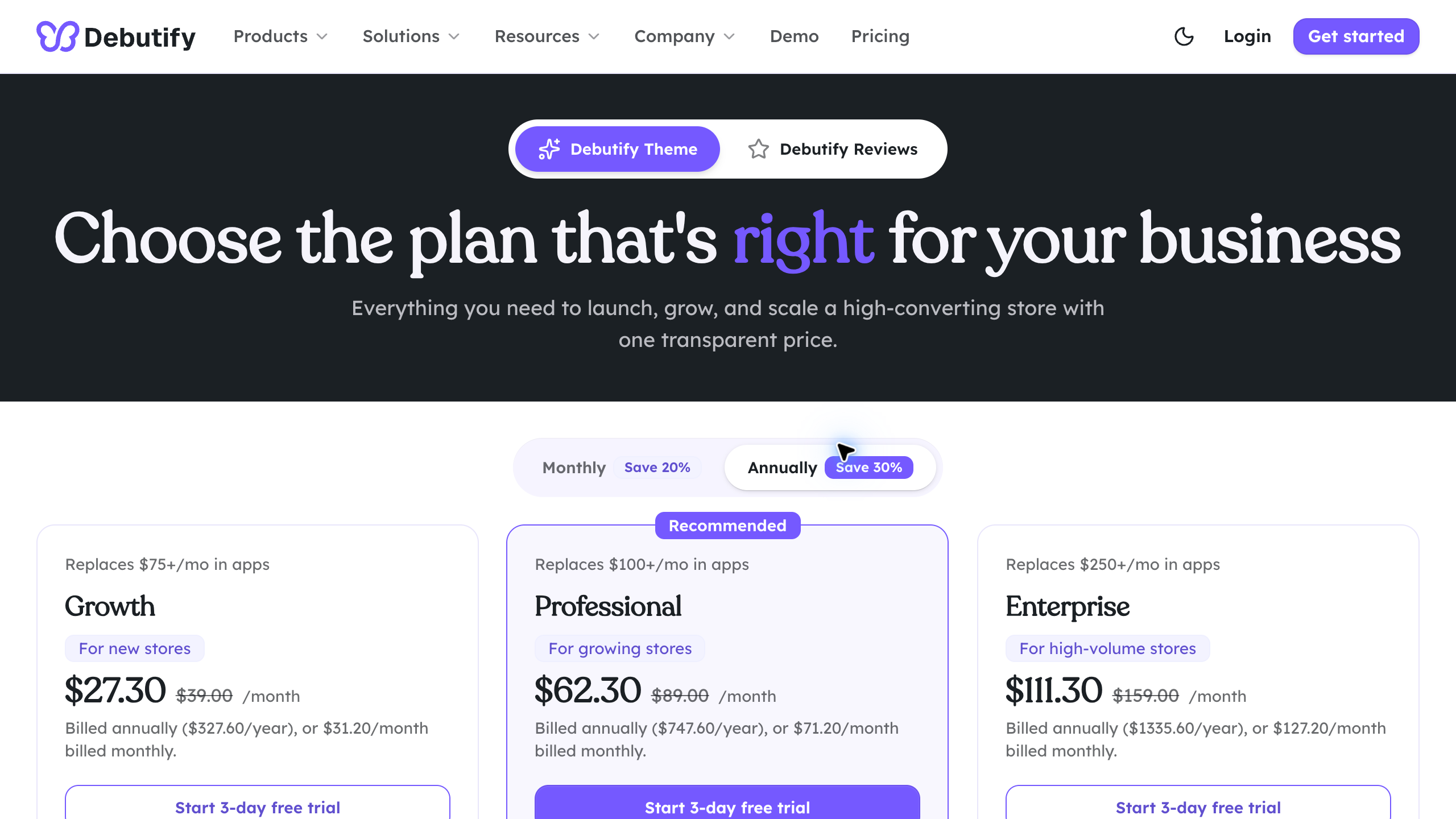
I’d look at Debutify Theme after naming the widgets and support you need, since it has a free route to start with. Its theme plans are different from the separate Debutify Reviews product.
The current theme page lists Free, Growth, Professional and Enterprise. The free route includes 26 free widgets and sections. Paid tiers give you different feature and support scopes.
Monthly and annual promotional displays need their billing context. Confirm the actual total, renewal and included access instead of treating the displayed monthly equivalent as month-to-month billing.
The FAQ limits Growth and Professional support to the latest version, while Enterprise supports up to 3 previous versions with priority help. Confirm the current scope for your version. No subscription, AI store generation or theme update was tested for this guide.
Start with the catalog and buyer’s questions
List the actual categories, models and variants your store carries. A small focused catalog and several hundred technical products need very different navigation. The theme should help customers understand the choices in front of them.
Write down the product information buyers need before purchase. Dimensions, compatibility, included accessories and delivery responsibilities often matter more than a big homepage image. Give those facts clear spots in the page plan.
So what you should do is pick several representative products for evaluation. Include a simple item and one with more complex options. A single polished vendor demo doesn’t prove the theme handles the hard parts of your catalog.
My high-ticket niches list helps with category research. Understand the customer and service expectations before choosing a layout around a product line you don’t know yet.
Check product information before visual styling
Prepare approved specs and images before you compare layouts. Missing information makes a page much harder to judge. A theme can’t supply a verified dimension or warranty obligation the store never confirmed.
Keep each product’s version and source visible in your working record. Conflicting documents need an answer from the responsible supplier. Don’t just use whichever spec makes the easiest design.
Confirm image rights and the actual variant shown. A manufacturer’s public photo is not automatic permission to reuse it. The customer should see an accurate picture of the item you’re offering.
Use my supplier sourcing guide for commercial verification. Dealer approval and current product access come before any storefront promises. I teach people to work with authorized, USA-based suppliers for exactly this reason.
Evaluate discovery with real category structure
Build navigation around the buyer’s task. Product type, size and compatibility are often clearer routes than the supplier’s internal codes. The hierarchy has to match the information your catalog actually has.
Test filters with real data. A listed filtering feature doesn’t mean your current products contain the required fields. Figure out what needs preparation before you treat the feature as ready.
Keep naming consistent across menus and product pages. Several labels for the same category force customers to guess. A shopper should understand the next click without learning your internal vocabulary.
No product-finding experiment was done for this guide. These are proposed evaluation tasks for your own authorized setup. Vendor descriptions list features, not measured usability on your store.
Check the mobile buying information
Review the title, price, options and key specs on a narrow screen. The first view should identify the product and the next action. Long decorative sections shouldn’t bury the information people need to decide.
Check readable text, image proportions and tap targets. A desktop layout often rearranges a lot on mobile. Look at the real pages instead of assuming a “responsive” label means every section looks right.
Test long product names and unusual variants during your own approved review. A short demo title is incomplete evidence. Note the page and layout when content wraps awkwardly.
Keep delivery and contact information easy to reach. A buyer with a question should find the right channel. The theme’s visual style doesn’t mean your support team has the facts to respond.
Compare the full cost and support commitment
Separate the theme price from the Shopify subscription, apps and paid setup. A free theme still comes with platform costs. A paid license sometimes leaves extra work or recurring services outside the purchase.
Record the store license, update route and support period. Lifetime theme access and lifetime technical help are different claims. Confirm the exact offer instead of assuming the second from the first.
For subscription themes, check the actual billing interval and renewal. An annual price shown as a monthly equivalent is not month-to-month payment. Keep promo rates separate from later charges.
Ask what support excludes. General troubleshooting, custom development and store administration each deserve their own scope. A friendly support headline doesn’t mean every design change you ask for is included.
Shopify’s themes help center points you to free and paid themes in the Shopify Theme Store. That’s a good place to compare official listings side by side before you look at third-party vendors.
Keep performance claims separate from benchmarks
A vendor’s speed or conversion description is marketing, not a result from your store. Your real images, apps, content and configuration shape the page people see. Don’t promise performance based on the theme name alone.
For your own authorized benchmark, define the page, device and measurement conditions upfront. Compare the same scenario and keep the results. An unrelated demo score doesn’t prove the same outcome for your catalog.
Check whether built-in features really replace a specific app’s required functions. A list of estimated app values does not prove your business saves that total. Confirm the actual job each feature handles.
No speed or conversion experiment was done for this comparison. The preserved figures are public demos and provider pages. They don’t show measured revenue or checkout performance.
Prepare an update and handover process
Record the installed version and important customizations in your own store documentation. An update sometimes means reviewing a lot more than the homepage. Keep the affected templates and the responsible reviewer visible.
Note the source of custom code and app dependencies. Another person needs enough context to maintain the store. Avoid an undocumented setup that depends on a contractor’s personal account you can’t reach.
Keep a proper backup and review route before any big change. The exact process depends on your store and tools. A theme purchase alone doesn’t give you a tested recovery plan.
Confirm support eligibility for your version before you count on help. Debutify’s current version conditions show why that question matters. No theme version was installed or updated for this guide.
Build the theme decision around the operation
The retail model I linked in the intro explains supplier-dependent responsibilities. A storefront has to describe the supported offer accurately, not just look good.
Supplier Paradise is a research resource I own. A directory lead is not approved inventory or a delivery promise you can put on a product page.
Use my business foundation checklist for the admin side. Theme selection doesn’t settle your business identity, account ownership or professional advice needs. I run my own business through a Wyoming LLC, and that was a separate decision from anything on the storefront.
The store still needs someone responsible for customer questions and exceptions. Keep the operating procedure right next to the page plan. A clear contact button needs a useful process behind it.
Prepare a small authorized theme review
For your own approved evaluation, use the same representative content across every shortlisted theme. Include the real title lengths, product images and specs. A vendor’s hand-picked demo content is an incomplete substitute.
Review one product with several options and another with a simple purchase path. Check whether the selected variant and key information stay clear. Record the task and the result instead of deciding from the first attractive homepage.
Click from a relevant category to the product and then to support information. The buyer needs enough context to make a decision. A visually impressive route sometimes adds unnecessary steps or hides details.
No theme trial or store configuration was completed for this article. These are proposed checks for your own authorized setup. The public screenshots don’t show how your existing apps or customizations behave.
Review the cart and customer promises
During your approved review, check what information carries from the product page into the cart. The model, variant and quantity should stay clear. Important delivery exclusions need accurate presentation before the customer commits.
Keep an estimate separate from an approved delivery promise. The theme displays whatever information the business supplies. A delivery date widget doesn’t create reliable supplier or carrier evidence.
Check discount and pricing displays against the actual terms. A crossed-out comparison price needs real factual and legal support. The FTC’s Guides Against Deceptive Pricing explain that a former price should be the actual, bona fide price the item was offered at on a regular basis, so don’t switch on every promo display just because the theme has it.
No checkout or payment was performed for this comparison. A screenshot of a purchase button is not evidence of a completed transaction. Your store needs a properly authorized end-to-end review before launch.
Keep a theme-change checklist
Write down why you’re changing themes and the problem the new one needs to solve. A design refresh is different from fixing missing specs or unclear fulfillment information. Identify the real issue before you choose a replacement.
Keep the current templates, app dependencies and customization record together. A change should never quietly remove a required customer detail. Name the person who reviews each important page type.
Check the accepted content and navigation after the change. Product pages, collections, search and contact routes each need their own review. A working homepage doesn’t mean the whole store is ready.
Keep a factual issue list with an owner and next action for each item. A missing section or broken option needs a specific fix. Don’t treat a nice new screenshot as proof every old function survived. Honestly, theme migrations are a pain in the butt, and this list is what keeps them under control.
Choose a theme you are prepared to maintain
Go with Dawn through Shopify’s theme options when a straightforward layout supports the operation. Free theme access is still separate from platform and setup costs.
Compare Empire’s current catalog features if navigation is your main requirement. Prepare the product data that supports the discovery process you want.
Look at Turbo’s layouts and purchase scope for the presentation you need. Judge any preset with your own content.
Review Booster’s selected license alongside the technical support duration. Keep theme access and later support charges clearly separate.
Compare Debutify Theme’s current tier against the widgets you need and its version support conditions. The separate Reviews product is a different purchase.
My private coaching is an offer I own for wider store decisions. It is not a promise of theme performance or conversion results.
Document the accepted layout and content
Keep the approved page structure and current product information in the handover. A later editor needs to know which details are required. Decorative changes should never remove an essential spec or support route.
Write down why you rejected a feature or section. Otherwise someone reactivates an unsuitable widget because the decision was never explained. The record should name the customer task and the evidence behind the choice.
Review later app additions against the accepted layout. A new banner, chat widget or product component can compete with existing controls. Look at real desktop and mobile rendering instead of assuming every app plays nicely together.
Keep one owner for current facts and another for technical changes where that makes sense. The storefront needs accurate information and usable presentation. A single visual review doesn’t cover every commercial or technical responsibility.
Shopify theme questions
Does a free theme make the platform free?
No. Dawn is free, while the Shopify subscription and other operating charges stay separate.
Does a lifetime license include unlimited support?
Read the actual terms. Booster’s public lifetime route includes 1 year of technical support, with separate renewal afterward.
Does a demo establish conversion performance?
No. The preserved figures are vendor content. No conversion or speed benchmark was performed for this guide.
Does a larger feature list mean a better fit?
Not necessarily. Match required functions to your catalog and team. Unused widgets just add another maintenance decision.
My take on picking a Shopify theme
So with that said, here are the key takeaways. Start with Dawn if your layout is simple, look at Empire for big catalogs, Turbo for flexible presentation, Booster if you want a yearly or lifetime license and Debutify if a specific widget tier fits. Whatever you pick, judge it with your own products, not the vendor demo.
Check the license, support period and renewal terms before you pay. Test product pages on mobile, keep pricing displays honest and document every customization so the next person can maintain it. That’s the stuff that actually keeps a store running.
I’ve built 20+ websites over the years and closed plenty of them, and I treat each one as a lesson. My take is that the niche, the suppliers and the customer service matter a lot more than the theme. If you’d rather have the whole store set up for you, check out my done-for-you store build.
Related guides
The dropshipping overview explains the operation.
My niches list supports category research.
The supplier sourcing guide covers commercial verification.
Use the business foundation checklist for administration.
My free Shopify apps guide compares tools by the job they do.

Trevor Fenner is the founder of Ecommerce Paradise. His main projects are Ecommerce Paradise, Supplier Paradise, and Review Paradise, which is currently in development. TrevorFenner.com publishes research-based reviews and practical guides to online business tools and remote-work services, with clear affiliate disclosures.