

The best ecommerce platforms fit the business you actually plan to run. So here’s my advice right up front. Choose the product model, the customer and the fulfillment process before you spend a week comparing themes.
A store needs a reliable route from product selection all the way through delivery and support. Start with the difficult order. A bulky product, several variants or an installation requirement tells you way more than a simple checkout demo.
Write down the information the customer needs before paying and the work your team does afterward. That list becomes your real platform checklist. Keep that in mind as you read.
At Ecommerce Paradise, I teach a focused approach to building an online business. I’ve been selling online since 2005, and I started my business in October 2010. My first store failed and my second one worked. Either way, a subscription doesn’t hand you supplier relationships or customers.
One clear market and a manageable operating process give you useful requirements for choosing software. If you’re new to the model, my guide on what high-ticket dropshipping is explains the kind of store I build and teach.
This comparison covers Shopify, WordPress.com, BigCommerce, Square Online and Shift4Shop. I’d begin with Shopify for a hosted niche-retail comparison. The others deserve attention where their publishing, local-selling or catalog strengths fit your operation.
Current public pricing and product information were reviewed October 14, 2026. 4 focused provider screenshots were captured October 15, and the retained Shift4Shop illustration dates from October 10. Captions identify the selected plan, region and billing context, and I did not create test stores, process payments or measure the platforms for this comparison.
Affiliate disclosure: I receive compensation for qualifying purchases through the documented affiliate links, subject to program approval and terms, at no extra cost to you. WordPress.com remains an unlinked comparison because its existing redirect lacks a matching current affiliate catalog entry. I own Ecommerce Paradise and Supplier Paradise.
Compare the complete operating arrangement
| Platform | Selected price reference | Decision to check |
|---|---|---|
| Shopify | Basic $39 monthly or $29 annual-billed equivalent | Payments, staff access and required applications |
| WordPress.com | Commerce US$70 monthly or US$45 twelve-month equivalent | Managed package versus separate hosting and extensions |
| BigCommerce | Core $39 monthly or $29 annual-billed equivalent | GMV thresholds and selected payment-provider charges |
| Square Online | Free $0, Plus $49, Premium $149 monthly per location | Online processing, domain and local fulfillment |
| Shift4Shop | Regional $41 reference differs from conditional $0 partner offer | Business-location eligibility and required processing agreement |
The first three price references use the reviewed US-dollar pages. The Shift4Shop regional display is not an established account quote. Subscription prices also leave out the full operating budget, so keep taxes, processing, domains, apps and maintenance on separate lines.
Shopify for a hosted retail-store comparison
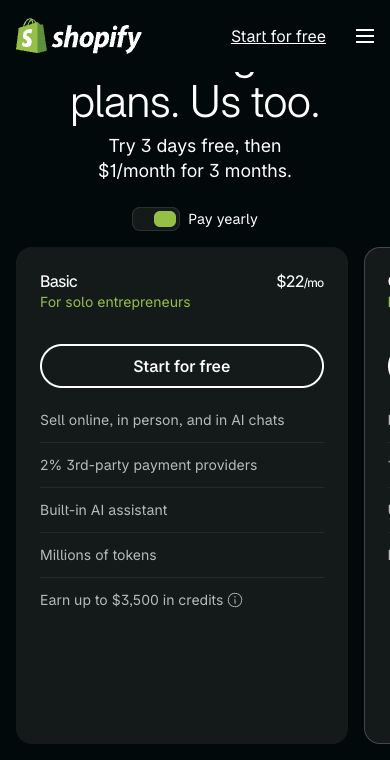
Shopify is my starting candidate for a focused hosted retail store. I build Shopify stores for clients through Ecommerce Paradise’s done-for-you service. That said, your requirements decide, not my habits.
The US source reference reviewed October 14 lists monthly prices of $39 for Basic, $105 for Grow and $399 for Advanced, with annual-billed monthly equivalents of $29, $79 and $299. An October 15 public-browser check showed $22 for Basic with yearly billing, even after USA was selected. The displays differ, so confirm the region, billing term and actual offer on Shopify’s official pricing page before committing.
Match access and delivery requirements to the tier. Basic has no additional staff accounts, while Grow lists 5 and Advanced 15. Third-party calculated shipping features differ by plan, and hosting doesn’t include every app, payment charge or operating service.
Here’s what I’d do. Test the real product options and delivery calculation before you buy extra tools. A freight shipment needs more thought than a parcel label, so get the supplier’s confirmed delivery terms instead of promising a service just because checkout has a shipping field.
Review the current Shopify offer against your required workflow. Keep a record of each needed app, recurring charge and maintenance owner. Every extra subscription needs a defined job.
WordPress.com for publishing and commerce together
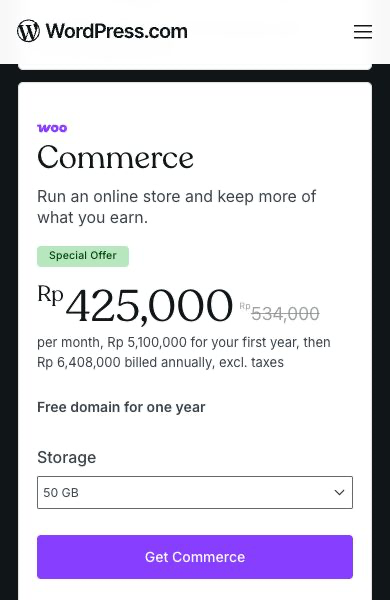
WordPress.com is a managed service with its own plans. Its Commerce offer lists $70 month-to-month or a $45 monthly equivalent billed for 12 months in the reviewed US view. Longer commitments use different equivalents.
Plugin installation is available on every paid WordPress.com plan. Commerce adds its included WooCommerce package, so plugin access alone doesn’t mean equal selling features across all tiers. Compare the complete arrangement, not one feature label.
A separately hosted WordPress site has different hosting and maintenance responsibilities. Identify the hosting provider, required extensions, support scope and the person responsible for updates. A proposal using the WordPress name needs those details before the price comparison means much.
My take is that this route makes sense where editorial publishing and selling belong together. Map the product catalog and checkout next to the content workflow. Keep the localized screenshot’s first-year and renewal amounts separate from the US-dollar source reference.
BigCommerce for catalog and growth requirements
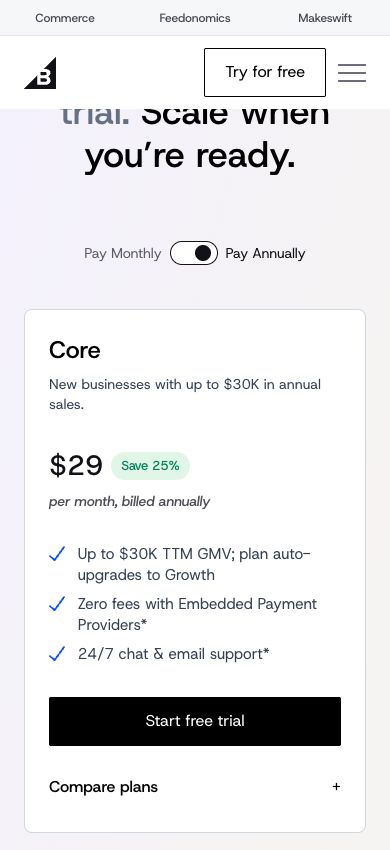
BigCommerce offers Core, Growth, Scale and Performance. Core is $39 monthly or a $29 annual-billed equivalent. Growth lists $105 or $79, and Scale $399 or $299.
Core uses a $30,000 trailing-12-month GMV threshold and Growth $100,000. Scale lists a $33,333 monthly GMV allowance with a 0.9% overage rate, and its calculation differs from a simple product-revenue total. You can check the current thresholds on BigCommerce’s official pricing page.
Scale also automatically upgrades to Performance when trailing-12-month GMV reaches $2 million. Review both the monthly allowance and the annual upgrade threshold. For high-ticket stores this matters a lot, because a high order value reaches a sales threshold with fewer orders.
Open Payment Provider fees are separate from processing charges. The current eligible order-GMV rates are 2% on Core, 1% on Growth and 0.6% on Scale. Embedded Payment Provider orders get different treatment, so don’t repeat an older blanket claim of zero fees for every gateway.
Review the current BigCommerce plan with your proposed provider and sales volume. Budget the next tier alongside the starting subscription. That way the upgrade never catches you off guard.
Square Online for local and online selling
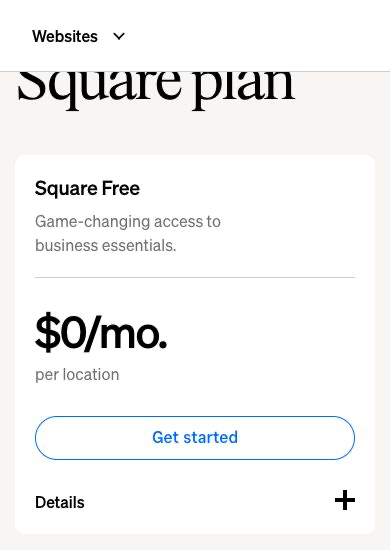
Square Online deserves a look when the website needs to work beside an in-person operation. The reviewed US plans list Free at $0, Plus at $49 and Premium at $149 monthly per location. Square’s official online store plans page shows the current numbers.
The online card rates shown are 3.3% plus 30 cents on Free and 2.9% plus 30 cents on Plus and Premium. Other payment methods and international cards have separate conditions. A zero subscription charge doesn’t remove payment costs.
Confirm custom-domain connection and the website features you need on your tier. Review pickup windows, location selection and stock handling with the person fulfilling orders. A customer choosing a collection time needs a reliable process behind the page.
I’d compare the current Square offer around the full local workflow. Don’t assume online inventory and a physical shelf stay in sync without checking the actual configuration and staff process.
Shift4Shop with location eligibility checked first

Shift4Shop offers a hosted commerce setup. The actual regional pricing page reviewed for this article showed a $41 monthly platform charge and PayPal payment integration. The same route showed a notice saying the service was unavailable in the detected country or region.
This is a regional observation, not a universal account quote or a promise of a free US plan. Get the applicable business-location offer, currency and payment requirements before importing products or paying someone to build the store.
The documented affiliate route reached a separate partner page showing a $0 platform offer with a merchant processing agreement required. That differs from the regional pricing view. Confirm which offer and agreement apply to your business, and don’t combine the two into one quote.
Here’s the move. Put eligibility ahead of the feature comparison and ask the provider for a direct answer using your business location and product model. Leave private application details out of public research documents.
Review the applicable Shift4Shop offer once availability is confirmed. A long feature list doesn’t fix an unavailable service or an unsuitable payment arrangement.
Write observable requirements before opening a trial
A requirement should describe a result someone can check. Specify the required variant, delivery address and customer-visible total. A request for a professional-looking website needs a separate design brief, not a spot as your whole operating spec.
Choose a normal product and the catalog’s awkward item. Record dimensions, options, supplier stock information and fulfillment constraints. Collect the confirmed facts before asking software to display them.
Separate required functions from preferences. Accepting an approved payment method is a must, and a decorative animation is a nice-to-have. Cut any platform that fails a required process before you debate visual preferences.
For the business model, read my high-ticket dropshipping guide. The operating responsibilities help decide which requirements deserve attention first.
I’d narrow the field to 2 serious candidates after the first source review. Building 5 complete trial stores eats time without improving every decision. Go deep before you go wide, and compare the same small catalog and written scenarios on your shortlist.
Confirm payments before promising checkout
Payment approval depends on the provider’s requirements for your business, location and products. Forming a company or buying a platform subscription doesn’t guarantee acceptance. Request confirmation through the provider’s supported process.
List the payment methods your audience expects, the available settlement currencies and the related fees. Keep platform transaction charges separate from payment processing. Similar labels can describe very different costs.
Ask how refunds, disputes and rejected transactions show up in the operating process. A staff member needs the order reference, customer request and approved next action. Never share card details or private financial records in a public checklist.
My business formation checklist helps organize ownership and related business responsibilities. Get qualified help for requirements specific to your situation, and don’t treat a platform feature as legal approval.
Use only an authorized provider test mode for checkout evaluation. Keep the test isolated from supplier fulfillment and customer messages. This comparison did not run payments, and the proposed checks are work for the eventual store owner.
Map fulfillment beyond the paid order
An order confirmation starts the fulfillment process. Assign responsibility for checking stock, reviewing product options, sending the supplier order and providing tracking. Write down the point where a person approves an exception.
For supplier relationships, use my guide to finding high-ticket suppliers. Confirm dealer permission and operating terms with the actual company. A listing in an integration marketplace doesn’t create an authorized relationship.
Supplier Paradise is another research starting point I own. Verify the manufacturer, products, dealer requirements and delivery arrangement directly. A directory entry is a lead, not proof of approval.
For a bulky product, collect the freight and site-access details before publishing the delivery description. Escalate uncertain installation, compatibility or arrival questions to the authorized supplier. Never invent an answer just to keep checkout moving.
Include a stock shortage and a partial shipment in the operating brief. Decide who contacts the customer and which confirmed alternatives are appropriate. A platform with order status fields doesn’t write a truthful customer response for you.
Use product data the customer understands
Build the sample catalog with accurate model numbers, variants and specs. Keep a record of the source for important claims. The product page needs enough information for a buyer to pick the right item.
Separate confirmed product facts from assumptions. A compatibility question belongs with the manufacturer when the answer is unclear. Don’t turn a similar-looking photo into a spec.
My high-ticket niches list helps narrow the research category. A focused catalog cuts down the number of unrelated data and delivery processes you need at launch.
Review information after import instead of treating an upload success message as proof of accuracy. Check the selected variant, image, price, availability and customer-facing delivery description. A mapping mistake repeated across a catalog needs fixing before promotion.
Keep original source files and the approved listing version under the business’s control. A future editor should know where an important claim came from. Supplier updates need a clear owner and review process.
Calculate the operating budget with the same assumptions
List the platform subscription, required apps, domain, processing and technical support separately. Add hardware and location charges for an in-person business. Use the same sales assumptions for every candidate.
In an original hypothetical example, a $40 monthly platform and $80 of required tools total $120 a month, or $1,440 across 12 months. These assumed figures are not provider quotes. Processing and labor sit outside the example.
Model a busier month as well as the launch period. Extra locations, team access, usage or a sales threshold changes the required arrangement. Record the trigger next to the next cost, instead of forecasting a permanent starting plan.
Compare the BigCommerce growth rules with its actual GMV calculation. Don’t substitute your accounting revenue total without checking how the platform counts eligible orders.
Annual billing trades a lower monthly equivalent for a bigger upfront payment. Keep the first payment, promotion period, renewal and cancellation terms visible. A monthly equivalent is not necessarily a monthly payment schedule.
Test customer and staff views together
For an authorized evaluation, follow the customer route from collection page to product selection and delivery calculation. Review the final amount before completing any supported test order. Write down the exact result you need for approval.
Then inspect the staff view. The person fulfilling the order needs the correct variant, delivery information and customer request. A usable customer screen doesn’t prove a complete staff handoff.
Include an unsupported delivery address, an unavailable option and a changed order in the test plan. These exceptions show where a person needs to step in. Keep real inventory and supplier shipments out of testing.
Check on a phone as well as a desktop. Text, option controls and contact routes need to stay usable at the smaller width. A high-ticket purchase that needs a conversation deserves a visible route to the responsible person.
My Ecommerce Paradise coaching supports business planning as a separate paid service. Bring your written requirements, instead of asking a software subscription to decide your business model.
Assign ownership and maintenance
The business should control the domain, primary account and approved recovery method. A contractor needs supported access for the assigned work, not ownership of the whole operation. Document the handoff before launch.
Assign someone to review integrations and recurring charges. An unused app still deserves a billing check. Remove dependencies only after you understand which live process uses them.
For a WordPress setup, identify the host and the person responsible for extension compatibility and updates. Managed hosting and self-hosting split responsibilities differently. The name of the publishing software is not a maintenance agreement.
Review the selected Shopify tier for your team-access needs before choosing permissions. Staff and collaborator access serve different arrangements. Keep private credentials out of shared editorial notes.
A handover needs the approved configuration, app inventory and next owner for each process. Include the procedure for removing contractor access when the project ends. Don’t leave store operations dependent on an undocumented personal account.
Protect useful URLs during a migration
A new theme alone is a weak reason to move an established store. Compare improving the current setup with a migration that fixes a specific operating limitation. Budget training and parallel subscriptions alongside development.
Identify valuable URLs and content before changing the structure. Map the intended destination for each important page. Redirect planning belongs before launch, not after customers hit missing pages.
Review product, order, customer and media exports separately. An exported spreadsheet doesn’t prove a complete backup or a successful import elsewhere. Confirm what the destination supports and which records need another process.
Keep original files and verify the new catalog before switching customer traffic. Check a representative order workflow and the expected public URLs. This article did not export customer records or move a store, and honestly, a migration is a pain in the butt if you skip these steps.
The Ecommerce Paradise Academy page has classroom and membership information. Review the current enrollment terms separately from your platform or migration budget.
Questions before choosing an ecommerce platform
Which platform would I compare first for a niche retail store?
I’d begin with Shopify as a hosted-store candidate. Compare payments, catalog requirements, delivery and budget before committing. A starting recommendation is not proof of fit for every business.
Does a free subscription remove operating costs?
No. Processing, required features, hardware and staff work need separate review. Calculate the complete process using the selected plan’s actual terms.
Is WordPress.com identical to self-hosted WordPress?
No. The managed service has its own plans and included features. Separate hosting and extensions change responsibilities and the total budget.
Does BigCommerce remove platform fees for every payment provider?
No. Its current pricing separates Open and Embedded Payment Providers. Applicable platform charges and payment processing are separate.
Were these platforms tested with live orders?
No. The comparison uses public provider sources and dated public screenshots. No test stores, payments, customer-data transfers or supplier shipments were performed.
Related guides
My comparison of free Shopify apps starts with the job each app does. My Shopify themes guide covers layout and catalog requirements.
Compare the shipping software options around your actual delivery process. Review my business banking guide for the separate operating-account decision.
My dropshipping supplier comparison separates software platforms from the companies fulfilling orders. Verify the actual relationship before promising delivery.
My take on choosing an ecommerce platform
So with that said, here are the key takeaways. Pick the business before the software. Write observable requirements, test the awkward order and confirm payments before you promise anything at checkout.
For most focused niche stores, I’d start the comparison with Shopify. Look at WordPress.com when publishing and selling belong together, BigCommerce when catalog and growth thresholds fit, Square Online for local selling, and Shift4Shop only once eligibility is confirmed.
Whatever you pick, budget the full operating cost, own your accounts and plan the fulfillment process behind every order. The platform is just the storefront. The business is everything behind it.
If you want the store built for you, my done for you high-ticket store build handles the setup for you. Or go check out my free high-ticket dropshipping mini course to learn the model first.

Trevor Fenner is the founder of Ecommerce Paradise. His main projects are Ecommerce Paradise, Supplier Paradise, and Review Paradise, which is currently in development. TrevorFenner.com publishes research-based reviews and practical guides to online business tools and remote-work services, with clear affiliate disclosures.