
Looking for the best dropshipping suppliers? Here’s the truth. The right supplier fits your product category, your customer’s destination and your selling channel. A huge catalog does not prove delivery reliability or an approved dealer relationship, so start with the products you plan to sell before you pick any software.
Keep the roles straight. A supplier fulfills the product, a directory helps you find businesses, and automation moves product data and orders between systems. Some services combine these jobs, but you still need a clear operating agreement.
At Ecommerce Paradise, I put the niche and the supplier relationship before the import tool. I’ve been selling online since 2005, and I teach a simple rule. Pick a focused product set and understand the costs before you add a broad catalog.
This comparison reviews Inventory Source, Spocket, Wholesale2b and SaleHoo using public provider sources checked October 14, 2026. The four retained provider images were captured October 13. No subscriptions, store connections, imports, sample orders or supplier-performance tests were completed.
You’ll see what each platform actually does, what it costs, and the questions to ask about approval, delivered-order math, inventory, shipping, returns, warranties and cash flow. If you’re new to the model, read my guide on what high-ticket dropshipping is first. It sets up everything below.
Affiliate disclosure: qualifying purchases through the documented links earn me compensation, subject to program approval and terms. I own Ecommerce Paradise and Supplier Paradise. A listing or platform subscription does not guarantee supplier approval, delivery performance or profit.
Inventory Source for the required automation
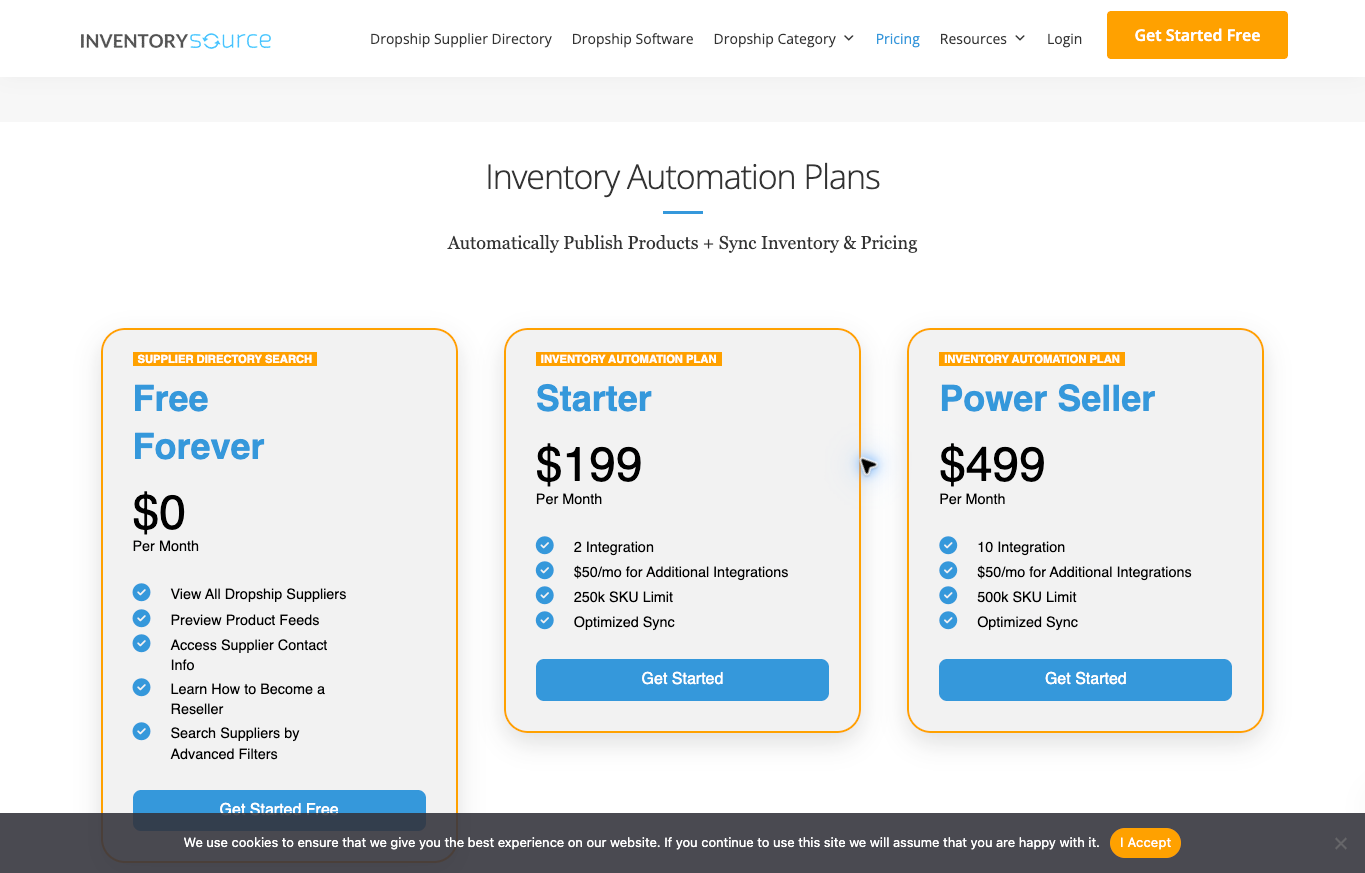
Inventory Source separates its free supplier directory from paid automation. I like that split because it makes you pick the service based on the work you need. Don’t assume every plan processes orders.
Inventory Automation Starter lists $199 monthly, 2 integrations and a 250,000-SKU limit. Full Automation Starter lists $299 monthly, 2 integrations and 500 monthly orders. Extra orders on that plan are listed at $0.30 each.
Inventory Automation handles product data, prices and inventory. Full Automation adds order routing and shipment-tracking sync. Confirm the specific supplier and integration before you commit to either one.
The provider separates its ordinary software services from US Direct. Don’t carry US Direct’s approval arrangement over to every supplier connection. Feed accuracy still depends on the source information and your approved settings.
Spocket for a defined product shortlist
Spocket is worth a look when its actual products and store workflow fit your business. A regional supplier label does not prove delivery timing for every item or destination. Check the specific products, not the label.
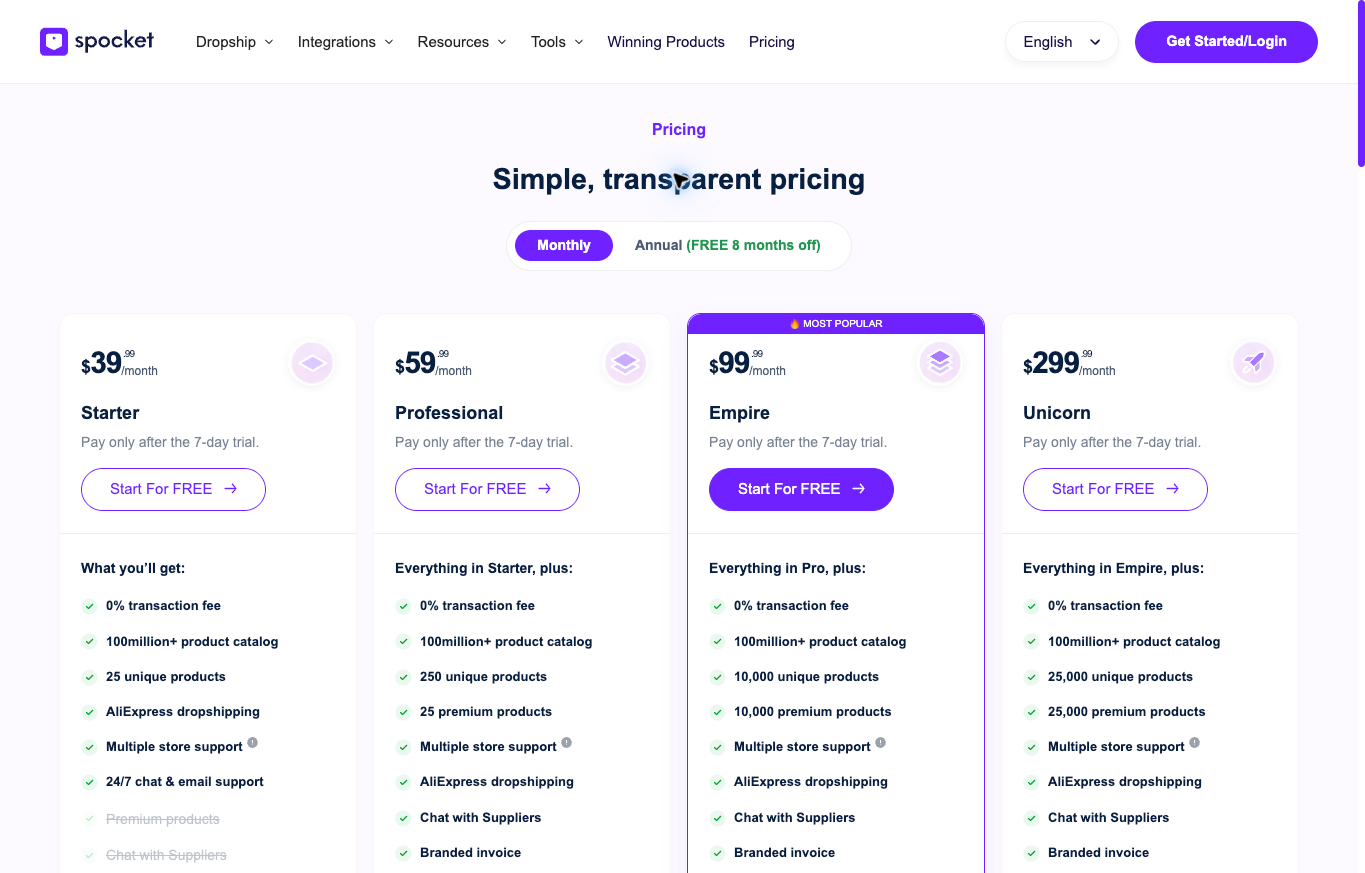
The Monthly view lists Starter at $39.99, Professional at $59.99, Empire at $99.99 and Unicorn at $299.99. Starter lists 25 unique products. Professional lists 250 unique products and 25 premium products.
When the official Spocket pricing page was rechecked on October 20, 2026, it showed the same monthly prices and a 7-day trial before payment. Confirm the actual billing and cancellation terms before you start. A trial and a permanent free selling plan are different offers.
Spocket’s supplier requirements separate manufacturers or businesses holding warehouse inventory from resellers without inventory. The stated supplier discount requirement is not your net profit. Shipping, acquisition and operating costs still need to be calculated.
Wholesale2b for the selected channel
Look at Wholesale2b for the exact store integration you need. A platform connection, a product-data download and a provider-built store are different operating arrangements. Pick the one that matches your channel.
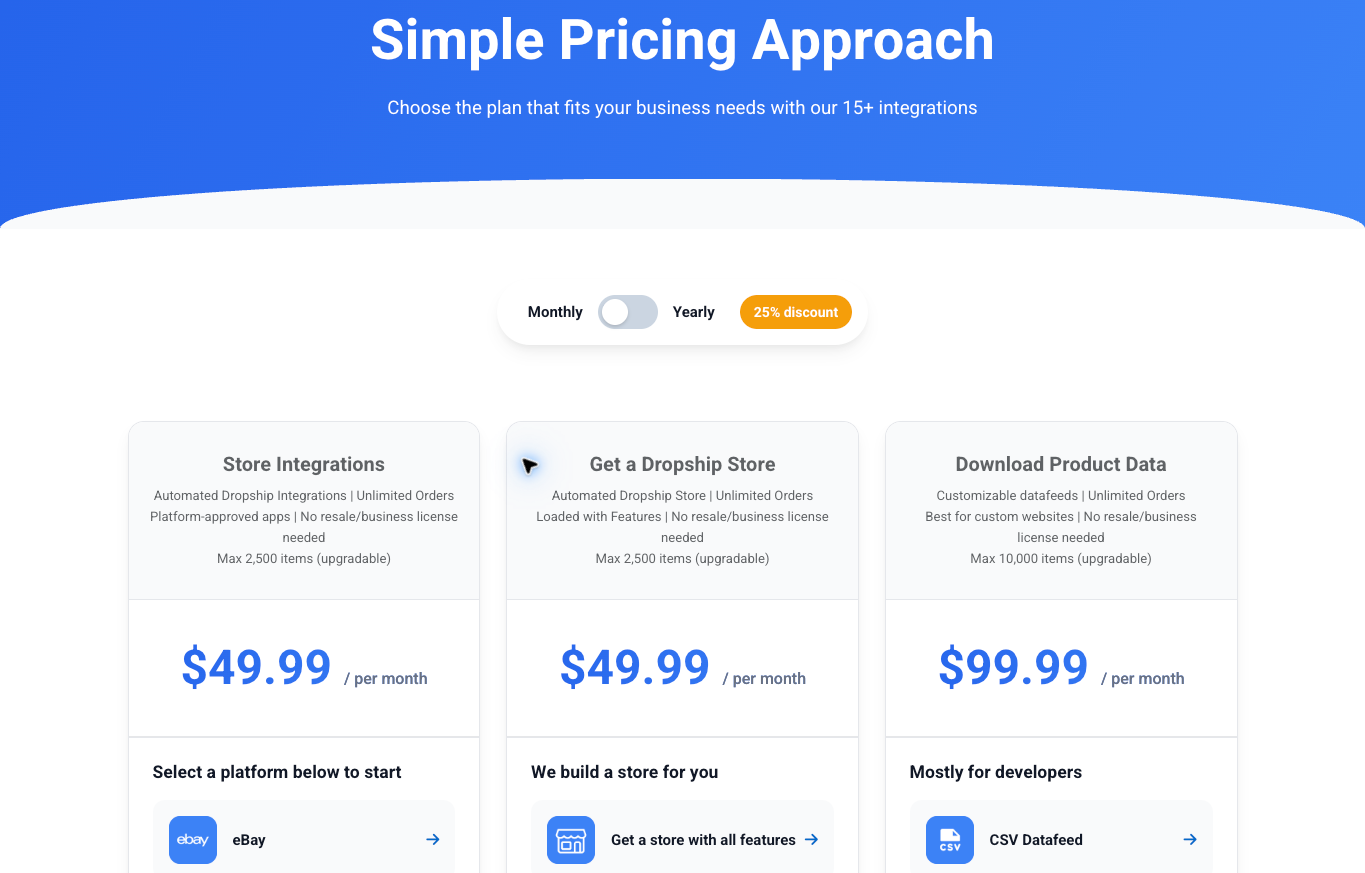
The current Store Integrations card lists $49.99 monthly and a 2,500-item allowance described as upgradable. Amazon is listed separately at $99.99 monthly. The product-data download service is another $99.99 monthly option.
The page describes handling supplier orders, tracking and returns. Ask what those functions mean for your specific product and issue. A general service description does not settle every item’s return authorization, shipping cost or warranty coverage.
Marketing language about licenses does not give your business a legal exemption. Review the actual selling, tax and channel requirements with proper guidance. Platform access is separate from compliance, and this is not legal or tax advice.
SaleHoo for research and current plan tools
SaleHoo gives you a supplier-discovery starting point with some store-related allowances. Review the current package instead of copying an old directory subscription from another comparison. Plans change.
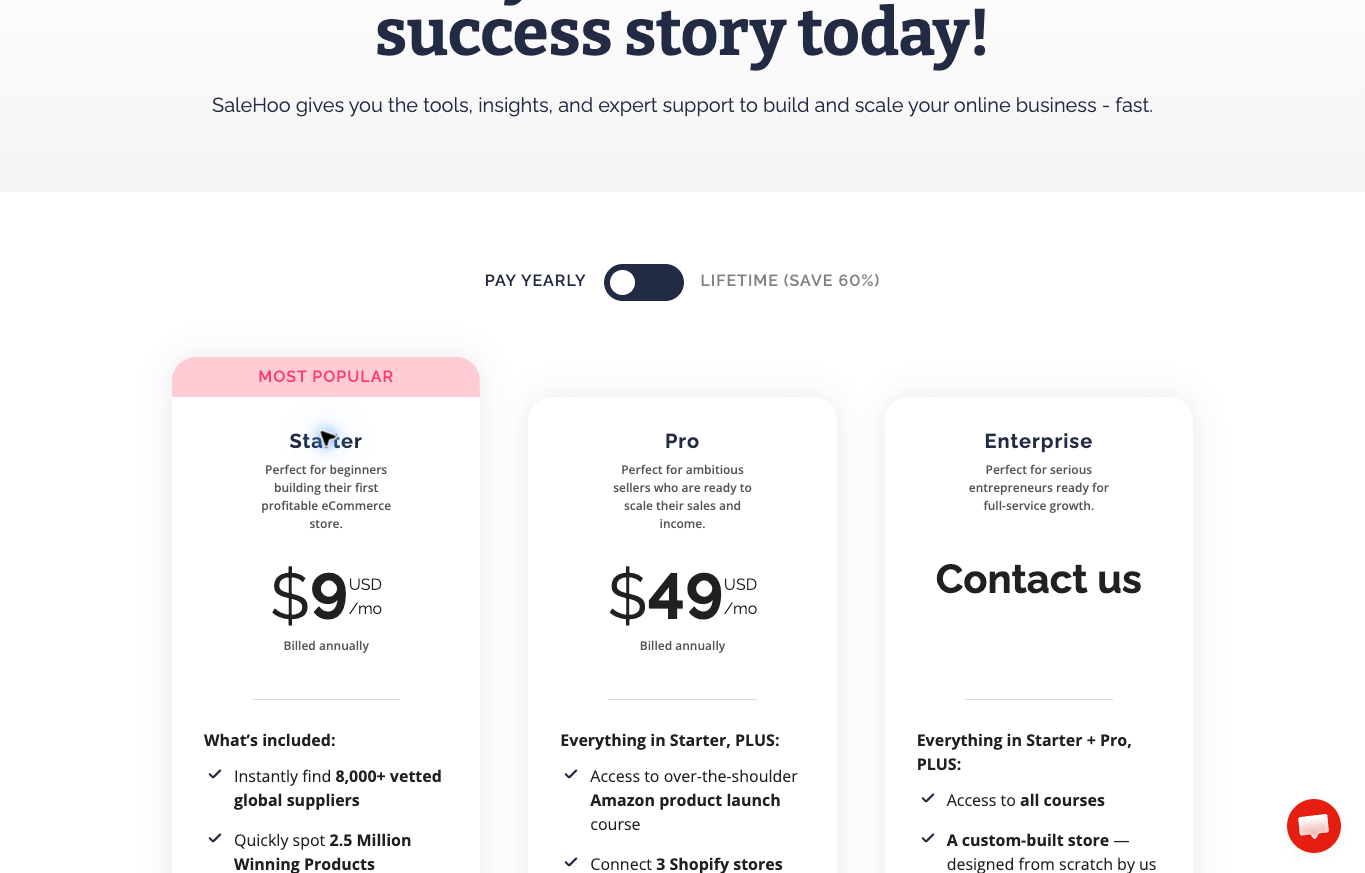
The Pay Yearly view lists Starter at a $9 monthly equivalent and Pro at $49, both billed annually. Starter lists 1 Shopify store, 200 monthly product imports and contact with up to 100 suppliers per month.
Simple multiplication gives you $108 and $588 over 12 months before taxes or purchase-specific conditions. Those equivalents do not mean monthly billing. Confirm the actual commitment and renewal terms.
The pricing FAQ describes contacting support within 60 days of signup for a refund and asks for 48 hours’ cancellation notice before renewal. Refund eligibility and cancellation are separate matters. Supplier terms need their own review.
Compare the platform job and subscription
| Platform | Job to evaluate | Reviewed cost | Separate check |
|---|---|---|---|
| Inventory Source | Directory and feed automation | Free directory. Inventory Starter $199 monthly | Full order automation and supplier approval |
| Spocket | Defined catalog workflow | Starter $39.99 monthly | Selected products, plan allowances and destination |
| Wholesale2b | Specific channel integration | Store Integrations $49.99 monthly | Amazon and data-download alternatives |
| SaleHoo | Supplier research and included tools | Starter $9 monthly equivalent billed annually | Actual annual commitment and research limits |
These subscriptions are separate from the delivered order. Product, shipping, selling and support costs need their own calculation. Choose the actual arrangement before you compare starting prices.
Map the responsibility before importing products
Write down who owns the stock, who accepts the order and who ships the item. Identify who supplies tracking and who approves a return. A product-import tool does not answer these questions for every supplier in a catalog.
You also need a customer-support process. If a parcel arrives damaged, the buyer needs a clear next step. A connection between dashboards does not decide which business investigates the claim or pays for a replacement.
Here’s what I’d do. Review the actual agreement before you put the product on sale, and keep confirmed terms separate from promo descriptions and open questions. A supplier saying shipping is fast is not the same as a defined handling estimate for a specific warehouse and destination.
Ask how everyone communicates when an order fails. An unavailable variant, a rejected address and a wrong item each need a different response. Write down who is responsible for each decision instead of assuming automation handles every exception.
Choose a product set small enough to review
Start with one category and a manageable group of products. Record the brand, model, variant and intended customer. Similar product titles do not prove identical materials, compatibility or included accessories.
Review dimensions, specs and where the product images came from. The listing needs confirmed information for the exact item. A catalog photo of one variant should not illustrate a different product without a clear explanation.
If you’re using Spocket, evaluate the shortlist inside the Spocket product workflow before you pay for a bigger allowance. Plan capacity is not a reason to sell a product. Go deep before you go wide.
Write down what would disqualify an item. Unsupported destinations, poor delivery arrangements or missing warranty information deserve attention before import. A big catalog does not remove the need for a product decision.
Confirm the selling channel and approval
A listed supplier does not automatically approve your store. Ask which channels and territories the arrangement supports. Marketplace selling, a standalone store and an authorized dealer relationship all have different requirements.
Keep the written approval and product restrictions with the supplier record. If a brand sets pricing or advertising conditions, read the actual terms before you promote. A software connection does not override those conditions.
Review the Inventory Source directory and automation options alongside the supplier relationship itself. Directory access and approved reseller access are separate decisions. Through Ecommerce Paradise I do supplier recruiting for client stores, and getting approved is its own process every time.
Don’t turn platform marketing about business licenses into legal advice. The business, tax and product requirements depend on your actual arrangement. Get qualified guidance when a requirement is unclear.
Calculate the delivered order rather than a markup
Record the retail price and the supplier charge separately. Add shipping, payment costs, acquisition, allocated subscriptions and support costs. Label missing inputs instead of filling the budget with a guess.
Here’s an original hypothetical example. Assume a $200 sale, a $120 supplier charge, $20 shipping and $6 in payment costs. The remaining $54 is before advertising and other expenses.
The $80 gap between retail and supplier price is not net profit. If acquisition costs $25 and allocated platform expense is $5, the remaining contribution is $24 before other costs. These figures illustrate the math, not a provider quote or tested store result.
Use your actual product and destination. Treat the selected Wholesale2b integration fee as one budget line, because a channel-specific subscription does not cover every product, delivery or selling cost. That’s why I push high-ticket over low-ticket, since thin margins leave no room for these lines.
Compare a realistic product mix instead of one attractive starting price. A larger variant, another warehouse or an unsupported shipping region changes the math. Keep the date and source next to each quoted cost.
Plan inventory updates and rejected orders
Ask where the stock information comes from and when the supplier updates the feed. A quantity received earlier in the day does not mean the item is reserved for your customer. Review what happens between checkout and supplier acceptance.
Decide who handles an unavailable product after payment. The store needs an approved response for confirming the problem and contacting the buyer. Do not silently swap in a different variant or promise a replacement without authorization.
The FTC’s business guide to the Mail, Internet, or Telephone Order Rule explains that when you can’t ship on time, you have to promptly offer the buyer a choice to accept the delay or cancel for a refund. Read it before you write your policies. This is educational context, not legal advice.
Check the automation arrangement against these exceptions. Inventory sync, order routing and tracking are different functions, and your plan needs the ones your process actually requires. Keep failed orders visible to the responsible person, and record acknowledgement and shipment as separate events.
Separate handling, transit and freight delivery
Confirm the exact warehouse and destination before you write a delivery estimate. Handling time starts before carrier transit. A broad domestic-shipping claim does not prove service to every address or delivery type.
The same FTC guide says that if you state a shipping time, you need a reasonable basis to expect you can meet it. So don’t copy a supplier’s best-case number onto your product page. Use what you’ve actually confirmed.
For freight items, ask about appointments, access, unloading and any paid delivery options. Do not promise installation or room placement from a general shipping statement. The buyer needs confirmed expectations for the specific product.
For several items, check whether the order ships together. Different suppliers or warehouses mean separate parcels and possibly different dates. A single checkout does not guarantee a single delivery.
Keep the source and date of the shipping terms. Update the listing when the approved arrangement changes. A supplier conversation about one product should not turn into a store-wide promise covering unrelated items.
Prepare return, damage and warranty questions
Ask who authorizes a return, where the item goes and which deadlines apply. Record any confirmed restocking charge and shipping responsibility. An advertised return-handling feature does not mean every claim gets reimbursed.
A damaged delivery and a change-of-mind return are different issues. Ask what evidence is needed and how the buyer should report the problem. Get usable instructions before a shipment goes wrong, because sorting it out afterward is a pain in the butt.
Warranty coverage needs its own review. Identify the warrantor and the actual product coverage, including exclusions and the claim process. Do not advertise a broad lifetime or replacement promise based on an unrelated catalog item.
The FTC’s Businessperson’s Guide to Federal Warranty Law covers how written consumer warranties work in the US. Read it so you understand what a warranty statement on your site actually commits to. It’s general information, not legal advice.
If you use Wholesale2b’s managed arrangement, compare it against your specific products. Coordinating a return and accepting financial responsibility for every return are different commitments. Your customer-facing obligations also deserve separate guidance, and your store policy should match the confirmed agreement and the rules that apply.
Keep order payment and settlement separate
A customer paying at checkout does not mean the funds settle before the supplier charges you. Review the actual processor and supplier timing. Your operating budget needs enough available cash for the approved arrangement.
Include costs the business absorbs during a refund or replacement. A subscription fee and an order charge hit cash differently. A positive product contribution does not prove you have enough cash for every payment deadline.
For SaleHoo plan research, separate the annual commitment from its monthly equivalent. Budget the actual payment schedule. Don’t assume the displayed equivalent gets charged monthly.
Keep renewal and cancellation dates in your internal records. A refund request, a subscription cancellation and removing a store connection serve different purposes. Confirm the actual process before you rely on a free-trial or cancellation headline.
Evaluate the workflow without inventing a test result
Plan a contained review of the chosen product and integration. Decide what the check needs to prove, who approves the work and which records to keep. This guide did not connect a store, import products or place orders.
An authorized sample order should record the exact item, destination and dates. Inspect what arrived against the approved spec. One successful shipment tells you about one order, not every supplier or route.
Review the customer-facing listing alongside the operating process. An accurate internal SKU mapping only helps when the buyer sees the right variant and expectations. Keep corrected product information with the current approved version.
Separate what you observed from what you assumed. A public provider screenshot documents the page on its capture date. The image does not show delivery speed, support quality or a completed integration.
Keep direct supplier relationships on the shortlist
A focused high-ticket store often needs direct manufacturer or authorized-distributor research. I teach working with USA-based authorized suppliers, and a broad catalog platform is not the only sourcing path. Choose the relationship based on the product and operating requirements.
My supplier research guide helps you organize those questions. An introduction and a signed dealer agreement are different stages of the process.
Supplier Paradise is a discovery resource I own. The directory does not approve dealers, reserve stock or guarantee a supplier’s performance.
Use my high-ticket niches list to organize category research. Narrow the choice with real customer, product and supplier information instead of expanding the catalog right away.
My high-ticket dropshipping guide explains the broader retail model. Supplier software is one part of the business, not the business itself.
My business foundation checklist covers wider setup responsibilities. Platform membership does not replace the admin work.
Ecommerce Paradise coaching is a separate paid service for business planning. Bring your intended category and open supplier questions before you add subscriptions.
The Ecommerce Paradise Academy page describes current classroom and enrollment options. Review that offer separately from supplier approval and product-order costs.
Questions before choosing supplier software
Does a directory approve my store?
No. Research access and an authorized selling arrangement are separate. Confirm the actual brand, supplier, territory and channel conditions.
Does inventory automation route orders?
Not necessarily. Inventory Source separates Inventory Automation from Full Automation. Review your plan’s actual functions.
Are annual monthly equivalents paid monthly?
No such conclusion follows from the equivalent. SaleHoo’s reviewed Pay Yearly plans are billed annually. Confirm the actual payment and renewal terms.
Does a supplier discount equal profit?
No. Delivery, payment, acquisition and other operating costs belong in the calculation. Use the exact product and destination.
Does an imported item establish delivery quality?
No. Import access is separate from an observed shipment. This comparison did not test individual supplier performance.
My take on choosing a supplier platform
So with that said, here’s the recap. Pick the niche and products first, then choose the platform whose job matches your need. Get approval, shipping, returns and warranty terms in writing, and run the delivered-order math before you list anything.
I sold a multi-store portfolio doing about $7M a year in 2022. What I teach now is niche stores over general stores and real authorized supplier relationships over random catalogs. That route takes longer, but it’s the part that actually lasts.
If you’d rather have a store built for you, my team builds done for you high-ticket dropshipping stores, including supplier recruiting. Either way, start small, verify everything and keep your records clean.
Related sourcing and store guides
My wholesale supplier research guide covers different ways to build a focused lead list. A lead still needs qualification.
My sourcing-agent comparison separates buying assistance from directory access. Choose based on the work you need done.
Review my high-ticket niche shortlist before you pick a broad catalog. The category decision comes before subscriptions.
My Shopify fulfillment comparison covers a separate inventory and order arrangement. A warehouse service is different from supplier discovery.
My free Shopify apps guide starts with the job the app needs to do. Don’t add tools without an operating purpose.

Trevor Fenner is the founder of Ecommerce Paradise. His main projects are Ecommerce Paradise, Supplier Paradise, and Review Paradise, which is currently in development. TrevorFenner.com publishes research-based reviews and practical guides to online business tools and remote-work services, with clear affiliate disclosures.