

The best solar generators for home backup are the ones that fit the loads and outage length you actually need to cover. So start with the refrigerator, internet equipment and lighting you want to keep running. A big battery number on its own doesn’t prove every appliance is compatible.
Here’s what I’d do first. Separate a portable plug-in setup from a system that supplies fixed house circuits. The equipment, the installation and the budget are all different, so decide which job you need before you compare a discounted base unit with a bigger installed arrangement.
At Ecommerce Paradise, I always put the operating requirement before the tool, and backup power works the same way. Build your load list first, then ask the manufacturer or a qualified installer to confirm the exact configuration. Battery-powered products are common in high-ticket ecommerce, from electric bikes to backup power stations.
In this guide you’ll compare the Jackery HomePower 3000, the Jackery Solar Generator 5000 Plus and the BLUETTI Apex 300, then learn how to size loads, check outlets and modes, budget for the full setup and stay safe with home wiring. If you’re thinking about selling equipment like this instead of just buying it, my high-ticket dropshipping guide explains how that business model works.
This shortlist uses public US product and support sources reviewed October 14, 2026. The three retained product images were captured October 13. No systems were purchased, installed, load-tested or measured for appliance runtime.
Affiliate disclosure: qualifying purchases through the documented Jackery and BLUETTI links provide compensation, subject to program approval and terms. I own Ecommerce Paradise and Supplier Paradise. Public specifications and manufacturer claims are separate from independently measured performance.
Jackery HomePower 3000 for finite essential-load capacity
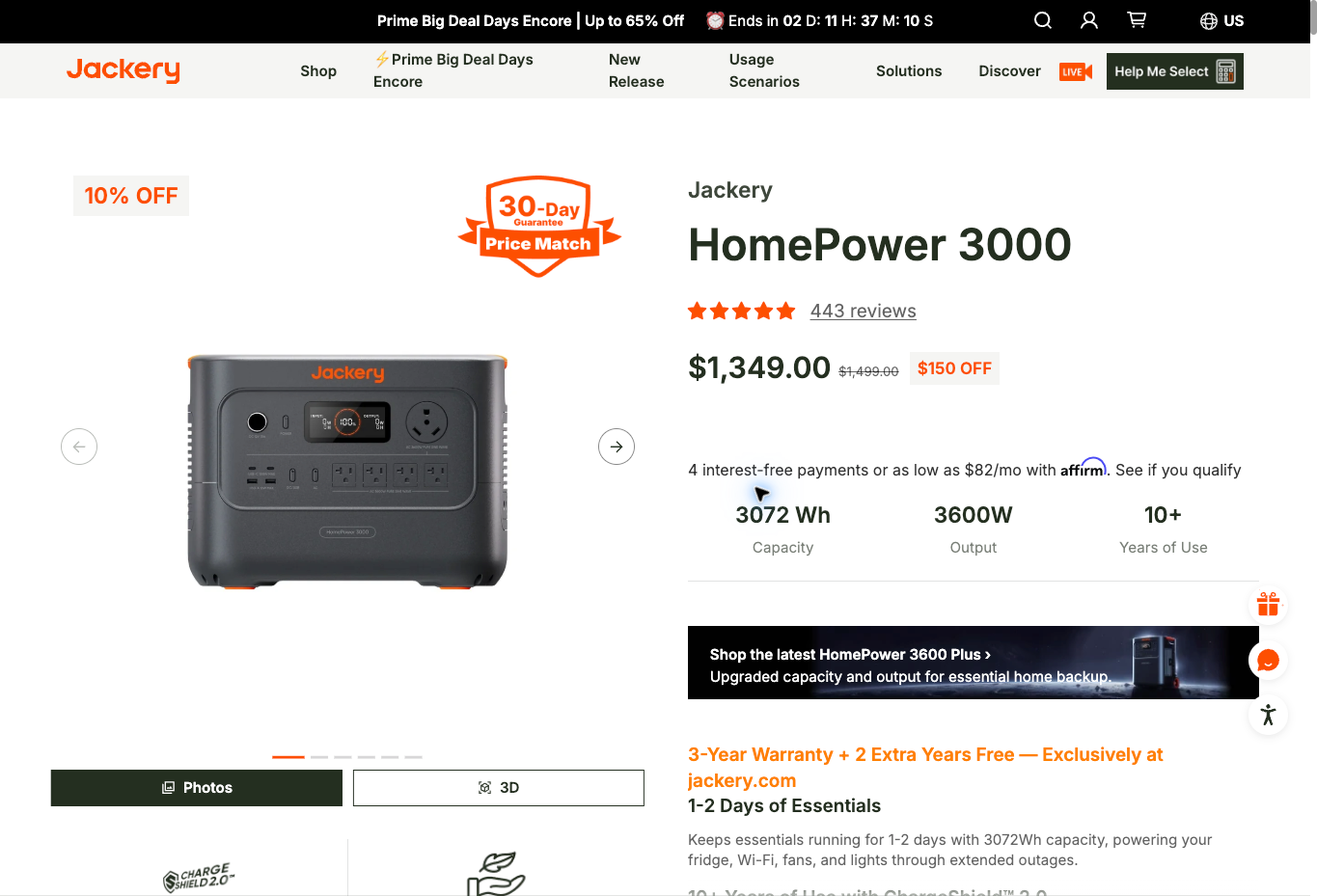
Check the Jackery HomePower 3000 against a defined 120V load list. The US support sheet lists 3,072Wh and a total 3,600W AC rating, subject to outlet limits. Keep in mind that stored energy and instant power do different jobs.
The public base offer lists $1,349 without solar panels. A package with two SolarSaga 200W panels lists $1,799. Those are dated offers for different included equipment, not installed-system quotes.
The model-specific support sheet says battery packs and parallel operation are not supported. So if the base capacity falls short of what you need, don’t plan on fixing the gap later with an expansion battery.
The sheet describes transfer within 20ms and explicitly excludes equipment that needs a true zero-interruption supply. Simultaneous charging and discharging has its own output limit. Confirm the operating mode you plan to use instead of applying the standalone rating everywhere.
I’d keep the capacity decision separate from marketing estimates about days of backup. The real result depends on your actual demand and settings. No refrigerator runtime test was performed for this guide.
Jackery 5000 Plus for the exact package and mode
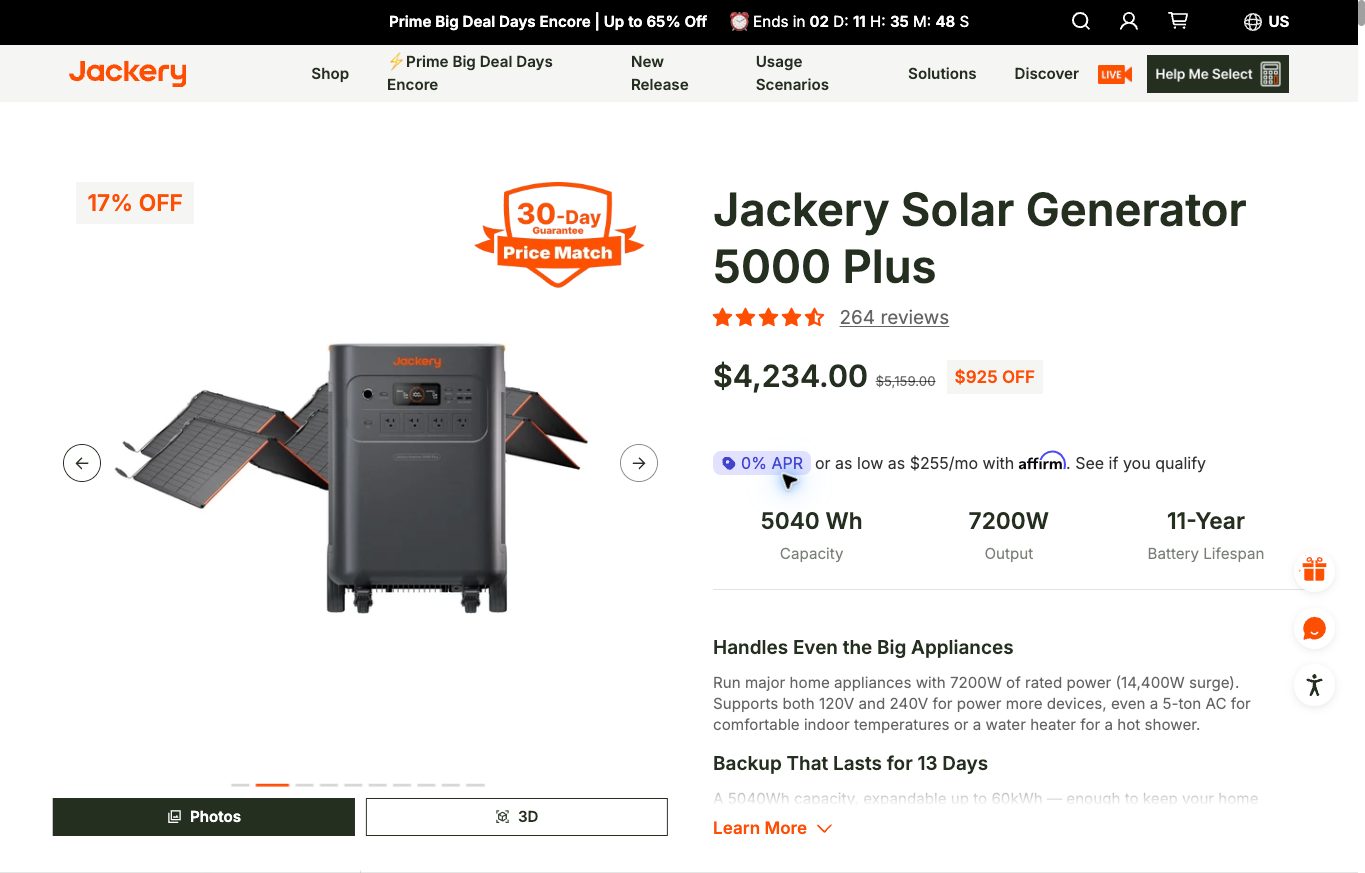
The Jackery Solar Generator 5000 Plus is worth comparing when you need more capacity or different voltage. Its base battery is 5,040Wh, with a published total 7,200W rating and outlet-specific conditions.
The public offer lists $4,234 with two SolarSaga 500 X panels. The separate battery-only option lists $3,149. A $4,934 package adds the Smart Transfer Switch, so the pictured solar bundle is not a complete house-circuit installation.
Support separates Online UPS and Backup UPS modes. The simultaneous charging-and-discharging split-outlet mode has different output conditions, including no output at its 240V ports. If you’re buying for a voltage-specific load, get your exact arrangement confirmed first.
Compatible expansion packs are supported under model-specific conditions. Expansion adds equipment, space and cost. Price the actual combination instead of putting the maximum system capacity next to the base package price.
Here’s an honest flag. The product marketing and the support sheet disagree on the larger surge claim. For an appliance with a tough starting requirement, I’d ask for clarification instead of treating the bigger number as a settled, tested capability.
BLUETTI Apex 300 for a defined modular arrangement
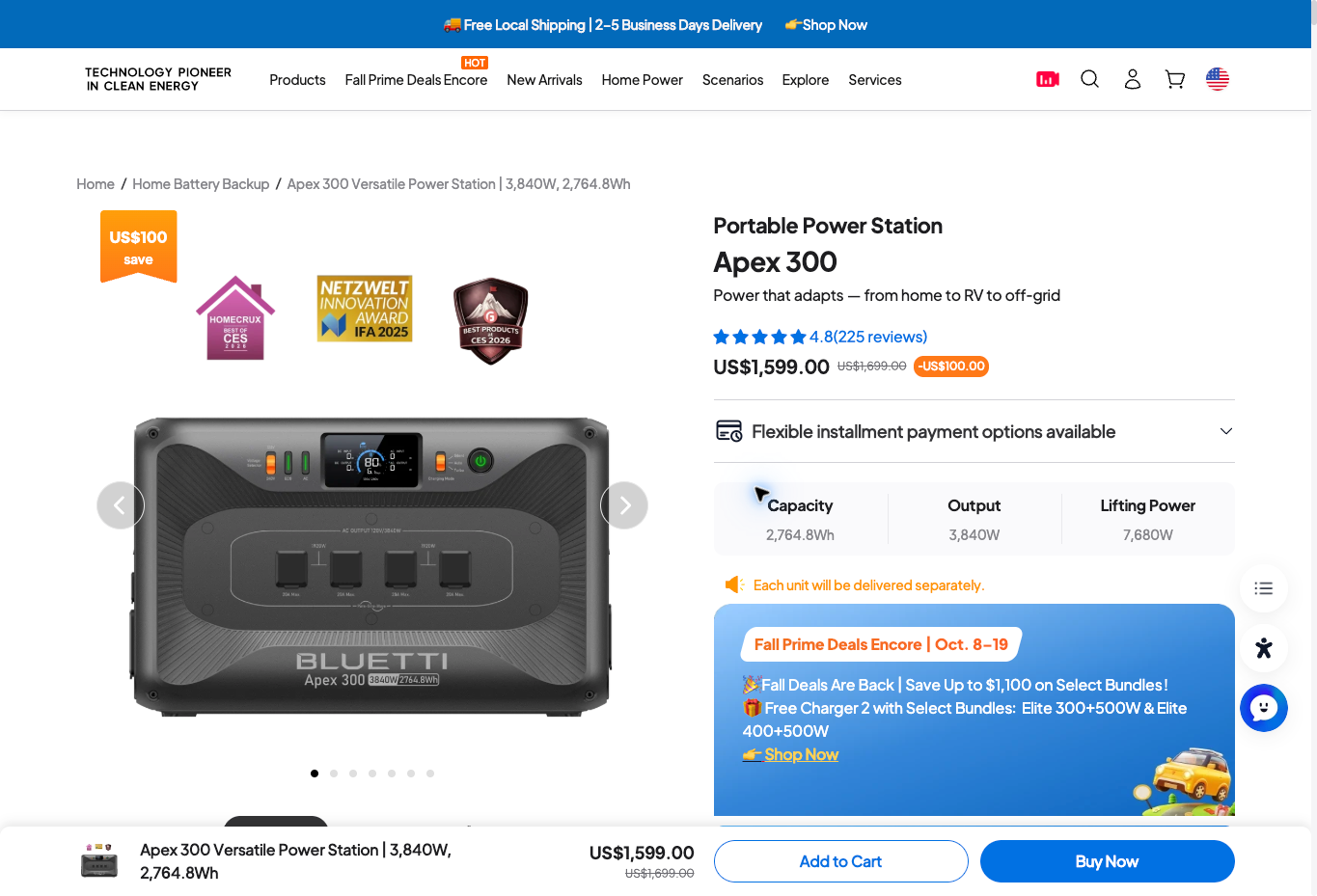
The BLUETTI Apex 300 is another modular option to look at. The US product page lists 2,764.8Wh and 3,840W for the base unit, with a dated $1,599 offer.
A base battery is different from an expanded system with extra batteries or multiple power stations. The page’s bigger system figures depend on that arrangement. Don’t attach the fully expanded capacity or output to the base price.
The displayed lifting-power figure is separate from the ordinary rated output used here. A special mode doesn’t prove every appliance meets its voltage, starting and operating requirements.
SolarX, expansion equipment and home integration are separate decisions. The public base box contents don’t show that panels or a fixed-wiring installation are included. Ask for a complete list of compatible equipment.
This review did not find a verified base solar-input voltage limit in a US manual. Get model-specific confirmation before you pick panels or fixed solar connections. Don’t swap in a maximum expanded-system marketing figure for that missing base detail.
Compare the base rating and selected package
| Model | Base energy | Published output | Dated US offer | Separate check |
|---|---|---|---|---|
| HomePower 3000 | 3,072Wh | 3,600W total, 120V, outlet limits | $1,349 battery-only | Finite capacity and operating mode |
| Solar Generator 5000 Plus | 5,040Wh | 7,200W total, mode and outlet limits | $4,234 with two SolarSaga 500 X panels | Voltage, expansion and integration equipment |
| Apex 300 | 2,764.8Wh | 3,840W rated output | $1,599 base unit | Complete modular configuration |
These references cover different included equipment. None of them is an installed-system quote or a measured runtime. Compare complete arrangements for the same loads and duration.
Build the load list before comparing batteries
Write down the equipment you need during an outage. Split essential and optional loads into separate groups. A refrigerator, router and lamp are a very different requirement from electric heating or cooking equipment.
For each item, record the model, voltage, running demand and any starting requirement. Use real appliance information or proper measurement. A generic refrigerator estimate doesn’t tell you what the appliance in your home actually uses.
Record how long you need each item to run. A device used for 10 minutes is different from equipment running continuously. A cycling appliance also needs a different estimate than multiplying the nameplate rating by every hour of the outage.
So here’s the move. Give the manufacturer or installer this list before you ask for a package recommendation, along with the intended connection method and location. A specific brief beats saying you want to back up everything.
Separate watt-hours from watts
Watt-hours describe energy. Watts describe power at a single point in time. Having enough stored energy doesn’t prove the inverter or the outlet you picked can handle the appliance’s demand.
The US Department of Energy’s guide to estimating appliance energy use uses the same basic math, multiplying wattage by hours used. For an original hypothetical example, equipment averaging 200W for 10 hours needs 2,000Wh before other allowances. That’s arithmetic, not measured consumption for your appliances, and conversion and standby losses need separate thought.
Here’s another hypothetical. Assume a 3,000Wh battery delivers 80% of its stated energy after combined allowances, so the assumed usable amount is 2,400Wh. At 200W average demand, that works out to 12 hours. At 400W, the same amount gives you 6 hours.
That 80% figure is not a tested efficiency for any model here. Real energy delivery depends on the load, operating mode, settings, temperature and battery condition. Write the assumptions next to the estimate instead of presenting the result as guaranteed runtime.
Cutting optional loads changes the requirement. Decide which equipment gets priority when energy is limited. A bigger output rating doesn’t automatically make the battery last longer.
Check the outlet and operating mode
A total output figure doesn’t mean every socket supplies the same power. Review the exact voltage, port limit and mode for the equipment you plan to connect. Different use conditions each deserve their own confirmation.
Use the Jackery model comparison to identify the product, then read the model-specific documentation. Standalone operation and simultaneous charging and discharging need different checks.
Starting demand matters for equipment with motors or other tough loads. Don’t size your setup around an unresolved surge headline. Ask for compatibility confirmation for the exact appliance and operating condition.
Save the appliance model number, intended outlet, operating mode and the manufacturer’s compatibility response together. Recheck that response after you replace an appliance or change the connection setup. Give support the updated details instead of reusing an answer meant for a different model.
Match the package to the equipment list
Write down the included battery, panels, cables and accessories. Product pages often show several packages together, and the base option you pick is different from the solar bundle shown elsewhere on the page.
Review the selected Jackery package against your required equipment. Keep the bundle contents and price together so an installer or another buyer understands exactly what you compared.
Build an itemized list for each option, covering the station, expansion batteries, panels, cables and transfer equipment. Put professional installation on its own line when fixed circuits are involved. Match every quoted price to its listed parts before comparing totals.
For BLUETTI configuration research, ask for a complete equipment list for the proposed setup. Separate the battery, expansion, charging and home integration parts before you compare costs.
Treat solar charging as a separate requirement
A panel’s advertised wattage is not continuous production at your property. Weather, shading and orientation all affect the energy you actually get. The receiving equipment also has its own model-specific electrical limits.
Confirm the exact panel model, the required connectors and the approved arrangement. A connector that looks like a match doesn’t prove a third-party panel or existing roof array is electrically compatible. Get technical confirmation before you buy.
Don’t assume a maximum solar input rating is what your panels will supply. The source and conditions have to support that input. An expansion-system headline also doesn’t prove the base unit accepts the same arrangement.
Plan for bad weather during an outage. Decide how much stored energy you need before a recharge becomes essential. A backup plan that depends on a perfect sunny day needs a rethink.
This guide gives no panel wiring or fixed solar installation instructions. Ask the manufacturer and a properly qualified installer to confirm the actual equipment, environmental conditions and permitted connections.
Keep home wiring separate from ordinary plug-in use
Using the station’s intended outputs for compatible plug-in loads is different from supplying fixed house circuits. Never feed power station output into a household wall outlet as a shortcut to power the home.
Improper backfeeding creates serious hazards, including harm to utility workers. House-circuit backup needs compatible transfer or isolation equipment and qualified professional installation under the rules that apply to you. This comparison is not an installation guide.
Manufacturer-approved wall charging is a different action from feeding output into the home’s wiring. Follow the exact product documentation. Don’t treat an AC charging cable as a way to supply fixed circuits.
Ask the installer which circuits and operating modes the design supports. Confirm what happens when utility power fails and when it comes back. A portable unit’s output badge doesn’t answer those installation questions.
Do not treat a UPS label as universal protection
Transfer behavior depends on the product and the mode. The reviewed HomePower support sheet explicitly separates its 20ms behavior from a true zero-interruption supply. The 5000 Plus support information separates its UPS modes too.
A published transfer claim doesn’t prove compatibility with every sensitive device. Give the equipment requirements to the right manufacturer or professional. No interruption behavior was measured for this guide.
For medical, life-support or other safety-critical loads, get specialized advice and a proper backup plan. The Red Cross power outage preparedness page recommends planning backup and non-power alternatives for medical devices and talking with your medical device providers. A consumer affiliate comparison should never promise uninterrupted support for those uses.
Write down each device’s interruption tolerance before you choose a UPS mode. Ask its manufacturer which supply requirements apply, then compare the answer with the station’s mode-specific documentation. Keep that check next to the energy estimate so a longer runtime doesn’t distract you from the transfer requirement.
Review placement and readiness
Pick the location before you buy. Review the manual’s requirements for moisture, ventilation, clearance and temperature. A panel built for outdoor use doesn’t mean the battery station belongs in the rain.
Get the real weight and dimensions of the station and any expansion equipment. Read the manufacturer’s lifting and handling instructions, then plan the route to the spot you picked. Account for stairs, narrow doors and any help you’ll need with delivery before you place the order.
Keep the current instructions and your approved load list somewhere easy to find. Follow the manufacturer’s storage and charging guidance. Buying a battery is not the same as knowing the system is ready for the next outage.
Plan a proper readiness review with the responsible professional. Record the actual result instead of treating a public screenshot as proof of a successful installation or equipment test.
Budget for the usable setup
Compare complete configurations that do the same job. Include the selected package, compatible extras, delivery, taxes and any professional work. A discounted base unit isn’t directly comparable with a battery-plus-panels-plus-transfer package.
Look at BLUETTI’s current offer as a dated equipment reference. The final configuration and installation need their own quote. No checkout total or delivery deadline was verified here.
Ask about the actual warranty, return terms and support process for the specific product and seller. General marketing language doesn’t mean every accessory has the same coverage or that every opened package is returnable. The FTC’s consumer page on how warranties work says to read the warranty to see what is and isn’t covered, and that’s good advice here.
Keep unresolved installation costs visible in the budget. Before ordering, ask for availability and delivery terms for the exact station, panels and accessories on your list. Note whether the parts arrive together or separately, and hold the purchase decision until the missing costs and equipment are sorted out.
Keep business continuity broader than power
A charged battery won’t restore internet service or answer customer messages. Decide how you’ll save work, communicate a disruption and handle essential decisions. Power is just one part of the operating plan.
If you’re thinking about an equipment store, the high-ticket dropshipping guide I linked in the intro is the place to start. A consumer affiliate offer is very different from an authorized dealer agreement.
The high-ticket niches list helps organize category research. Technical support and product obligations need a hard look before you treat a high price as a business opportunity. Go deep before you go wide, and learn one category properly.
Use the supplier research guide to prepare warranty, delivery and approved-selling questions. A product catalog doesn’t settle those terms.
Supplier Paradise is a discovery resource I own. Directory access doesn’t grant dealer approval or prove electrical compatibility.
My business foundation checklist covers admin responsibilities. Those decisions stay separate from technical installation and product compliance guidance.
Ecommerce Paradise coaching is a separate paid service for business planning. The Ecommerce Paradise Academy describes current classroom and enrollment options, with a 7 day free trial and then a paid membership. Neither service provides electrical installation or guarantees equipment performance.
Keep the proposed configuration in one written record. Include the exact station model, expansion units, selected panels, intended loads and the person responsible for technical confirmation. When an accessory or appliance changes, note which earlier conclusions need another look.
That record gives another household member or operator a usable reference without relying on a shopping page headline. Write down unanswered questions before ordering, and don’t read an incomplete quote as approval for the entire setup. Honestly, it’s a bit of a pain in the butt, but it’s the part that makes the plan usable.
Questions before choosing home-backup equipment
Does battery capacity establish whole-house fit?
No. Loads, voltage, starting requirements, usable energy and the approved connection arrangement all need separate review.
Are panels included with every station?
No. Check the selected package. Battery-only options and solar bundles are different purchases.
Is a UPS label always interruption-free?
No. Review the exact model, mode and device requirements. No transfer performance was tested here.
Does an ordinary wall outlet provide a shortcut to circuit backup?
No. Never backfeed power station output into a household outlet. Fixed-circuit backup needs a properly designed and professionally installed arrangement.
Are the runtime examples measured results?
No. The calculations use explicit hypothetical assumptions. Your actual load and delivered energy decide the result.
Related operating and business guides
My ecommerce platform guide starts with the work the system needs to support. Backup power deserves the same requirement-first approach.
The high-ticket niche shortlist helps organize product category research. Use it to pick a category for deeper supplier and customer demand research before you build a store.
Read the supplier-platform comparison for approval, fulfillment and support questions. Platform access is different from an authorized product relationship.
The business banking guide covers operating account decisions. Keep the equipment budget separate from reward or financing assumptions.
My VPN comparison covers device support, app requirements and plan selection for remote work. Review those alongside your internet and account access setup when you build a business continuity plan.
My take on choosing a solar generator for home backup
All right, here are the key takeaways. Build the load list first, with voltage, running demand, starting demand and duration for each item. Keep watt-hours and watts separate, and write your assumptions next to every runtime estimate.
The HomePower 3000 is a finite 3,072Wh option with no battery expansion. The 5000 Plus brings 5,040Wh and 240V capability with mode-specific limits, and the Apex 300 is a modular 2,764.8Wh base with separate expansion decisions. Compare complete packages, not headline numbers, and never backfeed a wall outlet.
For anything fixed to house circuits or anything safety-critical, get a qualified professional involved. This guide is educational, not electrical or safety advice.
And if this category got you thinking about the business side, grab my free list of 1,000+ niches and start researching which high-ticket categories fit you. It’s a solid first step before you talk to a single supplier.

Trevor Fenner is the founder of Ecommerce Paradise. His main projects are Ecommerce Paradise, Supplier Paradise, and Review Paradise, which is currently in development. TrevorFenner.com publishes research-based reviews and practical guides to online business tools and remote-work services, with clear affiliate disclosures.