

The best domain registrar gives you clear renewal costs and real control over a name your business depends on. Here’s what I’d do. Compare the full ownership cost and the DNS arrangement you need before you pick a provider, because a first-year discount is only one part of the decision.
My shortlist is Namecheap, Porkbun, Cloudflare Registrar and Network Solutions. Each one deserves a look for a different requirement. This guide uses public pricing and documentation, not purchased-domain tests, support benchmarks or guaranteed future prices.
I’ve been selling online since 2005 and I’ve built 20+ websites over the years, so I’ve registered a lot of domains and let plenty of them go. At Ecommerce Paradise I teach people to treat the domain as one small piece of a real business plan. If you’re building a niche store, start with how high-ticket dropshipping works before you buy a stack of names.
Disclosure: qualifying purchases through affiliate links provide compensation at no extra cost to you. I own Ecommerce Paradise and Supplier Paradise. Porkbun and Cloudflare appear without merchant links because their exact affiliate destinations were not verified.
Compare the exact extension and renewal
| Provider | Researched non-premium .com price | Important condition |
|---|---|---|
| Namecheap | $11.28 registration, $18.48 renewal | Affected-domain ICANN fee is separate. New-customer promotion has eligibility limits. |
| Porkbun | $11.08 registration, renewal and transfer | Published prices include fees. Confirm premium-name and extension conditions. |
| Cloudflare Registrar | At-cost model, no exact dollar quote verified here | Cloudflare nameservers required while registered there |
| Network Solutions | Standard table: $11.99 first year, $22.99 annual renewal | Separate affiliate promotions and privacy charges need review. |
The table uses USD public observations checked October 15, 2026. These are not completed checkout totals or permanent rates. Compare the same extension, term and eligibility across providers, and review premium names, taxes and optional services separately.
Namecheap
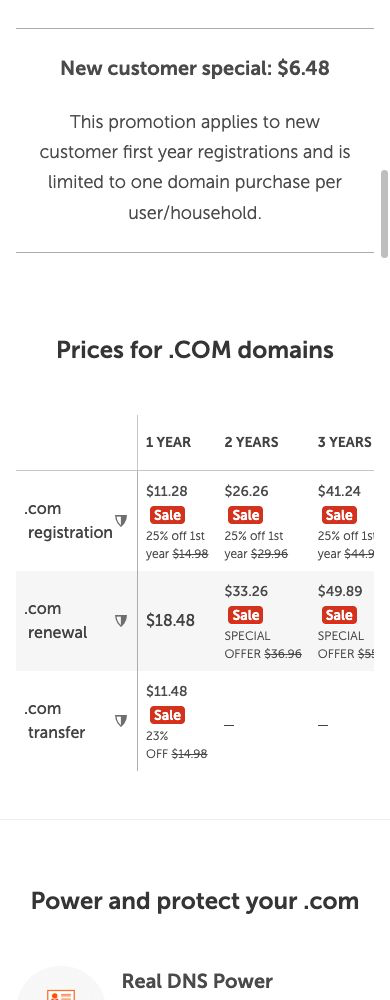
Namecheap is a useful standalone registration option to compare, because it shows its renewal price right in the public table. The current .com table shows $11.28 registration, $18.48 renewal and $11.48 transfer. Affected domains carry a separate $0.20 ICANN fee.
The October 14 public view also showed a $6.48 new-customer first-year promotion limited to 1 domain per user or household. That offer is separate from normal renewal pricing. Confirm eligibility and the selected quote before you budget around the discounted rate.
Privacy applies to eligible domains, and the listed DNS features depend on Namecheap DNS. Compare any hosting or email extras on their own. A trial mailbox is different from a permanent sending service, and buying the domain doesn’t mean you need every add-on at checkout.
My take is to use the visible renewal table to decide whether the arrangement fits the business. Keep the quote and renewal date in your records. My Namecheap renewal guide goes deeper on ongoing ownership costs.
Porkbun
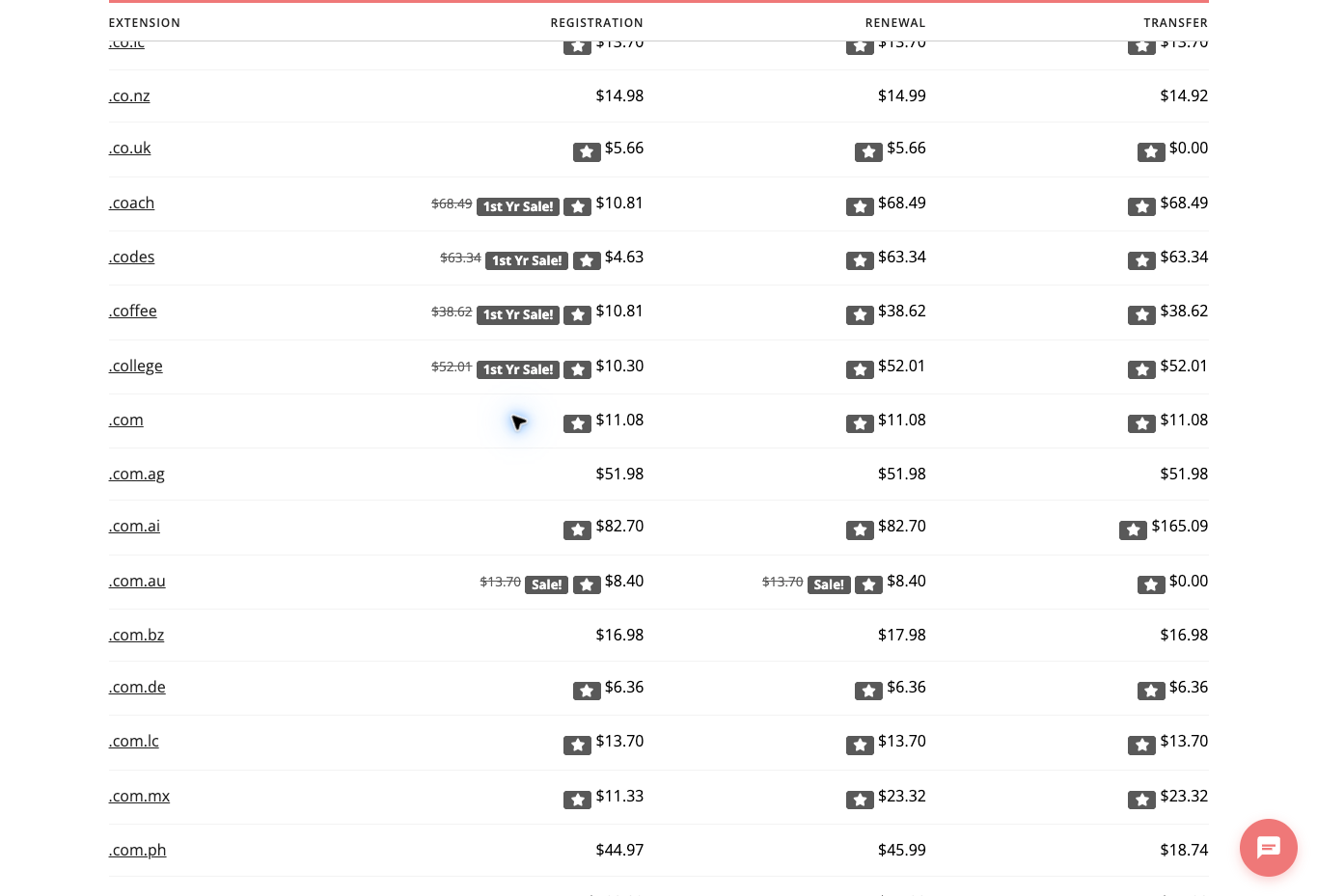
Porkbun’s public non-premium .com table shows $11.08 for registration, renewal and transfer, with ICANN and other fees included. That makes it a useful benchmark against a cheap first-year promo followed by higher annual renewals.
Confirm the chosen extension’s privacy eligibility and transfer treatment. Included forwarding is not the same as a sending mailbox. A current price table doesn’t guarantee future registry charges or any support response time.
Compare the complete cost for the name you plan to keep. If another provider costs more, identify the specific service or arrangement that justifies the difference. Don’t pay for a bundle unless you know which parts your business actually uses.
Cloudflare Registrar

The Cloudflare Registrar documentation describes buying and renewing domains at cost, without markup fees. The important restriction is its required authoritative nameservers. Domains registered there use Cloudflare nameservers, and switching to another DNS provider means transferring the registration away.
Required DNS does not mean required website hosting. Your website and mailbox still have their own service arrangements. Check your platform’s requirements before you pick a registrar tied to a specific nameserver setup.
I’d consider this route for an owner who is deliberately choosing Cloudflare DNS. No exact .com dollar quote was verified for this guide. Check the current quote instead of filling the gap with some other site’s old price comparison.
Network Solutions
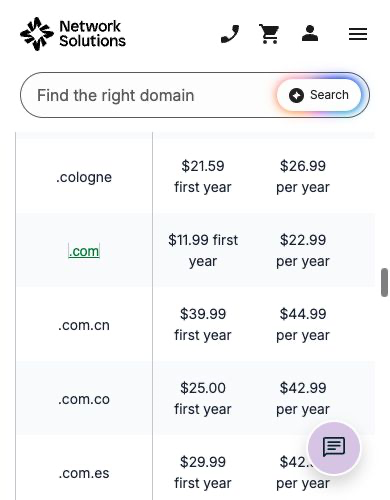
Network Solutions belongs in the comparison when its broader domain and related services serve a specific purpose for your business. The public standard .com table shows $11.99 for the first year and $22.99 annual renewal, with a 1-year minimum.
Affiliate promotions are separate from the standard table. Review privacy, email and other recurring services on their own before treating a discounted domain offer as the full cost. Confirm the renewal terms on the order you actually select.
Compare the broader service arrangement against the higher researched renewal. Keeping several services together should have a clear operating reason. Convenience alone doesn’t tell you whether the included features and ongoing charges fit your needs.
Separate registration, DNS, hosting and email
The registrar manages your domain registration. DNS points requests toward the services you use. Hosting runs the website, and a mailbox provider handles business email.
One company sometimes sells several of these services, but the jobs stay separate. Write down which company handles each role before you buy extras. A domain sold alongside hosting does not mean you need another hosting account, so check what your website platform already provides.
For Shopify, read the Shopify hosting guide before adding a duplicate hosting bill. My team builds client stores on Shopify, and the storefront hosting is part of the platform. A separate mailbox or domain registration is a different purchase.
If you run a WordPress site instead, then you do need hosting. SiteGround is a managed WordPress host I’d look at, and it stays a separate service from wherever your domain is registered.
Here’s an original operating example. A store uses one registrar, a supported DNS provider, Shopify for the storefront and a separate business mailbox. These services need compatible settings, but they don’t automatically share a subscription or support team.
For that mailbox, I like Google Workspace because it gives you real business email on your own domain, not just forwarding. Keep this whole service map with your operating records, because knowing the responsible provider helps you ask a specific question when something breaks.
Compare three years of ownership
Build a worksheet with the first-year registration, 2 renewals and any needed domain-related extras. Apply the same currency and tax assumptions to every option. Comparing one company’s intro coupon with another company’s regular renewal gives you a misleading answer.
Using the observed Namecheap prices, $11.28 plus two $18.48 renewals totals $48.24. If the separate $0.20 affected-domain fee applies each year, the example totals $48.84 before other applicable charges. This calculation assumes annual prices stay the same.
Porkbun’s observed fee-inclusive $11.08 annual rate totals $33.24 over 3 years under the same unchanged-rate assumption. Network Solutions’ standard $11.99 first year plus two $22.99 renewals totals $57.97 before separately applicable services or charges.
These worked examples are not guaranteed three-year quotes. Future registry charges, promotions, premium names and taxes change the result. The current quote for your exact name and term is the real purchase evidence.
Compare the admin work too. A small annual difference deserves review alongside the DNS features and account management you need. For several domains, multiply the recurring difference and count the renewals someone has to monitor.
Don’t collect speculative names without a purpose. Every registration is an expense and one more thing to manage. Keep names that support an active business or a deliberate protection strategy, and don’t treat availability as a reason to buy.
For a second hypothetical budget, a business holding 5 domains with a $5 annual renewal difference pays an extra $25 each year. Over 2 renewal years, the difference totals $50 under unchanged rates. Weigh that amount against a specific useful service instead of assuming every price difference is either waste or better quality.
Keep registration under business control
Decide who controls the registrar account before you hire a contractor. Building your website does not automatically make the contractor the owner of the domain account. Set access and handover expectations before work starts.
Keep accurate registrant and billing information. Record the registrar, account owner, renewal date and responsible contact. Privacy services don’t remove the need for valid information in the registration.
Use the provider’s supported account protections and recovery procedures. Give team members access suited to their work instead of handing the main login around. Never put credentials in a public content plan or a widely shared document.
Plan recovery before something goes wrong. Know who receives notices and where the account’s recovery information is stored securely. Review that plan when a staff member leaves or responsibilities change.
If a designer or agency manages the registration now, document the handover requirements. Domain access, DNS administration and website editor access are different permissions. A successful website handover does not prove the registration account is under your control, and this is honestly a pain in the butt to untangle later.
Review privacy without assuming anonymity
Domain privacy hides eligible registrant details from public lookup under the provider’s terms. Registry rules and the extension affect availability. Check your specific domain’s conditions instead of treating a privacy headline as a promise for every extension.
Privacy is different from account security, correct records and legal anonymity. The registrar still holds information about the registration. A privacy feature does not protect you from every scam or give you a right to use a business name.
Check how the provider handles email forwarding separately. Forwarding an address to another inbox does not create an independent sending mailbox. Review real mailbox requirements before you promise professional email from a domain-based address.
Domain availability is also different from trademark clearance. The USPTO’s trademark basics page is a good place to learn how trademark protection works, and you should get professional advice when a real rights question exists. Buying the name does not form a company or give you permission to use a brand in every market.
Plan a transfer around dependent services
A registrar transfer changes the registration relationship. Website migration and email migration are separate projects. Your site and mailbox usually stay with their providers, but DNS hosting and continuity need a deliberate review.
Before scheduling a change, document the current nameservers and required records. Identify where authoritative DNS is hosted and whether that service continues after the transfer. Check the destination’s requirements before assuming the settings follow the domain automatically.
ICANN’s transfer FAQs for domain name holders describe 60-day restrictions following initial registration, a previous registrar transfer and certain registrant changes. Eligible contact-change opt-outs depend on the registrar. Check the current status and authorization process before you promise anyone a transfer date.
Keep authorization information private and follow the provider’s documented procedure. This article does not request credentials or direct changes to your domain. An administrator handling a live transfer needs approval for the actual account and work.
Leave time to verify things afterward. Check website access, incoming mail, sending authentication and any other service using the domain. Completing a registrar transfer does not prove every dependent service works.
My domain transfer planning guide covers the continuity questions. Use it as a checklist, not a guarantee of zero interruption.
For a separate mailbox connection, read the Namecheap and Google Workspace guide. Keep mail routing and authentication requirements separate from the registration purchase.
Track renewals and notice handling
Keep the registrar quote separate from the approved change plan. A price comparison answers whether the service fits your budget. The change plan answers who does the work, which services depend on the domain and how the team checks the result.
Buying a cheaper registration does not settle those operational questions. Picture a hypothetical handover where a store owner keeps the registration account while a contractor gets appropriate access to website administration. The owner records renewal responsibility, and the contractor documents the DNS requirements for the storefront.
In that example, mailbox administration stays with the person responsible for business email. It describes responsibilities, not an account configuration performed for this article.
Before a planned change, agree on the communication window. The person editing records should know when customer service and the site owner can review results. Avoid unrelated changes in the same window, because separating a registrar transfer from a website redesign makes the cause of a problem easier to find.
Keep a documented recovery path that fits the actual services. Ask which provider supports reversing a failed change and what information the responsible admin needs. A saved list of old settings helps with review, but the right recovery action still depends on the specific configuration and provider procedure.
After verification, record the resulting service map and close out temporary contractor access according to your agreed process. Update the contact owner and renewal calendar if responsibilities changed. A stale operating record causes confusion the next time a provider sends a notice or the business changes platforms.
Assign someone to monitor renewals and registration notices. Record the renewal date, payment method review date and the applicable provider policy. Automatic renewal still depends on the account and payment method working correctly.
Set a calendar reminder before the provider’s renewal deadline. Different extensions have different expiry and restoration rules. Don’t assume a generic grace period applies to every name in your account.
Check the exact charge when renewing a premium domain or an extension with different registry terms. A cheap intro registration doesn’t tell you next year’s cost. Keep renewal confirmations with your operating records.
When retiring a domain, review the website, email and links that depend on the name before letting it expire. A forgotten registration affects more than the old homepage if customers or team members still use those addresses.
Make the domain support a business plan
Choose the audience, niche and first offer before you buy several names. A domain purchase takes a minute, while supplier research and customer service take real work. Keep the registration decision in proportion to the business you plan to run.
If a niche retail store is the goal, the model I linked in the intro is the place to start. The name should support the operating model. It doesn’t replace the work of understanding it.
Use the high-ticket niches list to build a research shortlist. Review buyer needs, competition and delivery costs before you commit the brand to a category.
My supplier research guide covers the commercial relationship behind a store. A clever domain does not get you dealer approval or confirmed fulfillment terms.
Supplier Paradise supports supplier discovery. Verify each potential relationship directly. Directory inclusion is different from an agreement that lets your business sell a brand’s products.
The business foundation guide is a broader setup reference. Company formation, domain registration and product permissions are separate tasks. I run my own business through a Wyoming LLC, and the domain was a completely separate step.
For help with niche research and store operations, check out Ecommerce Paradise coaching. Define the work you need and keep control of your business accounts. Any service package should state ownership and maintenance responsibilities clearly.
Questions about domain registrars
Which registrar stays cheapest forever?
No current price table proves a permanent winner. Compare the exact extension, renewal, required fees and useful services. Plan for future changes instead of treating an intro offer as a fixed lifetime rate.
Do I need hosting from the registrar?
Registration and hosting are separate services. Check what your website platform provides and which DNS arrangement it supports before buying another hosting plan.
Does included privacy cover every extension?
No. Registry requirements and provider terms decide eligibility. Review the selected extension and keep accurate registration records regardless of public privacy coverage.
Does Cloudflare Registrar require Cloudflare hosting?
Its authoritative nameserver requirement is about DNS. Website hosting is a different service. Moving authoritative DNS to another provider means transferring the registration away under the documented arrangement.
Does transferring registration preserve email automatically?
Review DNS hosting, mail records, nameservers and destination requirements first. Verify dependent services after the change. A completed registration transfer does not prove email kept working.
My take on picking a domain registrar
So with that said, here are the key takeaways. Compare the renewal price, not just the first-year price. Namecheap shows a clear renewal table, Porkbun publishes a flat fee-inclusive .com rate, Cloudflare charges at cost but ties you to its nameservers, and Network Solutions makes sense when you have a reason to use its broader services.
Keep registration, DNS, hosting and email mapped out separately. Keep the account under your business’s control, track renewals on a calendar and plan any transfer around the services that depend on the domain. Those habits matter a lot more than saving a couple of dollars in year one.
Most of all, don’t let the domain become a distraction. A great name won’t build the business for you. It is what it is. Pick a niche, line up suppliers and then grab the name.
If you want a head start, download my free list of 1,000+ niches. If you’d rather have the whole store built for you, take a look at my done-for-you store build.
Related domain and website guides
- Namecheap domain renewal costs
- Domain transfer and email continuity
- Namecheap and Google Workspace
- Website tools and hosting
- Shopify hosting requirements

Trevor Fenner is the founder of Ecommerce Paradise. His main projects are Ecommerce Paradise, Supplier Paradise, and Review Paradise, which is currently in development. TrevorFenner.com publishes research-based reviews and practical guides to online business tools and remote-work services, with clear affiliate disclosures.