
Trying to pick shipping software for your small business? Here’s the deal. The best tool fits the packages you send and the person responsible for sending them. So before you compare subscriptions, figure out the origin, the order flow and who owns the label, because a discount headline does not prove the best service for every parcel.
I’d investigate Easyship for broader shipping needs, Shippo for a parcel operation and Stamps.com for US mailing alongside shipping. These options serve different jobs. Keep in mind that software access and paid transportation are separate costs.
At Ecommerce Paradise, I focus on operating decisions around suppliers, customers and expenses. I’ve been selling online since 2005, and a shipping tool needs a defined role in the process, not another account nobody maintains.
A supplier-fulfilled store needs written shipping terms and a reliable tracking handoff. The store does not automatically need to buy the supplier’s outbound labels. If you’re new to that model, my high-ticket dropshipping guide explains it, and you should confirm the commercial arrangement before picking software for a task someone else performs.
In this guide you’ll get the plan comparison, a closer look at each tool, and how to handle package profiles, full costs, supplier handoffs, freight, store connections, tracking exceptions, returns and a fallback plan. The existing public provider screenshots keep their October 11, 2026 dates and selected billing context. No shipping account, label purchase, shipment or delivery test was performed for this comparison.
Disclosure: some links here are affiliate links, and qualifying purchases through them earn me a commission at no additional cost to you. I own Ecommerce Paradise and Supplier Paradise. Plan allowances do not establish free postage or measured shipping savings.
Compare the shipping task
| Software | Starting point | Observed monthly plan | Main decision |
|---|---|---|---|
| Easyship | Broader shipping and international workflow | US Free: $0, up to 50 shipments. Plus: $29, up to 500 | Origin country, checkout needs and own-carrier-account fees |
| Shippo | Small ecommerce parcel operation | Starter: $0, up to 30 labels. Pro: $19 monthly at 1–200 labels, from $17 a month billed annually | Label volume, support and team access |
| Stamps.com | US mailing plus shipping | Basic: $14.99, 25 stamps and 10 labels. Professional: $29.99 | Mailing needs and whether Basic’s label cap fits |
Easyship for a broader shipping arrangement
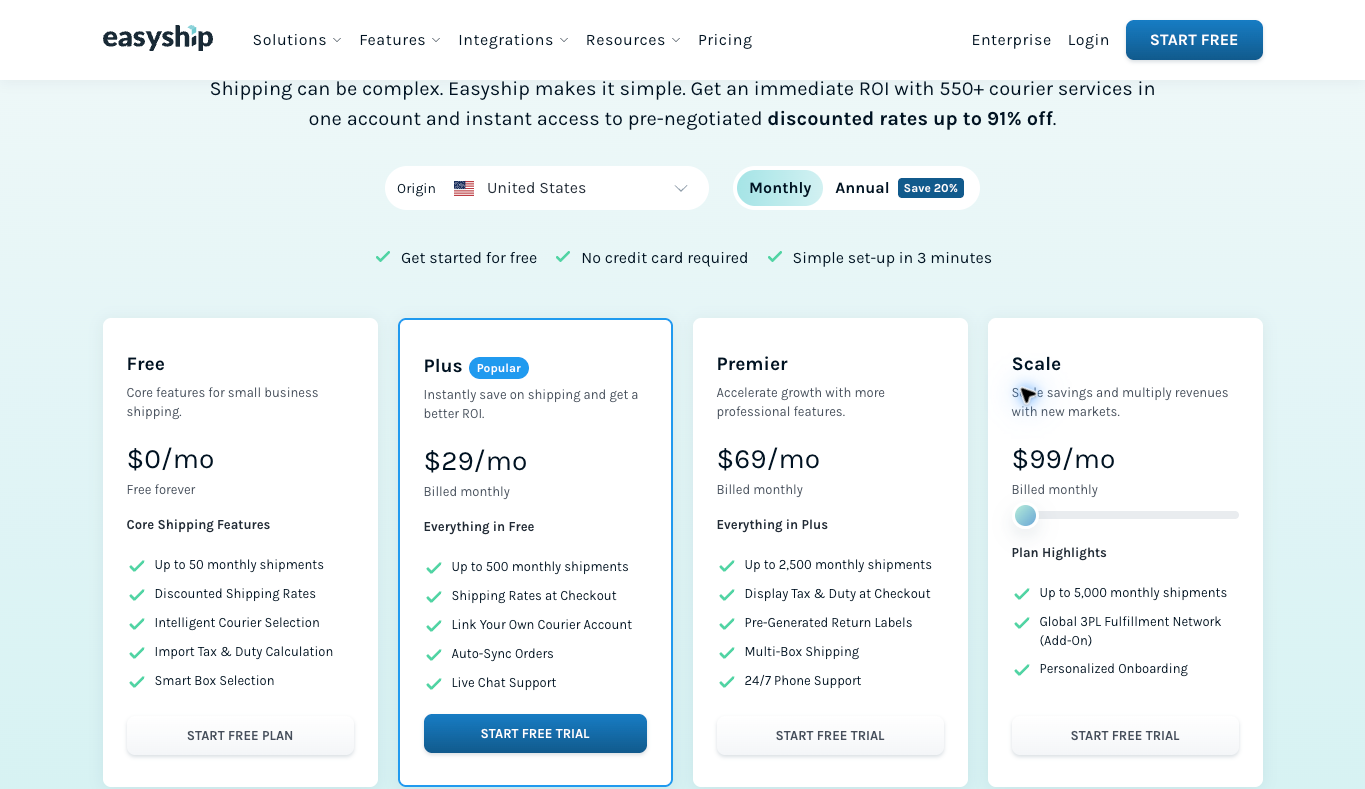
Easyship presents a broader shipping workflow, including international features. I like it as a starting point when you ship to more than one country. Start with the origin country, package requirements and selected plan instead of assuming one regional offer applies everywhere.
The actual US monthly view checked October 13 lists Free at $0 for 50 shipments, Plus at $29 for 500, Premier at $69 for 2,500 and the displayed Scale configuration at $99 for 5,000. These are subscription amounts and shipment allowances. They are not postage budgets.
Plus presents order auto-sync and checkout rates. Premier adds duties at checkout, pre-generated return labels and multi-box shipping. Verify the store’s compatibility and configuration before you promise those functions to customers.
The own-courier-account comparison lists labeling fees of 5 cents for Plus, 4 cents for Premier and 3 cents for Scale. Free shows zero linked own accounts. Carrier transportation and optional services remain separate costs.
Review representative packed dimensions, weights, destinations and equivalent service conditions before you judge a rate. No postage was purchased or international shipment tested here. An advertised maximum discount does not establish your actual saving.
Shippo for a parcel operation
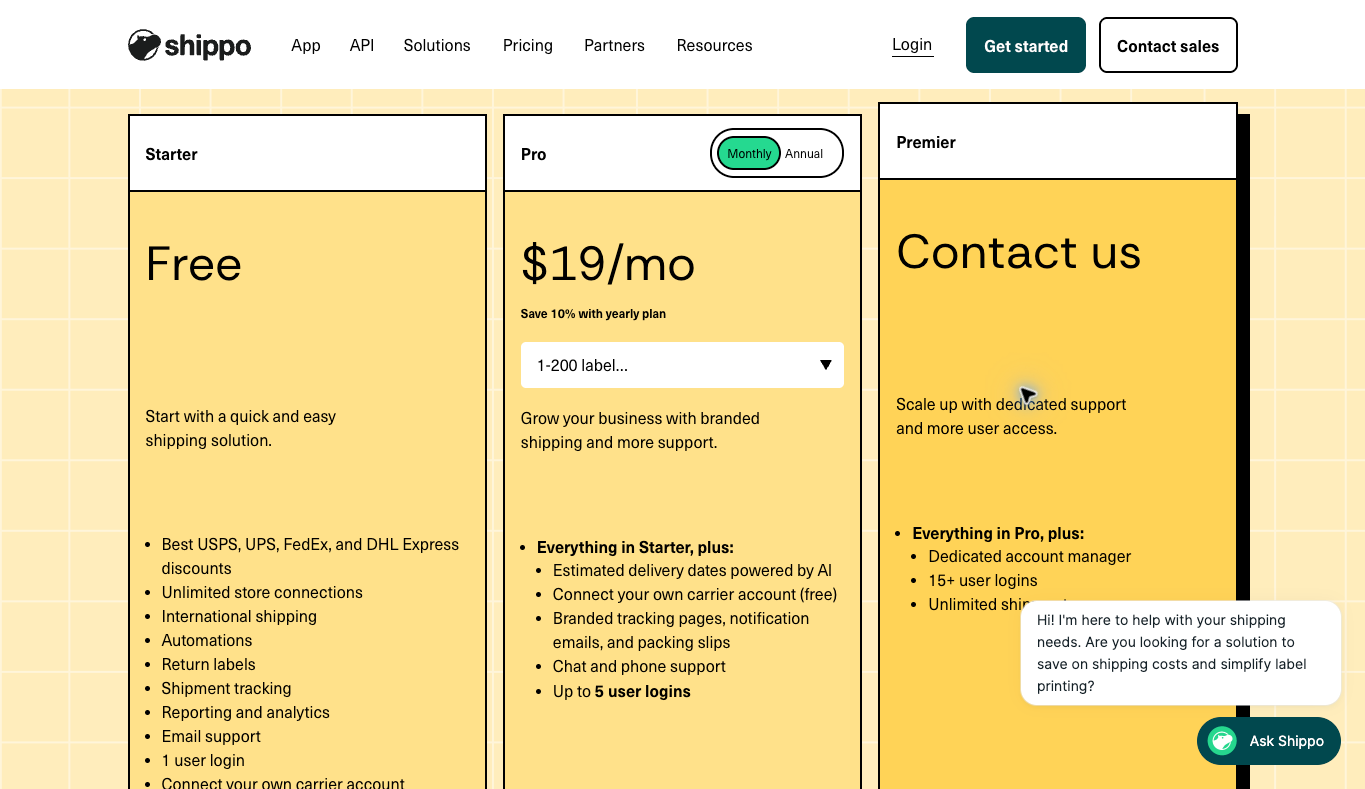
Shippo supplies App plans for an ecommerce parcel workflow. I like it for small stores because the free Starter tier lets you learn the workflow before paying. Keep those App plans separate from API pricing when you compare a subscription for staff processing orders.
The actual monthly view checked October 13 displays Pro at $19 with the 1 to 200 label band selected. Starter lists no subscription charge for 30 monthly labels and one user, according to Shippo’s pricing page. Paid volume bands need their exact selection checked. On November 3, 2026, the same page also showed Pro from $17 a month on annual billing, or $205 a year, with up to 10,000 labels a month and up to 5 logins.
Pro presents up to 5 logins, branded shipping materials and chat and phone support. Starter’s own-carrier-account fee is 5 cents per label, while Pro waives the software fee for the connection. Waiving a fee does not give you free postage.
Review the actual fields, order changes and tracking handoff before you turn on a store connection. Duplicate customer notifications and partial shipments need a clear owner. No integration or label workflow was tested for this guide.
Stamps.com for US mailing alongside shipping
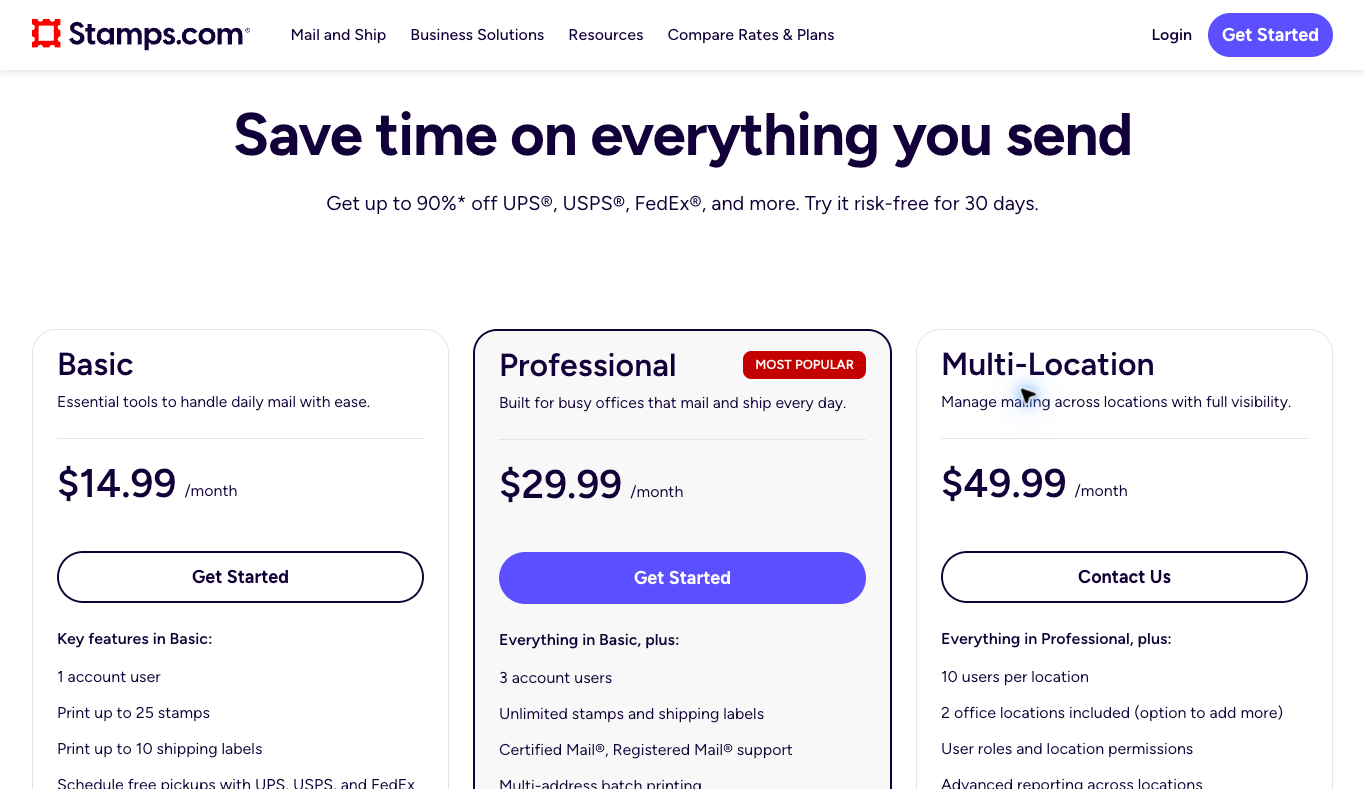
Stamps.com is another direction when the business sends office mail as well as parcels. I like it when one tool needs to cover stamps and labels for a US office. Compare the 2 jobs instead of choosing a familiar name for an unrelated requirement.
The current public Basic plan lists $14.99 monthly, 1 user, 25 stamps and 10 shipping labels. Professional lists $29.99, 3 users and unlimited stamp and label allowances, which matches the current Stamps.com pricing page. Postage remains separate from those software allowances.
Professional also lists batch printing and live chat and phone support. Multi-Location starts at $49.99 with 2 office locations. Look at your actual staffing and mailing volume before paying for a larger plan.
Basic’s 10-label cap deserves review for an active store. A general unlimited-printing headline does not describe every tier. Check the selected trial, recurring billing and cancellation conditions, and don’t treat promotion language as universal terms.
No mailing account, stamp purchase, shipment or delivery test was performed for this comparison. The preserved screenshot is dated public plan material, not evidence of measured operational savings.
Identify who ships the order
Write down where the order starts and who hands the package to the carrier. Your office, warehouse, fulfillment partner and supplier need different arrangements. The account buying postage should match the agreed responsibility.
For self-packed parcels, define the path from order information to a usable label. Record the address, service, packed weight and dimensions. Include the tracking information returning to the store and the person who fixes errors.
A supplier-fulfilled order needs the supplier’s actual dispatch terms and tracking handoff. Buying another outbound label without agreement risks paying twice or choosing a service the supplier does not use. Confirm the arrangement before you compare subscriptions.
Here’s the move. Identify the problem worth paying to remove. Manual address entry, carrier comparison and tracking exceptions are separate tasks, and a product that serves one task well still has limits you need to understand.
Use accurate package profiles
Compare representative packed parcels, not product dimensions alone. Packaging adds weight and changes the size the carrier sees. An unpacked specification does not establish the final shipment profile.
Keep origin, destination and service conditions consistent during comparison. A slower service is not an equivalent alternative just because its quoted amount is smaller. Review handling, delivery expectations and any additional requirements.
Include an ordinary parcel and a relevant exception. A multi-box order, unusual destination or address correction needs a defined process. The evaluation should reflect the packages your operation actually expects to send.
No package-rate experiment was performed for this guide. Use your authorized shipment information when evaluating quotes. A published maximum discount does not establish the savings on those profiles.
Compare the complete shipping cost
Software is one part of the cost. Postage, packaging, optional insurance, extra carrier services and prep time belong in the calculation. Keep adjustments separate from the original quote.
Here’s a hypothetical example. An extra $20 monthly subscription that cuts 2 minutes of work across 100 parcels would save 200 minutes. At an assumed $18 hourly labor value, that time is worth $60, and these figures illustrate a decision method, not measured provider performance.
The calculation only matters if the actual process saves those minutes. A new manual step or repeated correction changes the result. Review the real work instead of assuming the subscription delivers the claimed time savings.
Similarly, 40 cents less across 100 equivalent parcel quotes adds up to $40 before adjustments. A service mismatch breaks the comparison. Keep the assumptions and final carrier charges visible.
My accounting software guide covers the recordkeeping layer. Separate subscription bills from shipment charges so whoever reviews the books understands what each order costs.
Keep the original quote and final charge with the shipment reference. When an adjustment shows up, identify the reason and the person reviewing the difference. A quoted amount and a settled transportation cost are separate records.
Verify the supplier handoff
Ask who owns the shipping account, pays the carrier and prints the label. Confirm whether your order reference appears in the supplier’s records. The business needs a reliable way to match dispatch information with the customer order.
Document how tracking returns to the store. An email-based process needs an owner and review time. A connection needs its actual fields and error handling understood before the team relies on automatic updates.
Keep stock, dispatch and delivery estimates distinct. A supplier accepting an order does not prove carrier handoff happened. Get the relevant confirmation before describing the parcel as moving through the delivery network.
Also clarify return instructions and exceptions. Supplier authorization, receiving addresses and product condition requirements deserve an agreed procedure. A label platform does not replace the commercial relationship, which is why I teach building real relationships with USA-based authorized suppliers.
Separate parcel shipping from freight
A small accessory and a large piece of equipment need different delivery arrangements. A parcel-label feature does not automatically give you freight quoting, appointments, liftgate service or installation.
High-ticket stores often ship bulky products like electric bikes and mobility scooters, so this distinction matters. Confirm the actual product’s packed size and handling requirements with the responsible supplier. Identify access constraints before promising a service to the buyer, because general software descriptions are not product-specific delivery evidence.
Record the agreed service and customer responsibilities in the order process. Curbside delivery and placement inside a building are different arrangements. Use accurate supplier and carrier information instead of guessing what a broad delivery label means.
Keep freight exceptions under qualified operational review. This article did not quote a freight shipment or test a delivery service. The software comparison here covers mailing and parcel workflows, not every oversized-product arrangement.
Review the store connection before activation
Map the information the tool needs from the store. An order number and customer name aren’t enough when a package profile or service requirement is missing. Assign someone to complete the record before buying postage.
Check order-state changes with an authorized evaluation. Figure out what happens after an edit, cancellation or partial fulfillment. A connection showing up on an integrations list does not prove correct behavior in every case.
Review who owns tracking messages. Store and shipping software notifications need coordination to avoid duplicates or conflicting status updates. Identify which system sends each message and how corrections reach the buyer.
No live store was connected for this comparison. Account access, customer-data transfer and workflow activation need their own authorized review. Do not treat this article as an instruction to grant broad permissions.
Check equipment and staff responsibilities
Confirm the printer, label size and format the selected workflow needs. A supported software feature still needs compatible equipment. The person processing orders should recognize a poor print and know how to fix it.
Define who buys postage, creates returns and changes billing. Use individual access instead of sharing an owner’s login across helpers. Review the actual role controls in the plan you pick.
Keep customer addresses out of public demos. Use sample information for training and show only what the task requires. An example screenshot should not expose private order details.
Document the handoff between prep and dispatch. The person printing a label and the person giving the parcel to the carrier need an agreed record. Otherwise, a finished software task still leaves the physical shipment unresolved.
Turn this into a simple SOP once it works. Systems and SOPs are a big part of what I teach, because they let a helper run the process without guessing.
Handle tracking exceptions deliberately
A generated tracking number is not proof the carrier has the package. Match customer messages to actual dispatch evidence. The buyer should understand whether the package is prepared, handed over or stuck in a delivery exception.
Assign a reviewer for missing scans and failed delivery attempts. Software surfaces information without necessarily solving the problem. The reviewer needs the order context and a clear escalation route.
Record the latest confirmed status and the next action. Don’t repeat an outdated estimated date after an exception appears. In the US, the FTC’s business guide to the Mail, Internet, or Telephone Order Merchandise Rule explains what sellers must do when they can’t ship on time, so check it and get qualified advice for your situation.
Review the communication after the issue is resolved. The order record, carrier information and customer update should agree. A closed support task does not mean every related system shows the correct status.
Prepare the return procedure before sending a label
Confirm approval and the actual receiving destination. A supplier sometimes requires an authorization reference or a different return address. Sending the parcel somewhere else creates a new problem instead of completing the return.
Review when the selected return-label charge applies and what happens to an unused label. Provider and carrier rules differ. Put the right process in the staff instructions instead of assuming every label follows one refund arrangement.
Keep the approval, label reference and return tracking together. The person reviewing the case needs to know whether the parcel was dispatched, received or waiting on another action. Those states are not interchangeable.
No return label or postage refund was tested here. These checks are questions for your authorized evaluation. They do not establish a universal refund right or processing-time guarantee.
Keep an operational fallback
Write down how staff would process an order during a software outage. Identify the authorized alternative, required records and the person approving a temporary change. A fallback should preserve the actual service and customer information.
Understand what shipment records you can export before changing platforms. Keep the evidence needed for bookkeeping and unresolved customer cases. Cancelling a subscription does not remove those business responsibilities.
Review the next volume band before the operation hits the limit. Extra logins, support needs and customer-facing functions also affect the right tier. Define the actual upgrade trigger instead of buying the biggest plan on an assumption of growth.
Connect shipping to the wider store
Shipping software supports an agreed fulfillment process. It doesn’t replace the agreement with your supplier.
My high-ticket niches list gives you product categories to investigate. Check delivery costs and responsibilities alongside each product’s proposed margin.
Use my supplier sourcing guide to set commercial terms. An app installation does not secure supplier approval or a dispatch arrangement.
Supplier Paradise is a research resource I own. Directory leads support investigation, not confirmed shipping integration or delivery performance.
My business foundation checklist frames account ownership and administration. Confirm each provider’s actual business and billing requirements separately.
For help with the wider operating decisions, take a look at my private coaching. The service is separate from software, postage and carrier transportation.
Choose the defined shipping task
So with that said, here’s how I’d decide. I’d investigate Easyship’s origin-specific plans for broader shipping needs, and confirm the selected tier, connections and separate costs.
For a parcel operation, investigate Shippo’s current App allowance. Match label volume and user access to the people actually doing the work.
Review Stamps.com’s mailing and shipping plans when both tasks belong in the office. A plan name alone does not solve Basic’s label cap.
Define the shipping task and who owns it first, then pick the software that fits that job. If you’d rather start a store with supplier-direct fulfillment from day 1, my free high-ticket dropshipping mini course walks you through the model. Go check that out.
Frequently asked questions
Does a free software tier include free postage?
No. Subscription and transportation charges are separate, so review allowances and optional services.
Does unlimited printing establish unlimited paid shipping?
No. A label allowance does not pay the carrier’s transportation charge.
Does every supplier-fulfilled store need outbound labels?
Not automatically. Confirm who ships and pays the carrier before buying software for the task.
Is an annual monthly equivalent month-to-month billing?
No. Compare the actual charge, commitment and renewal terms.
Is the advertised maximum discount a guaranteed saving?
No. Review accurate package profiles, equivalent services and final costs. No universal saving is established here.
Related guides
My wholesale supplier guide separates discovery from fulfillment agreements.
The ecommerce platform comparison covers the store foundation.
Read the free Shopify apps guide for a task-based software evaluation.
My assistant hiring comparison covers administration responsibilities.
The VoIP guide covers another customer-support channel.

Trevor Fenner is the founder of Ecommerce Paradise. His main projects are Ecommerce Paradise, Supplier Paradise, and Review Paradise, which is currently in development. TrevorFenner.com publishes research-based reviews and practical guides to online business tools and remote-work services, with clear affiliate disclosures.