
The best webinar platforms fit the session you actually plan to deliver. So here’s what I’d do first. Define the audience, the format and the follow-up before you buy any capacity. A registration page needs a useful promise and a team ready to deliver the presentation.
Choose between a live session, a scheduled recording and an on-demand presentation. Then write down the expected audience and the people producing the event. Registrants, viewers, attendee credits and account users all describe different resources, and mixing them up is how people overpay.
At Ecommerce Paradise, I focus on practical business systems, and I’ve been teaching online since 2015. A webinar supports education and sales when the topic answers a real question. Software does not create demand or guarantee a conversion.
This comparison covers Livestorm and WebinarGeek using public provider information reviewed October 14, 2026. The retained screenshots were captured October 13. No events were hosted, no contacts were uploaded and no audience results were measured.
Affiliate disclosure: I receive compensation for qualifying purchases through documented links, subject to program approval and terms. I own Ecommerce Paradise and Supplier Paradise. The public screenshots document provider information, not hands-on event testing.
Compare the resource the event uses
| Option | Reviewed price reference | Capacity to check | Operating fit |
|---|---|---|---|
| Livestorm | Current support table: $1,200 for 400 annual credits | External participation counted per session | A planned annual event workload |
| WebinarGeek | Current 75-viewer Premium display: €59 monthly equivalent, billed yearly | Selected viewer capacity and included account users | Live, automated and on-demand formats |
| Existing meeting workflow | Your selected product’s actual terms | Invited audience and required controls | A smaller discussion with simpler requirements |
These price references use different currencies and resource definitions, so they are not a like-for-like cost ranking. Get the offer in your currency before you compare the complete payment. The retained WebinarGeek screenshot shows an October 13 selected USD display, while the public selection verified today stayed in euros.
Livestorm’s annual attendee-credit model
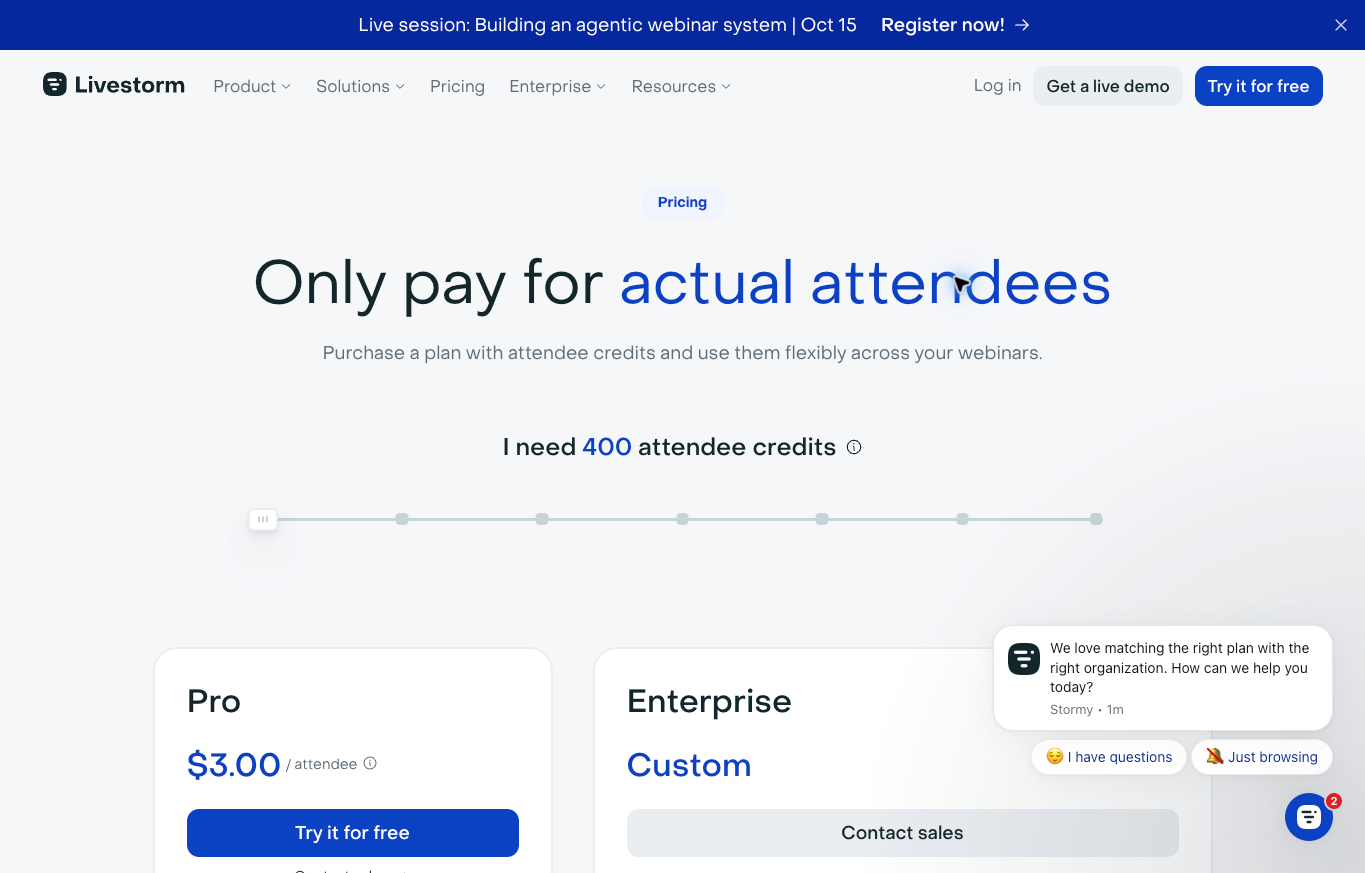
Livestorm uses annual attendee credits under its current pricing model, which I like for planned programs because you pay for people who actually show up. One external participant joining one session uses one credit. Coming back to the same session’s replay does not cost that participant another credit.
A person joining a different session uses another credit. Registrations without participation and internal team members don’t consume attendee credits. So an event with several sessions needs a separate attendance estimate for each one.
The Livestorm pricing page lists Pro with sessions up to 4 hours and unlimited events, recordings and team members. Those inclusions do not mean unlimited attendee usage or every add-on. Review the selected package and the integrations you need separately.
The current support table lists $1,200 for 400 annual credits. The default public pricing view shows euros, while the retained screenshot shows the selected USD package. Keep the currency and the annual commitment right next to the price.
My take is to estimate your annual workload before you review the selected Livestorm offer. Unused credits do not roll into the next billing period under the current guidance. A bigger allowance only makes sense with a planned use for it.
WebinarGeek’s selected viewer arrangement
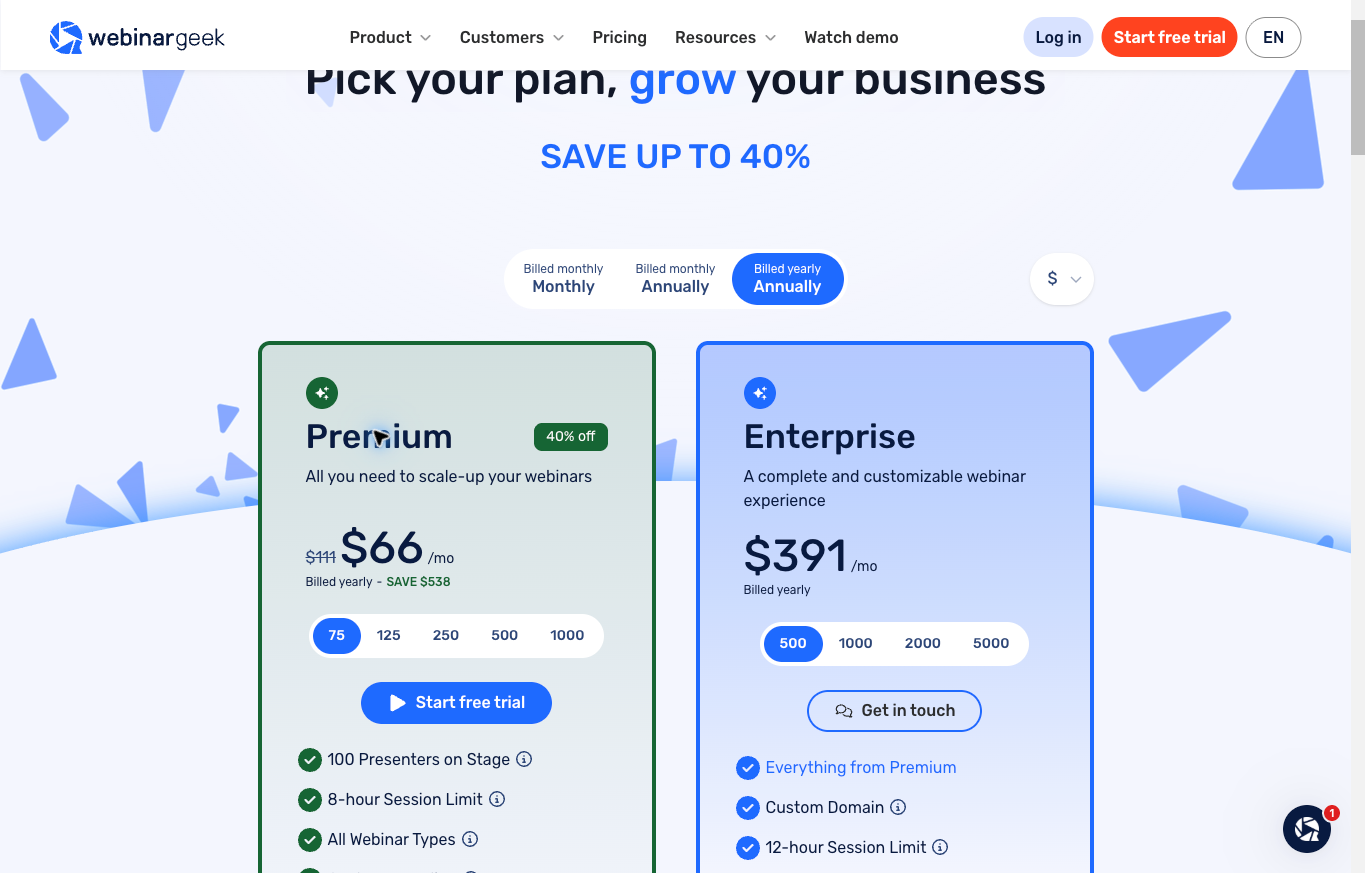
WebinarGeek deserves a look when live, automated and on-demand formats all belong in your publishing process, since it covers all three. Match the viewer selection and billing term to the session. Don’t treat every displayed plan number as the same allowance.
The current selected 75-viewer Premium display showed €59 per month equivalent with yearly billing. The WebinarGeek pricing page lists Premium with an 8-hour session limit, and the plan includes 1 account user. The retained October 13 screenshot shows a separate selected USD view, not a newly verified USD quote.
Keep the people presenting separate from the users administering the account. A platform that supports several presenters does not necessarily include several paid account users. Confirm the selected plan’s exact requirements before you assign the team.
I’d review the current WebinarGeek arrangement around registration, moderation and follow-up. Required integrations and extra users need separate checks. A feature listed somewhere else on a provider’s site does not prove it’s included in your chosen tier.
Write the audience promise before choosing capacity
Pick the question the session answers and who needs that answer. A useful topic gives someone a reason to attend. A general invitation to “hear about my business” leaves the audience guessing about the value.
Spell out the format and the intended outcome. A product demo, a training session and an open discussion need different preparation. Decide what the attendee should understand before you plan the promotional message.
For an ecommerce audience, start with a concrete decision. Product fit, delivery requirements or choosing a business model gives the presentation a purpose. Confirm factual answers before you put them on a slide.
My high-ticket dropshipping guide explains the operating model I teach. A webinar supports the business. It does not replace supplier relationships and customer service.
Separate registrations from actual attendance
A registration count records people who expressed interest. Attendance records people who joined the session, and replay viewing adds another behavior to track. Keep the provider’s capacity definition right beside your event forecast.
Here’s an original planning example under Livestorm’s stated session rule. Assume 20 external people join live and 5 others only watch the same session’s replay. The session uses 25 credits, and 10 live participants coming back to its replay do not add 10 more.
If those 25 people attend a second session, the two-session workload becomes 50 credits. This is an arithmetic example, not an event hosted for this comparison. Don’t carry the result into another provider’s viewer model without checking its rules.
So what you should do is compare the Livestorm annual package against your full intended schedule, because the credit math only works when you count every session. Include replay participation and review the quota process before you promote more sessions.
Choose the simplest format meeting the requirement
A small invited discussion doesn’t always need a dedicated webinar subscription. Compare your current meeting tool’s actual audience controls and presentation features first. Existing access only helps when the required process fits.
A public session with registration, reminders and replay follow-up is a different amount of work. Figure out the bottleneck before buying specialist software. The comparison needs a defined workflow, not a hypothetical huge audience.
Keep recurring costs in proportion to the planned activity. Running one useful discussion is a very different commitment from a year of public training. Don’t buy annual capacity just because a feature list looks pretty cool.
Describe recordings honestly
A live event happens in real time. A scheduled recording plays prepared material at a set time, while an on-demand presentation lets the viewer choose when to watch. State the actual arrangement in the invitation.
A recording does not need fake live comments or invented audience numbers to be useful. Don’t manufacture urgency or imply a presenter is answering in real time when nobody is there.
Review the WebinarGeek format options against your actual teaching plan. If a moderator handles questions during a recording, explain what support is available.
Set up a route for unanswered questions. Tell the viewer who reviews the question and what response to expect. A chat box alone does not mean an expert is standing by.
Prepare registration and reminder messages
The registration page should name the subject, intended audience, date, time zone and format. Make the promise specific enough that someone can decide whether attending is worth their time.
Time zones deserve extra care. I live in Bali, and time zones get tricky fast when your audience is in the US. Show the time zone clearly and test what the reminder displays.
Collect only the information you need for the stated purpose and explain the relevant permissions. Webinar registration does not automatically authorize every future marketing campaign. If you do email attendees later, the FTC’s CAN-SPAM compliance guide lists rules such as honoring opt-out requests promptly, so review applicable requirements with the responsible person.
For an authorized setup, check the confirmation and reminder sequence. Look at the access instructions, presenter details and time zone display. A correctly scheduled event still needs a message the attendee understands.
My email marketing software guide covers a separate part of the process. Platform content rules and audience permission still apply.
Give presenters and moderators different responsibilities
The presenter owns the teaching material and the factual answers. A moderator handles chat, questions and disruptions according to the agreed process. Administration and billing are separate jobs again.
Match account access to the role and the selected plan. Several people on stage does not mean several included admin accounts. Confirm the paid seats you need before inviting the production team.
Agree on a guest’s topic, recording use and commercial disclosures before the event. Don’t surprise a guest with a sales segment they didn’t expect, and don’t reuse their recording outside the agreed scope.
Keep an internal event brief with the approved agenda and the next owner for each task. Leave credentials and private attendee records out of the presentation document.
Use a rehearsal with observable checks
For your own authorized event, rehearse on the actual device and connection. Check the selected microphone, camera and screen sharing workflow. A provider’s public screenshot is not proof your device works with it.
Join through an authorized attendee test to see the viewing experience. Check slide readability on a phone as well as a computer. Small labels and dense charts need a presentation designed for the audience’s screen.
Practice the handoff between speakers and the method for handling questions. Assign someone to announce a fallback if a presenter drops. Keep the next action clear instead of letting everyone change settings at once.
This article did not perform those rehearsals or attendee tests. The checklist describes work for the event owner before approving a public session.
Plan for failure without promising uninterrupted delivery
Write down what happens if a presenter disconnects, media fails or the audience struggles to join. Decide who investigates and who updates attendees. The team needs that plan before the event starts.
Keep the approved slides and needed files available through your internal process. A recording fallback needs permission and an honest label. Don’t present prepared material as an uninterrupted live broadcast.
A short interruption also needs a realistic message. Explain the known issue and the next step without inventing a restoration time. Provider service claims do not guarantee perfect performance on every audience connection.
Review integrations as actual handoffs
Write down how the team handles a missing or duplicate contact before you turn on automation. The source system, destination record and responsible reviewer need clear definitions. An attendee who registers twice should not automatically get duplicate follow-up.
Use a supported, authorized test to check the intended treatment. If the result differs from the brief, fix the mapping before you rely on the integration for a public event.
Decide which event records belong in the CRM. Registered, attended and viewed replay are different statuses. Keep the intended fields and the follow-up owner in the implementation brief.
Check the supported direction, timing and tier access for each integration. A logo on a provider page does not mean a configured connection or the exact field mapping your business needs.
My CRM software comparison covers the broader sales process. Buying another connector doesn’t decide who contacts the lead.
Use only authorized test records when you evaluate the handoff. Review the actual result before uploading real contact lists. This comparison did not connect a CRM or send attendee data anywhere.
Keep recording and retention separate from publishing
A replay is useful only while the intended audience has access and the business holds the required rights. Review hosting, cancellation and export terms before you rely on the provider as your only archive.
Livestorm’s current help advises downloading replays and exports before the subscription ends, with event data deleted 30 days after cancellation takes effect. WebinarGeek’s pricing FAQ describes recordings becoming unavailable to viewers after a subscription goes inactive and webinars being removed after 2 weeks. That’s a pain in the butt if you forget, so put the export on your calendar.
Keep the approved presentation and the recordings you’re entitled to retain under your business archive process. Decide which attendee records need retention or deletion under the applicable requirements. Don’t download or share private records without authority.
My online course platform guide covers another delivery arrangement. A webinar replay and a structured course solve different publishing problems.
Compare the complete commitment
Budget audience capacity, account users, add-ons and implementation separately. A displayed monthly equivalent needs the actual payment term next to it. Confirm the complete charge before you accept annual billing.
Here’s an original hypothetical. A $100 monthly subscription used for 3 months totals $300 if those terms apply. A $75 monthly equivalent billed for a full year requires $900 upfront, and these assumed figures are not quotes from either provider.
I’d review the selected viewer offer against your intended event schedule, since its viewer tiers let you match capacity to a known audience size. A lower monthly equivalent does not automatically mean the smaller commitment for a short program.
Keep renewal, cancellation and unused allowances in your decision record. Don’t assume a provider refunds unused capacity. Set a review before renewal so an outdated forecast doesn’t turn into another annual purchase.
Build useful content around a focused audience
A product session should answer confirmed questions, not repeat a sales brochure. If compatibility, installation or delivery is unclear, get the supplier’s authorized answer before you present the claim.
The high-ticket niches list helps you narrow category research. A focused customer makes it much easier to pick a useful presentation topic. Go deep before you go wide.
Use my supplier research guide when you’re thinking about a manufacturer guest. Verify the actual relationship and promotional permissions before you announce a partnership.
Supplier Paradise is another discovery starting point I own. A directory entry does not verify a guest’s claims or create a dealer agreement.
My business foundation checklist covers broader ownership and admin responsibilities. Keep event agreements and account ownership lined up with the actual business.
Measure distinct outcomes
Keep a session review next to the approved agenda. Record the question answered, the follow-up requested and the work still needed. If an attendee asks a product question outside the presenter’s confirmed facts, route it to the authorized supplier.
Don’t turn an unanswered question into a promised feature. The next presentation should reflect the audience’s actual information needs. Base revisions on new source evidence, not a guessed explanation for conversions.
Keep signups, attendance, questions and business outcomes in separate records. A big registration count does not prove the session answered the audience’s question or produced a qualified lead.
Review real questions after an authorized event. Find the confusing sections and missing explanations, then use that evidence to pick the next topic. Don’t turn a small sample into a universal conversion claim.
Ecommerce Paradise coaching supports business planning as a separate paid service. It does not establish audience results for either webinar provider.
The Ecommerce Paradise Academy page has the classroom and membership information. Review the current enrollment terms separately from your event software.
Questions before choosing webinar software
Does registration equal a billable attendee?
Not under Livestorm’s stated model. Read the selected provider’s participation and capacity definition instead of treating every count as equal.
Does a monthly equivalent mean monthly payments?
No. Review the complete charge and commitment. An annual-billed price is different from month-to-month billing.
Are presenters and account users the same allowance?
No. Stage capacity is different from access for the people administering the program. Match both to the intended team.
Should a scheduled recording be described as live?
Describe the actual format. Explain the support available without inventing real-time presenters or audience interaction.
Were events hosted for this comparison?
No. Public provider information and dated screenshots support the comparison. No events, contact uploads or conversion tests were performed.
My take on choosing a webinar platform
So with that said, here are the key takeaways. Define the session and audience first, then match the resource the provider actually charges for. Livestorm counts attendee credits per session on an annual package. WebinarGeek sells selected viewer capacity with live, automated and on-demand formats.
Keep registrations, attendance and outcomes separate. Describe recordings honestly, rehearse on real devices, plan your exports before cancelling and price the full commitment, not the monthly equivalent. None of this is glamorous, but it’s what keeps an event from turning into a mess.
If webinars are part of a bigger ecommerce plan, I’d love to help you map it out. Book private coaching with me. You can also start with my free mini course to see how I build a store step by step.
Related guides
The online course platform comparison covers structured content delivery. My online courses guide covers choosing learning resources.
Review the ecommerce CRM comparison for the sales handoff. The email marketing guide covers a separate messaging decision.
The social media management tools guide covers distribution planning. Event hosting, promotion and follow-up each need their own owner.

Trevor Fenner is the founder of Ecommerce Paradise. His main projects are Ecommerce Paradise, Supplier Paradise, and Review Paradise, which is currently in development. TrevorFenner.com publishes research-based reviews and practical guides to online business tools and remote-work services, with clear affiliate disclosures.