

The best social media management tools fit the accounts, people and publishing work you actually manage. That’s the whole game. So before you compare a single subscription, count your required profiles and approval steps.
A solo owner scheduling a few posts needs very different support than a team reviewing several brands. A shared calendar only helps when the next action and the responsible person are clear. Otherwise it’s just a prettier mess.
At Ecommerce Paradise, I connect content tools with the store’s operating facts. Product posts for a high-ticket store need accurate specs, approved images and delivery claims you can actually support. If you’re building that kind of store, my guide on what high-ticket dropshipping is explains why the facts behind every post matter so much.
This shortlist compares SocialPilot, Later Social and a native-platform workflow. The third route is a simpler operating choice, not another paid tool. Match the required format and review process before you buy anything.
The real provider screenshots keep their October 13, 2026 dates. No account connection, scheduled publication, private analytics review or campaign-performance test was completed for this comparison. Keep that in mind as you read.
Disclosure: some links here are affiliate links, and qualifying purchases earn me compensation at no extra cost to you. I own Ecommerce Paradise and Supplier Paradise. A software subscription doesn’t create audience growth, sales or permission to reuse someone else’s content.
Compare the operating scope
| Route | Useful comparison | Required check |
|---|---|---|
| SocialPilot | Account capacity and approval roles | Included users and required review tier |
| Later Social | Sets, planning and scheduled post allowances | Profile mix and publishing method |
| Native-platform workflow | Smaller scope with one owner | Actual format and scheduling controls |
Here’s how I’d read that table. SocialPilot is about account capacity and approval roles. Later is about social sets and post allowances, and the native route is about keeping a small scope simple.
SocialPilot for account capacity and approvals
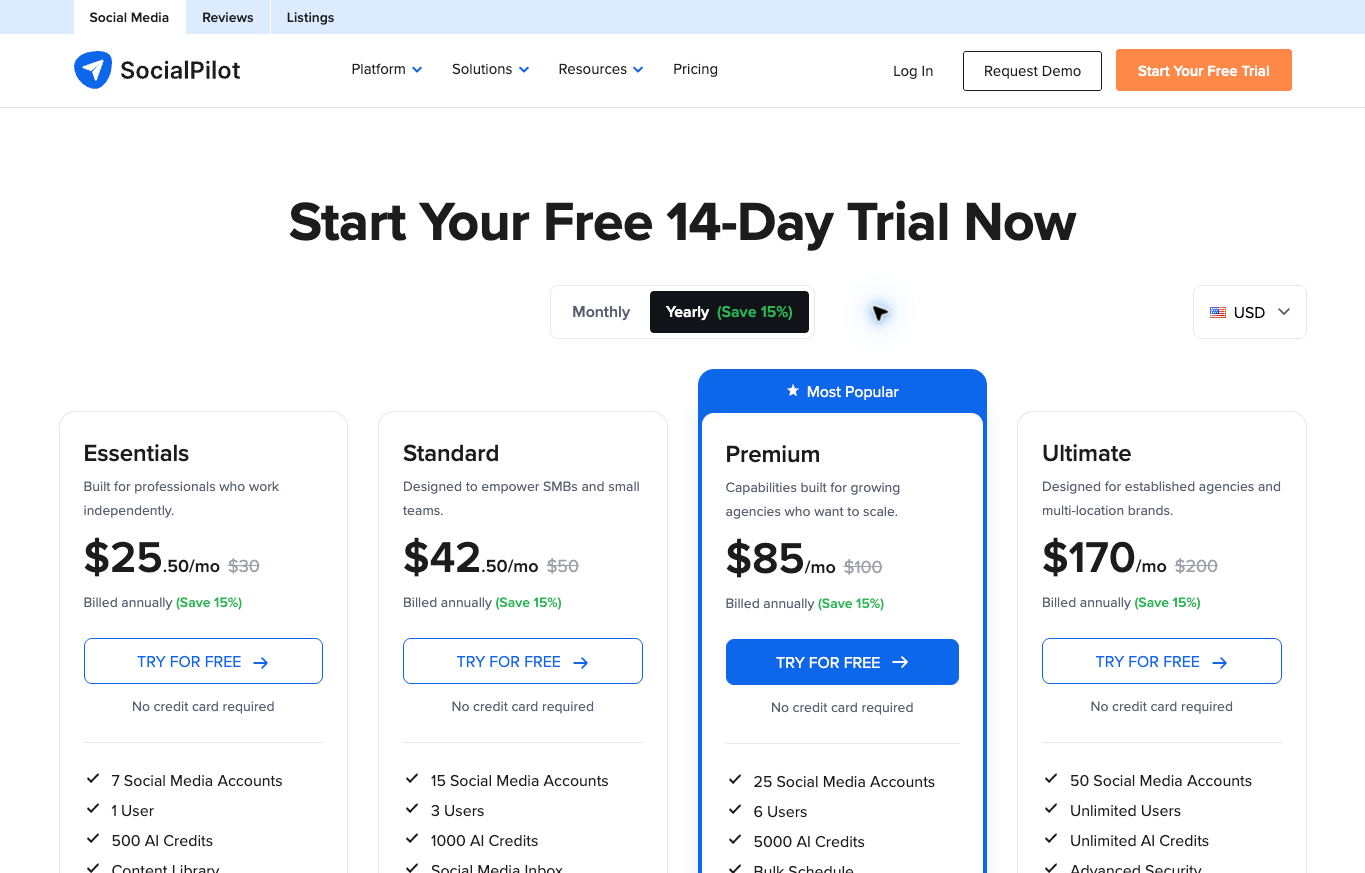
I’d look at SocialPilot when several profiles and a defined review process need one workspace. That’s where it makes the most sense. Count your required accounts and users before you pick a tier.
Current plan limits list Essentials with 7 social accounts and 1 user, Standard with 15 accounts and 3 users, Premium with 25 accounts and 6 users, and Ultimate with 50 accounts and unlimited users. Enterprise uses a custom scope. You can check the current numbers on SocialPilot’s official plans page.
Standard includes manager approval, team collaboration, analytics and the social inbox. Premium adds client approval and white-label reporting. Extra accounts and eligible additional users carry separate charges.
The provider’s linked structured pricing document lists US annual monthly equivalents of $25.50, $42.50, $85 and $170 for the 4 tiers, versus monthly $30, $50, $100 and $200. The preserved October 13 screenshot shows annual context. Confirm the actual annual total, renewal and extras before you commit.
No social account, approval workflow or scheduled post was tested for this comparison. Review the current plan against your actual profile types and publishing requirements.
Later Social for sets and planning
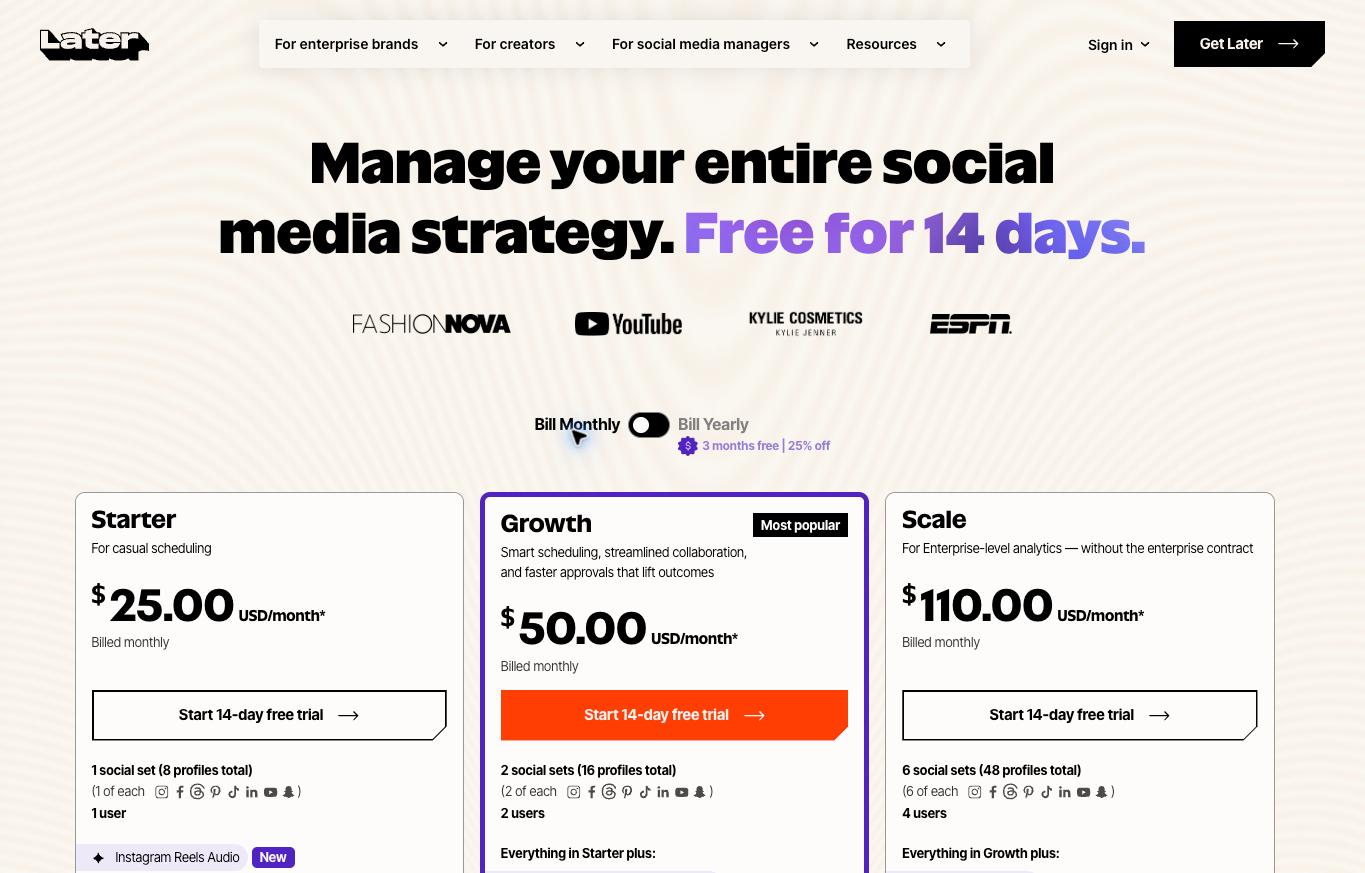
Later Social packages supported profiles into social sets. A set includes one profile from each supported network, not 8 interchangeable profiles from one network. That’s a really important distinction, and it trips people up.
Current Starter includes 1 set and 1 user, Growth 2 sets and 2 users, and Scale 6 sets and 4 users. Starter allows 30 scheduled posts per profile per month, Growth 180, and Scale lists unlimited posts. Later’s official pricing page shows the current set and profile counts.
Posts count when scheduled, not when published. The page separates automatic publishing from notification publishing for supported situations. A supported platform doesn’t mean every format publishes unattended.
The current annual extraction lists monthly equivalents of $18.75, $37.50 and $82.50 in USD, with annual billing and automatic renewal. The preserved October 13 figure shows monthly context. Confirm the selected interval, tax and add-ons before you compare totals.
No publication or private analytics test was performed for this guide. Look at the actual profile, format and approval process. Don’t assume the whole workflow from a pricing card.
Keep a native workflow for a small scope
A native-platform process is worth considering when a small number of profiles and one responsible owner need little coordination. A separate subscription should solve a defined problem. It shouldn’t become one more inbox to babysit.
Keep the content calendar, approved files and response responsibilities clear. Native tools still have platform-specific requirements. Verify the actual account controls for your format, because every network handles scheduling differently.
This route is not a third-party affiliate recommendation. No native account or scheduled publication was tested. Compare the admin work against the paid options before you choose.
If I were starting a single niche store today with one person running social, this is where I’d begin. Go deep before you go wide. Add a paid tool once the workload proves you need it.
Count profiles and people before comparing plans
List the actual profiles you manage and the networks involved. Several accounts on one network are different from a packaged set with one account on each network. Compare capacity against your real inventory.
Identify who drafts, reviews and publishes. A contributor supplying media might need different permissions than the person approving product claims. Record each role before you count paid users.
Keep inactive profiles separate from active requirements. A possible future brand doesn’t automatically justify a bigger subscription now. Weigh planned expansion against the real cost of adding capacity later.
For client work, separate internal review from client approval. The two routes sometimes sit in different tiers. An approval feature needs the right decision owner and a defined deadline.
Compare the annual commitment and required extras
Record the billed annual total separately from the monthly equivalent. A smaller monthly figure doesn’t mean month-to-month billing. Confirm payment timing, automatic renewal and cancellation terms before you buy.
Include extra profiles, users and required feature upgrades in the comparison. A base package that meets the account limit still needs the approval or reporting workflow you want. List optional features separately.
Use the same working scope across both providers. An account-based package and a social-set package need different capacity math. Compare the real setup, not two entry prices.
Keep the dated screenshot next to the current offer description. Public plans change. A saved pricing image describes its capture date and billing context, not a guaranteed future invoice.
Create an approved content record
Keep the draft, media file, source and intended destination together. The reviewer needs enough context to check the claim. A folder full of unnamed versions makes approval way harder.
Give the content a clear current version. Record who approved the wording and image before scheduling. If anything changes later, it needs review again, not approval inherited from the old draft.
For product posts, keep the model, specs and supported offer information on file. A short caption still creates customer expectations. Confirm delivery, compatibility and warranty details with the right source.
Don’t reuse images or customer content without proper permission. A media-library feature doesn’t give you rights. Keep the permission or licensed source with the asset record.
If you work with creators or post anything sponsored, read the FTC’s Disclosures 101 for social media influencers. It explains when a material connection with a brand needs to be disclosed in the post. That covers paid deals and free products.
Check the actual publishing method
Automatic publishing and a reminder to finish manually are two different workflows. Record which one applies to the intended account and format. The responsible person needs to know if an extra step remains.
Supported networks don’t guarantee support for music, stickers, product tags or every video format. Check the current official requirements for your selected post. A supported platform name alone is incomplete evidence.
Review the final destination before approval. Several similar brand accounts make mistakes easy. Record the intended profile and have the reviewer check the same destination the publisher will use.
No scheduled publication or account connection was tested for this guide. These checks describe your own proposed process. Provider feature lists don’t prove a specific post went out successfully.
Assign review and response responsibilities
Scheduling content doesn’t assign anyone to the replies. Name the person who monitors comments and direct messages. Sales questions and an existing customer’s order problem may need different routes.
Define what the social team is allowed to answer. Unconfirmed supplier stock or delivery dates need escalation. A smooth reply is no substitute for the missing operating fact.
Keep review deadlines explicit. If approval is late, the post stays pending under your procedure. A calendar date is not permission to publish an unresolved claim.
Give each escalation the record, the question and the action already taken. The decision owner needs context to respond. A vague notification is far less useful than a specific unanswered requirement.
Use AI drafts with a factual review
AI suggestions need the same product and offer checks as copy you wrote by hand. Review model names, prices, availability and customer promises. Generated text is not a verified source.
Keep unsupported benefits out of the caption. A planning tool’s marketing language isn’t evidence about your product. Use the approved spec and an accurate description of the customer’s decision.
Review voice and repetition along with accuracy. The caption should sound like your business and answer a useful question. Cut stock transitions and empty praise instead of posting every generated suggestion.
No AI performance or campaign experiment was completed for this article. Included credits describe an allowance. They don’t prove better engagement or sales.
Build the week around useful content
Start with the actual questions your audience asks before you fill every calendar slot. Product comparisons, operating explanations and documented updates each bring different value. A full schedule is not proof of useful content.
Collect the facts and media before you ask for approval. An incomplete draft delays review and invites guesses. Assign the missing information to someone instead of leaving a vague placeholder.
Review planned posts against current operations. A changed supplier arrangement or a discontinued product can make yesterday’s approved draft wrong. Pause the affected post until the facts are sorted.
Keep the published version and any correction with the original record. The team needs to know what the audience actually saw. A corrected draft in the library doesn’t prove the public post changed.
Connect content with the store’s operating model
My high-ticket dropshipping guide explains the supplier-dependent responsibilities. A social post should reflect the service your store really supports.
My high-ticket niches list helps with category research. Learn the customer’s product questions before you build a posting schedule around an unfamiliar niche.
Use my guide to finding high-ticket suppliers for commercial verification. A directory or competitor page doesn’t confirm your store’s stock, account approval or delivery promise.
Supplier Paradise is a research resource I own. Treat directory entries as leads that need current confirmation, not certified supply arrangements to advertise.
My business formation checklist covers the admin side. Keep account ownership and public contact details consistent with the actual business.
Review reporting against the actual question
Decide what the report needs to explain before you pick a dashboard. Reach, replies and website visits describe different actions. A bigger number on one metric doesn’t prove the business earned more revenue.
Record the reporting period and the included profiles. Compare equal periods and flag missing data. A report covering several accounts is not the same as a screenshot of one lucky post.
Keep paid and organic results separate. Ask which source supplies the data and whether your plan supports the view you need. A connected dashboard still needs a clear reading of the activity underneath.
No private analytics or campaign results were evaluated for this guide. Feature descriptions show reporting options, not measured gains. Your business needs its own records to judge whether a new workflow helps.
Assign access according to the job
Use identifiable accounts and the permissions each responsibility needs. Drafting content doesn’t automatically require publishing authority. Reviewing comments doesn’t require unrestricted access to every brand.
Keep ownership of the underlying social profiles clear. A contractor’s involvement shouldn’t leave the business stuck on an undocumented personal account. Record who handles recovery and the approved access setup.
Plan how access gets removed and work gets handed over when someone leaves. Recover approved assets and current instructions before the process depends on someone who’s gone. Confirm the real account options, since plans don’t all offer identical controls.
No permissions or security settings were changed for this comparison. Your own setup needs proper review. A security feature on a pricing page doesn’t prove a particular workspace is configured correctly.
Evaluate a small authorized workflow
For your own approved trial, pick a representative draft, review and publishing task. Use the same criteria across the shortlisted tools. Keep the task relevant to the work your team really does.
Review the account type and format before scheduling. Confirm the preview and the final destination. If the task needs notification publishing, assign someone to finish the manual step.
Record what the reviewer sees and how feedback gets back to the author. Approval should point to the correct version. A simple workflow often beats a pile of disconnected comments with no clear accepted result.
Check the public result after your authorized publication. A queued item is not a published post. Keep any correction and the evidence of completion, and note that no such account-level test was performed for this article.
Choose the scope supporting your team
Check out SocialPilot’s current plans if account capacity and a defined approval route solve your problem. Match the tier to the roles and required review. Don’t just chase the biggest advertised limit.
Compare Later Social’s current packages when social sets and planning fit your profile inventory. Confirm the publishing method and monthly post allowance for your formats.
Stick with a native-platform route when one owner and a small scope need less coordination. The decision should reflect the admin work. A paid tool isn’t mandatory just because another business uses one.
My private coaching is an offer I own for the bigger store decisions. Review that scope separately from software costs. It’s not a guarantee of social engagement or campaign revenue.
Keep a record of failures and corrections
Write down what happened when a scheduled item fails or displays wrong. Identify the affected profile, format and version. A factual record helps you tell missing approval apart from an account problem or an unsupported publishing method.
Assign the next action before retrying. Repeated publish attempts can create duplicate posts, which is a pain in the butt to clean up. Check the public destination first, instead of assuming a missing success message means nothing went out.
Keep the corrected wording and approved asset together. A fix shouldn’t bring back an outdated product claim. Review the public result against the accepted version before you call it resolved.
Use recurring problems to update the operating procedure. The team needs a dependable check for the actual failure, not another general reminder to be careful. Record who owns the instructions.
Keep a clear pause procedure for time-sensitive content. If stock, delivery terms or an event changes, identify the affected drafts and the person allowed to stop publication. Review every scheduled destination before resuming.
A revised source record doesn’t automatically change posts already waiting in a queue. Confirm the accepted version and next action. Don’t assume a team member noticed the update.
Social management questions
Are social sets interchangeable account slots?
No. Later defines a set around one profile from each supported network. Count your actual profiles before choosing capacity.
Does automatic publishing cover every format?
Review the intended network, account and format. Notification publishing needs another person to complete the action.
Does an annual monthly equivalent mean monthly billing?
No. Check the actual annual charge and renewal terms, and keep the commitment separate from the displayed equivalent.
Does a full calendar prove useful results?
Judge the content and the business evidence. No engagement or revenue experiment was performed for this comparison.
Related guides
My high-ticket dropshipping overview explains the operation.
My list of high-ticket niches supports category research.
My supplier sourcing guide covers the commercial facts.
Use my business foundation checklist for the admin side.
My guide to AI content creation tools covers source review and draft prep.
My take on picking a social media tool
So with that said, here’s what it comes down to. Count your profiles and people first. Then pick the route that matches that real workload.
SocialPilot fits multiple accounts with a defined approval chain. Later fits teams whose profiles line up with social sets and a planning calendar. A native workflow fits one owner with a small scope, without adding another third-party subscription.
Whatever you pick, protect the facts. Every product post needs an approved source, a clear owner for replies and a way to pause when operations change. I’ve been selling online since 2005, and my view is simple. The accurate information behind the post matters more than the tool.
If you want help building the store those posts point to, my done for you store build handles the heavy lifting for high-ticket dropshipping stores. Or start free and go check out my free high-ticket dropshipping mini course first.

Trevor Fenner is the founder of Ecommerce Paradise. His main projects are Ecommerce Paradise, Supplier Paradise, and Review Paradise, which is currently in development. TrevorFenner.com publishes research-based reviews and practical guides to online business tools and remote-work services, with clear affiliate disclosures.