
Looking for the best video hosting platforms for online courses? Here’s the key idea up front. A video host handles lesson storage and delivery. Your course software handles enrollment, lesson organization and the business around it, so define those jobs before you compare players or subscriptions.
Here’s what I’d do. Start with the learner’s route from enrollment to playback. A polished player won’t fix confusing course navigation, so check whether a separate host actually solves a specific problem your current course system leaves open.
At Ecommerce Paradise, I’ve been teaching online since 2015, and I always pick the job before the tools. Course delivery needs a reliable link between the learner account, the lesson page, the video and your support process. Somebody has to own each part.
This guide compares Bunny Stream, Wistia and Vimeo as hosting directions. I reviewed official product, pricing and help material on October 12 and rechecked it on October 13, 2026. No private course, learner account, upload, security configuration or course integration was tested, and provider research doesn’t rank teaching quality.
These examples cover dedicated video hosting, not courses to buy or meeting apps. My online course platforms comparison covers the separate choice of software for building and selling a course. If your course teaches ecommerce, the explainer in the related guides below shows the business model I teach.
Ownership and affiliate disclosure: I own Ecommerce Paradise and Supplier Paradise. Some links to supporting tools are affiliate links, and if you make a qualifying purchase I earn compensation at no additional cost to you. The three video providers are not affiliate links, because software affiliate attribution for them has not been verified, so any link to them goes to their official help or pricing pages.
Best video hosting platforms for online courses by the job
| Option to investigate | Starting fit | Cost approach to review | Main check |
|---|---|---|---|
| Bunny Stream | Dedicated storage, transcoding and delivery | Usage-based storage and traffic, with optional services | Implementation and the separate learner-access system |
| Wistia | Managed embeds, branding and video analytics | Plan capacity and additional requirements | Account-wide domain rules and actual course-page compatibility |
| Vimeo | Hosted video with documented embed privacy | Selected plan and storage/player requirements | Exact features and the difference between domain privacy and enrollment |
Use this table to narrow your evaluation, not to finish it. Review your course system, library, audience and who will maintain the setup. Buying all three won’t answer those questions, and a longer feature list doesn’t mean a simpler lesson delivery process.
Separate video hosting from the course platform
Assign ownership of learner accounts, the course outline and video delivery separately. A professional-looking player doesn’t prove enrollment management or lesson progress tracking is included. Look at what your course platform already does before adding another host.
Here’s how it splits in practice. Course software grants access to a lesson page, and an embedded player delivers the video. Page permission and delivery controls have to work together, but they’re separate settings with different jobs.
Some course platforms already include video delivery. Check the included setup and the supported external embeds before you buy another subscription. Every added tool needs maintenance too, so name the missing capability first.
Picture a fictional 20-lesson course with a small audience. The existing platform already delivers the lessons through a maintained setup. Write down the specific improvement you expect from an external host, like a supported player requirement or a clearer usage budget. This is a planning example, not a course migration I performed.
So here’s the move. Pick the reason for migrating before you touch any files. A defined integration need or cost limit gives your evaluation a purpose, and an attractive provider homepage doesn’t prove a useful improvement for your learners.
If your course lives on a WordPress site, the website host matters too. I like SiteGround for this because it’s a managed WordPress host, so the site holding your lesson pages gets server setup and updates handled for you. It hosts the pages, not the video files, so keep that in mind when you split the jobs.
Three hosting directions worth investigating
1. Bunny Stream for dedicated video delivery
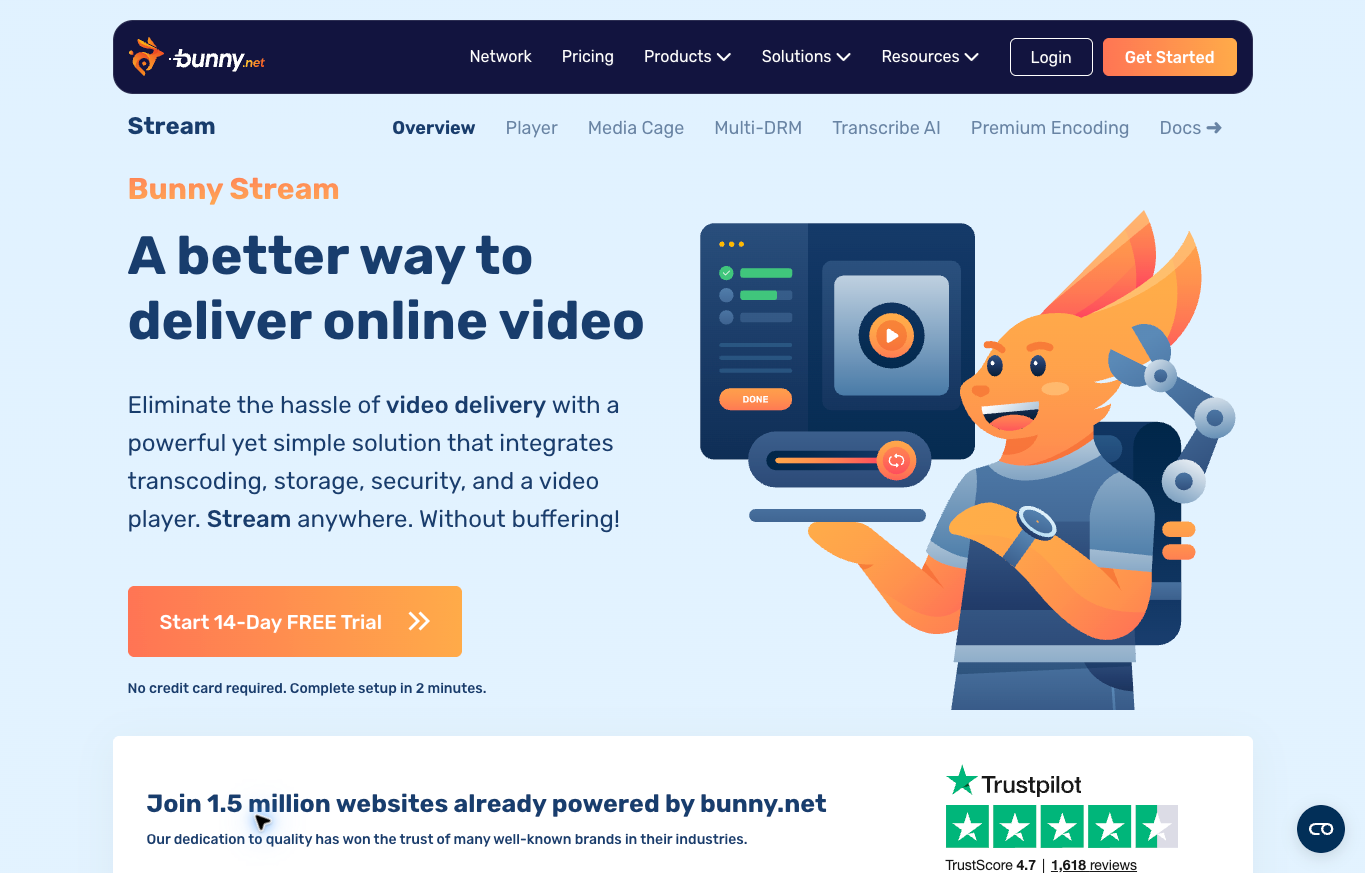
Bunny Stream combines uploading, transcoding, storage and delivery with a player. Look at it when you want a dedicated delivery layer and you have someone ready to own the implementation. Weigh the operating responsibilities, not just the low starting rate.
Its public overview showed storage starting at $0.01 per GB and delivery starting at $0.005 per GB. Those are starting rates, not a universal bill for every region or configuration. The official Bunny Stream pricing documentation breaks rates out by region and network, so calculate your real usage and check optional services before you treat the headline as your budget.
Enterprise Multi-DRM is a separate cost. The official page I inspected listed a $99 monthly base plus license fees. Don’t read a general line about a free player or standard features as meaning every protection option is free.
Review how playback fits your learner-access system and name the integration owner. Record who checks the setup after changes. Delivery controls need an admin who understands their scope and what the course platform handles.
Never promise impossible-to-copy lessons or universal playback performance. Review the supported configuration and run an authorized evaluation in your own course environment before making learner-facing claims. Provider performance language is not measured evidence from this comparison.
2. Wistia for managed embeds and video management
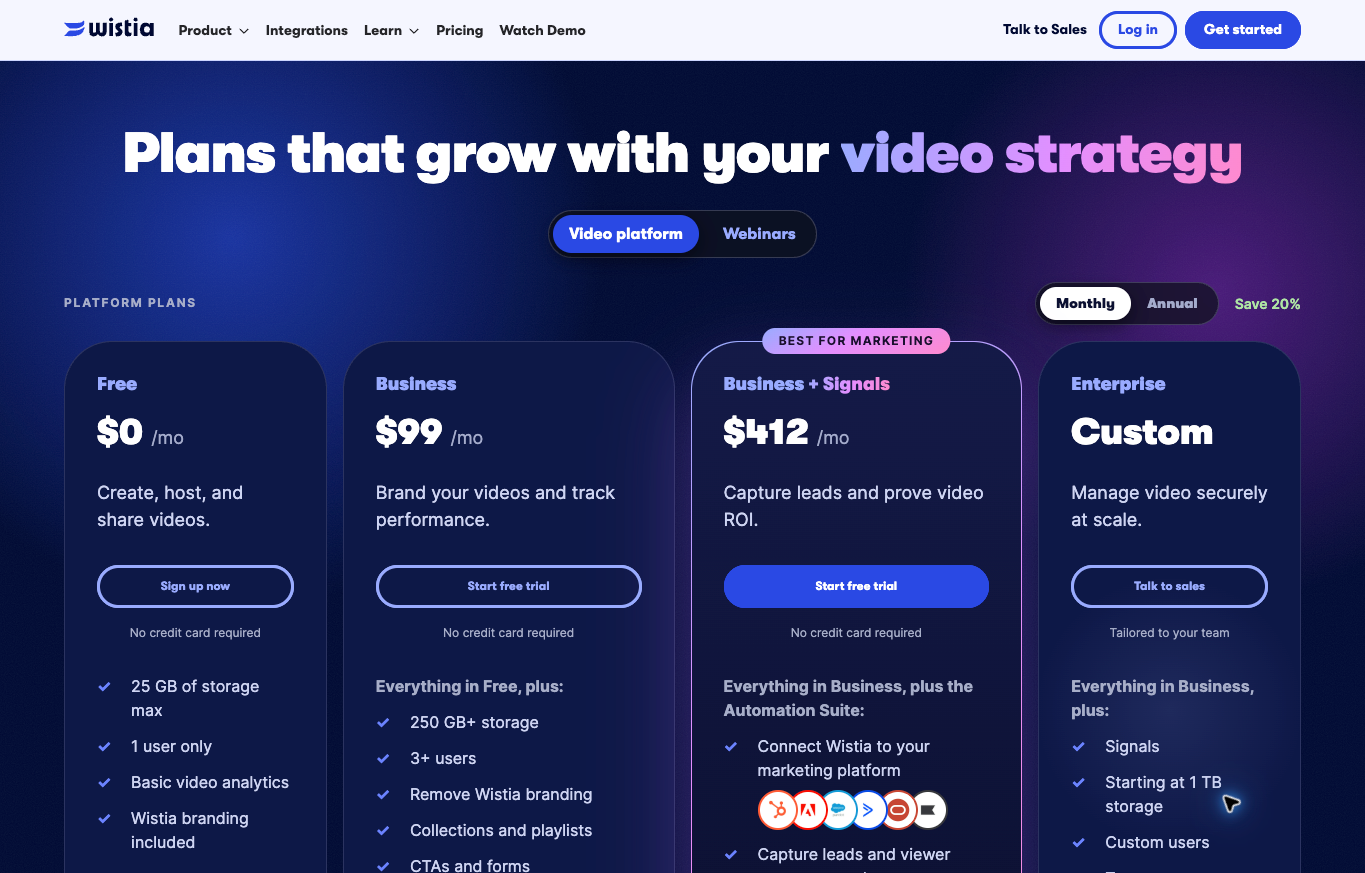
Wistia is worth a look when branded embeds, video management and analytics are part of what you need. Its public monthly selector showed Business at $99 per month and Business plus Signals at $412. The annual Business view showed a $79 monthly equivalent, which is a different billing commitment.
The public Free offer listed 25 GB of storage, 1 user and Wistia branding. Those limits help frame a small test, but they don’t tell you the right plan for your whole course. Review the capacity, features and extra charges on the plan you pick.
Wistia’s domain restrictions help article describes an account-wide allowlist, not a separate rule for each video or folder. It also covers script and iframe requirements. If one account serves both marketing pages and course lessons, review every property that uses it.
Check the published lesson page before you restrict domains. Builder previews, iframe setups and referrer handling differ from site to site. Hand the integration review to someone who knows the provider’s current requirements.
The bigger question is whether the management and analytics features are worth the cost for your course. A marketing feature isn’t automatically a measure of learning, and a branded player isn’t automatically learner authentication.
3. Vimeo for hosted embeds with documented privacy options
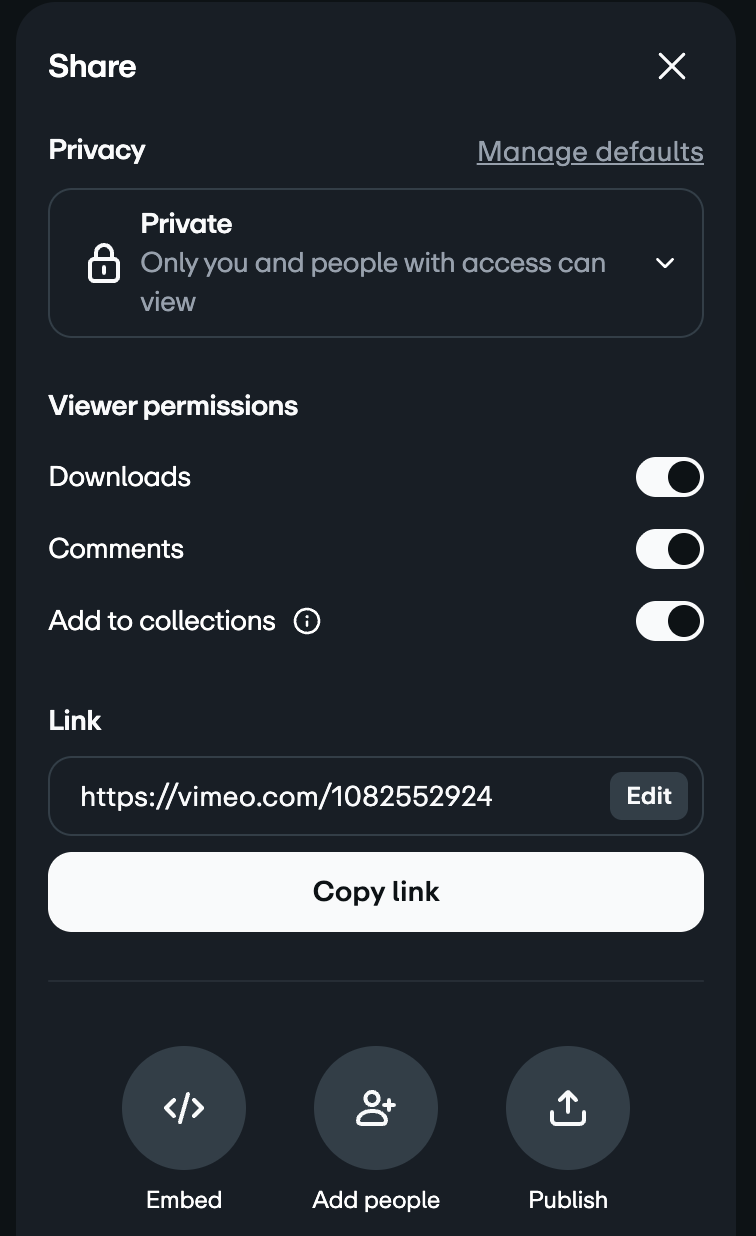
Vimeo’s official domain-level privacy help article describes embed privacy with up to 50 allowed domains and says it’s available on all plans. Confirm the other player and storage requirements on your chosen plan separately. Domain privacy alone doesn’t make a complete course platform.
I’m not quoting a current Vimeo subscription price here. Its public product page and homepage returned server errors during the earlier Chrome review, and the help domain didn’t load there. The official help text was reachable through research and rechecked October 13, but no browser integration test was completed.
Domain privacy controls where an embed is allowed to play. Enrollment controls which learners can open the lesson. Document both jobs instead of treating the allowed-domain list as your whole access system.
Evaluate the embed against your course system, player requirements and admin process before importing a big library. Confirm the exact combination your team will maintain before you promise any feature to learners.
Vimeo is a researched option, not an independently tested winner. A familiar name doesn’t prove it works with every course plugin. Review the exact subscription and setup instead of mixing features from different product packages.
Estimate storage and viewing traffic separately
Split the stored library from viewing traffic in your delivery budget. Upload size doesn’t tell you the total monthly bill. Stored renditions, delivery activity and optional services each need their own assumptions.
For a fictional budget exercise, 20 files averaging 500 MB total about 10 GB using decimal units. That’s the source-file collection, not the final hosted footprint. Stored renditions and replication depend on the service and configuration you pick.
Now suppose 100 learners each pull an average of 2 GB of video traffic in a month. Delivered traffic would total about 200 GB. These are hypothetical planning inputs, not measured viewing behavior or a provider quote.
Ask the provider how usage is measured and which services are included. For plan-based hosting, check capacity and overage behavior. Tie each estimate to a written assumption so another admin can follow the math.
Include repeat viewing, extra lessons and launch traffic in your planning. You don’t need exact predictions, but the billing relationship has to be clear. Starting rates only help when you apply them to the service and resources you’ll actually use.
I’m a big believer in systems and SOPs, and a simple shared spreadsheet makes this easy to maintain. I like Google Workspace for this because Sheets and Drive let you keep the budget, the file map and the source lesson files in one shared place your team can access. That’s one less thing living only on your laptop.
Check the embed in the real course environment
A simple-page embed doesn’t prove it works inside your learning system. Lesson pages add wrappers, iframes, scripts and access rules. Test the supported embed in the real published environment instead of assuming every website behaves the same.
Use one representative lesson before you build the full library. Name the integration owner and agree on a supported embed format. Any undocumented tweak needs a real review, not just an attractive preview.
Split the evaluation into separate questions. Can authorized learners get in, does playback work, does the layout hold up on each device and what can someone see without enrolling? Record each result on its own, because a general statement that the video works doesn’t answer all four.
Test the published lesson page, not just editing mode, since the learner’s view is different. Have the integration owner account for documented iframe and referrer requirements before reading too much into a failed preview.
To be clear, this guide didn’t run those checks on your course. The steps describe a proposed evaluation before you expand the setup. A product comparison doesn’t certify an untested integration.
Keep access controls and protection claims distinct
Learner access, embed restrictions, passwords and protection features all serve different purposes. Map each intended behavior to the component responsible for it. A feature name doesn’t guarantee the same protection in every environment.
Write down the expected behavior before you configure anything. Enrolled learners should reach the lesson, unauthorized visitors should not reach the paid page, and unrelated domains should not play a restricted embed. Assign each rule to the course or hosting component that enforces it.
A qualified implementation owner needs the chosen system’s current instructions. This comparison is not a security audit. No tokens were generated, no domains changed, no DRM enabled and no account permissions granted.
Protection features address specific redistribution risks within supported environments. They don’t justify promising that copying is impossible. Match your public claims to documented behavior and to evidence from your actual setup.
Review the lesson experience on mobile
The player is only one part of the lesson page. The learner also needs to know what to do next, read any supporting text and use the controls without fighting the layout. I’d review the whole lesson, not just the video frame.
Check captions and supporting material alongside playback. Readability on a big screen doesn’t mean the lesson works on a phone. Figure out what learners need to hear, read and reference, then test those needs in the real layout.
Playback working doesn’t prove the captions are accurate. Check names, numbers and specialist terms against the approved lesson. A caption that changes the meaning needs an editorial fix even when the video plays fine.
Keep the page around the video focused. Competing buttons, long unexplained text and unclear next-lesson navigation all add friction. The delivery system should support the learning sequence, not take over the page.
Decide who owns the files and maintains the setup
I’d keep the original lesson files organized outside the player interface. A host doesn’t replace knowing what assets you have and who’s responsible for them. Record the lesson name, source file and current published version.
Assign upload, replacement and removal permissions by role. Editing a lesson is different from running course access. Document the responsibilities and give each person only the access their authorized task needs.
Review captions, supporting text and course links whenever a lesson changes. A valid replacement file doesn’t update the instructions around it automatically. Confirm the approved revision across the whole lesson page.
Give your support owner a clear escalation path for playback issues. Spell out what information to collect privately, who the provider contact is and when to bring in a technical specialist. Don’t ask learners to post account details publicly.
Plan a small migration before moving the whole library
If you already have a course, I wouldn’t start by replacing every lesson link. Start with a small, representative section and a clear reason for switching hosts. Keep the existing setup running until you understand the new one.
Map source files to lesson pages before you migrate. Record the planned changes and the learner experience you want to keep. A clear map helps you catch missing embeds and outdated references before a wider rollout.
Ask the technical owner, the content editor and the support person to review the pilot against their own responsibilities. Give each of them concrete acceptance checks, because asking for general impressions won’t confirm the intended behavior.
Use the pilot evidence to decide the next step. One successful lesson doesn’t prove identical results across every file and device. Keep the rollout small enough to investigate failures and roll back to the approved setup when needed. Honestly, migrations are a pain in the butt, and small batches keep them manageable.
Match the hosting choice to the business
My niches list helps frame category research for the retail model I teach. A business-education lesson needs verified examples and clear assumptions. Picking a hosting service doesn’t prove demand for your subject or give you permission to reuse another creator’s material.
To check demand for a course topic before you record anything, a keyword tool helps. I like Semrush for this because it shows what people search for around a topic and the related questions they ask. Search data is a signal, not proof that anyone will buy.
The business foundation checklist covers wider admin planning. Record who owns the course assets and who has authorized account access. Video delivery doesn’t replace your business, consumer or privacy responsibilities.
If you’re forming a company to sell the course, I like Northwest Registered Agent for this because it handles LLC formation alongside a registered agent service. I run my own business through a Wyoming LLC. This is general information, not legal advice.
Once course sales come in, keep that money separate from your personal account. I like Mercury for this because it’s an online business banking platform that makes course revenue and hosting costs easy to see side by side.
A course about running a store needs accurate teaching material alongside reliable delivery. My supplier research guide covers commercial verification. A video player doesn’t back up supplier terms or business claims in your lessons.
Supplier Paradise is a research resource I own. Finding a supplier candidate doesn’t verify the relationship or back up a course claim. Keep source verification separate from the video delivery decision.
Choose the simplest supported setup that meets your course requirements and maintenance responsibilities. Included course delivery deserves a look before a dedicated host. An external service needs a specific reason and a practical owner.
The three examples show why this comparison needs context. Bunny Stream raises usage and implementation questions. Wistia raises plan, management and account-wide embed questions. Vimeo raises the exact plan and privacy fit, and none of them replaces your entire course business.
Frequently asked questions
Is a video host the same as a course platform?
No. Video storage and delivery are separate from enrollment, the course structure and the wider learner-access process. Check which parts your current course system already includes.
Does domain restriction identify enrolled learners?
No. Domain restrictions control where an embed can play. Learner access needs the right course-system controls separately.
Is every Bunny Stream protection feature free?
No. The enterprise Multi-DRM page I inspected listed a $99 monthly base plus license fees. Review the specific option instead of applying a general overview statement to every service.
Is Wistia’s $79 Business figure month-to-month billing?
No. The $79 figure I inspected was an annual monthly equivalent, and the monthly selector showed $99. Confirm the current billing choice and capacity before you buy.
What needs evaluation before moving a course?
Use a representative published lesson to review access, playback, mobile layout, captions and maintenance. This comparison did not run your integration test.
Related guides
My course platforms comparison covers building and selling the course, which is a different job from hosting its video files.
The online courses guide is about choosing learning material to study, not delivering lessons to your own audience.
Read the YouTube tools comparison for the separate research, packaging and production workflow.
My AI content tools guide explains why source checks and editing still matter even when software helps assemble the material.
The high-ticket business model explainer gives context for the retail education I teach.
My take on choosing a course video host
All right, here are the key takeaways. Split the jobs first. Your course platform handles enrollment and structure, and a video host handles storage and delivery. Check whether your current platform already covers video before you add anything.
If you do need a dedicated host, Bunny Stream suits usage-based delivery with an implementation owner, Wistia suits managed embeds and analytics, and Vimeo suits hosted embeds with documented domain privacy. Budget storage and traffic separately, and test one real published lesson on mobile before moving the library.
Pick the simplest setup that meets a specific, written requirement, and pilot it on one lesson before you migrate everything. Domain privacy is not enrollment, and protection features are not a promise that copying is impossible.
If your course is about ecommerce, the content matters more than the player. My private coaching is there if you want one-on-one help building the store side of the business you teach. Go deep before you go wide, and get one lesson working really well before you scale the library.
And if you’d rather start with the fundamentals for free, my free high-ticket dropshipping mini course walks through the model step by step. It’s a good way to see the teaching side before you build your own course around it.

Trevor Fenner is the founder of Ecommerce Paradise. His main projects are Ecommerce Paradise, Supplier Paradise, and Review Paradise, which is currently in development. TrevorFenner.com publishes research-based reviews and practical guides to online business tools and remote-work services, with clear affiliate disclosures.