
The best YouTube tools fix whatever is delaying your next useful video. That’s it. Research, packaging, production and reviewing channel data are different jobs, so pick the job before you add a subscription.
Here’s what I’d do first. Find where your workflow actually slows down. A weak explanation needs better evidence and editing, and a confusing title needs a clearer promise.
More generated footage doesn’t fix either of those. Keep that in mind before you buy anything.
At Ecommerce Paradise, I treat content as part of an operating business. I build stores for clients, and product content on those stores has to match real specs. The rule is the same for any channel: help a defined audience answer a real question, and let software support that work without replacing your judgment.
If your channel is about ecommerce, my guide on what high-ticket dropshipping is is a good example of the kind of focused topic that gives viewers a real reason to watch.
This guide compares native YouTube Studio features, TubeBuddy for research and channel tasks, and InVideo for production. Each one serves a separate stage. There’s no single best tool for all of it.
The TubeBuddy offer image was captured October 15, 2026. The InVideo and official YouTube help captures keep their October 12, 2026 dates, so preserve that billing and capture context when you compare current terms. No extension installation, channel experiment or generated-video test was performed for this article.
Disclosure: some links here are affiliate links, and qualifying purchases earn me a commission at no extra cost to you. I own Ecommerce Paradise and Supplier Paradise. Public feature descriptions and pricing screens don’t prove views, rankings, subscribers or revenue.
Compare the task
| Tool | Job to investigate | Starting point | Main boundary |
|---|---|---|---|
| YouTube Studio | Native channel review and eligible title/thumbnail testing | Check the features available to your channel first | Testing eligibility and inconclusive results matter |
| TubeBuddy | Research, packaging and optimization workflow | Choose the actual feature and applicable license | Plan limits and creator/business restrictions |
| InVideo | Video creation and editing workflow | Match the production job to the plan and model | Seats, credits, review work and renewal cost |
Read that table by job, not by brand. Studio answers questions about your own channel. TubeBuddy helps with research and repeated tasks, and InVideo helps with assembly and editing.
Review native YouTube Studio features first
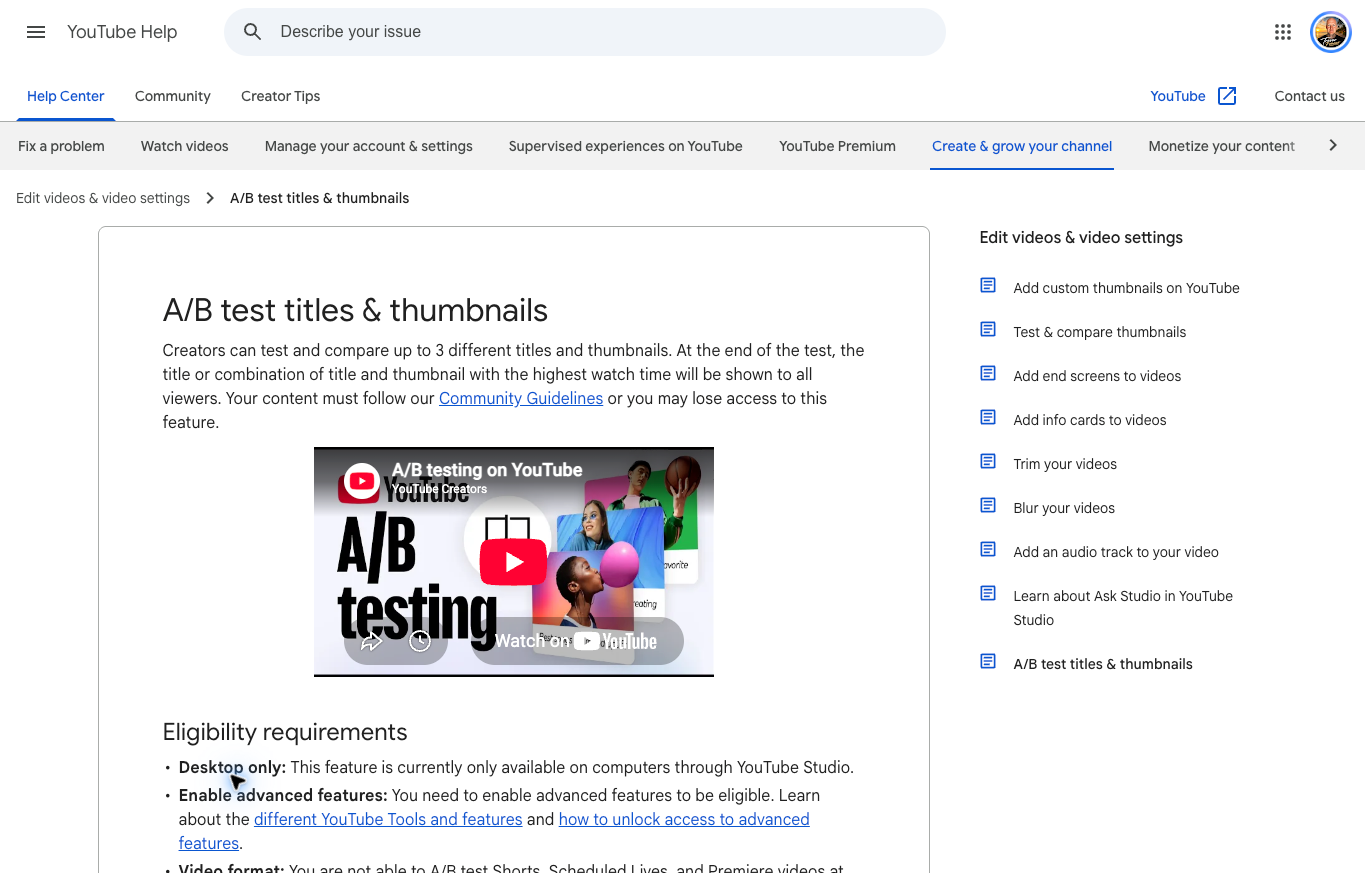
YouTube Studio is the starting point for understanding your own channel. Figure out the question you need answered before adding another dashboard. A third-party interface doesn’t turn estimates into native channel data.
YouTube’s help page on testing titles and thumbnails describes testing up to 3 title, thumbnail or combined options from a computer. Advanced-feature eligibility and content restrictions apply, and Shorts are excluded. Results use watch time and don’t always identify a clear winner.
Changing the title or thumbnail during a native test stops the experiment. Check the actual eligible video and current instructions before you start. This article did not enable account features or run a channel test.
My take: keep native observations separate from third-party suggestions. A packaging score is a research input, not measured proof of what your audience prefers. Write down the actual question and evidence before you make a change.
TubeBuddy for research and repeated channel tasks
TubeBuddy offers research, title, thumbnail, analytics and productivity tools. I’d look at it when you have a specific research or repeated channel task to speed up. Don’t buy a license just because the feature list is long.
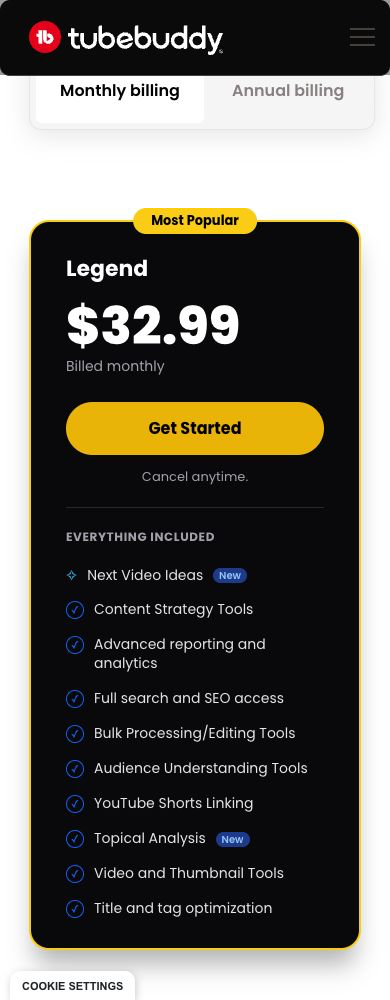
The public views rechecked October 15 showed Legend at $32.99 billed monthly, or a $26.39 monthly equivalent with a $316.68 yearly charge. The new image shows the monthly selection. These dated USD offers don’t confirm the right business license or a permanent renewal quote.
The page keeps individual-creator license restrictions and a custom-priced Enterprise option. Business, multichannel and team use need a look at the applicable terms. You can see the current plan lineup on TubeBuddy’s official pricing page.
Pick one defined evaluation: organizing a topic shortlist, writing a clearer title or reviewing a repeated upload task. Provider suggestions don’t guarantee rankings, views or revenue. No installation or channel-performance experiment was performed for this comparison.
InVideo for video production
InVideo handles production and editing, not channel analytics. It makes sense when assembly or editing is the step holding you back. Start with the specific scene or editing task, then compare the plan and available models.
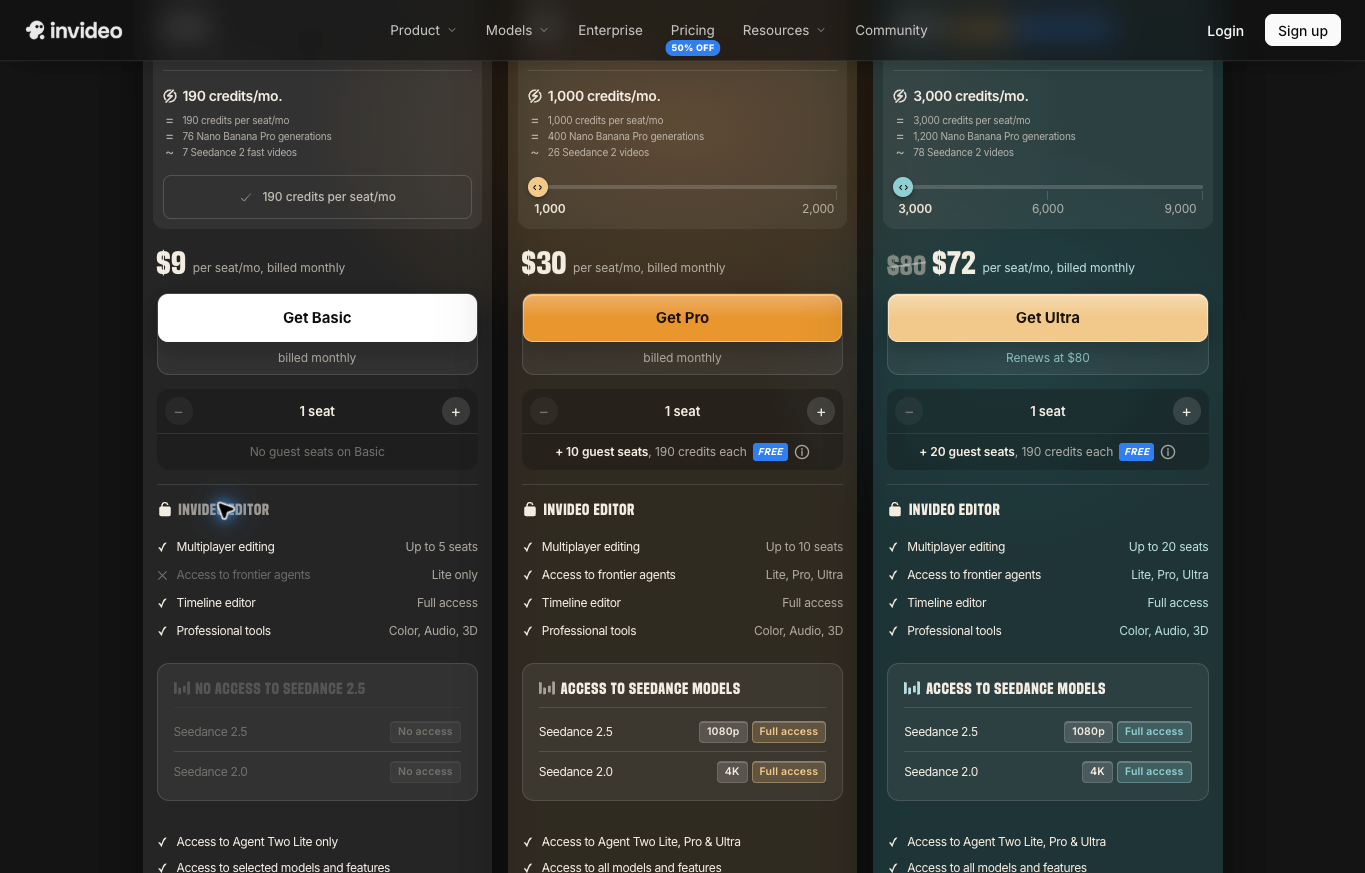
The actual October 13 Team-plan monthly view with 1 paid seat showed Basic at $9 with 190 credits, Pro at $30 with 1,000 credits, and Ultra at $72 initially with 3,000 credits. Ultra showed an $80 renewal. This matches the dated monthly screenshot, while the web extraction showed different plan names and allowances.
Confirm the actual purchase configuration instead of mixing those differing views. Seats, credits, model access and billing periods belong to the selected arrangement. InVideo’s official pricing page currently states that unused credits don’t roll over.
A credit allowance doesn’t equal a fixed number of finished videos. Include rejected outputs, revisions and editorial review in your evaluation. No production account, generation or export test was performed for this article.
Review speech, captions, visual meaning and source rights before publishing. A generated scene doesn’t show a real event or product demonstration. Keep creative illustrations separate from actual testing and customer results.
Identify the delayed production step
List the steps between a topic idea and a finished video. Research the question, prepare the explanation, gather evidence, record or assemble, edit and review the packaging. Then find where the work keeps stopping.
A creator with clear outlines but slow editing needs a different fix than someone collecting random ideas with no usable brief. Buying the same bundle for both ignores the real problem. Describe the task before you compare software.
Use your own recorded workflow time to make the call. In a hypothetical example, 4 hours researching vague topics and 1 hour editing point to a research-process problem. Those figures are an illustration, not a measured result from these providers.
Here’s the move. Change one part of the process first, finish a useful video and write down what got better or stayed hard. A real observation makes a better purchase decision than a guess about what a serious creator should own.
Turn a broad topic into a viewer question
A topic label is not a complete video promise. Shopify apps covers a ton of different tasks. A comparison that tackles a specific store problem, a current fee and a limitation gives the viewer a clear reason to watch.
Collect the questions, objections and points of confusion your audience has. Group related questions instead of turning every phrase into another upload. A pile of repetitive videos doesn’t give you broader coverage.
Treat research suggestions as inputs to investigate. Apparent search interest doesn’t mean you can produce a supported answer. Confirm the evidence before you build a title around an attractive phrase.
My comparison of keyword research tools covers the wider research process. For a video, keep the title, intro and actual explanation lined up around one defined question.
Write one short statement of what the viewer should understand afterward. If that statement is fuzzy, fix the outline before generating footage. An unsupported promise gets way more expensive to fix after recording and editing.
Keep packaging truthful
Treat the title as a promise about the video. Describe the actual comparison, demo or explanation. Don’t imply guaranteed income, universal fit or measured results the material doesn’t support.
The thumbnail should back up the same idea. Use readable wording and one clear focal point, not several competing messages. A screenshot for a walkthrough needs the real interface, not a generated success dashboard.
Tie before-and-after claims to documented evidence. Public plan research is a comparison, not a personal test. A fictional example should stay clearly labeled as an example, so it never looks like proof of a customer outcome.
If you evaluate TubeBuddy’s packaging tools, judge whether the suggestions help explain your actual video. Review the final wording yourself. A score doesn’t prove audience preference or search position.
Ask one clear question in an experiment
Decide what you want to learn before changing the packaging. A new title, a new visual concept and a different video are three separate changes. Mix them and the result gets hard to read.
Write down what changes, what stays fixed and which observation would change your next decision. Use the tool’s current instructions and an eligible video. Don’t assume native and third-party experiments use the same methods.
Keep an inconclusive result inconclusive. If the evidence doesn’t separate the options, make an editorial choice and don’t call it a statistically proven winner. Save the actual report and its limits.
This guide did not run a channel experiment or verify TubeBuddy’s current test scheduling. The native help describes a separate testing setup. Don’t credit one provider’s method to another.
Prepare evidence before assembling the video
Identify the source behind each important claim. Product specs, current pricing and delivery conditions need real documents. A generated script doesn’t establish any of those facts.
Keep the exact product or software version identified. A demo of one model doesn’t show how another model behaves. If your evidence covers a different variant, sort out the mismatch before publishing.
Use authorized manufacturer images, your own footage or real provider captures when the explanation depends on actual features. Separate conceptual artwork from a demonstration. A creative asset should never imply testing you didn’t do.
Review source rights and intended use separately from technical access. Finding an image online doesn’t give you permission to publish it. Get the right authorization instead of assuming an editing tool covers every required right.
Review the complete production output
If you run an authorized trial of InVideo, pick a defined editing or assembly task. Supply an approved outline and permitted assets. Record the selected plan and model before you judge the output.
Watch the result from start to finish. Listen to the narration, read the captions and check what the visuals suggest. Those parts need to agree, not just look nice on their own.
Check names, numbers and instructions against the approved source. A correct caption next to wrong narration still needs fixing. Log rejected material so the viewer never has to guess which part is right.
Inspect the exported file on the intended device. Confirm labels, captions and diagrams stay readable. The editor’s preview is a different surface than the file your viewers get.
No production or export experiment was performed for this comparison. These are proposed evaluation steps for your own authorized trial, not measured provider performance results.
Compare billing and access as one arrangement
Record the selected subscription, billing period and number of paid seats. A monthly equivalent attached to an annual charge is different from month-to-month billing. Introductory and renewal amounts need separate entries too.
For a hypothetical budget, a $30 monthly subscription used for 6 months totals $180 before other charges. 2 paid seats at the same rate total $360. These numbers illustrate budgeting and aren’t your final provider quote.
Check license eligibility against your actual operation. A business channel, several channel managers or multiple channels need the right arrangement. An individual creator card doesn’t cover every business use.
For credit-based production, decide how you’ll handle a depleted allowance before your workflow depends on another generation. Review extra usage terms and set a practical spending limit. More credits don’t remove review work.
Review account permissions before you connect any software. Identify who administers the account and what access the task really needs. This guide did not install an extension, authorize channel access or connect a production account.
Keep a usable production record
Save the approved outline, source documents and relevant capture dates next to the working project. The next editor needs to know why a claim made the cut. A finished file with no source context makes later corrections a pain in the butt.
Record who approved the explanation and which questions are still open. An editor should know whether a statement is verified, hypothetical or excluded. Keep unsupported material out of the published version.
When a provider changes an offer, review the affected narration, caption and description. An older screenshot stays historical material when its date and scope are clear. Never quietly present the old screen as current purchase evidence.
Update every place that shares the explanation. An article, email and video built from one source need consistent corrections. Assign the update to an owner instead of hoping every version gets fixed on its own.
Start with a repeatable review routine
Build a short checklist around your next useful video. Confirm the viewer question, factual sources, approved outline and permitted material. Review the final explanation and packaging before you publish.
Note where the work slowed down. Missing source information needs research. Repeated assembly tasks need a production-process review, and an unclear promise needs editing, not another generation allowance.
Compare the finished work with the time spent fixing it. A faster first draft doesn’t mean a faster finished video. Count discarded assets and repeated exports when you judge the workflow.
Expand only after you understand the first process. Go deep before you go wide. Adding several tools and formats at once makes responsibilities harder to track, so pick the next change from real observations.
Connect the channel to the business operation
My high-ticket dropshipping guide explains the retail model I teach. A channel that talks about the model should keep general education separate from promises of individual results.
My high-ticket niches list gives you categories to research. Choose a defined audience and study its real questions before you make another broad product video.
Use my guide to finding high-ticket suppliers to look into commercial relationships. A catalog listing doesn’t confirm availability, delivery performance or warranty handling for your store.
Supplier Paradise is a research resource I own. Directory leads support investigation, not approval or a confirmed supplier arrangement. Keep verified business facts separate from discovery notes.
My business formation checklist frames the broader setup decisions. Publishing videos doesn’t replace operating records, agreements or professional guidance.
For help with the bigger business decisions, check out my private coaching. It’s separate from any software subscription and comes with no channel-performance guarantees.
Choose the next useful change
I’d review native channel information before paying for a second analytics interface. Identify the unanswered question and the evidence you need. Another dashboard only belongs in the process when its job is clear.
Look into TubeBuddy’s current arrangement for defined research or repeated channel tasks. Confirm the feature, the applicable license and current billing before you subscribe.
Look into InVideo’s production options when assembly or editing delays the finished explanation. Match the seats, model access and ongoing charge to the actual project.
Frequently asked questions
Is paid software required to start?
Not necessarily. Review native features and the work you need to finish before you buy another tool.
Do research and production tools serve the same task?
No. Topic research and video assembly are separate stages, so choose the tool around the delayed step.
Does a packaging score guarantee views?
No. A suggestion is not independently measured audience preference or a ranking guarantee.
Should introductory pricing become the ongoing budget?
Record the selected renewal terms separately from the initial offer.
What should come before another subscription?
Finish one useful workflow, identify its limits and set up a defined evaluation for the next change.
Related guides
My guide to AI content creation tools separates production help from verified facts.
My keyword research tools comparison covers audience research.
Read my guide to online courses when learning a skill is the next task.
My comparison of email software for affiliate marketing covers another audience relationship and provider-policy limits.
My high-ticket retail model explainer introduces the wider business discussion.
My take on YouTube tools
So with that said, here are the key takeaways. Start with YouTube Studio, because it’s your own channel data and it’s already there. Add TubeBuddy when research or repeated tasks are the real bottleneck, and add InVideo when assembly or editing is.
Whatever you pick, keep the facts first. Every claim needs a source, every title needs to match the video and every test needs one clear question. Software speeds up the work, but it doesn’t do the thinking for you.
I’ve been selling online since 2005, and the businesses that last are built on accurate information and simple systems. If you want help building the store your channel points to, my done for you high-ticket store build handles the setup. Or go check out my free high-ticket dropshipping mini course to learn the model first.

Trevor Fenner is the founder of Ecommerce Paradise. His main projects are Ecommerce Paradise, Supplier Paradise, and Review Paradise, which is currently in development. TrevorFenner.com publishes research-based reviews and practical guides to online business tools and remote-work services, with clear affiliate disclosures.