

The best graphic design software fits the file you need to deliver and the person maintaining the design. Start with the destination, editable source and review process. A social template, product graphic and print document have different requirements.
My shortlist is Canva for browser-based templates and shared brand work, Adobe Express for quick marketing assets, and current Affinity for detailed vector, pixel and layout editing.
At Ecommerce Paradise, I teach the operating model behind an online store. Design should explain an accurate offer, not make an unsupported claim more persuasive.
Research date: October 15, 2026. This comparison uses official product and plan information. I have not installed applications, tested client files, measured editing speed or submitted print output for this guide.
Disclosure: I own Ecommerce Paradise and Supplier Paradise. Software names are unlinked because verified product affiliate destinations were not documented. Envato Market is a separate asset marketplace, not an editor.
Best graphic design software by file workflow
| Software | Review for | Useful workflow | Check before choosing |
|---|---|---|---|
| Canva | Browser templates and brand work | Graphics maintained by a team | Free includes 1 Brand Kit with 3 colors. Review team controls, asset rights and required output. |
| Adobe Express | Quick marketing assets | Selected Adobe content and editing tools | Express access is not a full Creative Cloud license. Check credits, assets and export requirements. |
| Affinity | Unified vector, pixel and layout work | Detailed editable-source control | Free for individuals on Mac and Windows. New iPad marked coming soon. Premium Canva AI is separate. |
Choose around the deliverable rather than treating the applications as identical packages. A reusable template and a detailed source document involve different handoffs.
Canva
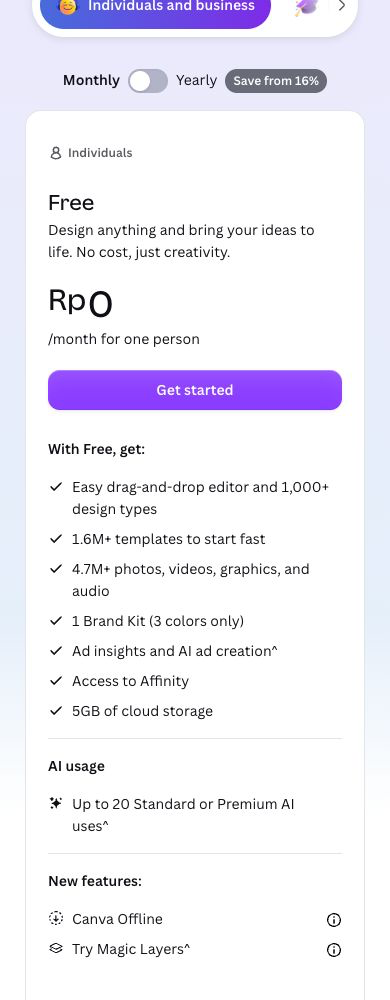
Canva’s current plans are Free, Pro, Business and Enterprise. Compare the current arrangement instead of relying on older team-plan names.
The inspected Free card included one Brand Kit limited to three colors. Wider paid brand and template features are separate. Free is not devoid of brand tools, and Pro does not automatically include every brand control.
Business and Enterprise address different collaboration and administration requirements. Confirm the selected users, features and billing terms.
Canva is my first direction for repeatable browser templates maintained by a non-specialist team. Verify the required output and asset rights. A library subscription does not establish permission for every commercial use.
Adobe Express
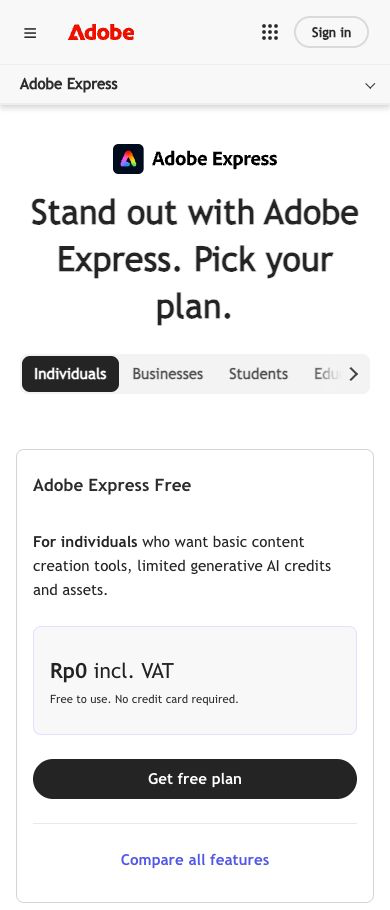
Adobe Express separates Free, Premium and broader Adobe packages. Express Premium does not automatically include full Photoshop, Illustrator or every Creative Cloud application.
Generative credits and storage are plan-dependent. An AI feature is not unlimited access to every generation workflow.
Check the selected package and content entitlements. The public page displayed several billing and product variants, so this guide does not supply a universal paid-price quote.
Review Express for quick marketing-content work. A quick-action feature does not establish compatibility with every complex source file. No file-conversion test was performed for this article.
Affinity
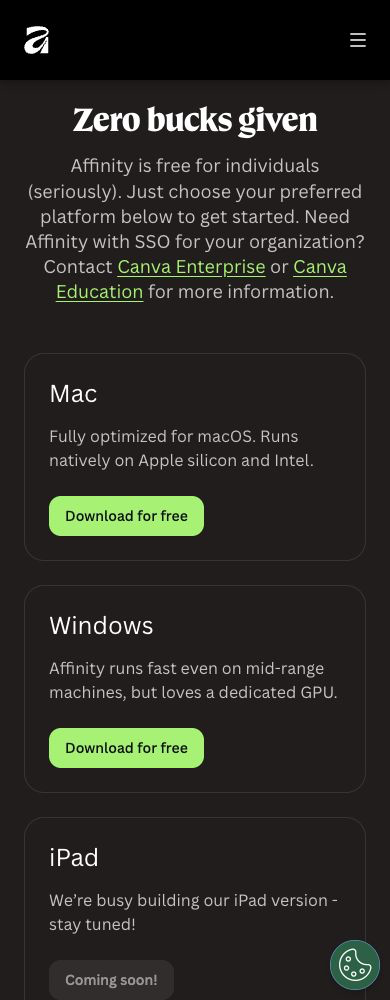
Current Affinity combines design, photo editing and page layout in one app. Its official site describes free individual access, with Mac and Windows downloads. The older paid V2 applications are a separate arrangement.
The new iPad version was marked coming soon. Optional Canva AI access requires an applicable premium Canva plan. Do not infer current iPad availability from an older app.
The provider lists supported formats and a Canva handoff. Verify the particular file rather than assuming every imported detail is preserved perfectly.
Choose Affinity for closer review when editable vector, pixel and layout control matters. Free individual access does not remove the learning, review or organizational requirements of the project.
Write the deliverable specification first
Identify the destination and message. A website banner, small social placement and printed document need different dimensions and output checks.
Assign creation, approval and maintenance responsibilities. If the owner updates the headline weekly, editable text and an understandable template matter. A specialist handoff needs the agreed source format.
For a fictional blog graphic, record the intended placement, approved headline and source-file owner. The example describes planning, not a client asset I created for this comparison.
Confirm the required format with the receiving service. A general template label does not establish suitability for every placement.
Keep the scope manageable. Define the approved content and necessary versions before creating decorative variations without a use.
Record assumptions requiring review. Unverified product claims belong in the project notes, not the final graphic.
Understand vector, pixel and layout requirements
Vector artwork uses shapes and paths. Pixel artwork uses a pixel grid. Layout work organizes text and visual elements into a document.
A photograph, scalable symbol and multi-page document involve different editing needs. Choose the source workflow around the material and destination.
An exported image is not an editable vector file solely because the original contained shapes. Review the format and what remains editable.
For your authorized evaluation, use suitable sample material and inspect the result. Confirm requirements with the person receiving the deliverable.
Keep source and export labels clear. A preview file helps with viewing without necessarily supplying the editable project.
This comparison did not test every format or verify cross-application output.
Keep source files and approved exports together
Preserve the appropriate editable source with the approved export. Later wording and layout changes need a maintainable project, not an unexplained image file.
Give versions understandable names. Identify the approved copy and publication date rather than keeping several files with the same final label.
Record relevant fonts, linked assets and destination requirements. Missing resources alter a document even when the application opens the file.
For a fictional handoff, supply the approved export, source location and editing owner. Include the asset-rights record and any unresolved compatibility issue.
Keep business ownership under an authorized arrangement. A contractor’s personal account should not become the only route to maintaining the project.
Describe the change process clearly enough for another authorized person to identify which source produces the live asset.
Review website and print output separately
For a fictional store-banner handoff, separate the working document from the publication copy. Record the page location, approved headline, requested image dimensions and destination filename. Give the editor the source document and supply the website maintainer with the approved export. Neither person should need to guess which version belongs on the page.
Include the crop requirement in the brief. A wide desktop placement and a narrow mobile placement might show different portions of a photograph. Keep the subject and essential information within the intended visible area. Review the real page before approving publication rather than treating an attractive editor preview as evidence of a successful placement.
Write a short change request when the headline changes. Specify the replacement wording, affected versions and approval owner. Do not quietly update one export while leaving another destination with outdated information. A dated approval record helps the next editor distinguish an intentional difference from a missed correction.
For an editable-file handoff, list the expected resources beside the source location. Identify which images are embedded and which depend on a separate file. Record font requirements and unresolved substitutions. Avoid supplying a package of assets without permission to redistribute those resources. If the recipient lacks an applicable license, agree on a permitted alternative before delivery.
Choose a naming convention your team understands. A project name, placement and revision number are useful when several people handle exports. Keep superseded versions away from the publication folder without destroying the original source. Document which revision produced the currently approved image so a correction starts from the right document.
Review the exported file independently of the source canvas. Look for missing elements, incorrect wording, unexpected cropping and unreadable small text. Open the intended file rather than relying on a thumbnail of a different revision. These are proposed review steps, not results from an application test performed for this article.
A print handoff needs a separate agreement with the printer. Ask who checks the supplied file and whether a proof is required before production. Record the approved size and any instructions supplied by the receiving service. Do not promise a production result based on the software name or an export option alone.
Finally, assign responsibility for replacing an incorrect live asset. Record the source revision, destination and correction request in the same project record. An approval process should identify who fixes the problem and which version replaces the old export. Keep private customer information and account credentials out of the handoff notes.
Ask the destination service for its requirements. A website image and printer-ready document do not share every output condition.
For web use, review dimensions, file weight and readability in the final layout. A larger export does not automatically improve a small placement.
For print, confirm the required format and production specifications with the printer. The editor’s print-template label does not validate the finished file.
Review the approved wording and visual elements at the intended size. Important details should remain readable without depending on the full editing canvas.
Keep the destination requirements with the project record. A later format change needs review of the export rather than an assumption of compatibility.
No printer submission or production proof was tested for this guide.
Use brand rules to support readable content
Define the colors, type choices, spacing and image direction needed for the project. The rules should help another person maintain consistency.
Give the headline, supporting text and next action a clear hierarchy. Equal visual emphasis makes the message harder to follow.
Check contrast in the selected combination. A pale accent color is not automatically suitable for important text.
Review templates with the real content. A long headline or different image needs an appropriate adjustment rather than shrinking everything until the layout looks tidy.
For a fictional brand record, specify the approved colors and type choices, then identify who reviews a change. Keep the rule practical enough to follow.
On-brand appearance does not establish accessibility. Evaluate readability and the required interaction in the final destination.
Check the offer and asset rights
Replace sample template content with verified information. Do not keep an invented testimonial, countdown or claim because the wording fills a space.
For a product visual, review included features, proportions and accessories. The image should not imply a different item from the buyer’s order.
Keep conceptual graphics separate from real product photography and provider screenshots. An article illustration is not evidence of hands-on testing.
Review applicable rights for fonts, images and template elements. Access to a library does not establish permission for every project or distribution arrangement.
Using an element in a finished design differs from redistributing the element or supplying an editable template. Review the relevant license and obtain qualified help for uncertain ownership or trademark questions.
Preserve the asset source and terms with the project. This guide does not supply legal clearance for a particular design.
Keep asset marketplaces separate from editors
Envato Market supplies downloadable products and assets. A marketplace purchase does not replace the required editing application.
Check the item type, application version and license before purchasing. A preview image does not explain every requirement for maintaining the file.
Budget the resource and editor separately. One supplies material, while the other supports the editing task.
A supported import format does not guarantee every document’s fonts, effects or linked elements remain unchanged. Evaluate the relevant file with suitable test material.
Agree on an exchange format when collaborators use different applications. A flattened viewing copy serves a different purpose from the editable source.
Envato Market is not ranked here as an editor. No asset purchase or compatibility test was completed for this guide.
Assign collaboration and account ownership
Decide who edits, comments and approves. Identify the current design’s location and the process for approving a change.
Review the selected subscription’s team and administration features. A personal editing license does not automatically supply organizational controls.
Give people the access needed for their authorized task. Keep private client material out of public demonstrations and unnecessary shared folders.
Record access and recovery responsibilities. The business needs a controlled route to its source files after a staff or contractor change.
For a fictional review process, name the editing owner and approver beside the asset. Preserve the agreed source location and final export rather than sharing an unlabeled collection of drafts.
No user invitations, permissions or private-storage connections were changed for this comparison.
Best graphic design software: compare the complete budget
Include the plan, relevant licenses, storage and creation or review work. Free software access does not make the whole project free.
Check billing commitments, renewal terms, credits and team allowances. A wide asset library or AI button does not establish unlimited use.
A hypothetical $20 monthly software allowance totals $240 annually before separate assets or review costs. This is a budget illustration, not a provider quote or return claim.
Identify the required feature before upgrading. A specific export, collaboration control or resource allowance provides a clearer purchasing reason than a longer feature list.
Keep one primary source workflow for each deliverable. Moving the same file repeatedly between applications adds maintenance without necessarily adding useful capability.
Record the selected scope for renewal review. An approved plan and project requirement are more useful than memory of a promotional page.
Review AI output and the final placement
AI assistance supports concepts and drafts without verifying product details or rights. Inspect names, spelling, visible numbers and the message.
A decorative chart must not appear to represent measured data. A generated review card must not look like an authentic customer testimonial.
Review input rights and authorized use before uploading photos or client files. A generation feature does not establish permission to use every available image.
Check the approved asset in the destination layout. A preview inside the editor does not prove readable text or suitable proportions on the website.
Assign the correction owner and preserve the approved version. A mismatch needs a clear action rather than another uncontrolled variation.
No AI result, file export or application speed was independently tested for this provider comparison.
Connect design to the store’s operating plan
My high-ticket dropshipping guide explains the retail model behind the offers I teach. Graphics support the catalog and customer explanation without establishing the supplier or service process.
The niches list supplies categories for research. Choose visuals around a verified product rather than an attractive concept implying unsupported features.
My supplier research guide covers commercial verification. Confirm the product information and rights to supplied materials before publication.
Supplier Paradise is a research resource I own. A supplier candidate does not establish approved images or claims for your store.
The business foundation checklist frames ownership and administration. Software and asset licenses need to fit the authorized business arrangement.
Frequently asked questions
Is current Affinity three paid apps? Its official site describes a unified app free for individuals. Review platform availability and optional premium features separately.
Does a template license cover every use? No blanket assumption is appropriate. Check the element, project and distribution terms.
Does Express Premium include every Creative Cloud app? Review the exact package. Full application licenses should not be inferred from Express access.
Will every import look identical? A supported format does not guarantee every document’s result. Evaluate suitable test material.
Did this guide test speed or print output? No. The comparison uses public information and proposed workflow checks.
Related guides
- AI content tools
- Social media management tools
- YouTube tools
- WordPress membership plugins
- Small-business software

Trevor Fenner is the founder of Ecommerce Paradise. His main projects are Ecommerce Paradise, Supplier Paradise, and Review Paradise, which is currently in development. TrevorFenner.com publishes research-based reviews and practical guides to online business tools and remote-work services, with clear affiliate disclosures.