

The best business software for small business fits the actual work and the people responsible for completing the work. Start with the missing process before buying another subscription.
This guide compares FreshBooks for invoicing and accounting, monday CRM for sales records, Box for file collaboration and Zoho One as an unlinked suite option. These products perform different jobs rather than compete as identical replacements.
You do not need all four. A small business with a working file system needs a reason to replace the file system, and a suite purchase needs an implementation plan beyond the number of included apps.
At Ecommerce Paradise, I connect software with practical operating tasks. A clear owner and reliable records matter more than a long list of unused features.
The three actual public provider captures retain their October 13, 2026 dates. No private account, invoice, customer record, file migration or automation test was performed for this comparison.
Disclosure: I receive compensation when a qualifying affiliate referral earns a commission, without adding to your purchase price. I own Ecommerce Paradise and Supplier Paradise.
Compare the job and the actual plan
| Option | Job to evaluate | Decision to resolve |
|---|---|---|
| FreshBooks | Invoicing and accounting records | Billable clients, required features, extra users and post-promotion cost |
| monday CRM | Sales follow-up and customer records | CRM-specific tier, minimum seats and activity allowances |
| Box | File sharing and collaboration | User minimum, external access and individual upload limits |
| Zoho One | An integrated business suite | Edition, payroll-employee licensing and implementation scope |
Choose a short list around the task. A bookkeeping requirement and a file-sharing requirement deserve separate checks even when a suite offers versions of both.
1. FreshBooks for the invoicing workload
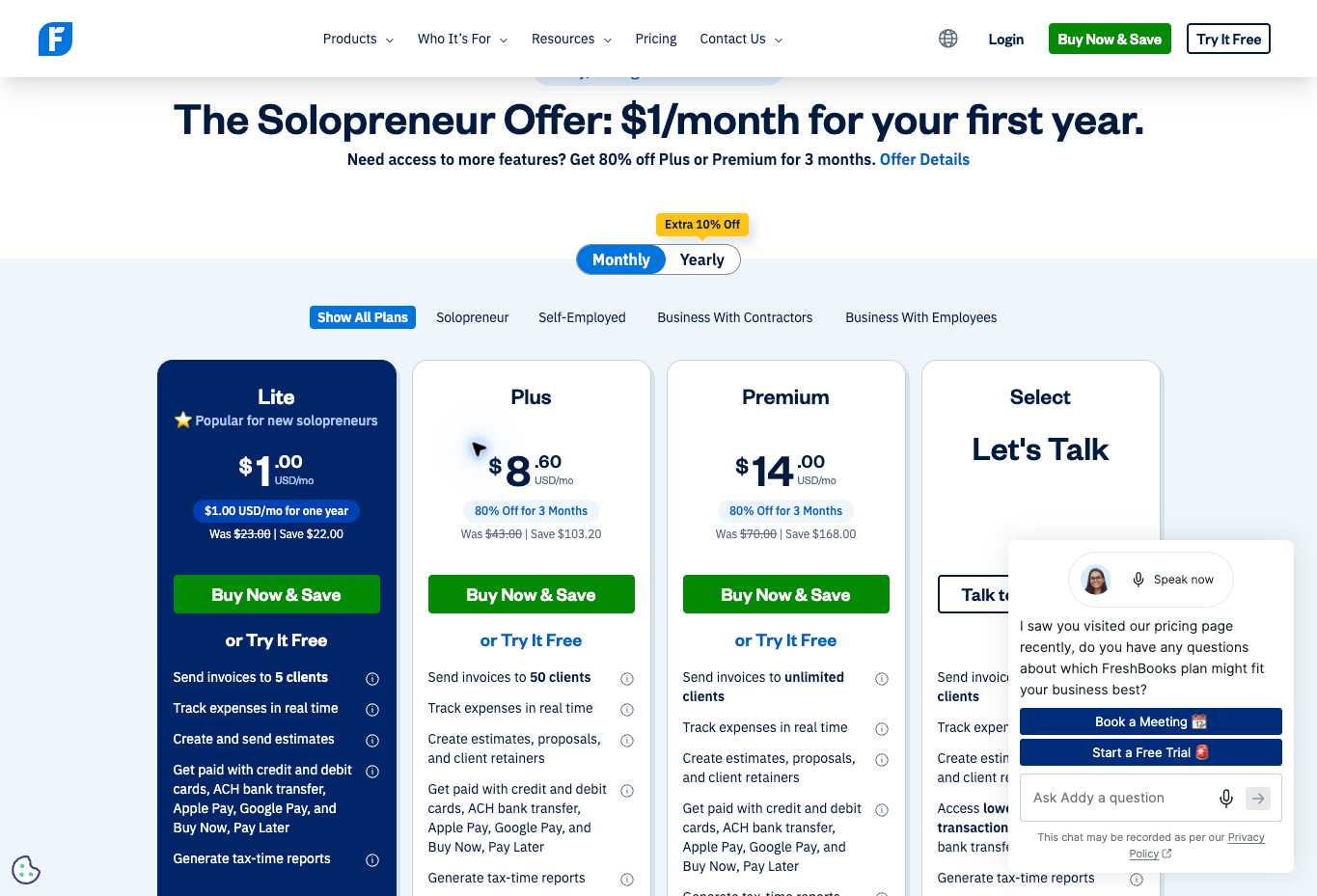
FreshBooks belongs in an invoicing and accounting comparison. Confirm the required records and workflow with the person handling the books rather than choosing from an introductory price alone.
The current USD pricing display shows Lite, Plus and Premium base figures of $23, $43 and $70 monthly alongside introductory offers. The listed billable-client allowances are five, fifty and unlimited respectively. FreshBooks’ FAQ counts both active and archived clients toward the limit.
Additional team members and services are separate cost decisions. The page lists $11 monthly per added team member, with other add-ons carrying their own charges. Unlimited billable clients does not establish unlimited user licenses or every advanced feature.
The dated screenshot records the eligible-customer offers shown October 13. Check the selected plan’s full price and accepted billing terms after the promotion. A marketing headline is not evidence of a completed bank connection, payment or accounting review.
2. monday CRM for the sales process
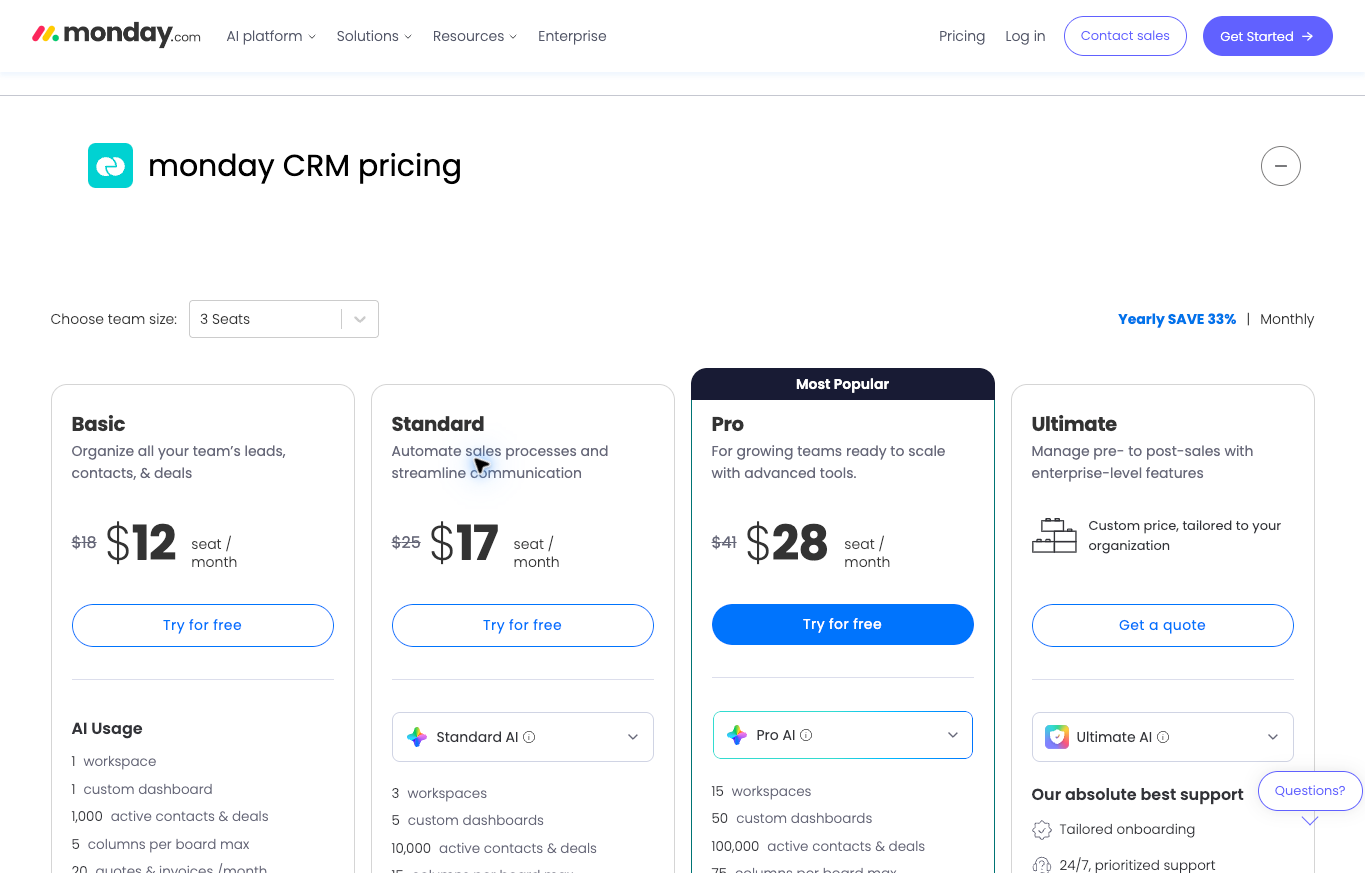
monday CRM is a sales-workflow option. Compare the CRM product rather than applying a separate monday work-management product’s free-seat offer to the CRM.
The current official CRM FAQ says plans start from three users. Prices depend on the tier and team size, with monthly and annual payment choices. Annual payment is made upfront, and the page says prices exclude tax and depend on billing country.
The dated screenshot has a three-seat annual selection. Its per-seat monthly equivalent is not the total charge for one person. Confirm the actual user bundle and required contact, automation or integration allowances before selecting a tier.
I would compare the product against a defined sales process: record the lead, assign the next action and keep the relevant conversation visible. A dashboard is useful when the team maintains the records behind the dashboard.
3. Box for file collaboration
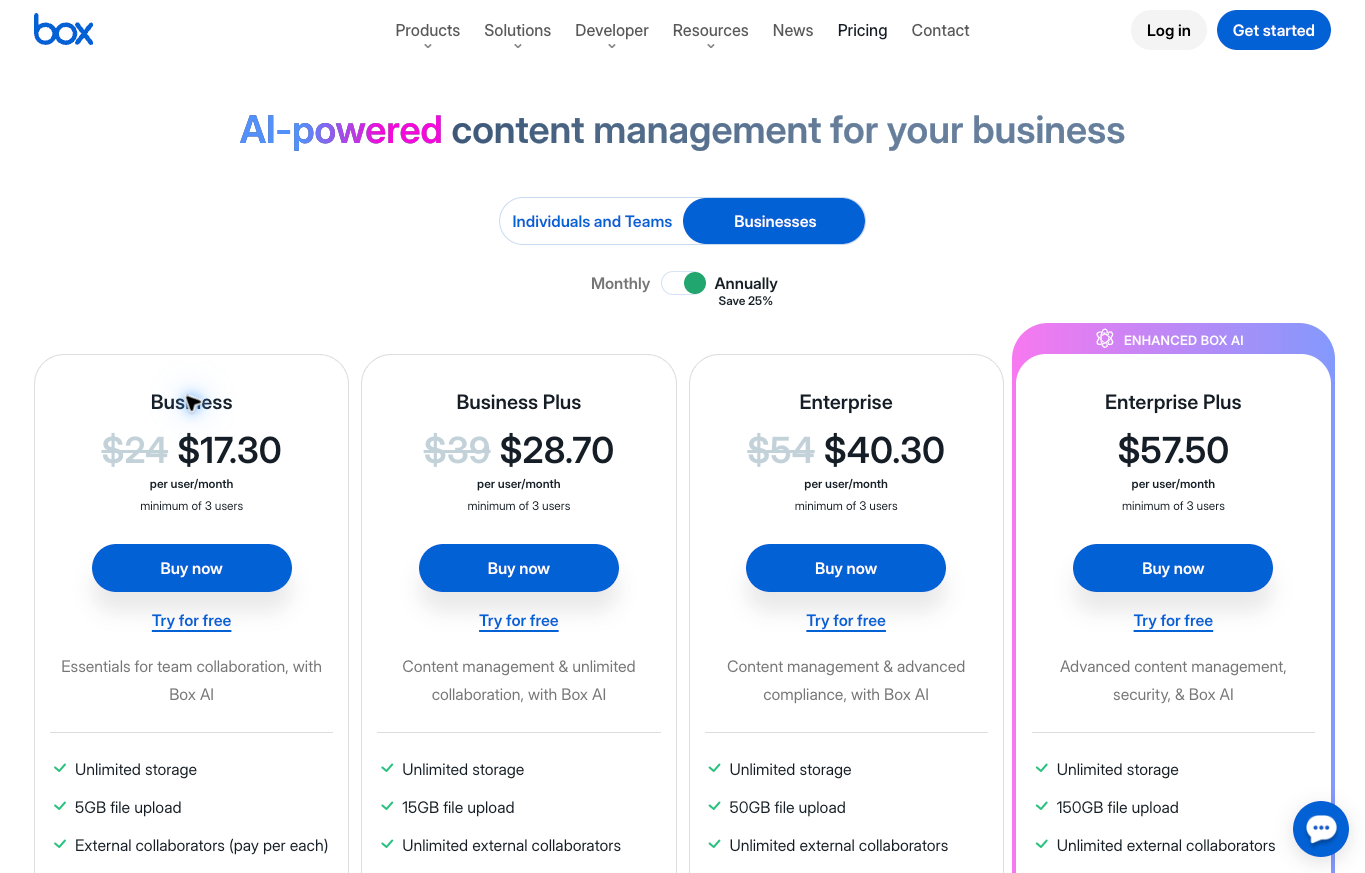
Box addresses file storage and collaboration. Start with the actual files and people involved, including external collaborators.
The current business-plan comparison lists a three-user minimum. Business and Business Plus list individual-file upload limits of 5 GB and 15 GB respectively. Unlimited overall storage is different from an unlimited upload size.
The table also distinguishes required paid external collaborator accounts on Business from unlimited external collaborators on Business Plus. Review the actual sharing permissions and billing terms for your selected arrangement.
The dated image reflects the public regional offer captured October 13. Currency and billing terms need their own confirmation. No private files, permissions, account settings or compliance controls were tested for this guide.
4. Zoho One as a suite comparison
Zoho One remains an unlinked suite option here. Compare the actual edition and licensing model rather than treating the general Zoho brand or a Books referral as proof of a Zoho One offer.
The current official page distinguishes Essentials with more than fifteen apps from Standard with more than fifty. A large app count does not establish every product feature, integration or allowance is unlimited.
The Standard all-employee pricing model requires licenses for all employees on payroll. Flexible-user pricing is a different model for selecting users. Confirm eligibility, actual headcount and the accepted commitment before comparing the total cost.
A suite deserves an implementation plan. Decide which workflows will move, who maintains the records and which existing tools will stay. No organization, trial, application or migration was opened for testing during this comparison.
Write down the missing process first
Name the actual task causing the problem. Missed sales follow-up, inconsistent invoices and scattered files are different issues. A general wish for more automation does not identify which system needs attention.
Describe what happens today and who handles each step. Record where the work stops or requires repeated correction. A software proposal needs this operating picture before a long feature comparison becomes useful.
Set a concrete requirement. The next sales action needs an owner and date. An invoice needs the correct customer and approved amount. A shared document needs the current version and appropriate access.
Choose the smallest change meeting the requirement. Improve a working process where possible before moving every record into a new suite. Replacing several tools simultaneously introduces several migration and training tasks.
My ecommerce CRM comparison adds context for customer-record workflows. A CRM purchase does not remove the need for the team to agree on the actual sales stages.
Assign a source of record for each task
Decide which system holds the approved customer details, sales status, invoice and working documents. Different systems often need different records, but the team needs to know which version controls the decision.
A contact name appearing in several apps does not establish every record is current. Identify the fields shared between systems and who corrects a disagreement. Avoid manually changing several copies without a clear process.
For a sales-to-delivery workflow, record what proves the job is accepted, what authorizes invoicing and what marks the job complete. Keep a software status separate from the evidence supporting the status.
Do not mark an invoice paid because a customer said payment was sent. Use the actual payment record and the approved reconciliation process. A connected account or imported statement does not establish every entry is correct.
For the accounting decision, read my accounting software comparison. Confirm the actual reporting and bookkeeping requirements with a qualified person before relying on a software report for consequential decisions.
Compare a suite with focused tools
Compare a suite’s commercial arrangement with the workflows you will use. The maximum app count does not establish how many tasks the suite replaces.
A focused tool addresses a narrower task and still needs administration and, where relevant, connections to other systems. Neither model removes the implementation work or the need for correct records.
List the tools the suite would replace and the tools you would keep. Confirm the necessary functionality belongs to the actual edition. A suite’s broad finance or CRM label does not establish the exact capability your team needs.
For an existing business, include the transition work in the decision. Templates, historical records, user training and customer-facing processes deserve a plan. A lower subscription headline does not establish a lower total migration cost.
Keep a requirement unresolved when the evidence is missing. Ask the provider about the specific feature or export rather than interpreting a general product statement as confirmation.
Budget the charge you will accept
Count the required users and any minimum bundle. Multiply the actual per-user rate by the billable count, then account for the commitment period. A per-seat monthly equivalent does not establish a month-to-month bill.
Here is an original hypothetical example, not a provider quote. A $15 monthly-equivalent rate with a three-user minimum equals $45 per month in the comparison. Paying for twelve months upfront at $45 per month equals $540 before tax and other costs.
One person using the system does not reduce the hypothetical bill to $15 when the minimum is three users. Apply the actual offer’s conditions rather than treating the lowest displayed figure as the entire purchase.
List required add-ons, usage charges and external-user costs. Keep optional services outside the base comparison until there is an actual use for them. A new capability deserves a spending decision rather than an automatic upgrade.
Compare renewal with the first term. Record the promotional period and the full selected-plan charge afterward. If a required feature exists only in a larger tier, price the larger plan rather than budgeting around the entry tier.
Read allowances at the level of the actual workflow
Users, contacts, clients, files, automation actions and API calls are different measurements. Read the relevant definition before comparing numbers from different products.
Unlimited storage does not establish an unlimited individual upload. Unlimited client records do not establish unlimited billable staff. A large automation quota does not prove the particular workflow is included.
Describe the actual activity expected in a normal period and a busy period. Keep forecast figures labeled as assumptions. Existing logs or records provide a stronger starting point than a guessed volume based on a growth target.
Review the exception when an allowance is reached. Determine whether the workflow stops, incurs a charge or requires an upgrade under the actual terms. Do not assume every provider handles overages the same way.
For the wider tool selection, my productivity software comparison covers another set of workflows. Add a tool when the actual task requires the tool, not because a feature count looks impressive.
Evaluate the handoff between systems
Define which event starts a transfer and which record confirms completion. A new lead, an accepted proposal and a paid invoice are different events. An integration needs to match the business’s definitions.
Review the exact fields transferred and how identifiers are matched. Duplicate customer names, incomplete email addresses and inconsistent product codes deserve a defined correction process rather than another broad automation rule.
Inspect failure handling through an authorized test arrangement. Determine how the responsible person sees a failed transfer and what happens next. A successful first transfer does not establish every exception is handled.
Keep automatic drafts separate from actions requiring approval. An automatically prepared invoice or message is different from an authorized send, charge or payment. The agreed owner still needs to review material facts.
Record which integration and plan were evaluated. A provider showing a familiar app logo does not prove your particular configuration supports the fields and actions you need.
Keep access tied to responsibility
Identify the account owner and the people performing routine work. Billing changes, document editing, customer records and administration involve different permissions. Review the actual roles available in the selected product.
Give a contractor the access required for the agreed task through an approved process. Keep permanent business ownership clear. A shared password is a weak substitute for assigned access and a defined handoff.
For file sharing, review the actual folder, recipient and permission. A business subscription does not establish every shared link is appropriate. Confirm whether the recipient needs access to one document or a larger collection.
Keep the approved recovery process and relevant records available to the responsible owner. Before a team member leaves, assign outstanding work and review access through the normal authorized process.
My virtual assistant websites guide adds hiring context. Define the work, acceptance check and access boundaries before delegating account administration.
Check exports before moving important records
Review the actual export format and the information included. A CSV of contacts is different from a complete history of documents, activities, permissions and related records.
Choose a representative record for an authorized evaluation. Check the identifiers, dates, attachments and relationships needed for the task. A file downloading successfully does not establish another system imports every detail correctly.
Maintain the source files and business records required for continuity. Agree on how the old system remains available during the transition. Do not cancel a working subscription before confirming the records and workflows you need have moved.
Record limitations explicitly. An unsupported field or missing history is a decision requiring attention, not a detail to hide under a broad claim of migration completed.
No private record was exported or imported for this guide. Use the public product information to build the shortlist, then evaluate the specific migration through an authorized process.
Connect software with the retail operation
Begin with the high-ticket dropshipping overview when learning the business model. The store, supplier and customer-service responsibilities remain separate from a CRM or accounting feature list.
The high-ticket niches list supports category research. Choose a focused customer need and investigate the actual operating requirements before expanding the software budget.
Follow the high-ticket supplier research guide for dealer-recruiting work. Record authorization, order handling and warranty responsibilities from the actual supplier.
Supplier Paradise is an owned research resource. Verify each lead before relying on the relationship for customer orders. A directory entry does not establish approval of a particular retailer.
Use the business formation guide for setup questions. Keep account ownership and commercial responsibilities with the other business records and appropriate professional advice.
For help defining the next task, review Ecommerce Paradise coaching. Confirm the actual service scope before purchasing. Coaching is a separate decision from a software subscription or a technical configuration.
Use a defined evaluation before buying a larger plan
Choose one representative task and describe the condition for proceeding. A sales follow-up needs the correct record and assigned next action. A document handoff needs the intended version and recipient access.
Review the actual desktop and mobile experience where those devices matter to the work. A polished public demonstration does not establish your team’s process is easier to complete.
Record the time, scope and observed result of the evaluation. Separate a completed task from an assumption about ongoing reliability. A short trial does not establish a commercial return or a particular saving.
Keep unresolved requirements visible before expanding. If the main task works but export or access remains unclear, report those states separately. One successful demonstration does not prove the entire operating setup.
Choose FreshBooks for a defined invoicing workload, monday CRM for a defined sales process, Box for actual file collaboration or Zoho One for a planned suite implementation. Buy around the required work and the accepted terms rather than a broad best-software label.

Trevor Fenner is the founder of Ecommerce Paradise. His main projects are Ecommerce Paradise, Supplier Paradise, and Review Paradise, which is currently in development. TrevorFenner.com publishes research-based reviews and practical guides to online business tools and remote-work services, with clear affiliate disclosures.