
The best VPN services fit your devices, your work and a subscription cost you understand. I would start with those requirements rather than a discount percentage. A laptop used for supplier calls needs a different evaluation from a television used for streaming.
Surfshark, NordVPN, PureVPN and FastestVPN belong on this focused shortlist. Each offers a different device allowance or purchase structure. None earns a universal speed or privacy award from this article.
I reviewed public provider pricing, support documentation and policies on October 14, 2026. The retained screenshots show public pages captured October 13. I did not install these apps, purchase subscriptions, measure connection speeds or perform leak tests.
My approach at Ecommerce Paradise starts with the business you intend to run. Choose tools around the work. A consumer VPN does not replace account permissions, secure devices or a reliable internet connection.
Before choosing a plan, write down your operating systems, required applications and expected simultaneous connections. Then compare the upfront bill, renewal period and supported settings. Provider offers change with location, purchase channel and promotion.
Affiliate disclosure: some links earn me a commission at no additional cost to you. I own Ecommerce Paradise and Supplier Paradise. Recommendations reflect documented features and decision criteria, not personal testing of these four services.
Compare devices and purchase terms
A connection allowance describes simultaneous use. Licensing, household sharing and employee access are separate requirements. Check the appropriate terms before treating a consumer account as a company-wide system.
| Service | Documented allowance | Purchase question |
|---|---|---|
| Surfshark | Unlimited simultaneous VPN devices on Starter, One and One+ | Displayed currency, charged currency and annual renewal |
| NordVPN | Up to 10 simultaneous devices, with connection conditions | App version, selected package and renewal total |
| PureVPN | 10 default connections, expanded allowance sold separately | Base plan versus bundle and add-on costs |
| FastestVPN | 10 simultaneous connections in the public FAQ | Lifetime base service versus separately billed extras |
Use the same device list for every option. Otherwise, a low price for a narrower setup looks better than a plan covering more of your requirements. Separate essential features from extras you would leave unused.
Surfshark
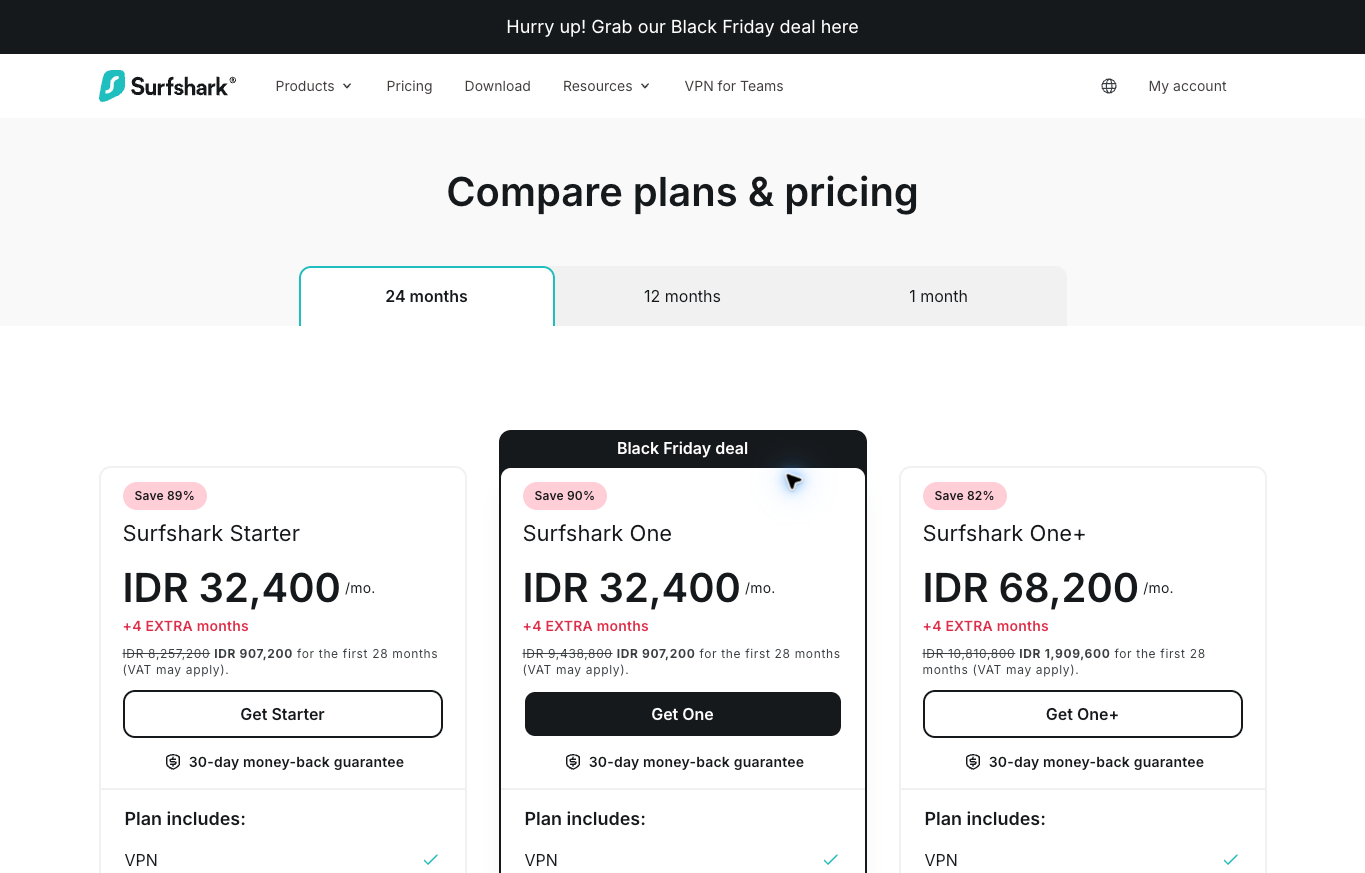
Surfshark is worth comparing when you need several supported devices connected simultaneously. Its documentation lists unlimited VPN connections for Starter, One and One+. Antivirus limits and subscription-use restrictions are separate.
The October 13 screenshot shows Starter at an IDR 907,200 introductory total for 28 months. Treat the displayed monthly equivalent as a description of an upfront purchase, rather than a monthly invoice. The captured offer is a dated localized example.
Display currency and payment currency also differ under Surfshark’s current policy. Card country and payment method affect the charged currency. The supported-currency list excludes IDR and lists USD for otherwise unlisted regions, subject to its payment rules. Bank conversion charges deserve their own review.
The October 14 renewal table displayed Starter at IDR 1,415,654 for one year after the two-year term, before taxes. Renewal prices use location-based display and conversion rules. Review the charged currency, renewal notice and applicable offer instead of treating either displayed amount as a permanent quote.
I would choose the required VPN coverage before buying a larger bundle. Check the exact apps and operating systems you use, then compare the additional products separately. My Surfshark pricing guide covers the purchase-versus-renewal questions in more detail.
NordVPN
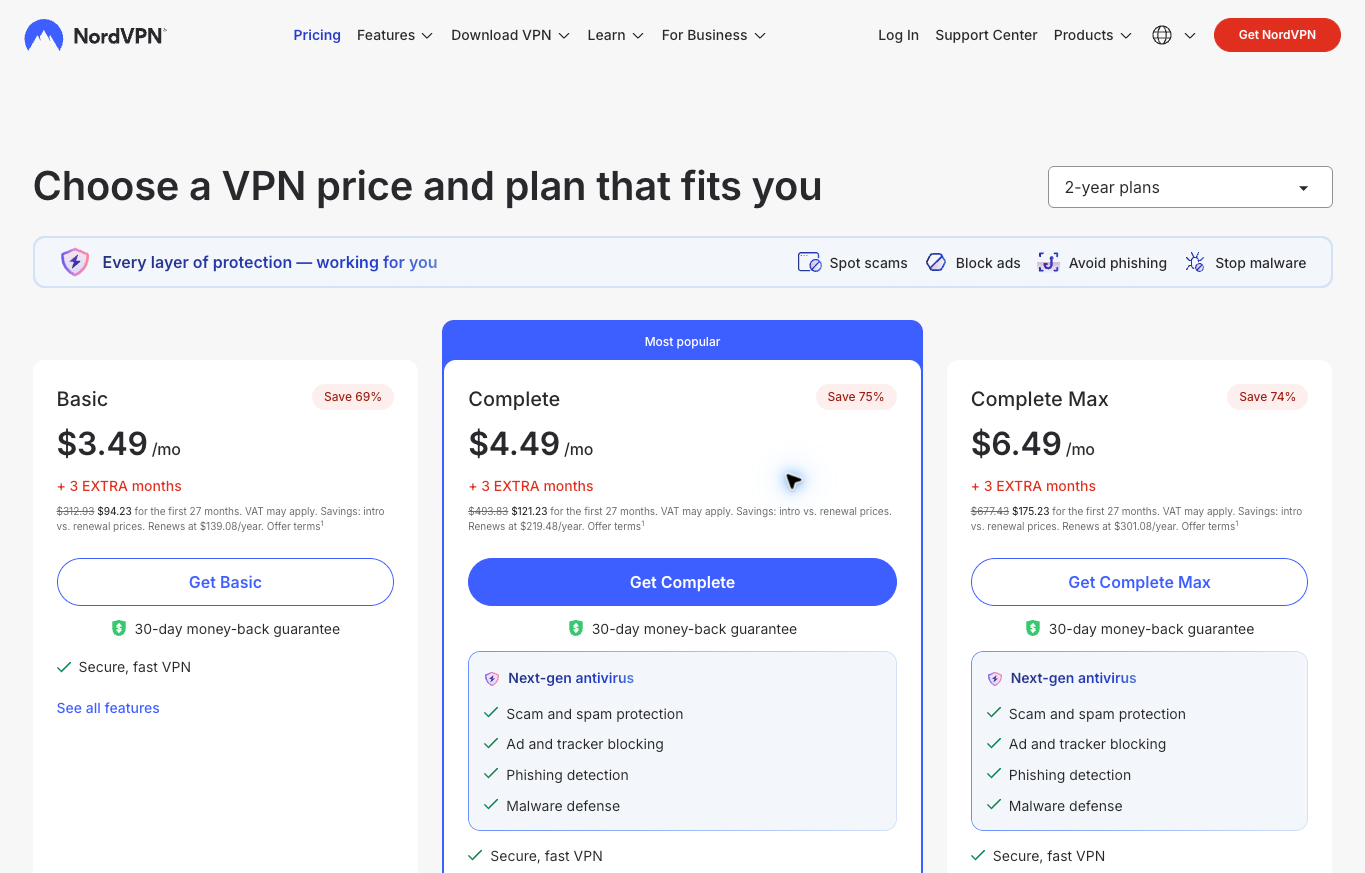
NordVPN suits a comparison centered on supported apps and package selection. Its support page lists up to 10 simultaneous devices. Same-server connection conditions deserve review for the arrangement you intend to use.
The retained October 13 capture shows a dollar-priced Basic offer of $94.23 for 27 months, followed by a listed $139.08 annual renewal. Those amounts document the captured page. The current web reader returned a different currency and package presentation, so I would not treat the screenshot as every reader’s present quote.
On macOS, the provider distinguishes its website download from its App Store version. Its current documentation requires macOS 14 or later and describes differences in connection controls and other features. Installation channel belongs in the decision alongside the subscription tier.
Start with your required app behavior. Choose a package after checking the relevant platform instructions, then save the initial bill and renewal terms. A broad feature list does not establish identical behavior across every supported device.
PureVPN
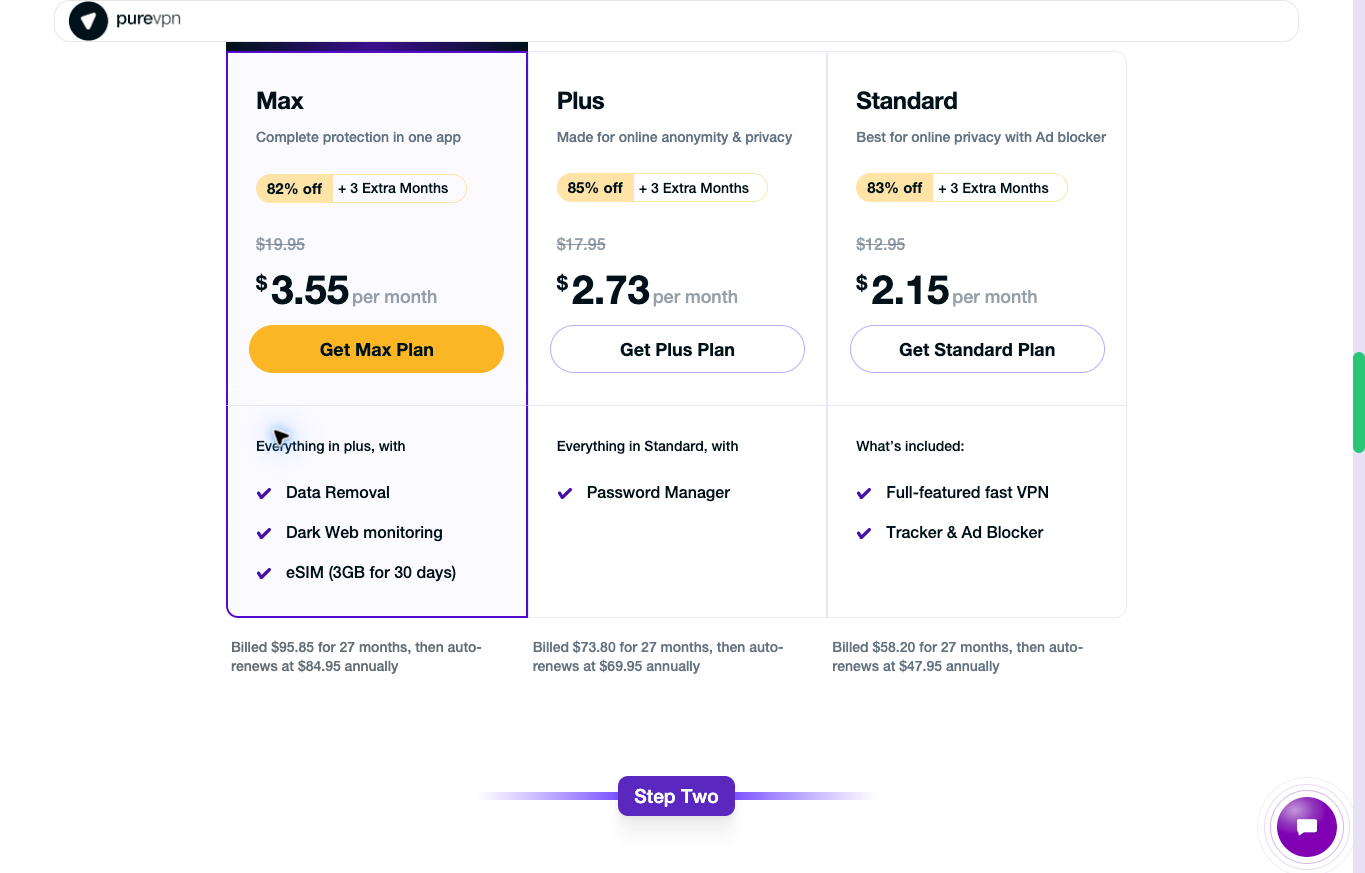
PureVPN provides a useful base-plan-versus-bundle comparison. The official multi-login page lists 10 simultaneous connections by default. Paid additions expand the allowance to 20, 30, 40 or 50.
The current affiliate landing displayed Standard at $58.20 for 27 months, followed by $47.95 annually. Plus showed $73.80 initially and $69.95 annually. Max showed $95.85 initially and $84.95 annually. Review taxes and the terms offered at purchase.
Use the stated total rather than multiplying a rounded monthly equivalent. Record separately billed additions and ask whether you need each bundled product. More connections do not establish an employee offboarding process or broader access controls.
I would compare the base allowance first. Review the PureVPN plans against your device list before paying for a larger connection count. Extra capacity adds little when your usual work already fits the base allowance.
FastestVPN
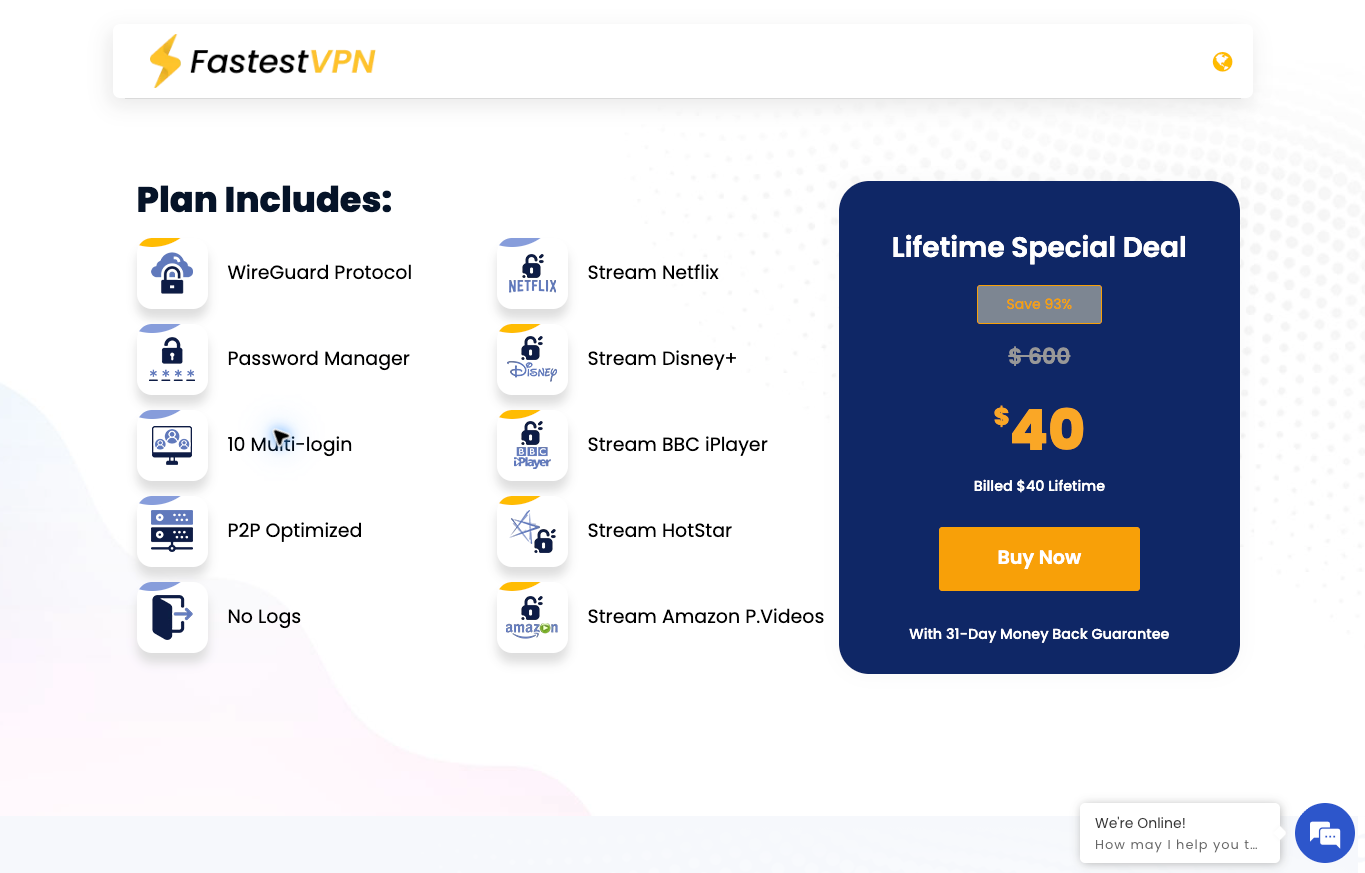
FastestVPN offers a different purchase model. The current partner landing displayed a $40 lifetime base offer, and its FAQ lists 10 simultaneous connections. Read the scope of the base service before comparing ongoing costs.
Optional extras on the landing carry separate charges. A lifetime label does not include every addition or promise unchanged features and service availability forever. Keep any recurring extras in the budget.
The offer advertises a 31-day money-back window. Refund conditions, payment methods and purchase channels still require review. Treat the policy as a set of eligibility terms, rather than an automatic refund for every transaction.
The brand name supplies no speed evidence. No benchmark or streaming test supports a fastest-provider claim here. Review the FastestVPN partner offer for its purchase structure, supported devices and optional charges.
Calculate the bill over your intended usage period
A monthly equivalent divides a longer purchase into smaller units. Your card still pays the stated upfront total under a prepaid offer. Read the number of included months and the next renewal term before treating the advertised rate as your monthly budget.
Use a simple hypothetical comparison. A subscription costing $90 upfront for 27 months has a $3.33 monthly equivalent. A $120 annual renewal has a $10 monthly equivalent. These are invented budgeting figures, not quotes from the providers above.
Keeping the subscription for the initial term and one renewal would cost $210 across 39 months in this example. Dividing $210 by 39 gives about $5.38 per month. Looking only at the introductory $3.33 figure leaves out a substantial part of the later cost.
Taxes, currency conversion and separately billed extras belong outside those assumed totals until you confirm them. Save the purchase confirmation and set a reminder before the renewal date. Review the service again rather than allowing a forgotten subscription to become an ongoing expense.
A short contract also deserves consideration when you have a temporary need. A larger upfront discount adds little if you stop using the service after a trip. Compare the money committed, not only the price divided across the longest available period.
Write down the exact apps you need
Start with your laptop and phone operating systems. Include version requirements and the installation channel you intend to use. Then add the work applications requiring a reliable connection, such as video calls, file uploads and supplier portals.
Keep a browser extension separate from a device-wide VPN app. Their traffic coverage differs. Review the provider’s instructions rather than assuming a browser installation covers every application running on your computer.
For a simple remote-work example, list a laptop for calls, a phone for messages and a tablet for reading documents. Three devices on the list do not necessarily mean three simultaneous connections. Record which devices usually connect together.
Now identify the feature needed on each device. A connection-control requirement on a laptop should not be answered with a screenshot from a phone app. Check the exact platform documentation and supported version.
Your requirements change when a company supplies the device. Follow the approved installation and access policy. A personal preference for one VPN does not authorize changing the company’s managed network arrangement.
Understand connection controls before relying on them
A kill switch needs a platform-specific explanation. Closing selected applications differs from blocking internet traffic outside the VPN connection. Learn the supported behavior for the version you intend to use before depending on a broad feature label.
Split tunneling creates routing exceptions where supported. Review which applications or destinations take each route and how exceptions interact with other controls. Keep a short configuration note instead of trying to remember several overlapping settings.
The provider’s setup guide is the starting point. Follow supported instructions and keep important protections in place. This article does not establish a tested configuration for your computer, router or phone.
If a work application stops connecting, collect the error message and contact the approved support channel. Do not disable a firewall, antivirus protection or certificate checking as an improvised fix. Solving one connection problem should not introduce a wider security problem.
A useful support request describes the operating system, app version, network and failing task. Exclude passwords, payment details and private customer records. Clear details help support understand the issue without unnecessary disclosure.
Keep privacy claims tied to their evidence
A VPN changes which service handles your network connection. You still need to trust the provider. Logged-in accounts, cookies and device location information introduce separate tracking questions.
A different IP address does not establish anonymity. Strong passwords, multi-factor authentication, current software and secure website connections still matter. Purchasing a VPN does not complete your account-security work.
Read the privacy policy behind a no-logs label. Traffic logs, billing records and operational information are different categories. A short marketing phrase does not answer every retention question.
Audit references require a date and scope. An assessment of one app or infrastructure component does not certify every product forever. No independent audit, leak test or privacy certification was performed for this article.
Evaluate calls and uploads under consistent conditions
For remote business work, I would evaluate the tasks which interrupt your day when they fail. A supplier call, customer meeting and large file upload reveal different problems. One download-speed result leaves those tasks largely unexplained.
Begin with an approved evaluation on a network you are authorized to use. Establish ordinary network behavior without exposing sensitive work traffic. Keep the device, network and task consistent when comparing permitted configurations.
Record a call’s interruptions, upload completion and connection failures. Note the date, network and chosen server alongside any speed result. Describe the observation narrowly instead of claiming the same performance for everyone.
Repeat an important task across more than one session. A favorable result during a quiet afternoon does not establish performance during a busy evening. A poor result also needs context before blaming a provider.
My VPN performance evaluation guide explains this distinction. The process is a way to gather your own evidence, not a report of tests completed for this comparison.
Separate personal VPN coverage from team access
A consumer VPN subscription addresses a different question from employee access to company systems. A connection limit tells you little about user approval, individual permissions or removing access after someone leaves.
Keep separate logins for business applications where supported. Assign the permissions needed for each role and document the offboarding process. Giving everyone the same VPN credentials does not solve those administrative requirements.
For a small online business, start with an access inventory. Name the person responsible for each account, billing record and recovery method. Review changes when contractors join or leave rather than waiting for a lost device or blocked login.
Apply the organization’s approved access arrangement when working with managed systems. Ask the responsible administrator before introducing another VPN. Compatibility, licensing and authorization need answers beyond a consumer pricing page.
My remote business tools guide places connection tools alongside communication and administration. Pick a setup your team understands and the responsible owner is prepared to maintain.
Prepare for travel without misrepresenting account eligibility
Check the current local rules and the terms of the services you intend to use. A server location does not establish residence, business eligibility or permission to access a restricted service. Keep identity and business information accurate.
Prepare your approved recovery methods before a trip. Know how to reach support without relying on the same failing app. Keep sensitive recovery information private and follow your organization’s storage requirements.
Test ordinary permitted work before an important meeting. A travel day is a poor time to learn an app lacks a required feature on your phone. Leave time for the provider’s supported troubleshooting process.
Have a practical backup for unreliable internet, such as an authorized alternate connection. Switching VPN providers does not repair weak underlying connectivity. Avoid promising clients uninterrupted availability based on a subscription alone.
My Surfshark travel guide covers the questions to review for travel use. Check destination-specific rules separately instead of assuming a general article establishes legal clearance everywhere.
Build the operating plan behind your tools
For an ecommerce business, connection software supports work already defined. Customer service, supplier follow-up and order exceptions still need an owner. My high-ticket dropshipping guide explains the supplier-direct model before you choose the supporting tools.
Use the high-ticket niches list to organize product research around a focused category. Choose a business you understand and investigate its operating requirements. A large software stack adds expense before validating the underlying opportunity.
Supplier communication deserves a documented process. The supplier research guide covers relationship development and questions to ask. A private connection does not establish dealer approval, product availability or reliable fulfillment.
Supplier Paradise offers another starting point for supplier discovery. I own the directory. Review manufacturers and their requirements directly before making commitments to customers.
The business foundation checklist addresses the wider setup. Keep business registration, banking eligibility and accurate account information separate from a VPN purchase.
For help choosing the model and building an operating plan, review Ecommerce Paradise coaching. Coaching is a separate paid business service, not a VPN installation or security audit.
The Ecommerce Paradise Academy offers a separate classroom and membership community for the business side. Review its current enrollment terms. Membership does not include a tested VPN configuration or establish a provider endorsement.
Questions before choosing a subscription
Which service is fastest for every user?
This comparison establishes no universal speed winner. Device, network, server route and task affect observations. Evaluate your permitted work under consistent conditions.
Does a monthly equivalent mean monthly billing?
No. A longer prepaid purchase uses a monthly equivalent to describe its cost. Check the amount charged, included months and renewal term separately.
Do unlimited VPN devices mean unlimited employees?
A device allowance does not establish a team-access license or employee administration. Review subscription-use terms and your company’s access requirements.
Does the displayed currency match the payment currency?
Do not assume a match. Surfshark’s current billing policy distinguishes local display from charge currency and explains payment-method rules. Review the final charge currency and conversion costs.
Does a lifetime offer include every extra forever?
Read the base service scope and separate charges. A lifetime label does not establish permanent availability, unchanged features or unlimited additions.
Related guides
Review my Surfshark pricing guide for introductory totals and renewal questions.
The Surfshark remote-work guide focuses on supported devices and work requirements.
Read the Surfshark travel guide before reviewing destination-specific use.
My performance evaluation guide explains how to keep observations narrow.
The remote business tools guide connects security decisions with communication and administration.

Trevor Fenner is the founder of Ecommerce Paradise. His main projects are Ecommerce Paradise, Supplier Paradise, and Review Paradise, which is currently in development. TrevorFenner.com publishes research-based reviews and practical guides to online business tools and remote-work services, with clear affiliate disclosures.