

The best social media management tools fit the accounts, people and publishing work you manage. Count the required profiles and approval steps before comparing a subscription.
A solo owner scheduling a few posts needs different support from a team reviewing several brands. A shared calendar helps only when the next action and responsible person are clear.
At Ecommerce Paradise, I connect content tools with the store’s operating facts. Product posts need accurate specifications, approved imagery and supported delivery claims.
This shortlist compares SocialPilot, Later Social and a native-platform workflow. The third route is a simpler operating choice, not another paid tool. Match the required format and review process before buying.
The real provider screenshots retain their October 13, 2026 dates. No account connection, scheduled publication, private analytics review or campaign-performance test was completed for this comparison.
Disclosure: qualifying purchases through affiliate links earn me compensation at no additional cost to you. I own Ecommerce Paradise and Supplier Paradise. A software subscription does not establish audience growth, sales or approval to reuse someone else’s content.
Compare the operating scope
| Route | Useful comparison | Required check |
|---|---|---|
| SocialPilot | Account capacity and approval roles | Included users and required review tier |
| Later Social | Sets, planning and scheduled post allowances | Profile mix and publishing method |
| Native-platform workflow | Smaller scope with one owner | Actual format and scheduling controls |
SocialPilot for account capacity and approvals
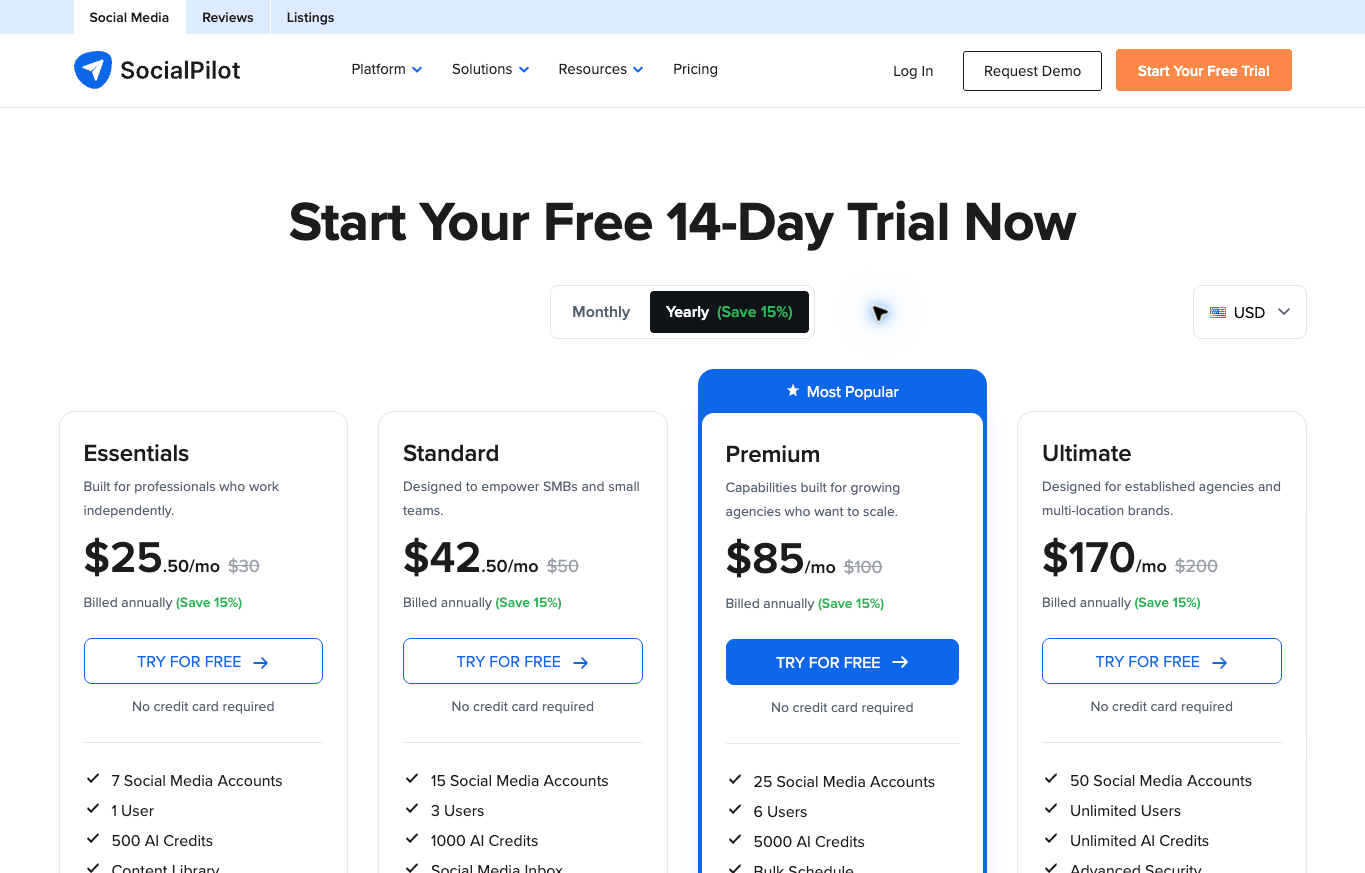
I would investigate SocialPilot when several profiles and a defined review process need one workspace. Count required accounts and users before choosing a tier.
Current plan limits list Essentials with seven social accounts and one user, Standard with fifteen accounts and three users, Premium with twenty-five accounts and six users, and Ultimate with fifty accounts and unlimited users. Enterprise uses a custom scope.
Standard includes manager approval, team collaboration, analytics and the social inbox. Premium adds client approval and white-label reporting. Extra accounts and eligible additional users introduce separate charges.
The provider’s linked structured pricing document lists US annual monthly equivalents of $25.50, $42.50, $85 and $170 for the four tiers, versus monthly $30, $50, $100 and $200. The preserved October 13 screenshot displays annual context. Confirm the actual annual total, renewal and extras before committing.
No social account, approval workflow or scheduled post was tested for this comparison. Review the current plan against your actual profile types and publishing requirements.
Later Social for sets and planning
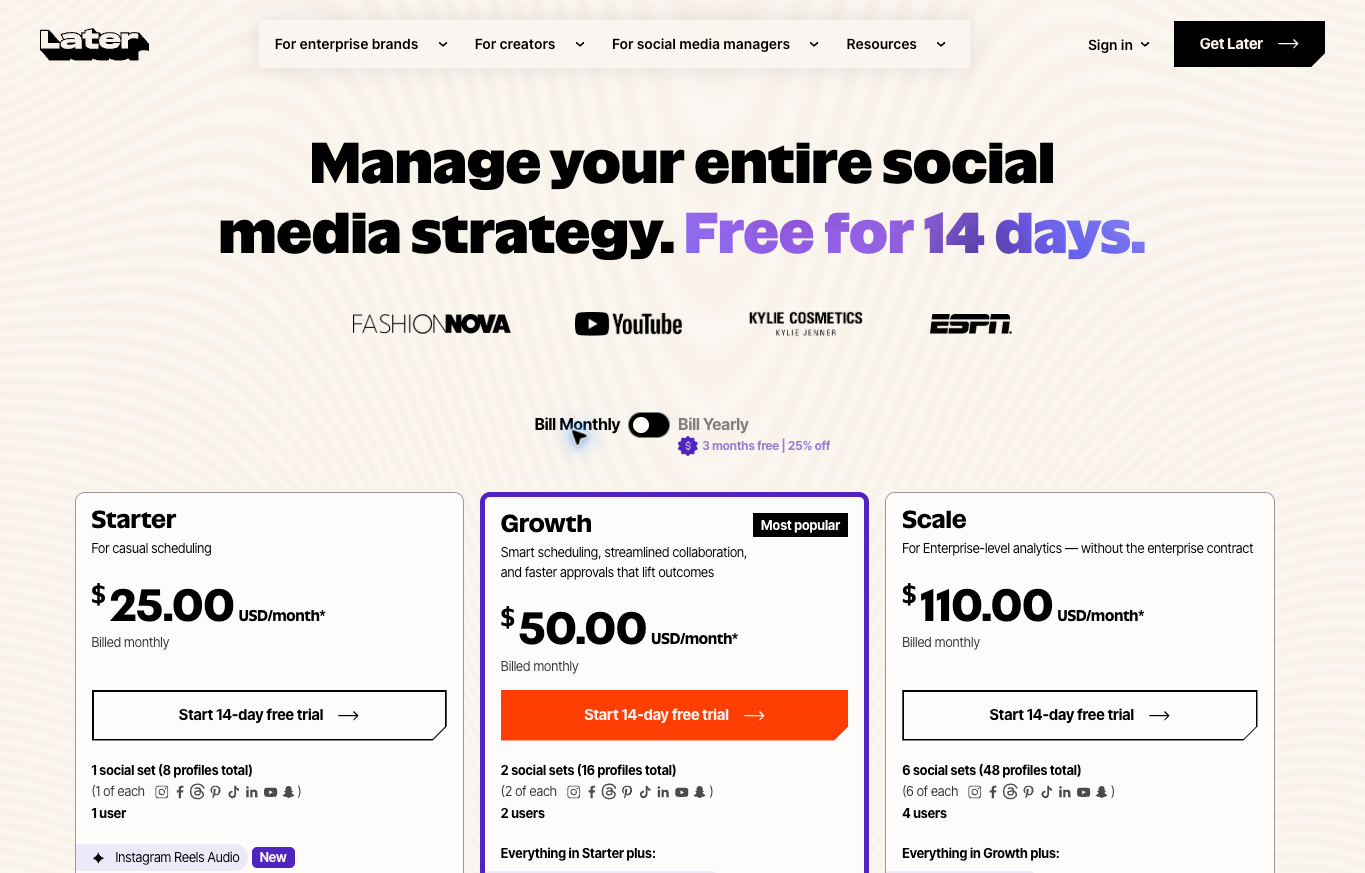
Later Social packages supported profiles into social sets. A set includes one profile from each supported network, not eight interchangeable profiles from one network.
Current Starter includes one set and one user, Growth two sets and two users, and Scale six sets and four users. Starter permits thirty scheduled posts per profile per month, Growth one hundred eighty, and Scale lists unlimited posts.
Posts count when scheduled, not when published. The page distinguishes automatic publishing from notification publishing for supported situations. A supported platform does not establish every format publishes unattended.
The current annual extraction lists monthly equivalents of $18.75, $37.50 and $82.50 in USD, with annual billing and automatic renewal. The preserved October 13 figure shows monthly context. Confirm the selected interval, tax and add-ons before comparing totals.
No publication or private analytics test was performed for this guide. Investigate the actual profile, format and approval process rather than assume the entire workflow from a pricing card.
Keep a native workflow for a small scope
A native-platform process deserves consideration when a small number of profiles and one responsible owner need little coordination. A separate subscription should address a defined problem rather than become another inbox to maintain.
Keep the content calendar, approved files and response responsibilities clear. Native tools still have platform-specific requirements. Verify the actual account controls for your intended format rather than assume every network offers the same scheduling workflow.
This route is not a third-party affiliate recommendation. No native account or scheduled publication was tested. Compare the administrative work with the paid alternatives before choosing the process.
Count profiles and people before comparing plans
List the actual profiles you manage and the networks involved. Several accounts on one network differ from a packaged set containing one account on each network. Compare capacity against your real inventory.
Identify who drafts, reviews and publishes. A contributor supplying media sometimes needs different permissions from the person approving product claims. Record the role before counting paid users.
Keep inactive profiles separate from active requirements. A possible future brand does not necessarily justify a larger subscription now. Review planned expansion against the actual cost of adding capacity.
For client work, distinguish internal review from client approval. The two routes sometimes belong to different tiers. An approval feature needs the correct decision owner and a defined deadline.
Compare the annual commitment and required extras
Record the billed annual total separately from the monthly equivalent. A smaller monthly figure does not establish month-to-month billing. Confirm payment timing, automatic renewal and cancellation terms before purchase.
Include extra profiles, users and required feature upgrades in the comparison. A base package meeting the account limit still needs the intended approval or reporting workflow. List optional features separately.
Use the same working scope across both providers. An account-based package and a social-set package require different capacity calculations. Compare the actual setup instead of two entry prices.
Keep the dated screenshot alongside the current offer description. Public plans change. A preserved pricing image describes its capture date and billing context, not a guaranteed future invoice.
Create an approved content record
Keep the draft, media file, source and intended destination together. The reviewer needs enough context to check the claim. A folder containing several unnamed versions makes approval harder to interpret.
Give the content an identifiable current version. Record who approved the wording and image before scheduling. A later change requires review rather than inheriting approval from the previous draft.
For product posts, retain the model, specifications and supported offer information. A short caption still creates customer expectations. Confirm delivery, compatibility and warranty details with the relevant source.
Do not reuse images or customer content without appropriate permission. A media-library feature does not establish rights. Keep the permission or licensed source with the asset record.
Check the actual publishing method
Automatic publishing and a reminder to finish manually are different workflows. Record which route applies to the intended account and format. The responsible person needs to know whether an additional action remains.
Supported networks do not establish universal support for music, stickers, product tags or every video format. Check the current official requirements for your selected post. A supported platform name alone supplies incomplete evidence.
Review the final destination before approval. Several similar brand accounts introduce avoidable mistakes. Record the intended profile and make the reviewer check the same destination the publisher will use.
No scheduled publication or account connection was tested for this guide. These checks describe your own proposed process. Provider feature lists do not prove a specific post was published successfully.
Assign review and response responsibilities
Scheduling content does not assign responsibility for replies. Name the person monitoring comments and direct messages. Sales questions and an existing customer’s order problem sometimes need different routes.
Define what the social team is permitted to answer. Unconfirmed supplier stock or delivery dates need escalation. A fluent reply should not substitute for the missing operating fact.
Keep review deadlines explicit. If approval is late, the post stays pending under your procedure. A calendar date does not establish permission to publish an unresolved claim.
Give each escalation the record, question and action already taken. The decision owner needs context to respond. A general notification supplies less useful information than a specific unanswered requirement.
Use AI drafts with a factual review
AI suggestions need the same product and offer checks as manually written copy. Review model names, prices, availability and customer promises. Generated text does not establish a verified source.
Keep unsupported benefits out of the caption. A planning tool’s marketing language is not evidence about your product. Use the approved specification and an accurate description of the customer’s decision.
Review voice and repetition alongside accuracy. The caption should sound like your business and answer a useful question. Remove stock transitions and empty praise rather than post every generated suggestion.
No AI performance or campaign experiment was completed for this article. Included credits describe an allowance. They do not establish improved engagement or sales.
Build the week around useful content
Choose the actual questions your audience asks before filling every calendar slot. Product comparisons, operating explanations and documented updates supply different kinds of value. A full schedule is not proof of useful content.
Collect the necessary facts and media before requesting approval. An incomplete draft delays review and invites guesses. Assign the missing information to someone rather than leave a vague placeholder.
Review planned posts against current operations. A changed supplier arrangement or discontinued product sometimes makes yesterday’s approved draft unsuitable. Pause the affected post until the relevant facts are resolved.
Retain the published version and any correction alongside the original record. The team needs to know what the audience saw. A corrected draft in the library does not prove the public post changed.
Connect content with the store’s operating model
My high-ticket dropshipping guide explains supplier-dependent responsibilities. A social post should reflect the actual service your store supports.
The niches list supports category investigation. Learn the customer’s product questions before choosing a posting schedule around an unfamiliar niche.
Use the supplier sourcing guide for commercial verification. A directory or competitor page does not establish your store’s stock, account approval or delivery promise.
Supplier Paradise is my owned research resource. Treat directory entries as leads requiring current confirmation, not certified supply arrangements to advertise.
My business foundation checklist supports administration. Keep account ownership and public contact details consistent with the actual business.
Review reporting against the actual question
Decide what the report needs to explain before choosing a dashboard. Reach, replies and website visits describe different actions. A larger number on one metric does not establish the business earned more revenue.
Record the reporting period and included profiles. Compare equivalent periods and identify missing data. A report covering several accounts differs from a screenshot of one unusually successful post.
Keep paid and organic results distinguishable. Ask which source supplies the data and whether the selected plan supports the necessary view. A connected dashboard still needs a clear interpretation of the underlying activity.
No private analytics or campaign results were evaluated for this guide. Feature descriptions indicate reporting options, not measured gains. Your business needs its own records to judge whether a changed workflow helps.
Assign access according to the job
Use identifiable accounts and the permissions appropriate to each responsibility. Drafting content does not automatically require publication authority. Reviewing comments does not require unrestricted access to every brand.
Keep ownership of the underlying social profiles clear. A contractor’s involvement should not leave the business dependent on an undocumented personal account. Record who maintains recovery and the approved access arrangement.
Plan how access is removed and work is handed over when someone leaves. Recover approved assets and current instructions before the process depends on an absent person. Confirm the actual account options rather than assume every plan provides identical controls.
No permissions or security settings were changed for this comparison. Your own setup needs appropriate review. A security feature listed on a pricing page is not proof a particular workspace is configured correctly.
Evaluate a small authorized workflow
For your own approved trial, choose a representative draft, review and publishing task. Use the same criteria across the shortlisted tools. Keep the task relevant to the work your team performs.
Review the account type and intended format before scheduling. Confirm the preview and the final destination. If the task requires notification publishing, assign someone to complete the manual step.
Record what the reviewer sees and how feedback reaches the author. Approval should identify the correct version. A simple workflow sometimes works better than several disconnected comments without a clear accepted result.
Check the public result after your authorized publication. A queued item is not a published post. Retain any correction and the evidence supporting completion. No such account-level test was performed for this article.
Choose the scope supporting your team
Investigate SocialPilot’s current plans if account capacity and a defined approval route address your needs. Match the tier to the roles and required review, not merely the largest advertised limit.
Compare Later Social’s current packages when social sets and planning fit your profile inventory. Confirm the publishing method and monthly post allowance for the intended formats.
Retain a native-platform route when one owner and a small scope need less coordination. The decision should reflect the administrative work. A paid tool is not mandatory simply because another business uses one.
My private coaching is an owned offer for wider store decisions. Review the scope separately from software costs. The offer is not a guarantee of social engagement or campaign revenue.
Keep a record of failures and corrections
Write what happened when a scheduled item fails or displays incorrectly. Identify the affected profile, format and version. A factual record helps distinguish missing approval, an account problem and an unsupported publishing method.
Assign the next action before retrying. Repeated publication attempts sometimes create duplicate posts. Check the public destination first rather than assume a missing success message means nothing was published.
Keep the corrected wording and approved asset together. A repair should not reintroduce an outdated product claim. Review the public result against the accepted version before treating the issue as resolved.
Use recurring problems to revise the operating procedure. The team needs a dependable check for the actual failure, not another general reminder to be careful. Record the owner responsible for maintaining the instructions.
Keep an explicit pause procedure for time-sensitive content. If stock, delivery terms or an event changes, identify the affected drafts and the person authorized to stop publication. Review every scheduled destination before resuming. A revised source record does not automatically change posts already waiting in a queue. Confirm the accepted version and next action rather than assume a team member noticed the update.
Social management questions
Are social sets interchangeable account slots? Later defines a set around one profile from each supported network. Count the actual profiles before choosing capacity.
Does automatic publishing cover every format? Review the intended network, account and format. Notification publishing requires another person to complete the action.
Does an annual monthly equivalent mean monthly billing? Check the actual annual charge and renewal terms. Keep the commitment separate from the displayed equivalent.
Does a full calendar prove useful results? Judge the content and business evidence. No engagement or revenue experiment was performed for this comparison.
Related guides
The dropshipping overview explains the operation.
My niches list supports category research.
The supplier sourcing guide addresses commercial facts.
Use the business foundation checklist for administration.
My AI content tools guide covers source review and draft preparation.

Trevor Fenner is the founder of Ecommerce Paradise. His main projects are Ecommerce Paradise, Supplier Paradise, and Review Paradise, which is currently in development. TrevorFenner.com publishes research-based reviews and practical guides to online business tools and remote-work services, with clear affiliate disclosures.