
The best YouTube tools address the work delaying your next useful video. Research, packaging, production and reviewing channel information are different jobs. Choose the task before adding a subscription.
I would identify where the workflow slows down. A weak explanation needs better evidence and editing. A confusing title needs a clearer promise. More generated footage does not resolve either problem automatically.
At Ecommerce Paradise, I treat content as part of an operating business. Help a defined audience answer a real question. Software supports the work without replacing editorial judgment.
This guide compares native YouTube Studio features, TubeBuddy for research and channel tasks, and InVideo for production. The directions serve separate stages rather than one universal best-tool category.
The TubeBuddy offer image was captured October 15, 2026. The InVideo and official YouTube help captures retain their October 12, 2026 dates. Preserve their billing and capture context when comparing current terms. No extension installation, channel experiment or generated-video test was performed for this article.
Disclosure: qualifying purchases through affiliate links earn me a commission at no additional cost to you. I own Ecommerce Paradise and Supplier Paradise. Public feature descriptions and pricing screens do not establish views, rankings, subscribers or revenue.
Compare the task
| Tool | Job to investigate | Starting point | Main boundary |
|---|---|---|---|
| YouTube Studio | Native channel review and eligible title/thumbnail testing | Check the features available to your channel first | Testing eligibility and inconclusive results matter |
| TubeBuddy | Research, packaging and optimization workflow | Choose the actual feature and applicable license | Plan limits and creator/business restrictions |
| InVideo | Video creation and editing workflow | Match the production job to the plan and model | Seats, credits, review work and renewal cost |
Review native YouTube Studio features first
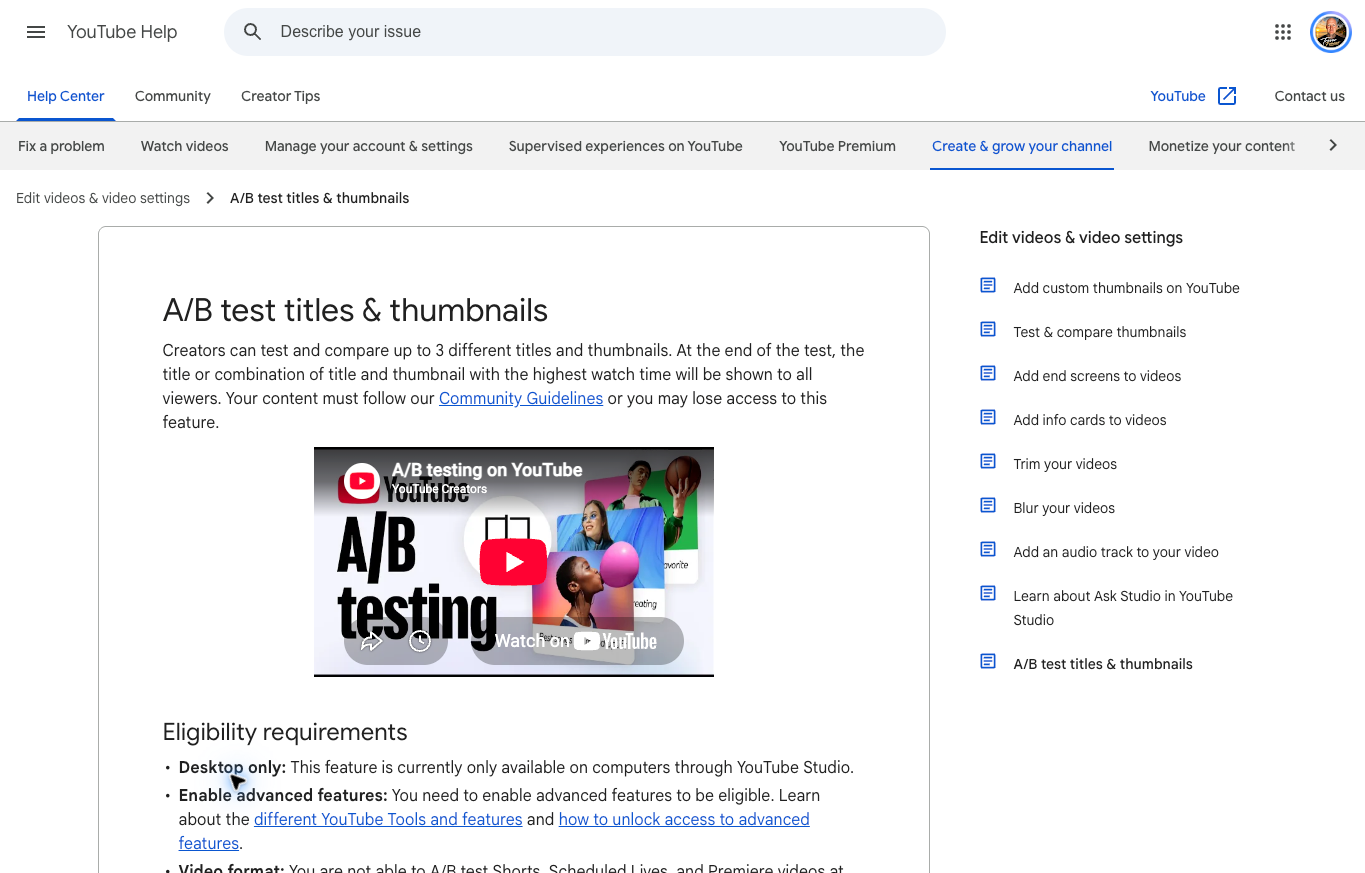
YouTube Studio is the starting point for understanding your own channel. Identify the question you need to answer before adding another dashboard. A third-party interface does not make estimates equivalent to native channel information.
Current official help describes testing up to three title, thumbnail or combined options from a computer. Advanced-feature eligibility and content restrictions apply, with Shorts excluded. Results use watch time and do not always identify a clear winner.
Changing the title or thumbnail during a native test stops the experiment. Check the actual eligible video and current instructions before starting. This article did not enable account features or run a channel test.
I would distinguish native observations from third-party suggestions. A packaging score is a research input, not measured proof of audience preference. Record the actual question and evidence before choosing a change.
TubeBuddy for research and repeated channel tasks
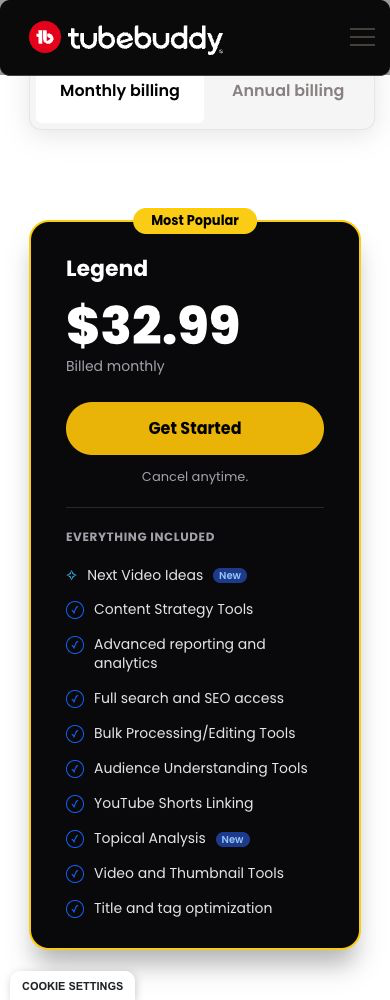
TubeBuddy presents research, title, thumbnail, analytics and productivity tools. I would investigate the particular task you need rather than buy a license solely for the size of its feature list.
The public views rechecked October 15 displayed Legend at $32.99 billed monthly, or a $26.39 monthly equivalent with a $316.68 yearly charge. The new image shows the monthly selection. These dated USD offers do not establish the applicable business license or a permanent renewal quote.
The page retains individual-creator license restrictions and a custom-priced Enterprise direction. Business, multichannel and team use need review against the applicable terms. Do not treat the individual card as a universal business quote.
Choose one defined evaluation: organizing a topic shortlist, preparing a clearer title or reviewing a repeated upload task. Provider suggestions do not guarantee ranking, views or revenue. No installation or channel-performance experiment was performed for this comparison.
InVideo for video production
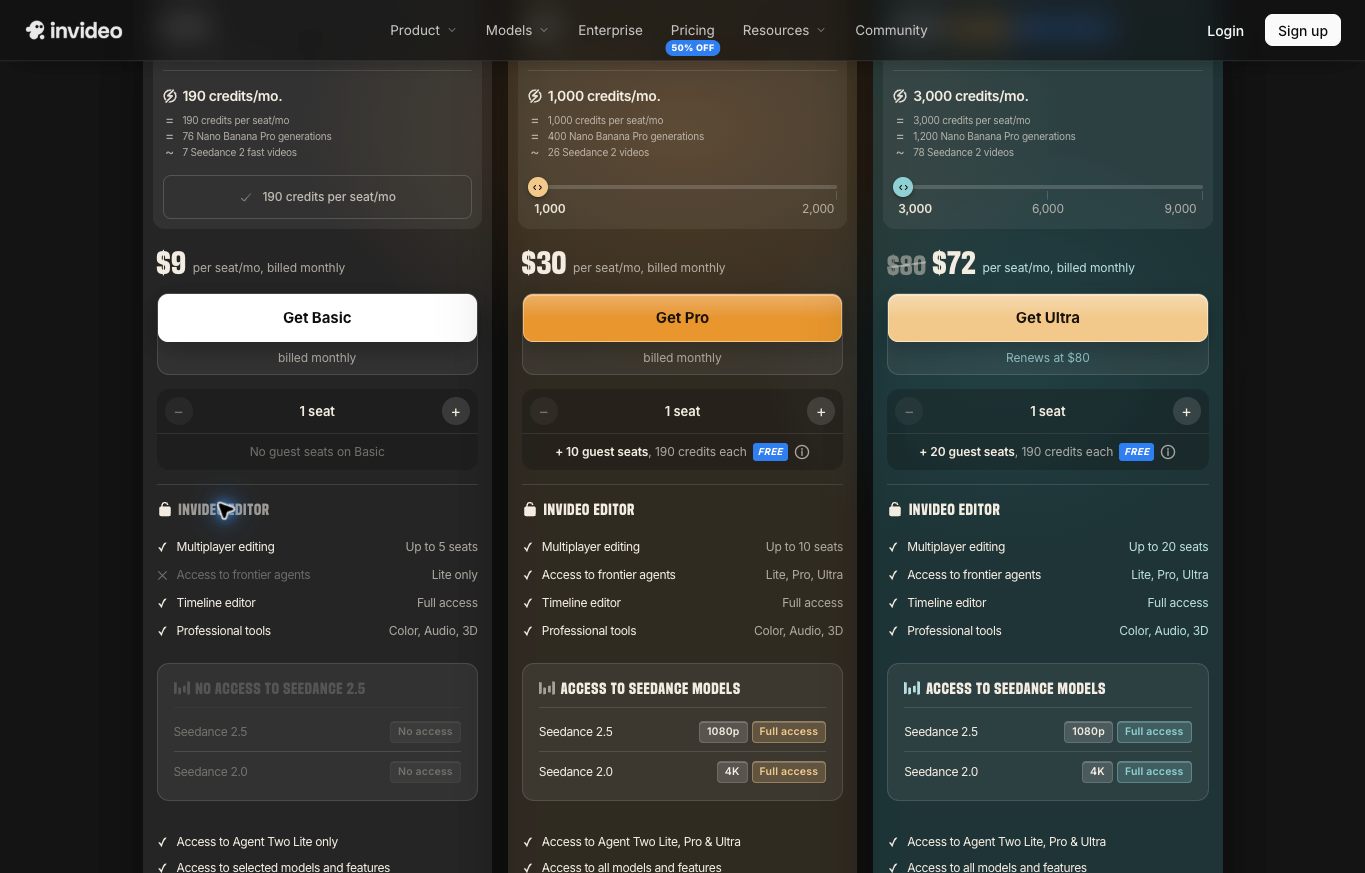
InVideo addresses production and editing rather than channel analytics. Start with the required scene or editing task, then compare the selected plan and available models.
The actual October 13 Team-plan monthly view with one paid seat displayed Basic at $9 with 190 credits, Pro at $30 with 1,000 credits, and Ultra at $72 initially with 3,000 credits. Ultra displayed an $80 renewal. This matches the dated monthly screenshot, while the web extraction showed different plan names and allowances.
Confirm the actual purchase configuration rather than combine those differing views. Seats, credits, model access and billing periods belong to the selected arrangement. Current FAQ wording states unused credits do not roll over.
A credit allowance does not establish a universal number of finished videos. Include rejected outputs, revision and editorial review in your evaluation. No production account, generation or export test was performed for this article.
Review speech, captions, visual meaning and source rights before publication. A generated scene does not establish a real event or product demonstration. Keep creative illustrations separate from actual testing and customer results.
Identify the delayed production step
List the steps between a topic idea and a finished video. Research the question, prepare the explanation, gather the evidence, record or assemble the material, edit the result and review the packaging. Identify where the work regularly stops.
A creator with clear outlines and delayed editing needs a different change from someone collecting unrelated ideas without a usable brief. Buying the same bundle for both situations ignores the underlying problem. Describe the task before comparing software.
Use your own recorded workflow time to evaluate the decision. For a hypothetical example, four hours researching vague topics and one hour editing suggest a research-process question. Those figures are an illustration, not a measured result from the providers in this shortlist.
I would change one part of the process first. Finish a useful video and record what improved or remained difficult. A defined observation gives you a better purchase decision than an assumption about which subscription a serious creator should own.
Turn a broad topic into a viewer question
A topic label does not supply a complete video promise. Shopify apps covers many different tasks. A comparison addressing a specific store problem, current fee and limitation gives the viewer a clearer reason to watch.
Collect the questions, objections and points of confusion relevant to the intended audience. Group related questions instead of turning every phrase into another upload. Several repetitive videos do not automatically provide broader coverage.
Use research suggestions as inputs for investigation. Apparent search interest does not establish your ability to produce a supported answer. Confirm the evidence before building the title around an attractive phrase.
My keyword research tools comparison addresses the wider research process. For a video, keep the title, introduction and actual explanation aligned around one defined question.
Write a short statement of what the viewer should understand afterward. If the statement is unclear, revise the outline before generating footage. An unsupported promise becomes more expensive to fix after recording and editing.
Keep packaging truthful
Treat the title as a promise about the video. Describe the actual comparison, demonstration or explanation. Avoid implying guaranteed income, universal suitability or measured results the material does not establish.
The thumbnail should reinforce the same idea. Use readable wording and a clear focal point rather than several competing messages. A screenshot supporting a walkthrough needs the actual relevant interface, not a generated success dashboard.
Keep before-and-after claims tied to documented evidence. Public plan research is a comparison, not a personal test. A fictional example should remain identifiable as an example instead of becoming apparent proof of a customer outcome.
For an authorized evaluation of TubeBuddy’s packaging tools, assess whether the suggestions help explain your actual video. Review the final wording yourself. A score does not establish audience preference or search position.
Ask one clear question in an experiment
Define what you want to learn before changing the packaging. A new title, new visual concept and different video are separate changes. Combining them makes a result harder to interpret.
Record what changes, what stays fixed and which observation would affect the next decision. Use the tool’s current instructions and the eligible video. Do not assume native and third-party experiments use identical methods.
Keep an inconclusive result inconclusive. If the evidence does not distinguish the alternatives, make an editorial choice without presenting the decision as a statistically established winner. Preserve the actual report and its limitations.
This guide did not run a channel experiment or verify TubeBuddy’s current test scheduling. The native help describes a separate testing arrangement. Avoid attributing one provider’s method to another.
Prepare evidence before assembling the video
Identify the source supporting each important claim. Product specifications, current pricing and delivery conditions require relevant documents. A generated script does not establish those facts independently.
Keep the exact product or software version identified. A demonstration of one model does not establish another model’s behavior. If the available evidence concerns a different variant, resolve the mismatch before publication.
Use authorized manufacturer images, your own footage or real provider captures where the explanation depends on actual features. Distinguish conceptual artwork from a demonstration. A creative asset should not imply testing you did not perform.
Review source rights and intended use separately from technical access. Finding an image online does not establish permission to publish the image. Obtain the relevant authorization rather than assume an editing tool supplies every required right.
Review the complete production output
For an authorized evaluation of InVideo, choose a defined editing or assembly task. Supply an approved outline and permitted assets. Record the selected plan and model before evaluating the output.
Watch the result from beginning to end. Listen to narration, read captions and examine the meaning suggested by the visuals. Those parts need agreement, not merely an attractive appearance in isolation.
Check names, numbers and instructions against the approved source. A correct caption beside an inaccurate narration still needs correction. Record rejected material rather than leave the viewer to infer which part is authoritative.
Inspect the exported file on the intended device. Confirm labels, captions and diagrams remain readable. The editor’s preview is a separate surface from the file delivered to viewers.
No production or export experiment was performed for this comparison. These are proposed evaluation steps for your own authorized trial, not measured provider performance results.
Compare billing and access as one arrangement
Record the selected subscription, billing period and number of paid seats. A monthly equivalent accompanying an annual charge differs from month-to-month billing. Introductory and renewal amounts also require separate entries.
For a hypothetical budget, a $30 monthly subscription used for six months totals $180 before other charges. Two paid seats at the same rate total $360. These calculations illustrate budgeting and do not establish your final provider quote.
Check license eligibility against the actual operation. A business channel, several channel managers or multiple channels need the applicable arrangement. An individual creator card does not establish permission for every business use.
For credit-based production, decide how you will handle depleted allowances before the workflow depends on another generation. Review additional usage terms and set a practical spending boundary. More credits do not eliminate review work.
Review account permissions before connecting software. Identify who administers the account and which access the task requires. This guide did not install an extension, authorize channel access or connect a production account.
Keep a usable production record
Save the approved outline, source documents and relevant capture dates beside the working project. The next editor needs to understand why a claim was included. A finished file without source context makes later corrections harder.
Record who approved the explanation and which questions remain unresolved. An editor should know whether a statement is verified, hypothetical or excluded. Keep unsupported material out of the published version.
When a provider changes an offer, review the affected narration, caption and description. An older screenshot remains historical material when its date and scope are explicit. Do not quietly present the old screen as current purchase evidence.
Update the destinations sharing the explanation. An article, email and video derived from one source need consistent corrections. Assign the update to an owner rather than assume every version will be repaired automatically.
Start with a repeatable review routine
Build a short checklist around the next useful video. Confirm the viewer question, factual sources, approved outline and permitted material. Review the final explanation and its packaging before publication.
Record where the work slowed down. Missing source information needs research. Repeated assembly tasks need a production-process review. An unclear promise needs editing rather than another generation allowance.
Compare the finished work with the time required for correction. A faster first draft does not establish a faster complete video. Include discarded assets and repeated exports when evaluating the workflow.
Expand after understanding the first process. Adding several tools and formats at once makes responsibilities harder to follow. Choose the next change from actual observations rather than a general expectation of growth.
Connect the channel to the business operation
My high-ticket dropshipping guide explains the retail model I teach. A channel discussing the model should separate general education from promises of individual results.
The niches list supplies categories for investigation. Choose a defined audience and research its actual questions before preparing another broad product video.
Use my supplier sourcing guide to investigate commercial relationships. A catalog listing does not establish availability, delivery performance or warranty handling for your store.
Supplier Paradise is a research resource I own. Directory leads support investigation, not approval or a confirmed supplier arrangement. Keep the verified business facts separate from discovery notes.
The business foundation checklist frames broader setup decisions. Publishing videos does not replace operating records, agreements or professional guidance.
For help with the wider business decisions, review my private coaching. The service is separate from the software subscriptions and does not establish channel-performance guarantees.
Choose the next useful change
I would review native channel information before purchasing a second analytics interface. Identify the unanswered question and the evidence needed. Another dashboard belongs in the process only when its task is clear.
Investigate TubeBuddy’s current arrangement for defined research or repeated channel tasks. Confirm the feature, applicable license and current billing before subscribing.
Investigate InVideo’s production options when assembly or editing delays the finished explanation. Match the seats, model access and ongoing charge to the actual project.
Frequently asked questions
Is paid software required to start? Review native features and the work you need to finish before purchasing another tool.
Do research and production tools serve the same task? Topic investigation and video assembly are separate stages. Choose the tool around the delayed step.
Does a packaging score guarantee views? A suggestion is not independently measured audience preference or a ranking guarantee.
Should introductory pricing become the ongoing budget? Record the selected renewal terms separately from the initial offer.
What should precede another subscription? Finish one useful workflow, identify its limitations and choose a defined evaluation for the next change.
Related guides
My AI content tools guide distinguishes production help from verified facts.
The keyword research comparison addresses audience investigation.
Read the online courses guide when learning a skill is the next task.
My affiliate-email software comparison covers another audience relationship and provider-policy limits.
The retail model explainer introduces the wider business discussion.

Trevor Fenner is the founder of Ecommerce Paradise. His main projects are Ecommerce Paradise, Supplier Paradise, and Review Paradise, which is currently in development. TrevorFenner.com publishes research-based reviews and practical guides to online business tools and remote-work services, with clear affiliate disclosures.