
The best shipping software for a small business is the one that fits the packages you actually send. That sounds obvious, but it is easy to get distracted by a discount headline and buy a subscription before you know who is printing your labels.
I would start with Easyship for a broader shipping workflow, Shippo for a small ecommerce parcel operation, and Stamps.com for a US business that needs both mailing and shipping. These are three different starting points, not three interchangeable ways to get free postage.
At Ecommerce Paradise, my approach is to build the business around the work it needs to do. Shipping is part of that foundation, right alongside your suppliers, customer service and profit margins.
This comparison uses public provider pages checked on October 11, 2026. The screenshots show those public pages, not my shipping accounts or a hands-on label test. Prices are software subscriptions in US dollars under the billing and shipment settings described below. Postage and optional services are separate.
Affiliate disclosure: some links in this article are affiliate links, and I may earn a commission at no additional cost to you. I also own Ecommerce Paradise and Supplier Paradise, which are mentioned where relevant.
Start with the shipping job, then choose the software. Compare Easyship’s available plans →
Quick comparison: three shipping tools worth considering
I am keeping this shortlist focused on software that helps with mailing or parcel shipping. A supplier directory can help you find a brand, but it does not become a shipping-label platform just because the supplier sends orders to customers.
| Software | Starting point | Observed monthly plan | Main decision |
|---|---|---|---|
| Easyship | Broader shipping and international workflow | US Free: $0, up to 50 shipments; Plus: $29, up to 500 | Origin country, checkout needs and own-carrier-account fees |
| Shippo | Small ecommerce parcel operation | Starter: $0, up to 30 labels; Pro: $19 at 1–200 labels | Label volume, support and team access |
| Stamps.com | US mailing plus shipping | Basic: $14.99, 25 stamps and 10 labels; Professional: $29.99 | Mailing needs and whether Basic’s label cap fits |
Those limits are important. A free plan with a small monthly allowance can be useful, but it is not automatically the right plan once someone else joins your operation or your shipment volume increases. Check the current selected offer before subscribing, especially when comparing monthly prices with annual equivalents.
What the best shipping software for small business needs to solve
Before you compare features, write down where an order starts and who hands it to the carrier. Are you shipping from your own office, a warehouse, a fulfillment partner or a supplier? The answer changes which software you need and who should own the account.
If you pack the boxes yourself, you need a reliable path from order data to an accurate label. That includes the shipping address, service level, package weight, package dimensions and the right tracking information going back to your store. You also need a process for corrections when an address or package size changes.
If a supplier fulfills the order, you may not need to buy the outbound label at all. You need the supplier’s shipping terms, dispatch confirmation and tracking handoff. Buying your own label without agreement can leave you paying twice or creating a service the supplier will not use.
My high-ticket dropshipping guide explains the business model behind that distinction. Software should support your fulfillment arrangement, not quietly replace it with an arrangement nobody agreed to.
I would also decide what counts as a problem worth paying to remove. Copying addresses manually, checking several carrier websites and answering tracking questions are different problems. A tool that handles one well might still require a separate process for another.
Three options, with their useful differences
1. Easyship: a starting point for a broader shipping workflow
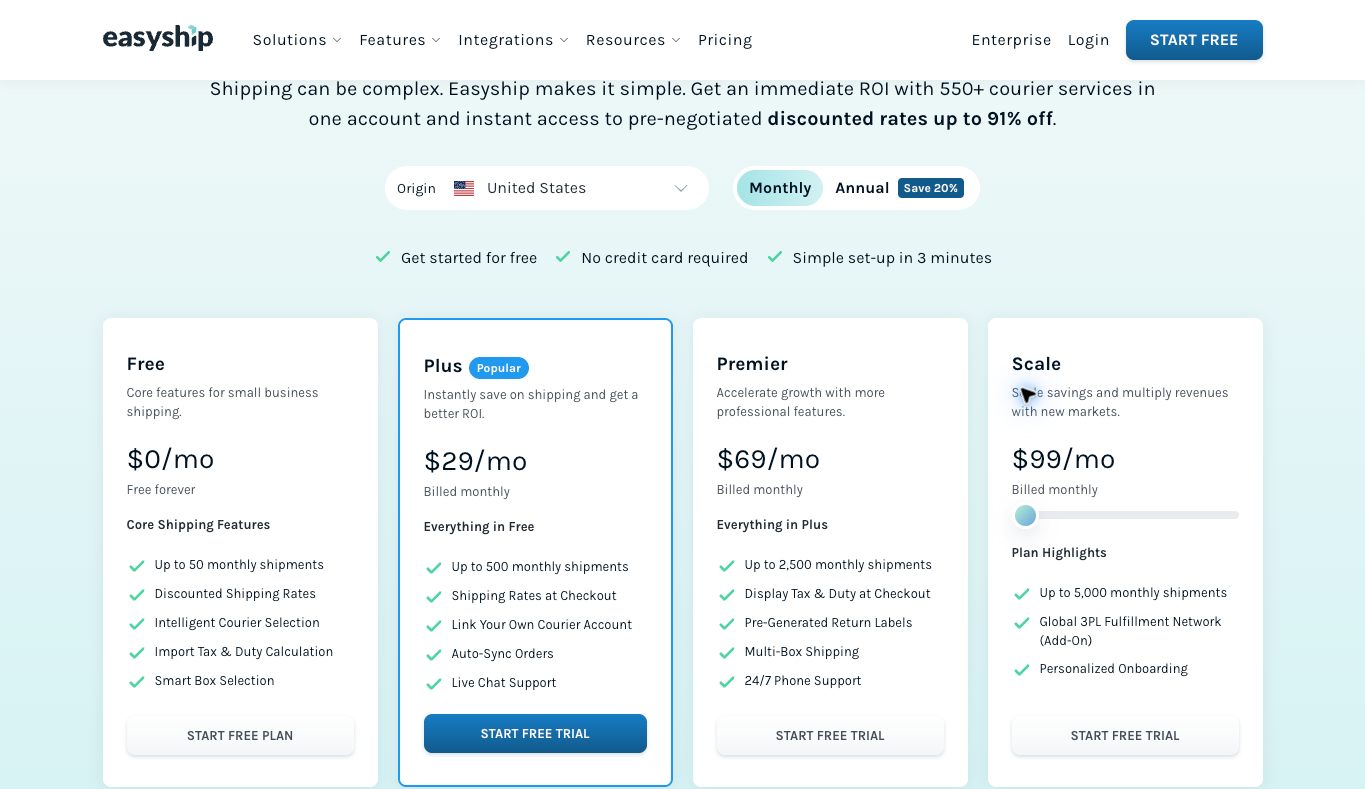
I would consider Easyship when you want to evaluate shipping choices across a broader workflow, including international requirements. Start with your origin country and the features you need, rather than assuming the first price you see applies everywhere.
The public US monthly view showed a Free plan for up to 50 shipments. Plus was $29 for up to 500, Premier was $69 for up to 2,500, and the observed Scale setting was $99 for up to 5,000. These are shipment allowances, not a postage budget.
The plan distinctions matter more than the price ladder by itself. Plus listed order auto-sync and checkout rates. Premier listed duties at checkout, pre-generated return labels and multi-box shipping. Verify compatibility with your store and chosen plan before making one of those features part of your customer promise.
One extra cost deserves attention: linking your own courier account is not the same thing as using a provider’s available shipping rates. The US comparison table showed own-account labeling fees of five cents on Plus, four cents on Premier and three cents on Scale. Free did not include own-courier-account linking in that table.
My practical next step would be to compare a few real package profiles without purchasing postage. Use the correct origin, destination, weight and dimensions, then check the service conditions. Do not treat a headline maximum discount as the savings your business will receive on every package.
For international orders, make sure you understand who pays duties and what the customer sees before checkout. A calculation feature does not remove the need for accurate product information or a clear delivery policy. Check how the proposed workflow handles a return across the same border.
If those are the problems you need to solve, review Easyship’s current origin-specific plans and compare the relevant tier. I would not pay for international or checkout features you do not expect to use.
Make fulfillment part of niche research. Explore the free Ecommerce Paradise niches resource →
2. Shippo: a starting point for a small parcel-shipping operation
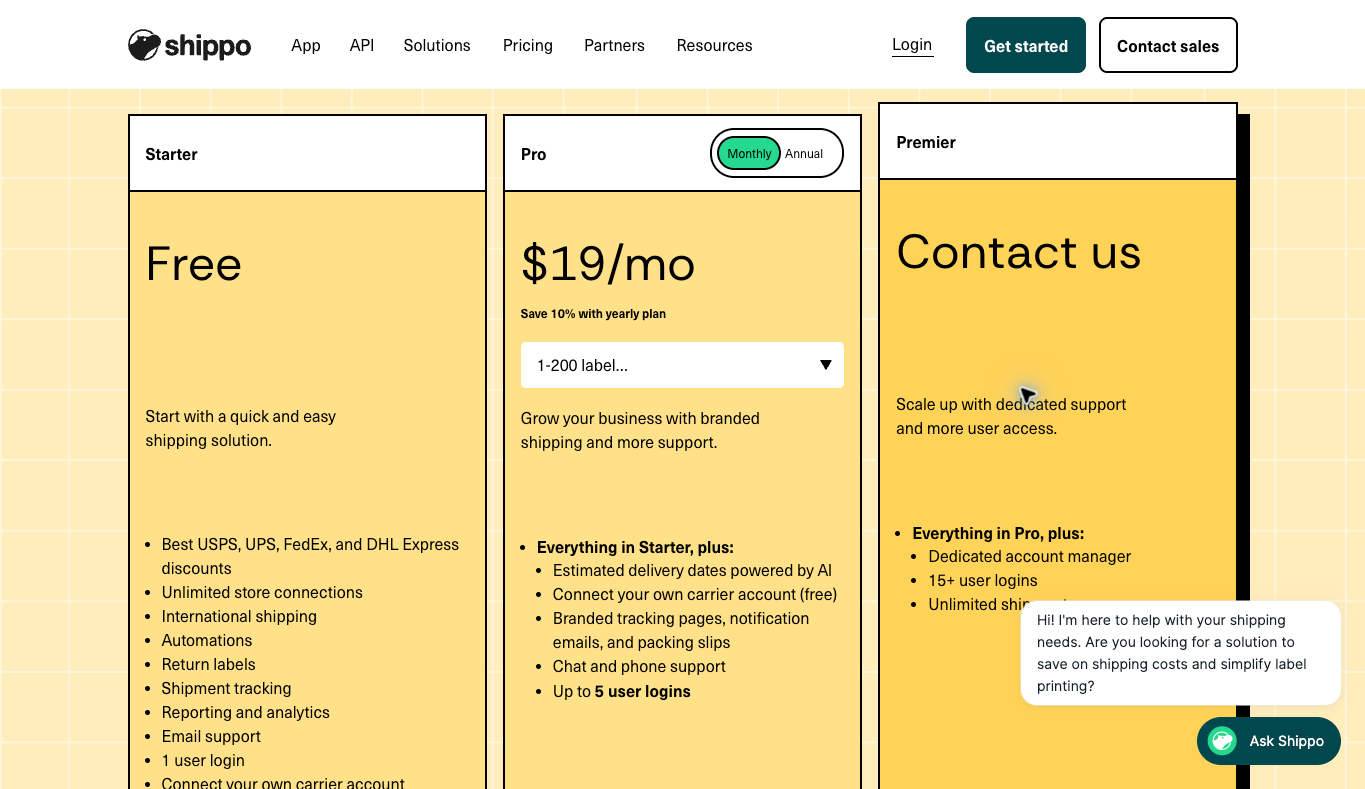
I would put Shippo on the shortlist for a business that handles its own ecommerce parcels and wants a focused place to evaluate labels, tracking and returns. It is worth looking at the actual App plans rather than mixing them with separate API pricing.
Starter showed no software subscription charge for up to 30 labels a month and one user login. Pro showed $19 monthly with the 1–200-label band selected. The annual option displayed a lower monthly equivalent, but that is a different billing commitment.
Pro also listed up to five user logins, branded customer-facing shipping materials and chat and phone support. If another person processes orders, that combination may be more relevant than simply increasing a label allowance. You still need to check the access controls and support availability that apply to your account.
Starter’s own-carrier-account fee was five cents per label, while Pro listed that fee as waived. That does not mean postage is free on Pro. Carrier charges, optional insurance and certain other services remain separate from the subscription.
Before connecting a live store, map the fields you need to move. An order number and a customer name are not enough if the product needs a specific box size or arrives in more than one package. Decide who corrects incomplete information before a label is purchased.
I would also check the tracking notification workflow carefully. If your store and shipping tool both email the customer, you can create duplicate messages or conflicting information. Decide which system owns each update and what happens when an order is only partially fulfilled.
The next step is to compare Shippo’s current App plan for your monthly volume. Look at the next volume band too, so a normal increase in orders does not surprise you with a different subscription cost.
3. Stamps.com: a starting point for US mailing and shipping together
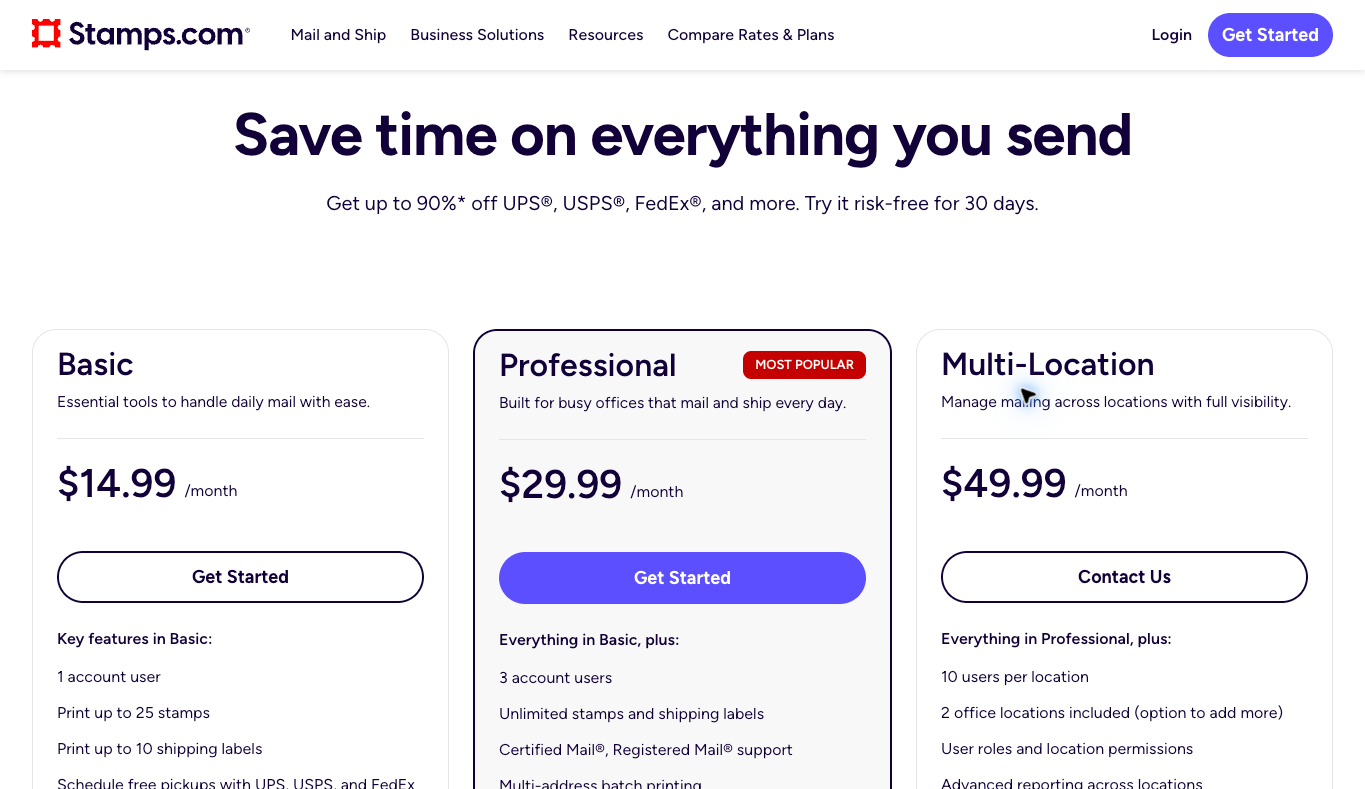
I would consider Stamps.com when the business sends office mail as well as parcels. That is a different use case from a store whose only requirement is generating labels for customer orders.
The current public Basic plan showed $14.99 monthly, one account user, up to 25 stamps and up to 10 shipping labels. Professional showed $29.99, three users and unlimited stamps and shipping labels. Postage is still paid separately, including on a plan that allows unlimited label printing.
Professional also listed batch printing and live chat and phone support. Multi-Location started at $49.99 and included two office locations in the public view. A small ecommerce business should not buy a multi-location plan just because it sounds more established.
The key question is whether mailing belongs in your workflow. If you send documents regularly, evaluate that alongside your parcels. If you only ship products, compare the actual label allowance and operational fit against the other tools instead of choosing a familiar name automatically.
Basic’s ten-label limit deserves a second look. Ten shipments can be a very small allowance for an active store, even when the monthly fee looks reasonable. Do not read an unlimited-printing marketing headline and assume it describes every plan.
The public page described a trial followed by recurring monthly billing. Confirm the terms of the offer you select, what is included and how cancellation works before enrolling. Carrier services, postage and optional insurance can create charges beyond the software subscription.
If your office really needs both workflows, check Stamps.com’s current mailing and shipping offer. I would compare Basic and Professional against a normal month’s activity, not your quietest week.
Compare total cost, not just the subscription
A shipping subscription is only one line in your shipping cost. You also have postage, packing materials, any optional insurance and the time someone spends preparing the order. Depending on the shipment, carrier adjustments and additional services can change the final amount.
Here is a hypothetical example, not a provider quote. Suppose you ship 100 parcels a month and a paid workflow costs $20 more than the free alternative. If it saves two minutes of work per parcel, that is 200 minutes, or three hours and twenty minutes, across the month.
If you value that work at $18 an hour, the time saved is worth $60 in this example. That could justify the extra subscription cost even without a cheaper postage rate. But the calculation falls apart if you do not actually save those minutes or the new tool adds another manual step.
Now suppose another option produces a quote that is 40 cents lower on each of those 100 parcels. That would be $40 in quoted postage savings, before considering service differences or later adjustments. It is useful arithmetic, but it is not evidence that your business will get that result.
Use your own package data to compare like with like. The same destination with a different delivery service is not an identical comparison. Neither is an unpacked product weight compared with the weight of the finished box.
Keep subscription bills and shipment costs in a format your bookkeeper can reconcile. My accounting software comparison is a useful next read if shipping costs disappear into a general expense category. You need to see what each order costs, not just what the software costs.
For dropshipping, check the supplier handoff first
This is where I would slow down before buying anything. In a supplier-fulfilled store, the supplier may select the carrier, print the label and send you tracking. Your job is to confirm the arrangement and communicate accurately with the customer.
Ask who owns the outbound shipping account, who pays the carrier and whether your store’s order number appears in the supplier’s records. Then ask how tracking gets back to you. A process that relies on finding an email every afternoon can become a pain in the butt when order volume grows.
My supplier sourcing guide explains the relationship side of this work. An approved dealer relationship and written fulfillment terms are more valuable than installing another app and hoping the supplier adjusts.
You can use Supplier Paradise as a supplier-discovery starting point. I own it, and a listing is not a guarantee that a supplier accepts your store, provides a particular shipping integration or meets a delivery timeline.
Also separate parcels from freight. A small accessory and a large piece of equipment can require completely different delivery arrangements. Do not assume a parcel-label tool includes a freight quote, appointment scheduling, liftgate service or the delivery terms required for an oversized product.
Check those requirements during product selection. The high-ticket niches list can help you explore categories, but you still need to research the actual product’s fulfillment costs. A good-looking margin can disappear when delivery expectations are wrong.
Build the store around real supplier terms. See the Ecommerce Paradise done-for-you build service →
What to verify before connecting your live store
I would start with a small written workflow and a few representative package profiles. Include an ordinary order, a multi-package order if you sell one, and an order that needs an address correction. You do not need to purchase a label just to organize the questions you want answered.
Confirm the store integration supports the fields and order states you depend on. Check what happens after an order is edited or cancelled. You want to know whether the tool imports that change, leaves an old version in place or requires someone to correct it manually.
Check your printer and label format before committing to a large rollout. A supported label workflow still needs to fit the equipment in your operation. Make sure the person processing orders can identify a bad print and knows the normal correction process.
Then check account ownership and staff access. Use appropriate individual permissions instead of giving every helper the owner’s login. Write down who can purchase postage, issue a return label and change billing settings.
Customer addresses are operational data, not material for a public software demo. Use only the information the task requires and keep example screenshots free of customer details. If you later document your process, make that distinction part of the training.
Business identity and billing information should also match your actual setup. My business formation checklist provides a broader foundation to review. It does not replace provider requirements or professional advice for your circumstances.
Returns and tracking need their own process
A label being created is not proof that a carrier has the package. Keep that distinction in your customer updates. If an order has not been handed over, do not describe it as moving through the delivery network just because a tracking number exists.
Assign someone to look for exceptions. That could include an order with no expected carrier scan, a failed delivery attempt or a return waiting for instructions. Software can surface information, but the customer still needs a person who knows what to do next.
For returns, establish the destination and approval process before sending a label. A supplier may require an authorization number or a different receiving address. Sending a parcel back to the wrong location can make an already frustrating situation worse.
Check when return-label charges apply and what happens to an unused label. Do not assume the cancellation or refund process is identical across providers or carriers. Keep the relevant rules in your procedure so staff do not have to improvise.
Improve the process before adding more volume. Review the Ecommerce Paradise scaling service →
How to choose the best shipping software for small business
My recommendation is to choose one tool for one clear job and verify the workflow before expanding it. Easyship is worth evaluating for broader shipping requirements. Shippo is worth evaluating for a small ecommerce parcel operation. Stamps.com is worth evaluating when US mailing and shipping belong together.
If your supplier already owns outbound fulfillment, your next step may be improving the tracking handoff rather than subscribing to any of them. That is still a useful outcome. Spending less on unnecessary software is part of building a profitable business.
Choose the smallest plan that covers your real requirements, then write down what would trigger an upgrade. That might be monthly volume, another staff login, a support requirement or a specific customer-facing feature. A clear trigger is better than buying the largest plan because you hope the store will grow.
Keep the decision reversible where possible. Know how to export the shipment records you need and how your staff would process orders if the tool were temporarily unavailable. A simple fallback prevents a software problem from becoming a customer-service mess.
Frequently asked questions
What is the best free shipping software for a small business?
Easyship and Shippo had free software tiers in the public views checked for this article, with different shipment allowances. Postage is not free. Compare your volume, origin and required features before treating either free tier as a complete operating solution.
Does an unlimited-label plan include free postage?
No. Unlimited label printing describes a software allowance, not unlimited paid transportation. Check postage, insurance, carrier services and any own-account fees separately.
Do I need shipping software for high-ticket dropshipping?
Not necessarily for outbound labels. If your supplier handles shipping, focus first on written fulfillment terms and tracking updates. You may still need a separate process for returns or products shipped from your own location.
Should I choose monthly or annual billing?
I would verify the workflow before making a longer commitment. Compare the total charge, renewal terms and cancellation rules rather than comparing an annual monthly equivalent with a true month-to-month price.
Can these tools guarantee the cheapest rate for every order?
Do not assume that. Compare accurate package profiles and equivalent services, then consider the final charges and operational fit. A maximum discount advertisement is not a guarantee of your savings.
Build a shipping process you can actually run
Keep this simple: know who ships, what each package costs and who owns the next action when something goes wrong. Then choose software that makes those jobs easier. You do not need a complicated stack to have a professional operation.
For the wider store foundation, the Ecommerce Paradise masterclass is another place to start learning the model. Choose guidance based on the work you need help with, not a promise that software or a course will remove the work.
Need help connecting the operational pieces? Explore Ecommerce Paradise coaching →
Related guides
Read my wholesale supplier comparison to separate supplier-discovery options from actual fulfillment agreements.
My ecommerce platform comparison covers the store foundation that your shipping workflow needs to support.
The free Shopify apps guide explains why I would start with a specific job instead of installing apps just because they are free.
The virtual assistant hiring comparison helps you plan the role before handing someone your order-processing work.
My small-business VoIP comparison is relevant when shipping exceptions need a clear phone-support workflow.

Trevor Fenner is the founder of Ecommerce Paradise. His main projects are Ecommerce Paradise, Supplier Paradise, and Review Paradise, which is currently in development. TrevorFenner.com publishes research-based reviews and practical guides to online business tools and remote-work services, with clear affiliate disclosures.