

The best live chat software for ecommerce is the one your team can actually operate. A chat widget looks simple, but somebody still needs to answer the question, understand the order and follow through when the customer needs help.
I would start with Tidio for an ecommerce-focused chat and automation workflow, Help Scout for a team managing chat alongside a shared support inbox, and Text by LiveChat for a live-chat workflow with its current AI and usage options. These are different starting points, not three guarantees of higher sales.
At Ecommerce Paradise, I focus on systems you can run consistently. For a high-ticket store, that means getting accurate answers to the buyer and knowing when a conversation needs a person.
This comparison is based on public official pages checked October 11, 2026. I did not connect a store, create a paid account or run customer conversations for this article. The provider screenshots are research references, not proof of hands-on testing.
Affiliate disclosure: some links in this article are affiliate links, and I may earn a commission at no additional cost to you. I also own Ecommerce Paradise and Supplier Paradise.
Choose a support workflow before adding the widget. Explore Tidio’s current options →
Quick comparison: three support workflows
| Software | Starting use case | Observed monthly price | Important cost check |
|---|---|---|---|
| Tidio | Ecommerce chat and automation | Starter $29, 100 billable conversations | Human conversations, Lyro and Flows have different allowances |
| Help Scout | Chat within a shared support operation | Standard $30 per user | Team seats and AI Answers add-on |
| Text by LiveChat | Live chat, inbox and current AI options | Essential $25 per user | AI resolutions, API usage and legacy-plan differences |
These prices use the month-to-month context checked for this article, not the lower annual equivalents. They are starting comparisons, not a quote for your whole business. Verify the selected offer, taxes and optional services before subscribing.
Start with the support job, not the widget
Before you install anything, write down what customers ask before and after an order. Product fit, delivery details, tracking and return instructions may require different information. A canned reply is useful only when it answers the actual question accurately.
Then decide who owns the conversation. If a customer starts in chat and needs an email follow-up, somebody should be responsible for that handoff. Otherwise you end up with a friendly widget and an unanswered support problem.
Also choose the hours you can realistically cover. AI availability is not the same as a staffed support team. Tell the customer what happens when a person is unavailable and how they can request help.
What the best live chat software for ecommerce needs to solve
1. Tidio: ecommerce chat with separate automation allowances
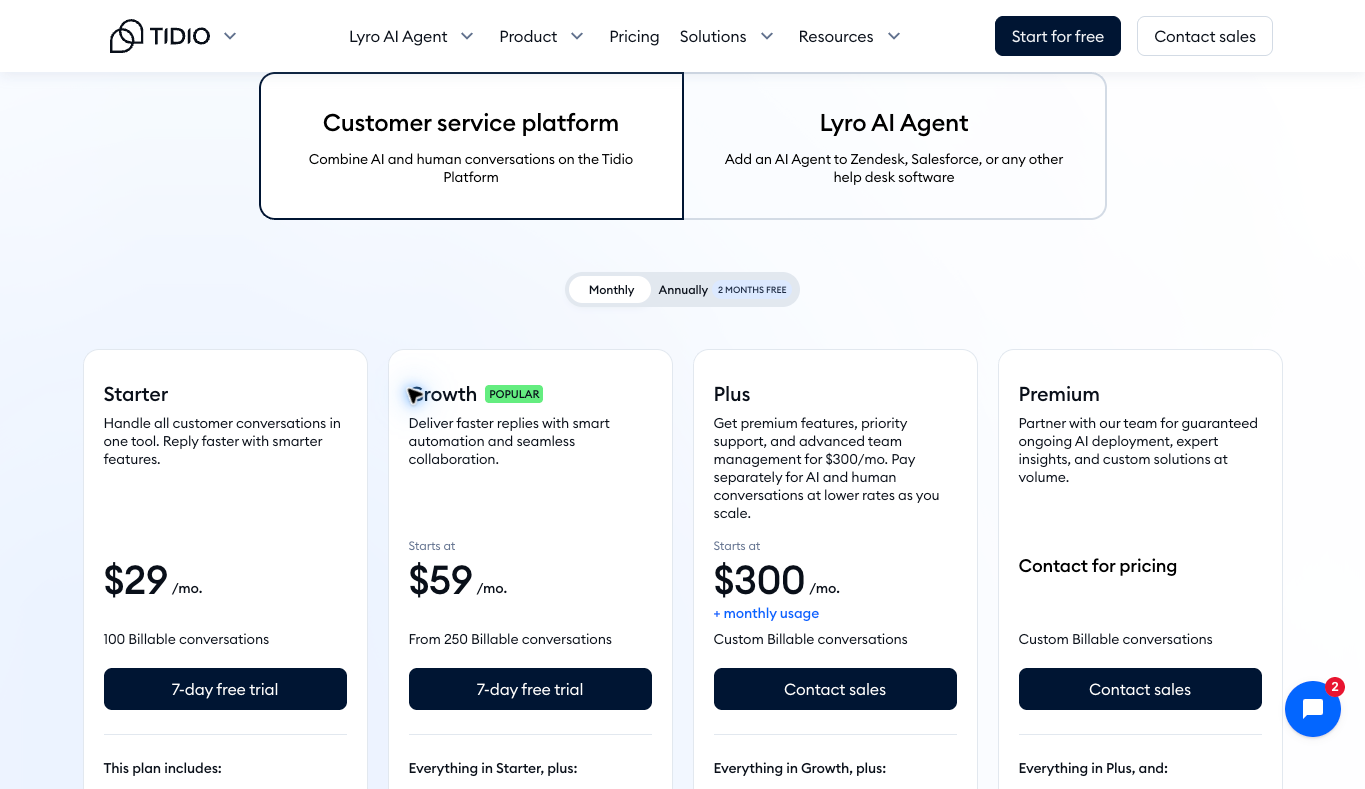
I would consider Tidio when you want to evaluate live chat, ticketing and ecommerce automation together. Start with the number of support conversations you expect and the features your team needs.
The current monthly Starter view showed $29 with 100 billable conversations. Growth started at $59 with a starting allowance of 250. The annual view showed lower monthly equivalents, so do not compare those numbers as if the commitment were identical.
The first 50 Lyro AI conversations were described as one-off, with the comparison calling them a lifetime allowance. They are not 50 new free AI conversations every month. Review the paid AI quota separately if automation is part of your operating plan.
The comparison also showed a free plan with 50 billable conversations and 100 Flows visitors reached. That can be a starting point for evaluating a small workflow, but it is not unlimited support capacity. Decide which limit your actual store is likely to reach first.
I would evaluate Tidio’s current plan and add-ons against the questions you want it to handle. A product-fit conversation may need a person, while a simple policy question may be suitable for a verified knowledge-base answer.
Choose products you can support accurately. Explore the free niches resource →
2. Help Scout: chat as part of a shared support operation
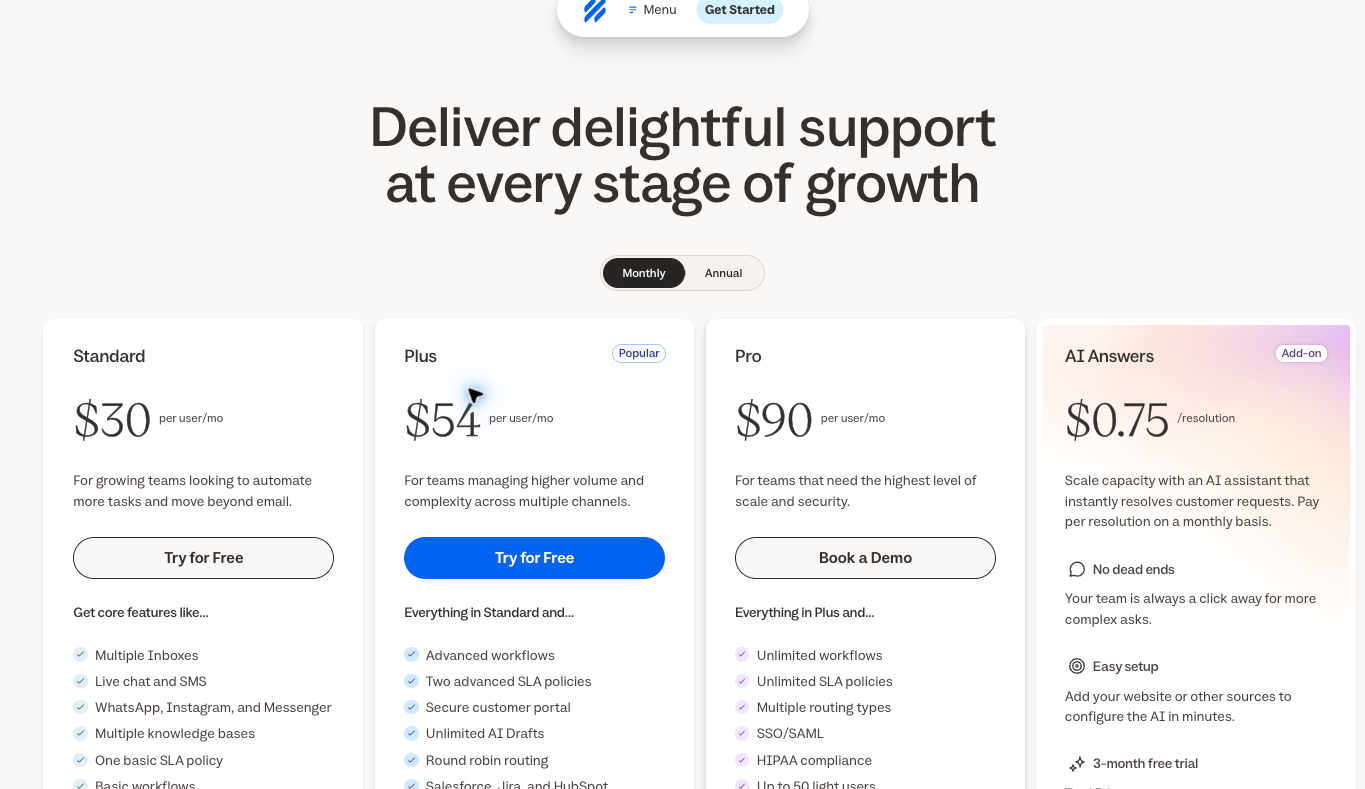
I would consider Help Scout when the team needs to manage chat alongside a shared inbox and knowledge base. The important question is whether the full conversation can stay organized when more than one person handles support.
The monthly view showed Standard at $30, Plus at $54 and Pro at $90 per user. Those prices are per user, not the total cost for an entire team. The initial annual view displayed different monthly equivalents.
AI Answers was listed separately at $0.75 per resolution. An AI feature being available does not mean every AI-assisted interaction is included without another charge. Estimate the team and usage cost before choosing a plan.
A shared inbox becomes useful when the conversation changes channels or owners. Check how a person sees the history, assigns the next step and follows up. If the team still has to copy the whole chat into an email, the process may need more attention than the subscription tier.
The public page described a 15-day trial for Standard and Plus without a credit card. I would use an authorized evaluation process to inspect the workflow, but I am not claiming that I ran that trial. The next step is to compare Help Scout’s current support plans against the way your team works.
3. Text by LiveChat: verify the current product and plan
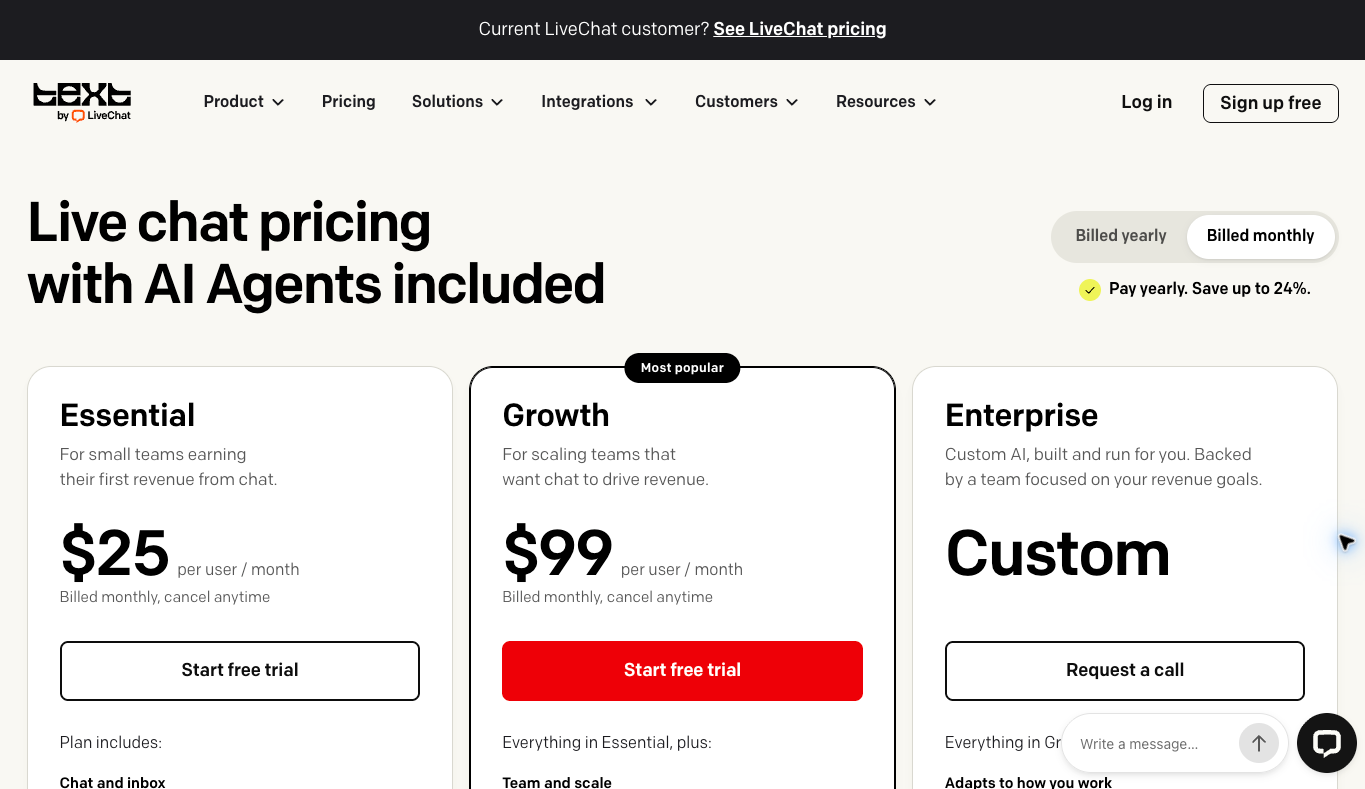
I would consider Text by LiveChat for a live-chat workflow where you want to evaluate its current shared inbox, AI and team options. Check the current Text plan rather than assuming a familiar product name describes an older subscription.
The official pricing FAQ lists Essential at $25 per user with monthly billing, or $19 per user per month equivalent billed annually. Growth is $99 monthly or $79 annually equivalent. Extra AI resolutions and API usage can add costs.
Existing LiveChat customers should not assume their subscription includes every feature on the newer Text page. The provider explicitly distinguishes those plans. Check the actual product, plan and allowances you are selecting before making a customer-service promise.
The current Text FAQ listed ten monthly AI resolutions on Essential and 200 on Growth. Extra packages of 50 resolutions were $49.50. The base price is per user, while some allowances are per account, so adding people does not automatically multiply every included quota.
If this workflow fits, review Text by LiveChat’s current offer and the relevant plan. Verify the allowance that matters to you rather than reading AI included as unlimited AI use.
Calculate the team cost before choosing a plan
Here is a hypothetical example using the monthly prices observed for this article, not a quote for your account. A three-person Help Scout Standard team would have $90 in base monthly seat charges at $30 per user. That excludes optional usage charges, taxes and any other services.
A three-person Text Essential team would have $75 in base monthly seat charges at $25 per user. If it needed one additional 50-resolution package at the observed $49.50 price, the combined base and that package would be $124.50. Other charges may apply depending on the setup.
Tidio uses a different structure in the inspected plans, so do not simply multiply its Starter price by the number of agents. Review the included seats, billable conversations and add-ons. Comparing unlike billing units can make a cheap-looking option seem more or less expensive than it really is.
Also budget for the people doing the work. A $30 software seat is not the cost of a trained support representative. Estimate staffing, training, follow-up and the time needed to maintain accurate answers.
I would track the software and staffing expense alongside the work completed. The useful question is whether the process handles customer needs reliably at a sensible total cost. A lower subscription bill does not help if missed conversations create more work later.
Human handoff matters for high-ticket questions
A buyer considering an expensive product may ask about fit, installation, warranty or delivery. Those questions need accurate answers based on the specific product and supplier terms. A chatbot should not invent a specification just to keep the conversation moving.
Define the questions that go to a person. That could include an uncertain compatibility question, an unusual delivery arrangement or a damaged item. Make the handoff easy for the customer and make sure someone on the team actually receives it.
My high-ticket dropshipping guide explains the store model behind those support needs. Software supports the process, but your business remains responsible for what you promise the buyer.
For supplier-specific questions, use the written terms rather than a generic script. The supplier sourcing guide helps you gather the information before it becomes a support emergency.
You can use Supplier Paradise as a discovery starting point I own. A listing does not guarantee a delivery time, warranty response or dealer approval. Confirm those details directly before putting them in your chat knowledge base.
Build support around the actual supplier terms. See the Ecommerce Paradise store build service →
Write a useful offline and follow-up process
If nobody is available, the widget should not pretend a live person is about to reply. Explain the support hours and what happens next. Ask only for the information needed to route the request properly.
Give every follow-up an owner and a reasonable internal deadline. A visitor who asked a product question should not disappear into an inbox nobody checks. Decide where the conversation lives after chat ends and how the team knows it is finished.
Keep order-status messages precise. A tracking number being created is not proof that a carrier has the package. If you do not have a confirmed update, say what you know and what you are checking rather than filling the gap with reassurance you cannot support.
For returns or damage, do not promise approval before checking the process. The person handling the conversation needs the right policy and escalation contact. A quick wrong answer can be more expensive than a slightly slower accurate one.
Keep the knowledge base and access controls accurate
An automated answer is only as useful as the information behind it. Keep shipping, returns, product details and support hours current. Assign someone to review changes when you add a supplier or update an offer.
I would separate facts the tool can answer from decisions it cannot make. It may explain a published return policy, but an exception may require approval. It may summarize a product specification, but uncertainty about suitability should be escalated.
Do not put customer payment details, passwords or unnecessary personal information into a public support article or demo. Review the provider’s current data practices and the permissions your team needs. Use appropriate individual access instead of sharing the owner login.
Your business foundation checklist is a broader place to review ownership and responsibilities. It does not replace a privacy review of the particular software and integrations you select.
Test the workflow before relying on it
Train the person answering chats to recognize the difference between a published fact and an assumption. If a supplier says an item usually ships within a range, that is not a guaranteed arrival date. If a product has several variants, the answer needs to match the variant the buyer is considering.
Keep a short internal escalation note for each common exception. Include where to find the current policy, which person approves the decision and what information they need. That gives a newer team member a useful next step without asking them to improvise a promise.
Also review the handover between shifts. An unresolved chat should include the customer’s question, what has already been checked and the next action. A long transcript without a clear handover can leave the next person repeating the same questions and frustrating the buyer.
Use an authorized test process with non-sensitive example information. Prepare a simple product question, an uncertain product question, an offline request and a conversation that needs a person. Check the handoff and follow-up, not just whether the widget opens.
Do not judge the whole system by a single successful automated answer. Check whether incorrect or incomplete information is escalated appropriately. Make sure someone can review the conversation and correct the knowledge base when needed.
Also check the store on mobile. The widget should not block the product options, cart controls or important policy information. A support feature that gets in the way of shopping is not doing the job you installed it for.
Review performance using measures you can collect, such as unanswered conversations, follow-up completion and repeated questions. Those measures can help identify a process problem. Do not attribute every sales change to chat software just because it was installed during the same period.
Improve the process before expanding the team. Review Ecommerce Paradise scaling support →
How I would choose the best live chat software for ecommerce
I would evaluate Tidio for ecommerce chat and automation, Help Scout for chat within a shared support operation, and Text by LiveChat for its current chat and team workflow. The right choice depends on the job, your staffing and the total cost at the usage you expect.
Choose the smallest plan that meets the requirements you have actually written down. Then decide what would justify an upgrade. More conversations, another support channel or a specific routing requirement can be valid reasons; hoping the store grows is not enough by itself.
Keep the customer experience simple. One clear place to ask, one accountable next step and accurate information are more important than a long list of automation features. That is the foundation I would build first.
Frequently asked questions
Is live chat worth adding to an ecommerce store?
It can be useful when you have a real process for answering and following up. Start with the customer questions, support hours and staffing rather than assuming a widget alone will improve sales.
Is AI included the same as unlimited AI support?
No. Providers use different allowances and billing units. Tidio’s first 50 Lyro conversations were one-off, Help Scout AI Answers was separately priced, and Text plans had specific monthly resolution limits.
Should I compare monthly or annual prices?
Compare the same commitment. An annual monthly equivalent usually involves paying for a longer period. Check the total charge, renewal and cancellation terms before deciding.
Can a chatbot answer every high-ticket product question?
Do not assume that. Use verified product information and a clear human handoff for uncertainty, unusual delivery requirements or decisions needing approval.
Do newer Text features apply to an existing LiveChat subscription?
Not automatically. The provider distinguishes the current Text plans from existing LiveChat plans. Check the actual product and subscription before relying on a feature.
Need help connecting support to the wider store? Explore Ecommerce Paradise coaching →
Related guides
My VoIP comparison covers the phone-support side of an online business.
The virtual assistant hiring guide helps you define a support role before delegating it.
Read the shipping software comparison to understand the fulfillment information support staff need.
My free Shopify apps guide explains why a specific job should come before another installation.
The ecommerce platform comparison covers the store foundation your support tools need to fit.

Trevor Fenner is the founder of Ecommerce Paradise. His main projects are Ecommerce Paradise, Supplier Paradise, and Review Paradise, which is currently in development. TrevorFenner.com publishes research-based reviews and practical guides to online business tools and remote-work services, with clear affiliate disclosures.