

Here’s the truth about Amazon seller tools. The best one is the tool that fits the next job in your business, and product research and ongoing repricing are two very different jobs. So figure out the decision you haven’t made yet before you buy any software.
A research estimate does not prove supplier access, product eligibility or profit. A pricing rule needs real costs and limits behind it. Keep your operating facts separate from the vendor’s feature description.
At Ecommerce Paradise, I connect tools to the actual business model. I’ve been selling online since 2005, and in 2022 I sold a multi-store ecommerce portfolio doing about $7M a year. That taught me to pick tools around the business model, and an Amazon marketplace operation works very differently from a supplier-dependent standalone store.
If the standalone side is new to you, my guide to what high-ticket dropshipping is explains that model in full. Some product research overlaps, but the responsibilities don’t.
This shortlist compares Helium 10 for research and listing workflows with Feedvisor for a pricing-operation investigation. Neither tool guarantees sales, margin or account approval.
Keep that in mind: the two real provider images keep their October 11, 2026 dates. No seller account, inventory purchase, repricing action or accuracy experiment was performed for this comparison.
Disclosure: qualifying purchases through affiliate links earn me compensation at no extra cost to you. I own Ecommerce Paradise and Supplier Paradise. A recommended tool does not replace the marketplace’s requirements or your own unit-cost review.
Compare the seller task
| Tool | Investigation | First verification |
|---|---|---|
| Helium 10 | Research and listing workflow | Relevant marketplace, feature allowance and fees |
| Feedvisor | Operating pricing problem | Actual scope, supported inputs and permitted actions |
Helium 10 for research and listing tasks
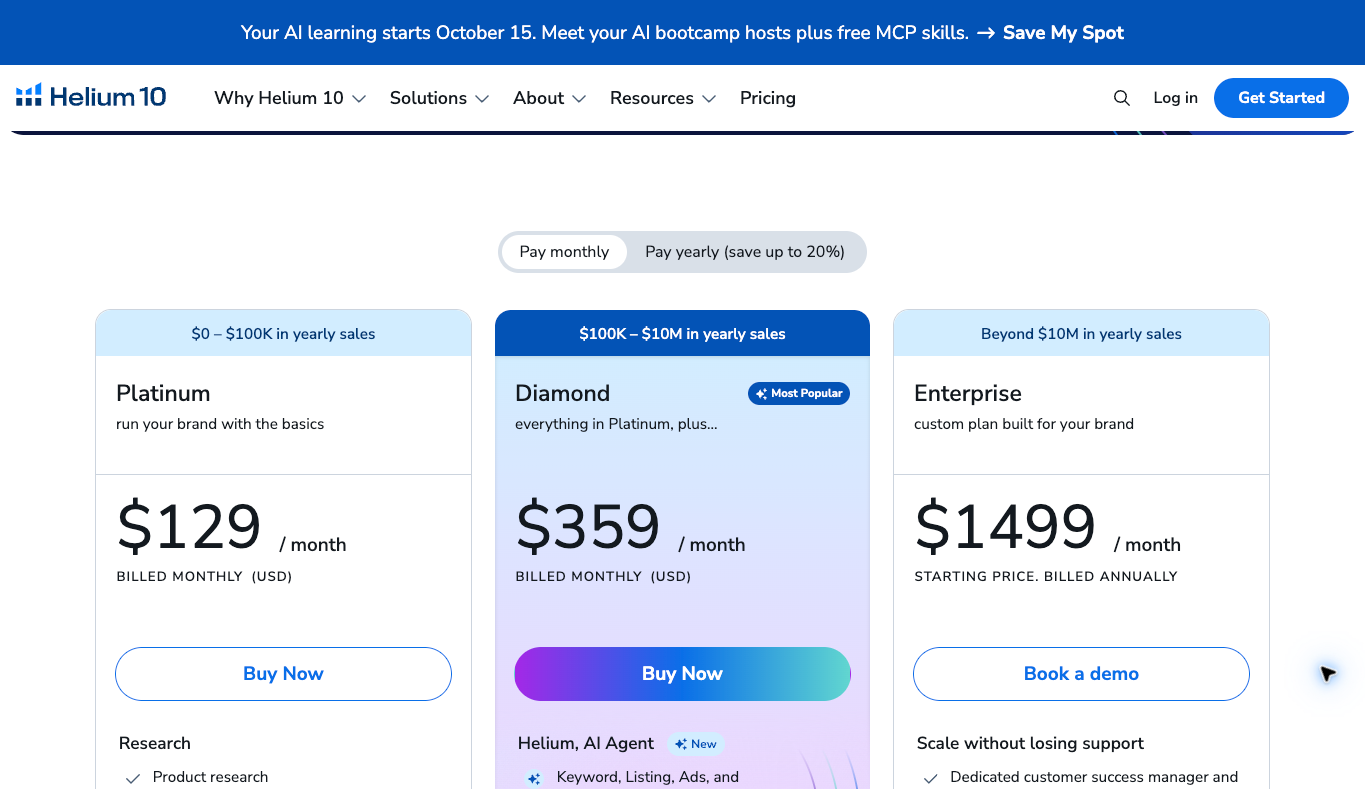
I’d look at Helium 10 when you have a defined research or listing task that needs support, because it bundles product research, keyword research and listing tools in one place. Confirm the actual marketplace and tool allowance before you choose a plan.
The current Helium 10 pricing page lists Platinum at $129 monthly and Diamond at $359 monthly. Annual billing shows monthly equivalents of $99 and $279. Enterprise displays a starting $1,499 monthly figure billed annually, which is not an interchangeable month-to-month offer.
Platinum covers product and keyword research with basic performance tracking. Diamond lists extra listing, advertising and operations tools. The pricing FAQ also lists a separate 2% management fee on PPC spend managed through Helium 10 Ads for Diamond customers.
Review the features and fees you actually need instead of treating a seat subscription as the full cost. The dated pricing image documents its selected context. No account connection, listing change or product-research accuracy experiment was performed for this guide.
Feedvisor for a defined pricing operation
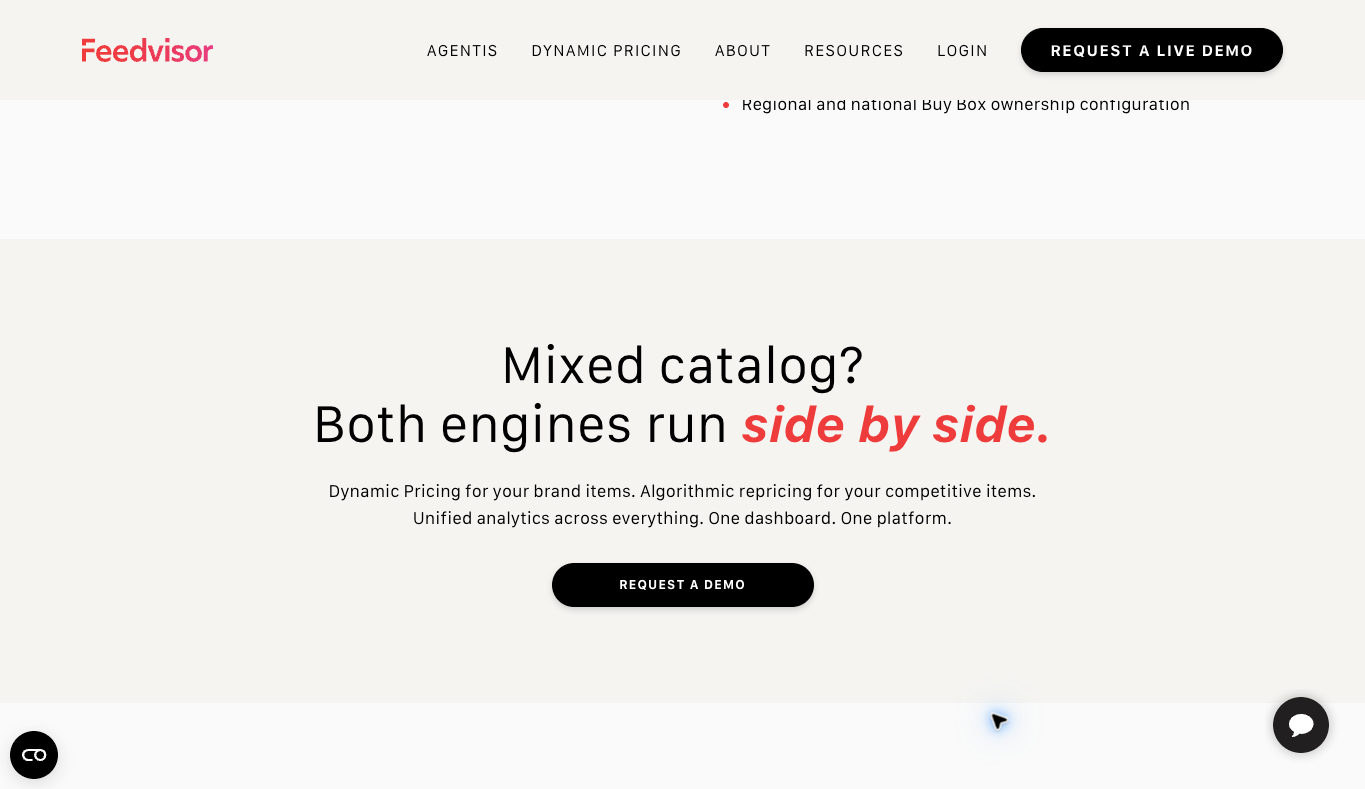
Feedvisor deserves a look when an existing catalog has a real pricing-management need, since its focus is pricing and repricing for Amazon sellers. A new product idea and an operating repricing process need different evidence.
The current official site separates Agentis Commerce from Dynamic Pricing. Its Dynamic Pricing page describes pricing for brands and private-label catalogs alongside a separate repricing engine. The public descriptions also connect pricing, advertising and business information, so confirm how those features relate for your selected service scope.
Get the actual account quote, required inputs and permitted actions before you buy or connect anything. A public product explanation is not a fixed-price offer. Vendor margin and advertising claims are not measured results from this comparison.
Define approved limits and a responsible reviewer before you consider automation. No seller data, prices or ad settings were changed for this guide. The existing screenshot shows the provider’s stated workflow, not a benchmark.
Start with the seller model and next decision
Describe the operation you plan to run. Researching a new product is different from managing an existing catalog’s pricing. The tool should handle the actual task, not become the reason you chose a business model.
Write down the market, product category and fulfillment arrangement. Supplier access and account eligibility are separate questions. A product showing up in a database doesn’t give you permission to sell it.
Here’s what I’d do. Identify the missing fact before buying another subscription, because sometimes the question is demand, sometimes it’s cost and sometimes it’s authorization. Then compare software features against that one unresolved decision.
I teach niche stores over general stores and go deep before you go wide. The same thinking works on Amazon. One focused product line with verified facts beats a giant research spreadsheet you never act on.
Treat research outputs as estimates
A product research number is an input for investigation. Review the source, date and actual scope before using it in a purchase decision. A vendor’s demo is not the same as a completed search for your proposed product.
Keep demand estimates separate from supplier terms and unit costs. A promising sales projection doesn’t prove inventory availability or a workable commercial account. Each requirement needs its own evidence.
Check whether the result covers the right marketplace and product variation. Similar product names sometimes hide different packages or specs. Record the exact item before you combine information from several sources.
Say your research compares a single replacement filter with a 3-pack. Record the pack size before comparing estimated sales or selling prices, because a 3-pack priced at $36 is $12 per filter before fees and costs. A single filter priced at $16 is a different offer, and combining the two gives you a misleading comparison even when the listings use similar names.
Verify supply and marketplace eligibility
Ask the supplier about current product access and permitted sales channels. Approval for a standalone store doesn’t automatically mean permission to sell on Amazon. Keep the actual channel requirements in your sourcing record.
Review Amazon’s current requirements for the product and your account. Category restrictions and required documents need specific evidence. A tool recommendation doesn’t approve a listing or resolve the marketplace’s process.
Keep the source and date next to every confirmed fact. Information from a directory is different from the supplier’s current answer about your account. An unanswered question stays unknown, not an assumed yes.
The supplier sourcing guide gives you commercial research context. Extend that review to the Amazon channel instead of treating a dealer lead as a finished arrangement.
Calculate costs for the exact item
Start with the supplier price and the product’s actual package details. Shipping, prep and fulfillment costs depend on the real dimensions and weight. A different package can change the estimate a lot.
Amazon’s official selling fees page separates selling-plan fees from category-dependent referral fees. Optional services add other costs. Don’t apply one guessed percentage to every product or fulfillment arrangement.
Its Revenue Calculator gives estimates using product and fulfillment inputs. The result depends on what you enter and is not a guarantee of actual costs. Keep the inputs you reviewed next to the estimate.
Include advertising, returns and operating expenses in your own calculation. Accounting and tax questions need proper professional advice. A research subscription does not create profit.
Distinguish the price floor from a target
A minimum price needs a documented cost basis and the actual commercial requirements. A tempting competitor price sometimes leaves you too little contribution under your arrangement. Never use another seller’s price as your whole calculation.
Write down the assumptions and the conditions that trigger a review. Changed supplier charges, packaging or fulfillment terms can affect the approved limits. Whoever maintains the prices needs the current version.
A target price is a separate decision about the offer and the market. The minimum and target shouldn’t become interchangeable just because an automation tool accepts both values. Explain what each one is for in your operating record.
Here’s a simplified planning example. Assume $18 product cost, $6 fulfillment cost and a hypothetical fee equal to 15% of the selling price. At $30, the remainder is $1.50 before ads, returns and overhead, and at $28 it falls to negative $0.20.
These invented inputs explain the math, not Amazon’s actual fee schedule. A floor based only on product cost misses the percentage fee and the fulfillment expense.
Review automation authority and limits
Define which products and actions the proposed automation covers. A repricing service can affect a lot of offers at once. Keep the scope explicit before you connect a tool or grant permissions.
Set review responsibilities and approved boundaries through your own process. Name the person who handles exceptions. A vendor’s automated feature does not remove your responsibility for the outcome.
Write down when the process needs to pause. Missing cost information, an unexpected product mapping or a changed supplier policy each deserve a defined response. Don’t let an unresolved question turn into a repeated automatic action.
Write the operating instruction in plain language before you talk settings: include these SKUs, exclude these bundles and request review whenever the current cost is missing. Add the maximum permitted change and the person who can approve exceptions. Then ask the provider to show whether the service supports each requirement, and put any unsupported rule on the unresolved list instead of inside an assumed configuration.
Check account access before connecting
Review the access a tool requests and the job that needs it. Research, reporting and changing prices are different capabilities. A connection shouldn’t get broader authority just because the default form offers it.
Keep account ownership and the responsible administrator clear. A contractor’s tool shouldn’t leave the business depending on undocumented credentials. Follow the actual provider and marketplace instructions for an approved setup.
Plan how access gets removed and records recovered when the service ends. Identify the information the business needs to keep. A canceled subscription doesn’t automatically prove every connected permission was removed.
No seller account or private records were connected for this guide. Authentication and permission changes need their own authorization. Public screenshots are not evidence of a correctly configured account.
Compare the subscription with the required scope
List the research, reporting and operating tasks you plan to do. Confirm the plan limits and market coverage that apply. A big feature list doesn’t mean every function is included at the entry price.
Separate base subscription charges from managed advertising fees and other service costs. Helium 10’s stated managed-spend fee shows why the math needs more than a seat rate. Review your actual intended use.
Record the billing interval, minimum term and renewal. An annual monthly equivalent is different from a monthly subscription. Enterprise starting prices need their actual account scope, not a comparison as an identical package.
Using the listed Helium 10 rates, 12 monthly Platinum payments total $1,548. The $99 annual monthly equivalent totals $1,188 across 12 months, a $360 difference before taxes or optional charges. If your research project only lasts 1 month, though, an annual subscription is a very different expense, so check the current checkout terms before choosing.
Evaluate a small authorized workflow
For your own approved trial, pick a representative task and define the output you need. A keyword or product investigation needs a different check from an operating repricing task. Keep the evaluation tied to your current business.
Record the settings and information you supplied. Someone else needs enough context to understand the result. An unexplained screenshot can hide a different market, product or reporting period.
Review the result against current source facts. A recommended action still needs the approved cost and account conditions. Don’t treat a tool’s confidence or polished interface as permission to change the business.
Pick one product investigation and define the deliverable before you start: an identified marketplace, the exact variation, 5 relevant search terms and a dated supplier quote. Have a second person check whether the evidence supports the same product and package. For a pricing evaluation, use a separately approved scope and compare proposed actions with documented limits, and judge the trial against the job you assigned, not the number of screens you opened.
Keep an exception and review record
Assign a responsible person for unexpected results. Incorrect product mapping, missing cost information and unavailable inventory each need different follow-up. A general warning with no owner leaves the problem unsolved.
Record the original information and the approved correction. Another reviewer should be able to tell a revised source fact from a different judgment. Keep the version and date next to the decision.
Pause affected automation through your authorized procedure when a key input is uncertain. Wanting a fast response doesn’t justify repeated actions on missing evidence. Name the fact you need before the process resumes.
A useful exception entry names the SKU, observation time, affected input and next action. For example: supplier quote expired, updated quote requested, pricing review assigned to the catalog manager. Close the entry only after the missing evidence arrives and the responsible person approves the next step, and keep a missing quote separate from a product-mapping error because they need different fixes.
Honestly, this record-keeping is a pain in the butt. But it’s what keeps one bad input from turning into dozens of bad prices.
Connect product selection with the customer
My niches list supports category research. Review the buyer’s product questions alongside the numbers before you choose a line to research.
Supplier Paradise is a research resource I own. Directory entries give you leads, not guaranteed inventory, marketplace authorization or margins.
Use my business foundation checklist for the admin side. Your actual marketplace account, legal structure and tax requirements need review based on your circumstances.
Keep customer support and delivery responsibilities visible even when another service fulfills the order. A research tool won’t supply a missing product spec or fix an unclear warranty process.
Write the decision before expanding software
Look into Helium 10’s selected plan when research and listing work solve a defined requirement. Confirm the actual allowance, marketplace and extra fees.
Compare Feedvisor’s current pricing-operation scope when an existing catalog and supported inputs justify it. Get the actual quote and action boundaries before connecting.
Write the reason for your choice next to the requirements. A bigger suite is only useful when the business needs the included work. Another subscription won’t answer an open supplier or cost question.
My private coaching is an offer I own for wider business decisions. Its scope is not marketplace approval, individualized investment advice or a guarantee of tool performance and earnings.
Review the information before a product commitment
Keep the actual product, supplier quote and fulfillment assumption together. A similar model or package can have different costs and requirements. The record needs to identify exactly which offer the estimate describes.
Separate confirmed commercial facts from hypothetical planning figures. An intended quantity is not purchased inventory, and a projected price is not completed revenue. That distinction helps the next reviewer see what’s still unverified.
Record the source date and the follow-up you need. Supplier and marketplace information changes. An earlier answer may need another check before a bigger commitment or a new sales channel.
Don’t hide unknowns inside a reassuring total. Missing shipping costs, unclear access or an unapproved category deserve explicit treatment. The decision should explain the evidence you have and the condition blocking a safe next step.
Maintain the service and data handover
Identify which records stay available when the software subscription ends. Research exports, settings and operating notes may need separate retention. Keep the approved business record outside any undocumented personal account.
Review the current quote and the actual service responsibilities at renewal. A promotion or onboarding package isn’t necessarily the ongoing arrangement. Compare the work you still need with the subscription you’re paying for.
Record any changed source or service term before you revise an automated procedure. The approved version should be available to the responsible person. An old price-floor document shouldn’t stay authoritative after its inputs change.
Before ending a service, prepare a handover list covering business-owned exports, active connections, billing renewal and the person taking responsibility. Check the provider’s current export and cancellation instructions instead of assuming every record survives. Keep sensitive account information out of shared documents, and mark each task complete so an exported report doesn’t get mistaken for canceled billing or removed access.
My take on Amazon seller tools
So with that said, here’s the short version. Use Helium 10 when you have a defined research or listing job, and look at Feedvisor when an existing catalog has a real pricing problem. Verify supplier access, marketplace eligibility and exact-item costs yourself, and set price floors and automation limits before any tool touches your listings.
My first store failed when I started back in October 2010, and the second one worked. The difference wasn’t a fancier tool. It was getting the basic facts right and building systems and SOPs around them. Tools only help once that foundation is in place.
If you’re weighing Amazon against a standalone high-ticket store, start with my free list of 1,000+ niches to find a focused category. Go check that out, then come back to these tools once you know exactly what you’re researching.
Amazon seller tool questions
Does a research estimate establish profit? Verify actual product costs, supplier access and the relevant marketplace fees. An estimate is not completed revenue.
Does buying a tool approve a seller account? Marketplace and product requirements remain separate. No account approval was obtained here.
Is repricing the same as product research? Repricing affects an existing operating offer and needs approved inputs and action limits.
Does the screenshot demonstrate personal results? The preserved figures show public provider information. No accuracy, sales or repricing test was completed for this comparison.
Related guides
The dropshipping overview explains the standalone-store model.
My niches list supports category research.
The supplier sourcing guide addresses commercial verification.
Use the business foundation checklist for administration.
My wholesale research guide distinguishes leads from approved supply arrangements.

Trevor Fenner is the founder of Ecommerce Paradise. His main projects are Ecommerce Paradise, Supplier Paradise, and Review Paradise, which is currently in development. TrevorFenner.com publishes research-based reviews and practical guides to online business tools and remote-work services, with clear affiliate disclosures.