

Looking for the best live chat software for ecommerce? Here’s my honest take. The right tool is the one that fits the support job your team can actually handle. I’d choose based on the questions customers ask, the hours you cover and who owns the follow-up, because a widget alone doesn’t give anyone accurate answers.
Tidio, Help Scout and Text by LiveChat are 3 solid starting points. Tidio combines chat with separate automation products. Help Scout connects chat to a shared support inbox, and Text offers a current chat-and-inbox package that’s different from older LiveChat subscriptions.
At Ecommerce Paradise, I focus on operating processes you understand and can maintain. I’ve run online stores since 2010, and in high-ticket niches buyers ask detailed product questions before spending real money. For a high-ticket store, a buyer’s question often needs info from a specific manufacturer, so the software organizes the conversation while your team owns the answer.
If you’re new to the model, my guide on what high-ticket dropshipping is explains why support matters so much here. Supplier-direct fulfillment still requires clear communication from your business.
Public provider pricing and documentation were reviewed on October 14, 2026. The retained screenshots show public pages captured October 11. I did not connect a store, subscribe to these plans or run customer conversations for this comparison.
Use this shortlist to compare billing units and workflow needs. A seat, a billable conversation and an AI resolution are 3 different charges. Review the plan and usage terms before treating a starting price as your whole support budget.
Affiliate disclosure: some links here earn me a commission at no extra cost to you. I own Ecommerce Paradise and Supplier Paradise. Provider screenshots document public offers, not my results or a promised sales increase.
Compare support workflows and billing units
The prices below use month-to-month billing checked for this article. Annual equivalents mean a different commitment. Taxes, extra usage and optional services need their own calculation.
| Option | Starting workflow | Selected monthly price | Usage question |
|---|---|---|---|
| Tidio | Chat and ecommerce automation | Starter $29 | Human conversations, Lyro and Flows have separate limits |
| Help Scout | Chat alongside a shared inbox | Standard $30 per user | Seats and AI Answers resolution charges |
| Text by LiveChat | Current chat, inbox and AI packages | Essential $25 per user | Account-level AI allowances and paid extras |
Map out a realistic month of activity before you choose. Count the staff who need access, the expected support volume and the automated work you’ll allow. Don’t multiply one provider’s account price as if every plan bills per seat.
Tidio
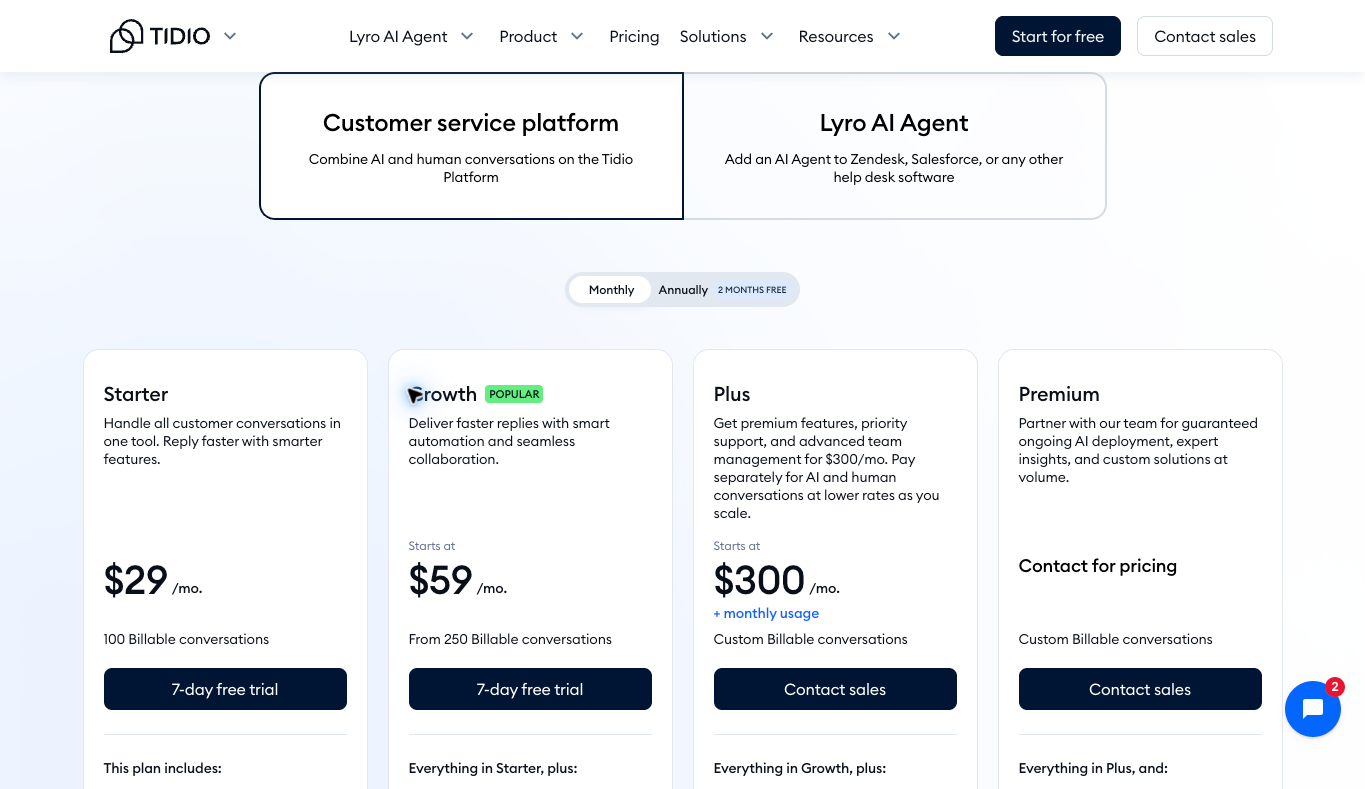
Tidio is worth a look when you want chat, ticketing and ecommerce automation in one setup. I like it for smaller stores that want chat and simple automation without stitching several tools together. Define the questions your team handles before you decide which products and quotas belong in the subscription.
The monthly view showed Starter at $29 with 100 billable conversations. Growth starts at $59 with a starting allowance of 250, and Plus starts at $300 plus monthly usage. Review the selected quota instead of reading a starting price as unlimited support.
The Tidio pricing page lists Lyro’s first 50 free AI conversations as a one-off allowance, not a monthly refill. Its paid monthly quota is separate. Flows counts visitors reached, so automation traffic and human support conversations need different estimates.
Here’s the move: compare Tidio’s current options against your recurring questions and your human handoff process. A published policy question and an uncertain product-fit decision need very different treatment.
Help Scout
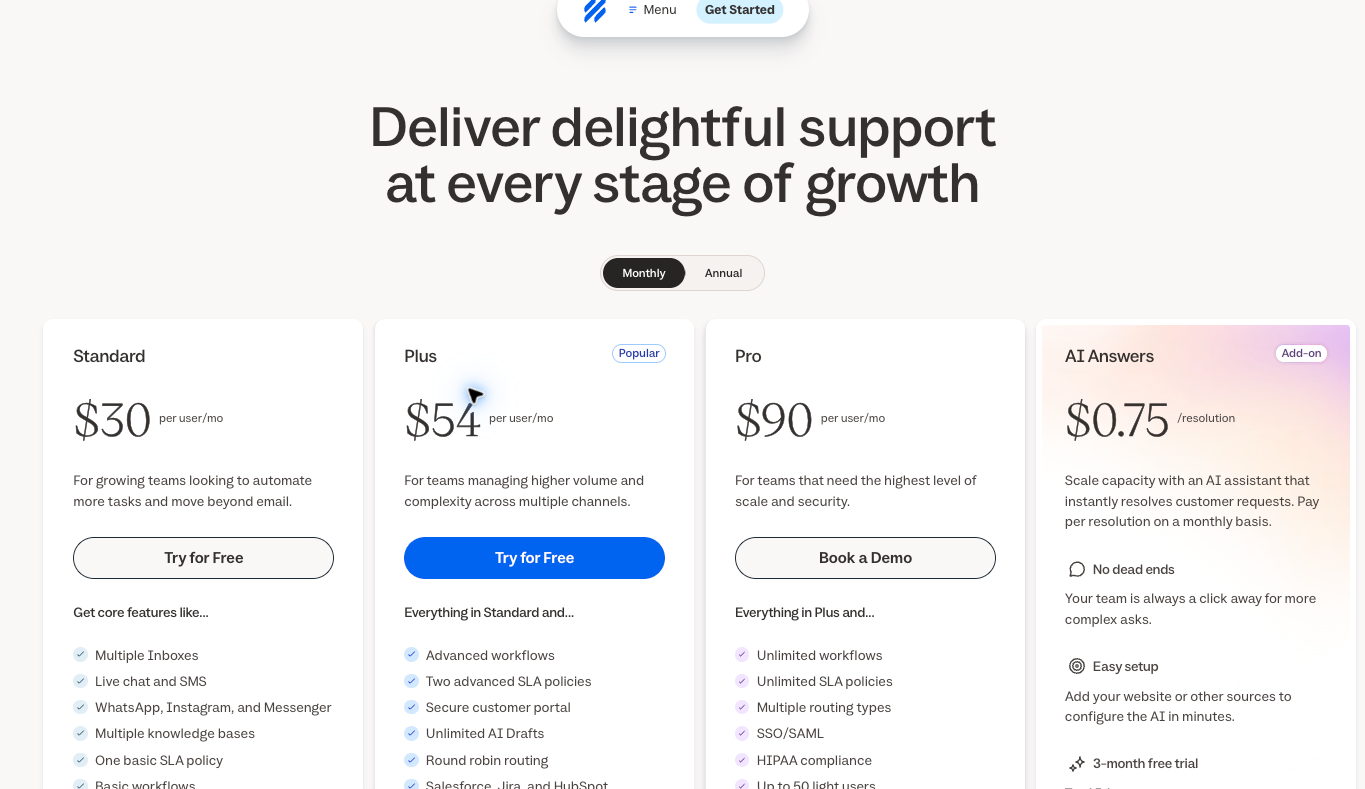
Help Scout belongs on the shortlist when chat needs to stay organized alongside email and a knowledge base. I like it when more than one person answers customers, because the shared inbox keeps ownership clear. Compare how your team handles follow-up instead of picking from a feature checklist.
The monthly view listed Standard at $30, Plus at $54 and Pro at $90 per user. Those are seat prices, not whole-team totals. The lower annual equivalents require annual billing.
The Help Scout pricing page lists AI Answers as a separate $0.75-per-resolution add-on, and it kicks in after the trial. The support documentation describes a resolution as a session resolved without human help, with one charge per session, not per question. Review that billing definition and the trial separately from the main subscription.
So what you should do is compare Help Scout’s support plans around conversation ownership and access. A shared inbox only helps when someone knows which request needs the next action.
Text by LiveChat
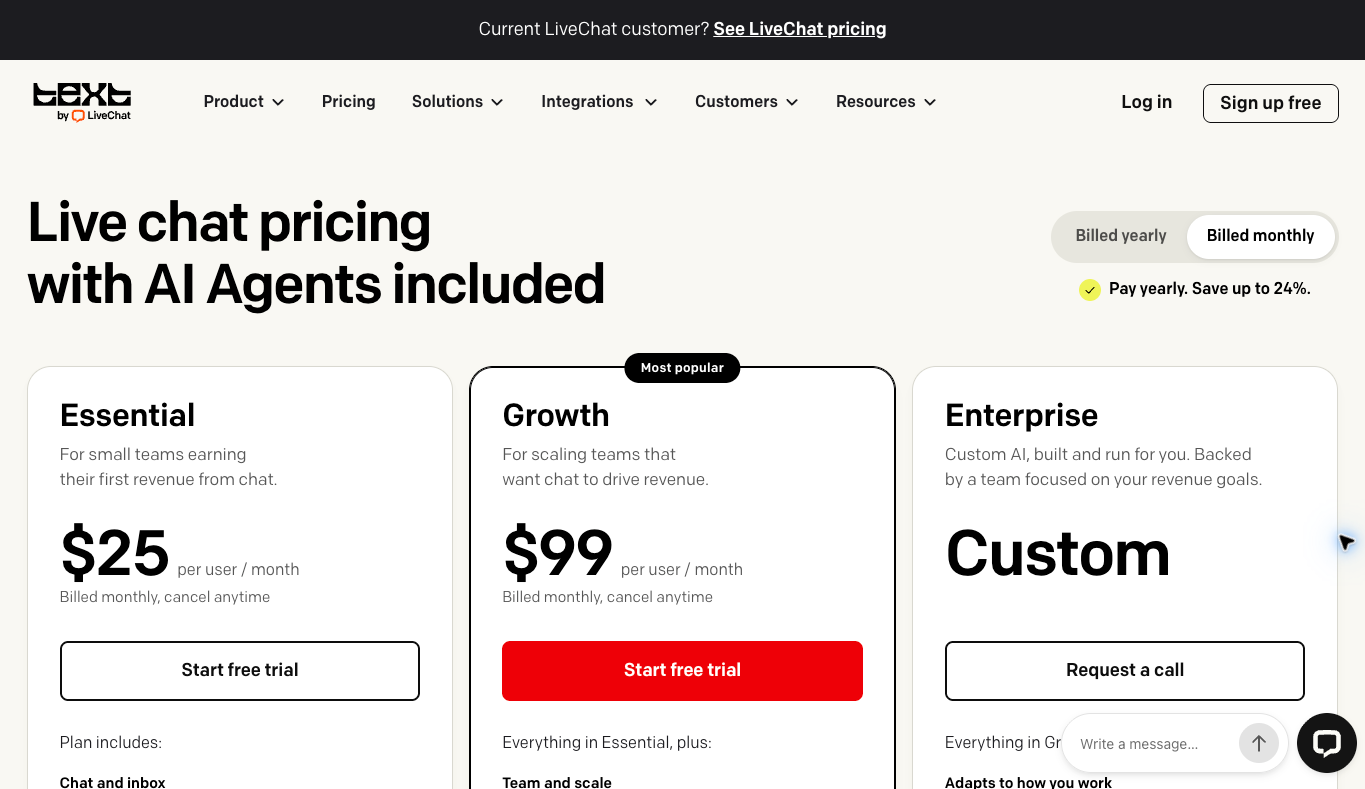
Text by LiveChat offers a current chat-and-inbox workflow with AI options. I like it for teams that want live chat as the main channel with AI help layered on top. Check the selected Text plan instead of borrowing prices or features from older LiveChat subscriptions.
On the Text pricing page, monthly Essential is $25 per user and Growth is $99 per user. Their included monthly AI allowances are 10 and 200 resolutions. The current comparison also lists an extra 50-resolution package at $49.50.
Seat prices and account allowances are different units. The provider’s example of 5 Growth users includes 200 resolutions, not 1,000. Adding a user doesn’t automatically multiply every included quota.
Review Text’s current offer for the team workflow and usage you actually need. Existing LiveChat customers should check their real subscription before assuming the current Text page describes their account.
Start with the questions your store receives
Separate pre-purchase questions from requests about existing orders. Product dimensions, delivery requirements and installation info need different records than tracking or return requests. Build the support process around the question, not the channel where the customer first asks.
For a high-ticket product, verify manufacturer specs before recommending a fit. An uncertain answer deserves human review. A chatbot should never turn missing information into a confident compatibility claim.
Use a short intake process that asks for the relevant product and use details. Don’t collect payment information or unnecessary personal data. Gather enough context to route the request without making the customer repeat everything.
This is where high-ticket stores really differ from cheap-product stores. One wrong answer about fit or delivery can cost you a big order, or worse, a big return. Keep that in mind when you decide how much to automate.
I’d start with a small set of recurring questions. Add verified answers and note their sources. A short, accurate knowledge base serves customers way better than a long list of uncertain promises.
Budget for people and usage together
A software subscription doesn’t include a trained rep’s time. Estimate the staff covering chat, the time spent on follow-up and the work it takes to maintain the knowledge base. Keep those costs separate from the provider’s fee.
For a hypothetical seat-priced tool, 3 users at $30 each cost $90 per month before taxes or add-ons. At an assumed $0.75 per charged AI resolution, 100 resolutions add $75. The combined illustration is $165, not a quote for your specific account.
An account-priced tool needs a different calculation. Review the included seats and conversation allowance before you multiply its starting price by your staff count. Check the unit your store is most likely to blow past.
Estimate both a quiet month and a busy month. Seasonal demand or a delivery problem changes support volume fast. Compare the cost of extra usage with the work a person still has to finish after automation replies.
For Tidio’s quotas and add-ons in particular, put human conversations, Lyro and Flows on separate lines. That keeps unlike billing units from disappearing into one optimistic total.
Define the human handoff before enabling automation
Write down the situations that need a person. Unclear compatibility, unusual delivery arrangements and requests for exceptions all deserve an assigned owner. An automated answer should never invent approval authority.
The handoff needs more than a button. Decide which inbox gets the request, what context travels with it and who checks the queue. Give the customer an accurate expectation for the next response.
Picture a hypothetical buyer asking whether a product fits a particular installation. The support summary should list the product, intended use, known specs and the open question. Send the technical question to the authorized manufacturer contact instead of guessing.
My supplier research guide helps you gather the terms and contacts behind those answers. Support staff need current info after supplier onboarding, not just during the initial research.
Supplier Paradise is another discovery starting point I own. A directory listing doesn’t establish a delivery date, warranty outcome or dealer approval. Confirm those details directly.
Publish support hours your team covers
A “live chat” label sets an expectation. Show the hours someone is actually there to answer and explain the offline process. AI availability should never be described as a human team that’s always staffed.
Outside those hours, collect the info needed for follow-up and name the next step. Keep the message specific enough that the customer knows where the request goes. Don’t promise a response time your team hasn’t agreed to meet.
I’ve worked from Bali since about 2019, so I know how time zones mess with support coverage. If your customers are in the U.S. and you’re not, be honest about your hours. It is what it is, and customers handle clear expectations better than silence.
Assign an owner to each offline request. A transcript sitting in an inbox nobody checks is unfinished support. Decide how the team tells an open question from a finished conversation.
Review requests at the start and end of each staffed period. Check unresolved handoffs and failed notifications. That routine matters more than an attractive widget on every page.
Keep saved replies tied to confirmed facts
Saved replies work well for stable policies and ordinary instructions. Store the source and the responsible owner with each important answer. Review the reply whenever a supplier changes shipping terms or you update a policy.
Separate general policy explanations from decisions that need approval. A return-policy summary doesn’t authorize an exception. A product description doesn’t prove suitability for every buyer’s installation.
For tracking questions, report the latest confirmed event. A created label doesn’t prove a carrier has the package. If the team is checking on an update, say what you know and which party you’re contacting.
Damage or warranty requests need the correct process and escalation contact. Don’t promise a refund, replacement or approval before the authorized party reviews it. A quick unsupported answer just creates another problem for whoever follows up.
Using Help Scout’s shared-support workflow fits this ownership process well. The software should help staff find the history and the next action, not replace factual review.
Evaluate the workflow without using customer data
Prepare a small set of fictional scenarios for an authorized test. Include an ordinary policy question, an uncertain product-fit question and an offline request. Each one tests a different part of the process.
Check whether the rep sees the relevant history and whether the escalation reaches the right destination. Review the offline message and how the conversation picks back up. Write down open questions instead of assuming one good first reply proves the whole workflow.
Use invented names and order details. Never upload real customer payment info, passwords or private records into a demo. Review the provider’s current terms and privacy setup before connecting production systems.
This comparison did not run those tests. The scenarios describe prep for your own authorized review. Provider screenshots show public pricing, not an installed widget or a completed customer interaction.
Inspect the widget on the pages customers use
Check product pages, the cart and other permitted storefront areas where support shows up. A widget covering a purchase button creates friction, not help. Review the placement at desktop and mobile widths.
On a phone, look at the closed launcher as well as the open conversation. Watch for overlap with navigation, consent notices and other controls. The customer should still know how to close the widget and keep browsing.
Use the supported installation path for your storefront. Review the permissions and integration scope before connecting a store. A general compatibility claim doesn’t prove how your specific theme and app combination will behave.
My free Shopify apps guide explains why the specific job comes before another installation. Keep your app stack small enough to maintain.
Review access and knowledge-base changes
Give each person their own user access where supported, with only the permissions their role needs. Someone answering messages doesn’t automatically need owner-level billing or integration controls. Make access removal part of your offboarding process.
Decide who approves knowledge-base changes. New product facts, supplier policies and support hours need a source and a review date. Otherwise an outdated answer keeps repeating long after the business has changed.
The business foundation checklist covers broader ownership and operating responsibilities. A support subscription doesn’t complete the privacy or access review for your store.
Document the escalation contact for provider problems. Include failed integrations and interrupted notifications in your review routine. Staff should know what to do when the tool doesn’t behave.
Measure unresolved work alongside response speed
A fast first reply tells you very little about whether the customer got a correct answer. Track unresolved questions, repeat contacts and missed handoffs alongside response time. Review the conversations behind the numbers.
Keep the provider’s billing definition of an AI resolution separate from your own support-quality review. A charged session isn’t automatically proof of a happy customer. Each provider defines usage through its own terms.
For an original arithmetic example, closing 90 of 100 reviewed requests gives a 90% closure rate under your own definition. Describe the review period and what counts as closed. Don’t borrow a provider’s marketing percentage as your store’s result.
Look at Text’s current allowance structure alongside the workload your team actually finishes. Staff capacity and software usage answer different questions.
Plan a tool change around unfinished conversations
Before switching support tools, list open requests and the person responsible for each. Decide where existing transcripts, attachments and customer context go under your approved retention process. A new inbox should never make an open request disappear.
Review the provider’s supported export and migration options before committing. Check whether exported records keep the context staff need, and separate archived history from the active queue. Keep the transition plan separate from a sales demo.
Document the cutover date, notification routing and a fallback contact method. Staff need to know which system gets new requests and where to find older work. Don’t run 2 competing widgets without a clear purpose and owner.
After an authorized switch, run a few fictional new requests and confirm where they land. Reconcile the remaining old queue through your internal process. This article did not migrate transcripts, connect accounts or change a storefront integration.
Organize the store behind the support process
A focused catalog helps staff learn the products and supplier terms. The high-ticket niches list helps organize your category research. Pick a product range you’re ready to support accurately.
For help building the business and operating plan, check out Ecommerce Paradise coaching. Coaching is a separate paid service, not installation or testing of the 3 products above.
The Ecommerce Paradise Academy page has the classroom and membership details. Review the current enrollment terms separately from your software decision.
Questions before choosing live chat
Which option guarantees higher sales?
None in this comparison. Choose from documented requirements and judge the support work your team completes. No sales test was performed here.
Does AI availability replace human coverage?
No. Define the questions that need a person and the offline follow-up process. Customers need an accurate expectation for human help.
Are Tidio’s initial free Lyro conversations monthly?
No. The initial 50 conversations are a one-off allowance. Review the paid monthly quota separately from human conversations and Flows visitors.
Do extra seats multiply every AI allowance?
Don’t assume they do. Text’s current seat pricing and its account AI allowance are different units, so review the selected provider’s terms.
Does current Text pricing describe an older LiveChat account?
No. The provider separates current Text offers from legacy subscriptions. Check your actual product and plan.
My take on live chat for ecommerce
All right, let’s wrap it up. Tidio fits a store that wants chat plus automation in one place. Help Scout fits a team that needs chat inside a shared inbox, and Text fits a chat-first team that wants AI options on current plans.
Whichever you pick, count seats, conversations and AI resolutions as separate units. Write down the handoff rules before you turn on automation. Publish hours you can actually cover, and never let a bot invent a compatibility claim or a refund approval.
I’ve been teaching store owners through Ecommerce Paradise since 2015, and accurate support for expensive products is something I always push. I’m not promising a sales lift from any tool here. I’m saying accurate answers and clear ownership are worth the setup time.
If you’d rather have a store built with these basics in place, check out my done-for-you store build service. Confirm the scope before you commit. Go check that out.
Related guides
My VoIP comparison covers phone support.
Read the virtual assistant hiring guide before delegating a support role.
The shipping software comparison covers information support staff need for fulfillment questions.
My free Shopify apps guide starts with the job each installation serves.
The ecommerce platform comparison covers the storefront foundation.

Trevor Fenner is the founder of Ecommerce Paradise. His main projects are Ecommerce Paradise, Supplier Paradise, and Review Paradise, which is currently in development. TrevorFenner.com publishes research-based reviews and practical guides to online business tools and remote-work services, with clear affiliate disclosures.