

The best webinar platforms fit the session you intend to deliver. I would define the audience, format and follow-up before buying capacity. A registration page needs a useful promise and a team prepared to deliver the presentation.
Choose between a live session, a scheduled recording and an on-demand presentation. Then record the expected audience and people producing the event. Registrants, viewers, attendee credits and account users describe different resources.
At Ecommerce Paradise, I focus on practical business systems. A webinar supports education and sales when the topic answers a real question. Software does not supply demand or guarantee a conversion.
This comparison covers Livestorm and WebinarGeek using public provider information reviewed October 14, 2026. The retained actual screenshots were captured October 13. No events were hosted, contacts uploaded or audience results measured.
Affiliate disclosure: I receive compensation for qualifying purchases through documented links, subject to program approval and terms. I own Ecommerce Paradise and Supplier Paradise. Public screenshots document provider information rather than hands-on event testing.
Compare the resource the event uses
| Option | Reviewed price reference | Capacity to check | Operating fit |
|---|---|---|---|
| Livestorm | Current support table: $1,200 for 400 annual credits | External participation counted per session | A planned annual event workload |
| WebinarGeek | Current 75-viewer Premium display: €59 monthly equivalent, billed yearly | Selected viewer capacity and included account users | Live, automated and on-demand formats |
| Existing meeting workflow | Your selected product’s actual terms | Invited audience and required controls | A smaller discussion with simpler requirements |
The price references use different currencies and resource definitions, so they are not a like-for-like cost ranking. Obtain the applicable currency offer before comparing the complete payment. The retained WebinarGeek screenshot documents an October 13 selected USD display, while today’s verified public selection stayed in euros.
Livestorm’s annual attendee-credit model
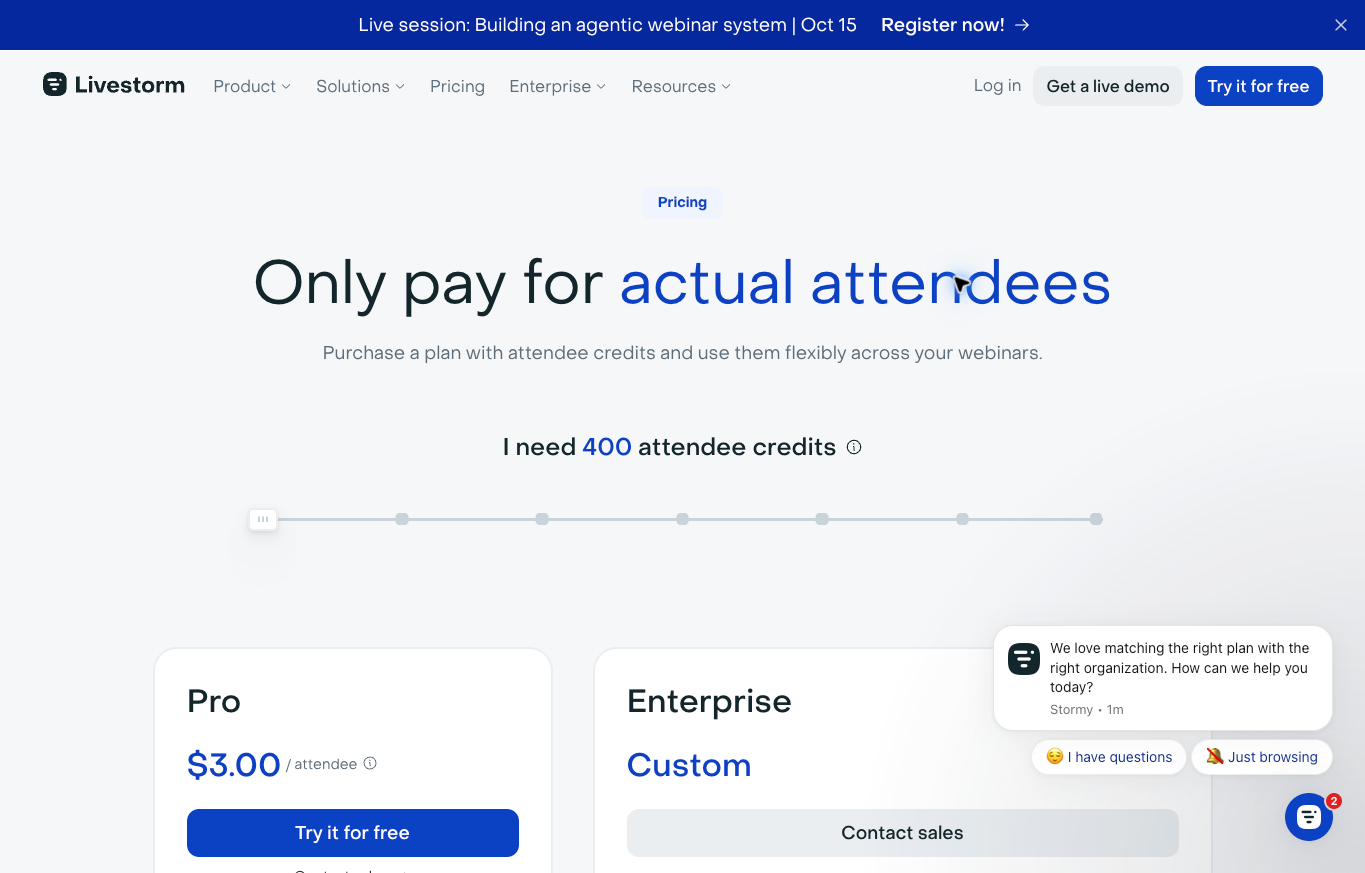
Livestorm uses annual attendee credits under its current pricing model. One external participant joining one session uses one credit. Returning to the same session’s replay does not create another credit charge for the participant.
A person joining another session uses another credit. Registrations without participation and internal team members do not consume attendee credits. An event containing several sessions needs a separate attendance estimate for each.
Pro lists sessions up to four hours and unlimited events, recordings and team members. These inclusions do not establish unlimited attendee usage or inclusion of every add-on. Review the selected package and required integrations separately.
The current support table lists $1,200 for 400 annual credits. The default public pricing view displays euros, while the retained screenshot shows the selected USD package. Keep the currency and annual commitment beside the price.
I would estimate the annual workload before reviewing the selected Livestorm offer. Unused credits do not roll into the next billing period under the current guidance. A larger allowance needs a planned use.
WebinarGeek’s selected viewer arrangement
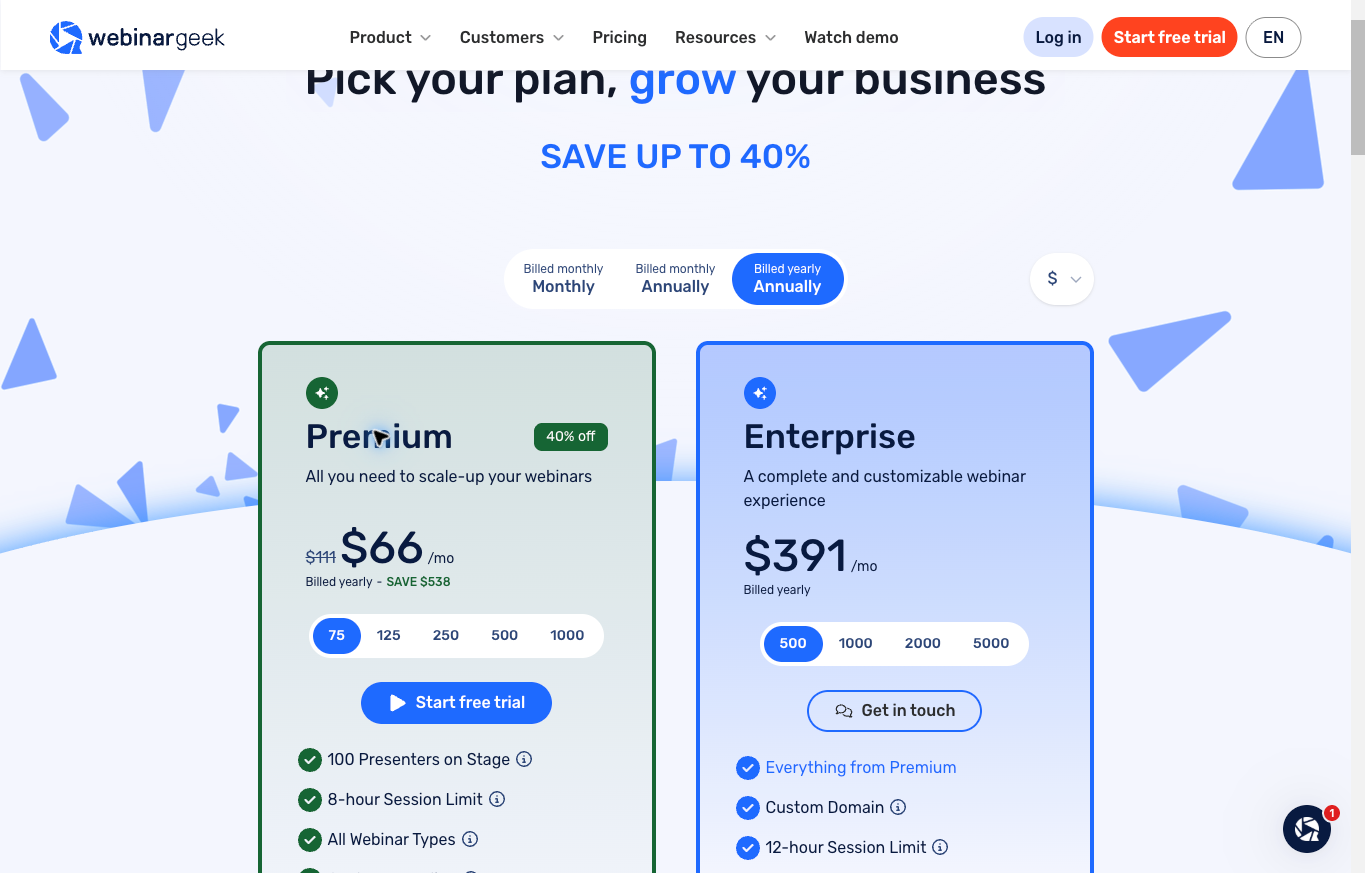
WebinarGeek deserves a comparison where live, automated and on-demand formats belong in the publishing process. Match the viewer selection and billing term to the session rather than treating every displayed plan number as the same allowance.
The current selected 75-viewer Premium display showed €59 per month equivalent with yearly billing. Premium lists an eight-hour session limit and one included account user. The retained October 13 screenshot shows a separate selected USD view, not a newly verified USD quote.
Separate people presenting from users administering the account. A platform supporting several presenters does not necessarily include several paid account users. Confirm the selected plan’s exact requirements before assigning the team.
I would review the current WebinarGeek arrangement around registration, moderation and follow-up. Required integrations and extra users need separate checks. A feature listed elsewhere on a provider site does not prove inclusion in your chosen tier.
Write the audience promise before choosing capacity
Choose the question the session answers and who needs the answer. A useful topic gives someone a reason to attend. A general invitation to hear about your business leaves the audience guessing about the value.
Specify the format and intended outcome. A product demonstration, training session and open discussion need different preparation. Decide what the attendee should understand before planning the promotional message.
For an ecommerce audience, begin with a concrete decision. Product fit, delivery requirements or choosing a business model give the presentation a purpose. Confirm factual answers before placing them on a slide.
The high-ticket dropshipping guide explains the operating model. A webinar supports the business rather than replacing supplier relationships and customer service.
Separate registrations from actual attendance
A registration count records people expressing interest. Attendance records people joining the session, and replay viewing adds another behavior to review. Keep the provider’s capacity definition beside your event forecast.
For an original planning example under Livestorm’s stated session rule, assume 20 external people join live and five others only view the same session’s replay. The session uses 25 credits. Ten live participants returning to its replay do not add ten more.
If those 25 people attend a second session, the two-session workload becomes 50 credits. This is an arithmetic example, not an event hosted for this comparison. Do not carry the result into another provider’s viewer model without checking its rules.
I would compare the Livestorm annual package with the full intended schedule. Include replay participation and review the quota process before promoting more sessions.
Choose the simplest format meeting the requirement
A small invited discussion does not always need a dedicated webinar subscription. Compare the current meeting tool’s actual audience controls and presentation requirements first. Existing access is useful only when the required process fits.
A public session with registration, reminders and replay follow-up creates different work. Identify the bottleneck before buying specialist software. The comparison needs a defined workflow rather than a hypothetical large audience.
Keep recurring costs in proportion to the planned activity. Running one useful discussion is a different commitment from a year of public training. Avoid purchasing annual capacity solely because a feature list looks attractive.
Describe recordings honestly
A live event happens in real time. A scheduled recording plays prepared material at a selected time, while an on-demand presentation lets the viewer choose when to watch. State the actual arrangement in the invitation.
A recording does not need fake live comments or invented audience numbers to be useful. Do not manufacture urgency or imply a presenter is answering in real time when no presenter is available.
Review the WebinarGeek format options around the actual teaching plan. If a moderator handles questions during a recording, explain the support available.
Prepare a route for unanswered questions. Tell the viewer who reviews the question and what response process to expect. A chat field alone does not establish immediate expert help.
Prepare registration and reminder messages
The registration page should identify the subject, intended audience, date, time zone and format. Make the promise specific enough for someone to decide whether attending is worth the time.
Collect information needed for the stated purpose and explain the relevant permissions. Webinar registration does not automatically authorize every future marketing campaign. Review applicable requirements with the responsible person.
For an authorized setup, inspect the confirmation and reminder sequence. Check the access instructions, presenter details and time-zone display. A correctly scheduled event still needs a message the attendee understands.
My email marketing software guide covers a separate part of the process. Platform content rules and audience permission still apply.
Give presenters and moderators different responsibilities
The presenter owns the teaching material and factual answers. A moderator handles chat, questions and disruptions according to the agreed process. Administration and billing are separate duties.
Match account access to the role and selected plan. Several people on stage do not establish several included administrator accounts. Confirm the required paid seats before inviting the production team.
Agree on a guest’s topic, recording use and commercial disclosures before the event. Do not surprise a guest with an unexpected sales segment or reuse their recording outside the agreed scope.
Keep an internal event brief with the approved agenda and next owner for each task. Leave credentials and private attendee records outside the presentation document.
Use a rehearsal with observable checks
For your own authorized event, rehearse on the actual device and connection. Check the selected microphone, camera and screen-sharing workflow. A provider’s public screenshot is not proof of device compatibility.
Join through an authorized attendee test to inspect the viewing route. Review slide readability on a phone as well as a computer. Small labels and dense charts need a presentation designed for the audience’s screen.
Practice the handoff between speakers and the method for handling questions. Assign someone to communicate a fallback if a presenter loses connection. Keep the next action clear instead of letting everyone change settings at once.
This article did not perform those rehearsals or attendee tests. The checklist describes work for the event owner before approving a public session.
Plan for failure without promising uninterrupted delivery
Write down the response if a presenter disconnects, media fails or the audience struggles to join. Decide who investigates and who updates attendees. The team needs a plan before the event starts.
Keep the approved slides and necessary files available through the internal process. A recording fallback needs permission and an honest label. Do not present prepared material as an uninterrupted live broadcast.
A short interruption also needs a realistic message. Explain the known issue and next step without inventing a restoration time. Provider service claims do not establish perfect performance on every audience connection.
Review integrations as actual handoffs
Write down how the team handles a missing or duplicate contact before enabling automation. The source system, destination record and responsible reviewer need clear definitions. An attendee registering twice should not automatically receive duplicate follow-up. Use a supported, authorized test to inspect the intended treatment. If the observed result differs from the brief, correct the mapping before relying on the integration for a public event.
Decide which event records belong in the CRM. Registered, attended and viewed replay are different statuses. Keep the intended fields and follow-up responsibility in the implementation brief.
Check the supported direction, timing and selected-tier access for each integration. A logo on a provider page does not establish a configured connection or the exact field mapping your business needs.
The CRM software comparison covers the broader sales process. Buying another connector does not define who contacts the lead.
Use only authorized test records when evaluating the handoff. Review the actual result before uploading real contact lists. This comparison did not connect a CRM or transmit attendee data.
Keep recording and retention separate from publishing
A replay is useful only while the intended audience has access and the business holds the required rights. Review hosting, cancellation and export terms before relying on the provider as the sole archive.
Livestorm’s current help advises replay downloads and exports before the subscription ends, with event data deleted 30 days after cancellation takes effect. WebinarGeek’s pricing FAQ describes recordings becoming unavailable to viewers after an inactive subscription and webinars being removed after two weeks.
Keep the approved presentation and recordings you are entitled to retain under the business’s archive process. Decide which attendee records need retention or deletion under the applicable requirements. Do not download or share private records without authority.
My online course platform guide covers another delivery arrangement. A webinar replay and a structured course solve different publishing tasks.
Compare the complete commitment
Budget audience capacity, account users, add-ons and implementation separately. A displayed monthly equivalent needs the actual payment term beside the price. Confirm the complete charge before accepting annual billing.
For an original hypothetical example, a $100 monthly subscription used for three months totals $300 if those terms apply. A $75 monthly equivalent billed for a full year requires $900 upfront. These assumed figures are not quotes from the providers.
I would review the selected viewer offer with the intended event schedule. A lower monthly equivalent does not automatically produce the smaller commitment for a short program.
Keep renewal, cancellation and unused allowances in the decision record. Do not assume a provider refunds unused capacity. Assign a review before renewal rather than allowing an outdated forecast to become another annual purchase.
Build useful content around a focused audience
A product session should answer confirmed questions rather than repeat a sales brochure. If compatibility, installation or delivery is unclear, get the supplier’s authorized answer before presenting the claim.
The high-ticket niches list helps narrow category research. A focused customer makes choosing a useful presentation topic easier.
Use the supplier research guide when considering a manufacturer guest. Verify the actual relationship and promotional permissions before announcing a partnership.
Supplier Paradise is another discovery starting point I own. A directory entry does not authenticate a guest’s claims or establish a dealer agreement.
My business foundation checklist covers broader ownership and administrative responsibilities. Keep event agreements and account ownership aligned with the actual business.
Measure distinct outcomes
Keep a session review beside the approved agenda. Record the question answered, the follow-up requested and the work still needed. If an attendee asks for a product answer outside the presenter’s confirmed facts, route the question to the authorized supplier. Do not convert an unanswered question into a promised feature. The next presentation should reflect the audience’s actual information needs, with revisions supported by new source evidence rather than a guessed conversion explanation.
Keep signups, attendance, questions and business outcomes in separate records. A large registration count does not prove the session answered the audience’s question or produced a qualified lead.
Review real questions after an authorized event. Identify confusing sections and missing explanations, then use the evidence to choose the next topic. Do not turn a small sample into a universal conversion claim.
Ecommerce Paradise coaching supports business planning as a separate paid service. The service does not establish audience results for either webinar provider.
The Ecommerce Paradise Academy provides classroom and membership information. Review current enrollment terms separately from event software.
Questions before choosing webinar software
Does registration equal a billable attendee?
Not under Livestorm’s stated model. Read the selected provider’s participation and capacity definition rather than treating every count as equivalent.
Does a monthly equivalent mean monthly payments?
No. Review the complete charge and commitment. An annual-billed price differs from month-to-month billing.
Are presenters and account users the same allowance?
No. Stage capacity differs from access for people administering the program. Match both to the intended team.
Should a scheduled recording be described as live?
Describe the actual format. Explain the support available without inventing real-time presenters or audience interaction.
Were events hosted for this comparison?
No. Public provider information and dated screenshots support the comparison. No events, contact uploads or conversion tests were performed.
Related guides
The online course platform comparison covers structured content delivery. My online courses guide covers choosing learning resources.
Review the ecommerce CRM comparison for the sales handoff. The email marketing guide addresses a separate messaging decision.
The social media management tools guide covers distribution planning. Event hosting, promotion and follow-up need distinct responsibilities.

Trevor Fenner is the founder of Ecommerce Paradise. His main projects are Ecommerce Paradise, Supplier Paradise, and Review Paradise, which is currently in development. TrevorFenner.com publishes research-based reviews and practical guides to online business tools and remote-work services, with clear affiliate disclosures.