
Looking for the best stock research tools? Here’s the short answer. Different tools do different information jobs. Screening organizes symbols, news flags developments and primary filings let you read what a company actually disclosed.
My shortlist is TradingView for screening and chart information, Benzinga Pro for financial-news workflows and SEC EDGAR for public company filings. A dashboard that combines all three jobs still doesn’t remove the need to understand each source. So pick your research question first, then pick the package.
In this guide you’ll see what each tool is for, what to check before you pay, how to read filings and data in context and how to keep clean research records. I’ll also be straight about what I did not test.
Quick context on me. I’ve been selling online since 2005, and at Ecommerce Paradise my work is online-business education. The business resources linked here are not stock-picking services, investment advice or a trading course.
Research date: October 13, 2026. This comparison uses official product and support information. I have not connected a portfolio, placed trades, run backtests or measured provider performance.
This is educational software information, not a recommendation to buy or sell securities. Investing involves risk. Get qualified financial help for your own circumstances.
Disclosure: some links here are affiliate links, and qualifying purchases earn me a commission at no extra cost to you. I own Ecommerce Paradise and Supplier Paradise. TradingView and Benzinga referrals reached their documented destinations during research, and SEC EDGAR is a free public resource with no affiliate relationship.
Best stock research tools by information source
| Tool | Review for | Research job | Important check |
|---|---|---|---|
| TradingView | Screening and chart information | Organize symbols against defined criteria | Feed, timing, subscription and limits |
| Benzinga Pro | Financial news and related tools | Find and monitor relevant information | Source context, tier and add-ons |
| SEC EDGAR | Public company disclosures | Examine the filing behind a summary | Form, period, version and interpretation |
Here’s the move when your question is about a company disclosure. Start with the right filing. A more expensive news package is not automatically the missing piece. For market information, identify the feed and entitlement before you treat two displays as the same thing.
TradingView
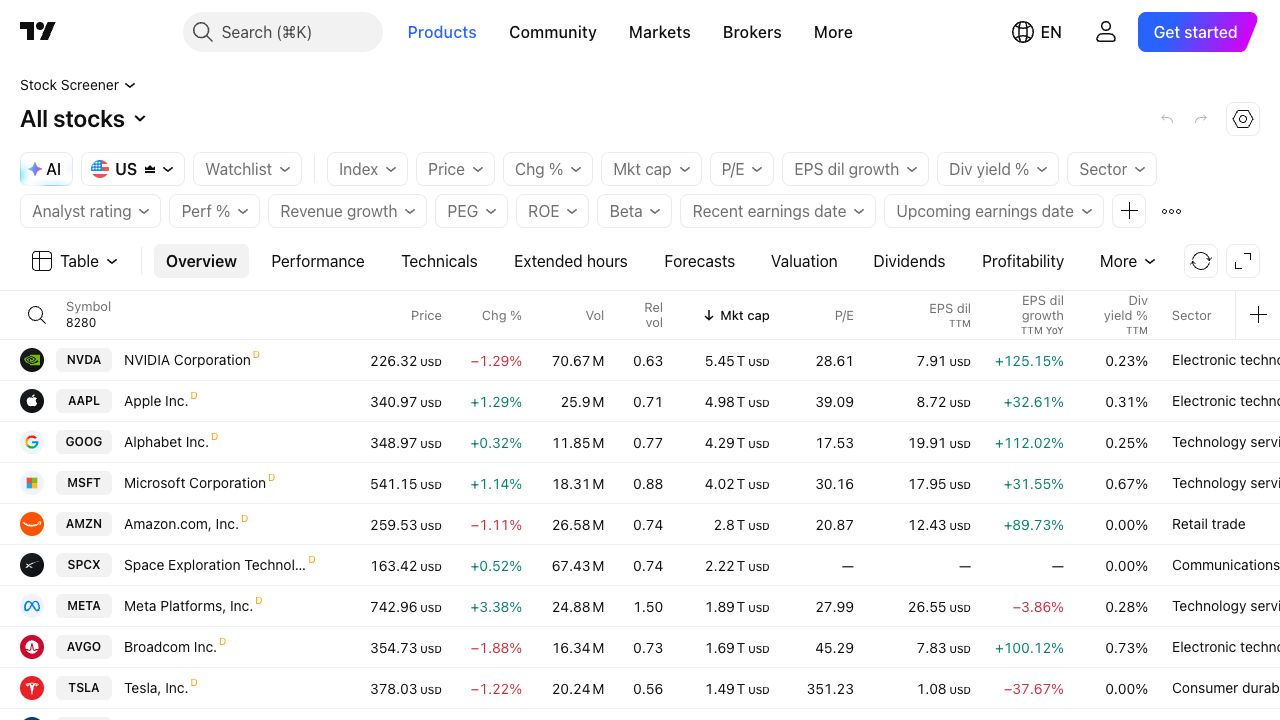
TradingView‘s screener walkthrough describes filters, configurable columns and table or chart views. The stock screener organizes information around your criteria. It does not decide whether an investment suits you.
Keep this one in mind before you upgrade. TradingView’s market data purchase guide says paid plans don’t cover additional real-time exchange fees. The package you need depends on your subscriber status and the exchange rules.
Default US stock data comes from Cboe and can differ from primary-exchange data. The TradingView note on default US stock data explains that exact primary-exchange figures need separate real-time data from NASDAQ, NYSE or NYSE Arca. So paid software access does not mean access to every primary feed.
My take: look at TradingView for a defined screening or chart-information task. Check the selected limits and the data source. No screener, broker connection or indicator performance was tested for this comparison.
Benzinga Pro
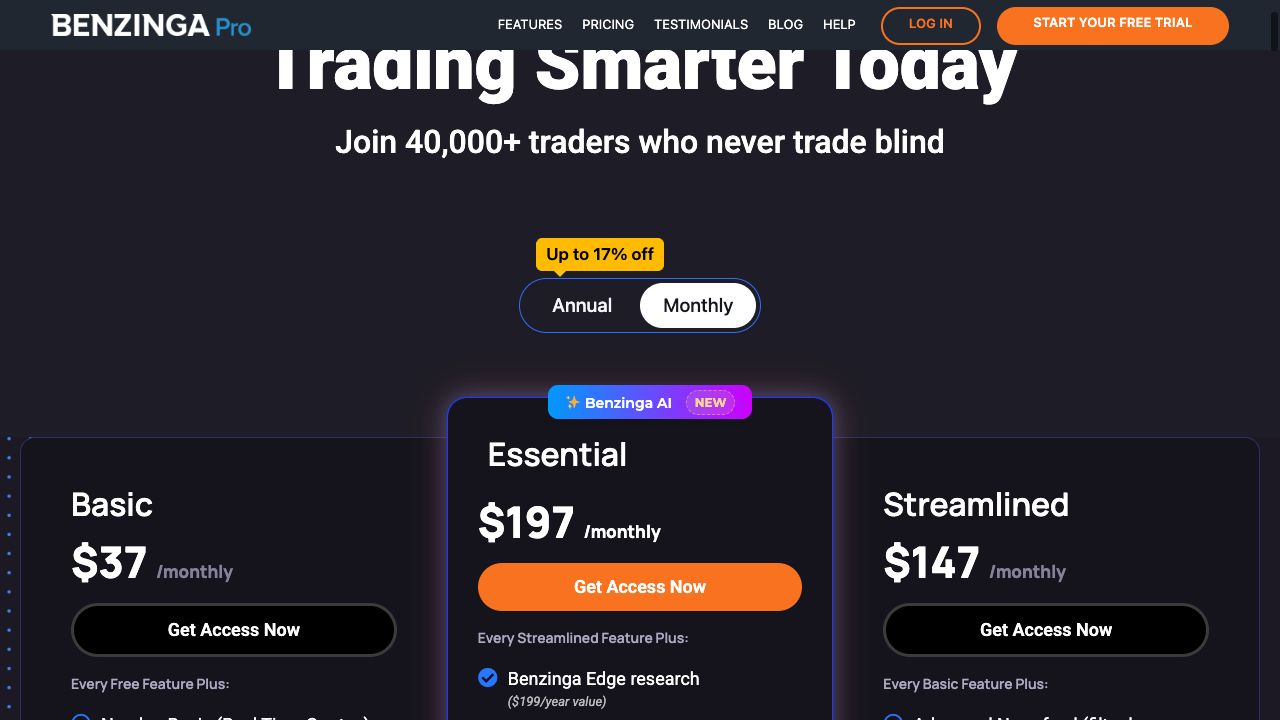
Benzinga Pro describes newsfeeds, watchlists, alerts and research features that depend on the plan. Its scanner and screener supply information. They are not proof of profitable decisions.
The inspected page showed monthly Basic, Streamlined and Essential offers at $37, $147 and $197, next to lower annual equivalents. Confirm currency, commitment and selected terms instead of comparing monthly billing with an annual headline.
Feature access differs by package. High Beta Squawk was listed as a separate $99 monthly add-on. Don’t assume the entry tier includes every audio, scanner or research feature.
News speed, alerts and performance testimonials were not tested here. Faster information does not guarantee a correct interpretation or an investment return.
SEC EDGAR
Investor.gov’s guide to using EDGAR describes it as free public access to corporate filings. Use the relevant filing to check the disclosure behind a company summary or news story.
For domestic public companies, that guidance separates the annual Form 10-K, the quarterly Form 10-Q and the current Form 8-K. An appended /A marks an amendment. Check the form and the period before you treat two documents as comparable reports.
A public filing is not a government recommendation to buy the security. Look at the business, the financial statements and the risk information in context.
This guide did not evaluate any issuer’s investment merits or audit any financial statements.
Define the question before entering a symbol
Write the information task in plain words. Decide whether you need a source check, a disclosure review or a comparison of data definitions. The question tells you which product or public resource is relevant.
A list produced by a filter only describes the criteria you selected. It does not show the complete risks or suitability of each security.
Keep unresolved questions visible in your notes. If the available information doesn’t answer the question, record the limitation instead of filling the gap with a confident guess.
For a fictional research record, write down the source, the reporting period and the claim that needs review. Leave the conclusion blank until the evidence supports a proper statement. The exercise is information management, not stock selection.
Keep the task separate from personal investment decisions. This comparison gives you no screening thresholds, allocation recommendations or trading instructions to copy into an account.
Store the selected data definitions with the research question. Someone reading your notes later should understand which information you examined without rebuilding the original dashboard.
Follow summaries to their source
A summary points you to material worth reading, but the important qualifications often live in the original source. Check where the information came from. Then check whether the full disclosure explains a limitation the short version left out.
Review dates and reporting periods. A story published today might discuss an older result. A company announcement, a financial statement and an analyst opinion are different kinds of information.
Separate what the source said from someone’s interpretation of it. A forecast is not a completed result. A market reaction does not mean the reported financial figure changed.
Keep the original reference in your research record. A source name, the relevant document and a date beat your memory of a headline every time.
If two sources disagree, name the unresolved issue before you pick the more appealing number. Compare their periods, definitions and scope.
No private issuer data or personal portfolio information was accessed for this comparison.
Understand the figure before comparing applications
Similar labels do not mean identical calculations. Check the currency, the date range and whether the figure is reported, adjusted or estimated.
A ratio needs inputs you understand. If the provider’s definition is unclear, write the question down and get clarification before you rely on the comparison.
Keep price, revenue, profit and cash flow distinct. Those figures answer different questions. Precision on a screen does not make a bad comparison reliable.
For a fictional comparison sheet, put the field definition right beside the source value. Include the period and currency instead of burying context in an unlabeled note. The example does not evaluate a real issuer.
Separate a document’s publication date from the period the statement covers. A recently filed report does not turn an earlier reporting period into current daily information. In your review sheet, label both dates and keep the referenced version.
If another application shows a figure under a shorter label, check the underlying definition before you treat the values as equal. Record the unresolved difference. Don’t change a number just to make the comparison look consistent.
Use a separate note for a revised definition or corrected source. The original record should still explain which information supported the earlier observation. An amendment, a different currency presentation or a changed period deserves a fresh look at the comparison, not a silent replacement.
Keep any interpretation limited to the information you examined. This procedure does not establish a finding about any particular company.
Use proper financial expertise when interpretation matters. Showing a figure on screen does not answer every accounting question behind the number.
Keep uncertainty about missing or revised information visible. Don’t turn an incomplete display into a definitive conclusion.
Check the feed and update timing
Identify the instrument and the source. A platform that supports several markets does not give every chart the same timing, coverage or entitlement.
Review the data-status description for your selected account and market. Keep the display’s refresh interval separate from the underlying feed’s timing.
Separate the exchange package from the software subscription. Subscriber classification and exchange rules shape the arrangement. Owning an online business does not automatically decide your classification.
For your own authorized evaluation, confirm the selected terms with suitable non-private examples. This guide did not purchase a feed or verify a private account configuration.
More detailed information does not remove risk. The source supplies data. It does not prove your interpretation or a future outcome.
Record changes to the selected feed when you compare observations over time. Otherwise an apparent discrepancy might come from a changed data source, not from the thing you’re examining.
Read the relevant filing in context
Confirm the company, form, period and version. A document’s name tells you its purpose, but it doesn’t replace reading the contents.
Investor.gov separates audited annual statements from unaudited quarterly statements in the relevant domestic-company reports. So don’t give every disclosure the same review status.
Read the business and risk material alongside the financial information. A short excerpt is not enough when the missing context changes the meaning.
Check amendments and later disclosures related to the document. Keep note of the version you used instead of treating a saved file as permanently current.
Public access starts a research task. The fact that a filing exists does not validate every interpretation or prove the security suits you.
This article contains no issuer-specific audit, recommendation or financial-statement judgment.
Keep news, commentary and promotion distinct
Identify what kind of material you’re reading. Reporting, analysis, opinion and commercial promotion each need different treatment.
A confident headline is not a verified fact. Read the context and the original evidence before you adopt the claim.
Don’t treat a testimonial about a subscription paying for itself as an expected result. One person’s claim does not establish repeatable returns for anyone else.
Be careful with claims of guaranteed outcomes or privileged information. A research product should help you examine evidence, not pretend the normal uncertainty has disappeared.
Get proper professional help for a specific investment or personal concern. This software guide is not an adviser assessing your financial position.
No news-speed benchmark, alert test or provider performance claim was independently measured for this article.
Best stock research tools: compare the complete cost
List the tier, billing commitment, required data packages and optional products separately. The entry subscription does not include every feature shown elsewhere on the website.
Compare the annual total with month-to-month billing. Review introductory terms, renewal conditions and cancellation requirements for the arrangement you pick.
A hypothetical pair of research services costing $45 a month totals $540 over 12 months, before any extra data or other expenses. That is a budget example, not a provider quote or an investment-return forecast.
Don’t justify the expense with an imagined winning trade. Judge the information need and your software budget separately from investment outcomes.
Check the resource limits that matter for your task, including saved screens, alerts, historical coverage, exports and users. A bigger allowance in one area does not remove restrictions in another.
Before you subscribe, write down the feature you need and the scope that supports the purchase. An unexplained broad bundle is a pain in the butt to assess at renewal time.
For a fictional software-purchase record, create separate entries for the base subscription, the exchange entitlement and any optional service. List the billing period and renewal information beside each one. Name the person who reviews the invoice and the evidence behind the selected scope.
Compare any unfamiliar charge with the approved order instead of lumping it into an undocumented total. The exercise describes subscription admin, not a financial-account transaction or a provider quote.
Keep research records and data rights clear
Use notes that name the source, definition, period and unresolved question. Keep observations separate from assumptions and interpretations.
For an export, check the selected plan’s support and the applicable terms. A downloadable file does not give you permission to redistribute the feed commercially.
Keep field definitions with the data. A later file that combines several periods or currencies needs enough context for a meaningful review.
Review the column label, timestamp, currency and definition the provider supplies. Keep those fields with the file. Anyone receiving the export needs enough information to tell the recorded observation apart from a later display, so don’t strip context when you combine files from different tools.
Record why the research changed. A revised source, corrected definition or new disclosure deserves a note explaining the difference.
Give shared notes a clear review status. A draft observation, an unresolved source question and an approved explanation should never look identical to another reader. Assign someone to check each discrepancy and keep the original reference.
When the review is done, describe the evidence examined and any remaining limitation. Don’t turn an organizational label into a claim of financial validation. The record supports collaboration, but it does not certify the investment or the research method.
Keep the information within the authorized task and the provider’s permissions. Convenient access is not ownership of every underlying dataset.
A thorough notebook does not remove investment risk. The notes support source review without promising a future result.
Separate research access from financial-account authority
Reading public information and connecting a financial account are two different actions. Review the purpose and permissions before you authorize access.
Research does not need broker execution for every task. Understand what an integration can do before you grant it authority.
Keep credentials, private holdings and account records out of public examples. Use suitable non-private material for any interface demonstration.
No account was opened or connected for this comparison. No financial transaction, security change or permission expansion was performed.
Keep a clear owner for authorized access and recovery. A contractor’s involvement does not remove the need for controlled ownership.
For account-specific questions, get proper help instead of treating a general product comparison as approval for a connection.
Review AI and historical examples without adopting their claims
AI tools organize material, but they don’t verify every statement. Check periods, figures and qualifications against the original source.
Keep facts and recommendations separate. If a generated answer suggests an investment, review the evidence and ask whether the output goes beyond the available information.
Don’t upload unnecessary private account records just to test an AI feature. Review the service terms and your authorized purpose before you send sensitive information anywhere.
A platform’s historical tools, simulations or indicators do not establish a properly evaluated strategy. Historical results are not guaranteed future outcomes.
Know the difference between a demonstration, a hypothetical scenario and a documented real result. A screenshot of a profitable example does not prove you’ll see comparable performance.
No backtest, paper trade, private-portfolio analysis or stock selection was performed for this guide.
Keep online-business education separate from investing
I want to be really clear about this part, because people mix the two up. What I teach is building online businesses, and I started Ecommerce Paradise in 2015 to help people reach location independence that way. None of it is securities advice.
My high-ticket dropshipping guide explains an independent retail model with a catalog, suppliers, a storefront and a customer-service process. That model is not a securities strategy.
The high-ticket niches list gives you retail categories to investigate. Those categories are not stock picks or promises of investment returns.
My supplier research guide covers a commercial relationship. Supplier verification and securities research need separate scopes.
Supplier Paradise is a retail discovery resource I own. It is not a broker, investment adviser or financial-research platform.
The business foundation checklist frames the admin side of a business. Use qualified legal, tax and financial professionals for obligations and personal decisions outside general software information.
Frequently asked questions
Does a paid TradingView plan include all exchange fees?
No. Current documentation excludes additional real-time exchange fees from the software plan. Review the selected market and your subscriber arrangement.
Are screening, news and filings interchangeable?
No. Each one supplies a different research input with its own context.
Is EDGAR a recommendation service?
No. Public filings are material to examine, not personalized advice to buy securities.
Does a research subscription guarantee returns?
No. Information access does not remove risk or establish a future outcome.
Did this comparison test a strategy?
No. The guide includes no trades, backtests, private portfolios or performance results.
Pick the tool that matches your question
So with that said, here’s how I’d decide. If your question is about what a company disclosed, start free with EDGAR and read the filing. If you need to organize symbols against criteria, look at TradingView and check the data feed first. If your workflow is built around financial news, compare Benzinga Pro tiers and add-ons carefully.
Choose the research question first, then buy only the access that answers it. Track the full cost, keep the data definitions with your notes and treat every summary as a pointer back to the source.
And keep your expectations grounded. No tool here removes investment risk, and none of this is a recommendation to buy or sell anything.
If what you really want is to build an asset you control, that’s my world. Grab the free 1,000+ niches list and start researching a store idea instead.
Related guides
- Small-business software
- Business bank accounts
- AI content tools
- Online-business brokers
- Online courses

Trevor Fenner is the founder of Ecommerce Paradise. His main projects are Ecommerce Paradise, Supplier Paradise, and Review Paradise, which is currently in development. TrevorFenner.com publishes research-based reviews and practical guides to online business tools and remote-work services, with clear affiliate disclosures.