

Looking for the best virtual mailbox? Here’s the short answer. The right one fits the mail you actually receive and the work you need done after it arrives. So before you pick a subscription, map out a realistic month of scanning, storage and forwarding, because the advertised price alone does not describe the full bill.
A virtual mailbox receives physical mail and lets you manage it remotely through an online account. Email, registered-agent service and a residential or bank-accepted address are separate requirements. Confirm how you plan to use the address before you change any important records.
This one is personal for me. I’ve been a digital nomad since about 2019, based in Bali, and I started Ecommerce Paradise in 2015 to help people get location independent. If you’re building a business you can run from anywhere, my guide on how high-ticket dropshipping works explains the model I teach.
In this guide you’ll get a comparison table, a breakdown of 7 providers, how to estimate a full month of mail costs, how to confirm address use, what authorization involves, and how to handle scans, storage and a clean exit.
Disclosure: some links here are affiliate links, and qualifying purchases through them provide me compensation at no additional cost to you. I own Ecommerce Paradise and Supplier Paradise. This guide compares public information, not purchased-mailbox tests, delivered parcels or measured support response times.
Compare the selected address and usage
| Provider | Research starting point | Confirm before committing |
|---|---|---|
| Anytime Mailbox | Location-specific mail-center comparison | Services, fees and permitted address uses at the chosen location |
| iPostal1 | Personal from $9.99 monthly, business from $14.99 | Address tier, tax, recipients and volume |
| Traveling Mailbox | Basic $15 monthly, 40 envelopes and 35 page scans | Recipients, overages, selected address and forwarding |
| PostScan Mail | Monthly Starter as low as $10, 30 items | Billing-specific recipient and scan allowances |
| VirtualPostMail | Starter displayed at $20 monthly | Mailbox versus separate physical-address products |
| US Global Mail | Business workflow and team comparison | Address, billing selection, users and retention |
| PO Box Zone | Entry plan $99 annually | Mailout handling, postage and scans |
These public observations are not all-in quotes. Use the same expected mail volume and forwarding pattern across every provider. Billing selection, destination and optional services all change the comparison.
Anytime Mailbox
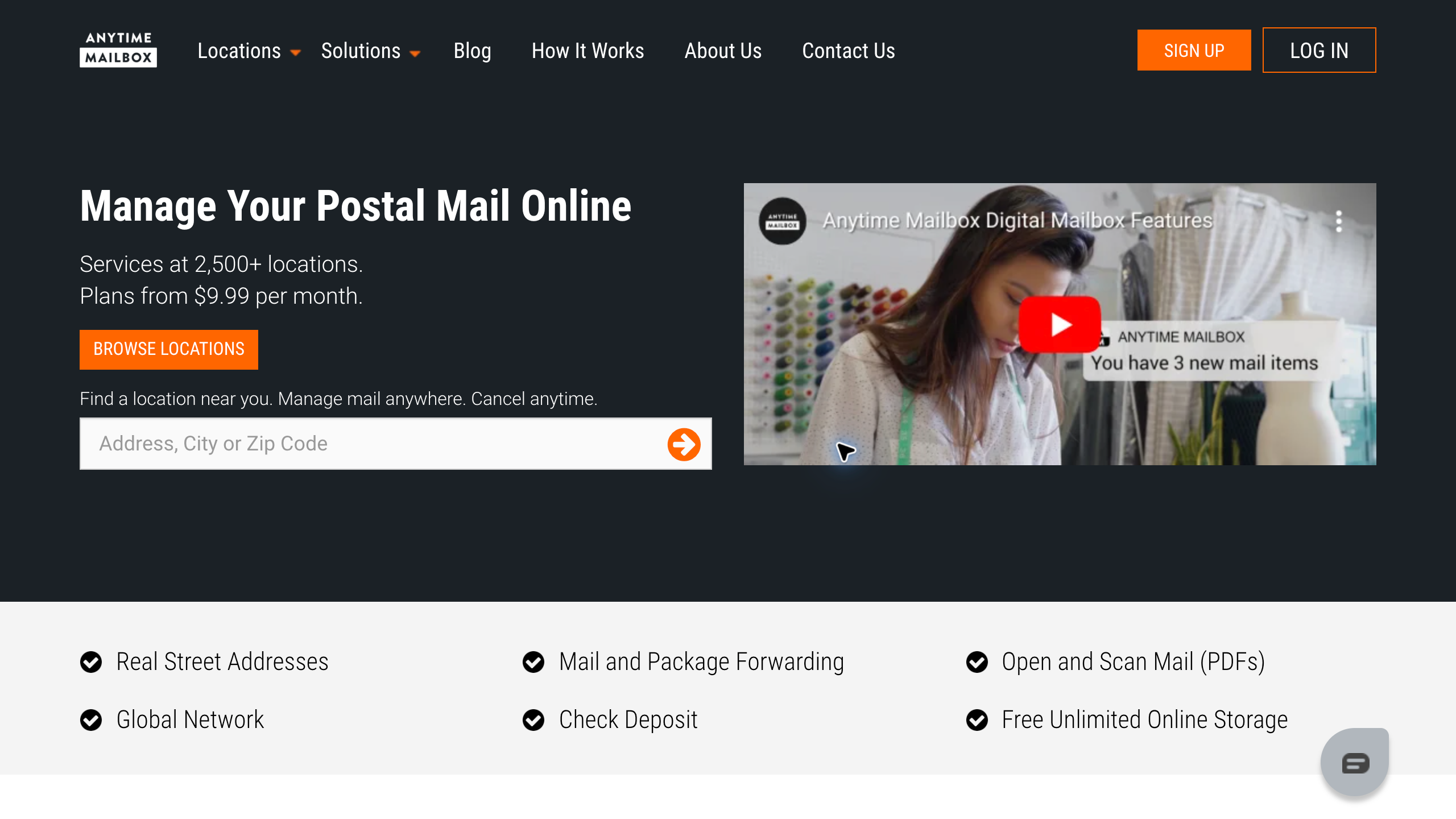
Anytime Mailbox is a candidate when a particular city or mail center matters to you. I like it for that reason, because you choose the location first. Compare the chosen location’s scanning, package handling, pickup and forwarding services, and note that check deposit is available at selected locations, not every address.
The company cautions against assuming its mailbox address works for official business registration or banking. Confirm acceptance with the institution asking for the address. A real street address for mail handling does not establish a residential address or universal approval.
Here’s what I’d do. Shortlist suitable locations before you compare brand-level prices. Read the actual location’s service terms and ask how unusual mail is handled, because 2 centers under one brand can have different operating details.
iPostal1
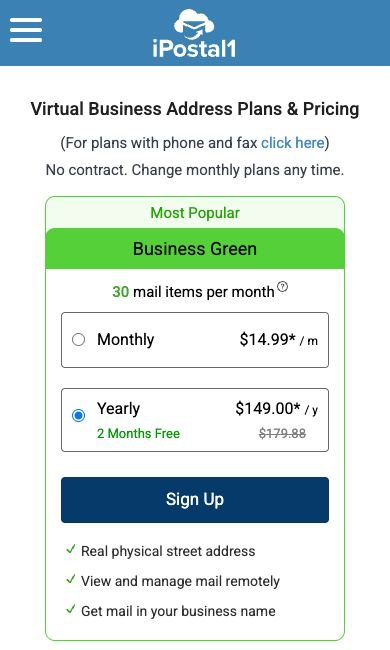
iPostal1 separates personal mailing, business address and virtual-office plans. Current advertised starting prices are $9.99 monthly for personal mail and $14.99 for a business address. Location tiers and applicable taxes affect the quote you get.
Pick the category that matches the names receiving mail. Personal Green and Business Green each list 30 incoming mail items monthly, but the personal plan excludes a company name. Business mail handling and a virtual-office phone setup are different purchases, and registered-agent service is another scope check that depends on the state and offering.
Record each recipient and location separately. Confirm included volume and optional charges before comparing a personal entry price with a business plan from another provider.
Traveling Mailbox
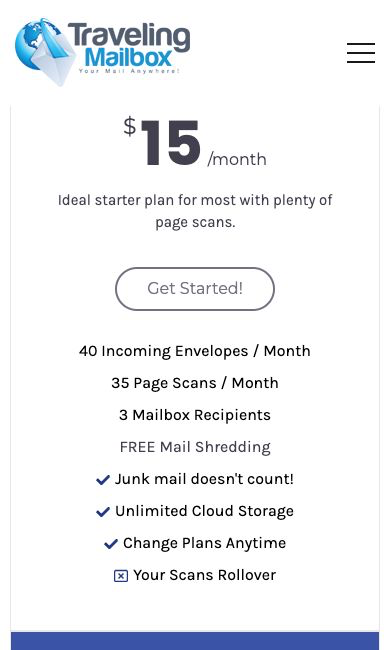
Traveling Mailbox lists Basic at $15 monthly with 40 incoming envelopes, 35 page scans and 3 recipients. Envelopes and scanned pages are separate allowances. One envelope holding a long statement uses more than one page scan.
The Traveling Mailbox pricing page lists forwarding at postage plus $2 per shipment, not per piece. Review the selected address and overage terms. Do not assume every plan carries identical rollover rules or that every service is included.
So what you should do is estimate the pages you’d need reviewed from an ordinary month of mail. A short-letter workload is very different from contracts and long statements. Use that estimate to compare a bigger allowance against paying for occasional overages.
PostScan Mail
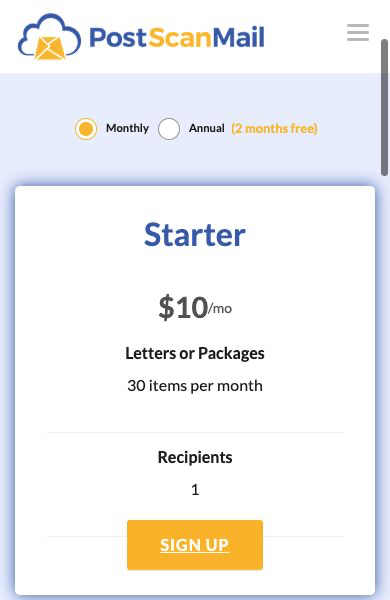
PostScan Mail shows monthly Starter as low as $10 with 30 incoming items and 1 recipient. Its annual Starter display lists $100 billed annually, a monthly equivalent of $8.33, and 2 recipients. Keep those billing selections separate in your notes.
Incoming items are different from open-and-scan requests. According to the PostScan Mail pricing page, an extra open and scan costs $2 per envelope for up to 10 pages, then $0.25 per additional page. So a 12-page envelope costs $2.50 for scanning when no included allowance covers the request.
The Standard and Premium allowances also change with billing selection. Keep the selected price and allowances together.
Add storage and forwarding to the quote too. Letters and packages have different free storage periods, and forwarding includes handling plus shipping. A package-locker product is a separate service from the full mailbox comparison.
VirtualPostMail
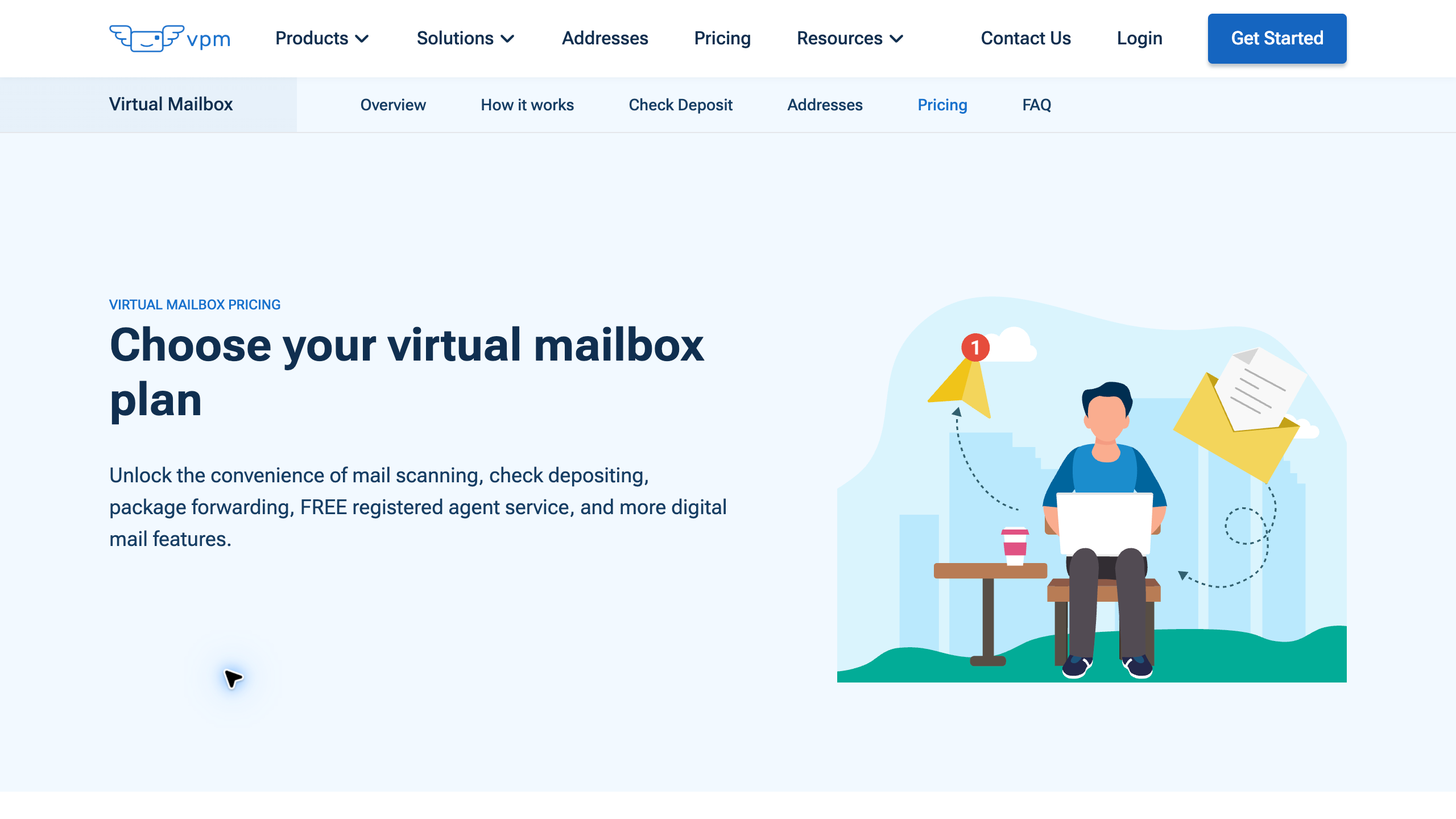
VirtualPostMail displays Starter at $20 monthly, Plus at $35, Business at $60 and Premium at $90. The actual public pricing table confirms these figures after loading. Review recipients, envelope scans, content scans and shipping for the plan you pick.
The provider clearly separates its mailbox from TruLease and TruResidence physical-address products. A mailbox purchase does not prove a bank or another institution accepts the address for its requested purpose.
My take? Start with the institution’s exact requirements, then compare the relevant product. Check the supporting documents and confirm acceptance yourself, and don’t buy a broader address service based only on a general verification promise.
US Global Mail
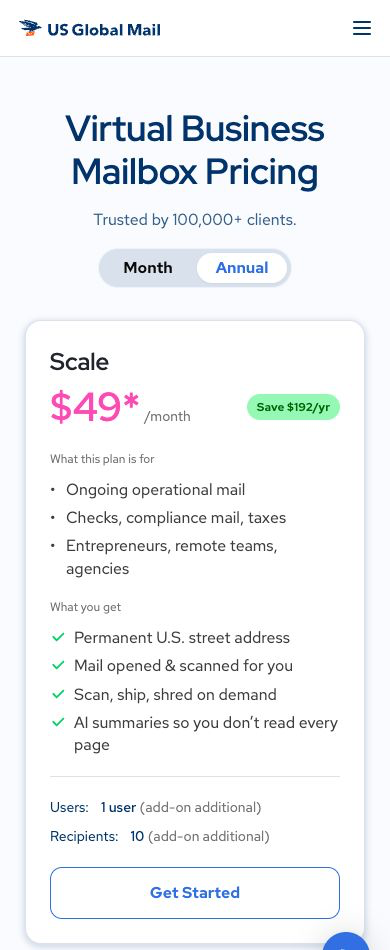
US Global Mail presents Scale, Teams and Enterprise business offerings. The selected address and billing arrangement affect prices. Compare the actual quote instead of carrying an older plan name or flat rate into the decision.
Recipients and users are different counts. Review who receives mail and who needs account access, plus what additions cost. Public feature descriptions also need confirmation where storage or user allowances differ between displayed tables.
I’d only choose a broader workflow when roles and document routing serve a real need. Confirm the retention, forwarding and notification setup. An automation description does not establish who actually handles the task after a document arrives.
PO Box Zone
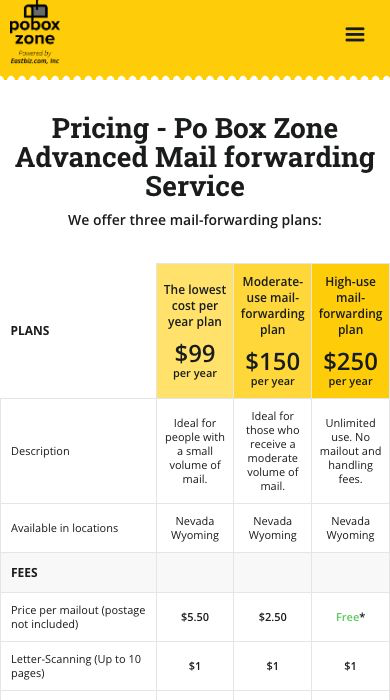
PO Box Zone lists its entry plan at $99 annually, equal to $8.25 monthly but paid once a year. The published entry charges include $5.50 per mailout before postage and $1 for scanning up to 10 pages.
Calculate your expected shipments before choosing a low annual subscription. Frequent forwarding creates a very different bill from occasional letters. Check the selected address, authorized names and current storage terms.
Compare an annual plan against a monthly alternative using the same workload. Record the upfront payment and cancellation conditions separately from the monthly equivalent.
Estimate the full month of mail handling
List incoming envelopes, scanned pages, packages, recipients and physical shipments. Use a recent month of mail where you can. For a new business, write down an honest estimate and revisit the numbers after using the service.
Here’s an original hypothetical budget. A $15 subscription plus $8 in scans, $6 in handling and $18 in postage totals $47. These are assumed inputs, not a provider quote, so compare the total with another plan covering the same workload.
An envelope allowance and a content-scanning allowance describe different actions. Receiving a letter does not necessarily include opening and digitizing every page. Separate envelope images, content scans and extra pages in your worksheet.
Then add storage and forwarding. A low-volume business requesting originals every week has a different cost pattern from someone receiving occasional letters. Ask for shipping estimates to your intended destination, including handling and any international requirements.
Record annual payments as upfront commitments. A monthly equivalent helps comparisons, but the billing schedule and cancellation terms still matter. Don’t combine an annual price with another plan’s monthly allowances.
Keep a record of the selected location and plan version alongside the quote. Save the provider’s confirmation of any essential service. That makes a later review easier if the location changes its handling process or your business gets more mail.
Confirm the address use before changing records
Run a second hypothetical workload through the comparison. Suppose a founder receives 8 envelopes but requests scans of a 20-page statement and 2 letters of 5 pages each. That’s 30 content pages, not 8 scans automatically covering all the mail, so replace these assumptions with your real pattern and check the provider’s unit of measurement and included allowance.
Another original budgeting example. 4 forwarding requests at an assumed $5 handling charge create $20 in handling before postage. Combining permitted items into 2 shipments at the same assumed charge cuts handling to $10, but postage depends on weight and destination, and these are illustrative inputs, not a promise about any provider’s consolidation policy.
Ask for comparable shipment estimates instead of assuming consolidation always produces the lowest complete price.
A mailing address helps you receive mail. A bank, licensing authority or another institution decides which address and supporting documents meet its requirements. Get confirmation for the exact intended use before you pay for a long commitment.
Keep the questions specific. Receiving letters in a company name is different from satisfying a physical business-address requirement. A provider’s answer about receiving mail does not establish the institution’s acceptance of the address.
A mailbox is also different from registered-agent service. Some providers offer related services in selected states, but ordinary mail handling does not automatically include legal-notice responsibilities. Review the separate service and availability for your business.
Use my business foundation guide to organize the broader admin work. Keep formation, registered-agent service and mail management on separate lines instead of expecting one address purchase to handle everything. For what it’s worth, I run my business through a Wyoming LLC, and I still treat each of those as its own task.
Complete authorization through the provider’s process
USPS guidance for commercial mail receiving agencies requires PS Form 1583 and 2 acceptable forms of identification, including photo identification. The current USPS PS Form 1583 also distinguishes photo ID from address ID. Follow the selected provider’s instructions and the current official requirements.
Submit identification only through the intended service’s proper process. Keep identity documents out of shared spreadsheets and public demos. This article does not complete a form, submit identification or accept an agreement on your behalf.
Confirm authorization for each intended recipient and company name. Recipient allowances and the authorization process are separate checks. Adding a name to your budget does not give you permission to receive mail for an unverified recipient.
Wait for the service’s setup confirmation before sending important mail to the address. Record the approved address format and any required private-mailbox designation. Ask the provider how incorrectly addressed or unauthorized mail is handled.
Assign someone to act on scanned documents
A scan gives you access to a document. The business still needs someone to read it and act on deadlines. Decide who monitors incoming mail and who handles notices that need accounting, supplier or legal follow-up.
Here’s an original workflow example. A solo owner reviews new envelopes twice a week, requests the content scans that matter and puts deadlines in the business calendar. Urgent or expected documents get a more frequent check, and the schedule should reflect the mail your business actually receives.
Save useful documents in a proper filing system and restrict access based on what’s inside. Don’t forward every sensitive scan into a broadly shared inbox. Define who needs the document and what action follows.
For a team, separate authorized mail recipients from account users. Review permissions and additional-user charges. Someone handling invoices does not necessarily need full access to every personal or legal document.
Keep a backup owner for absences. A mailbox subscription does not give you continuity if the only person watching notices is unavailable. Document the handover process and where outstanding tasks live, ideally as a simple SOP.
Plan forwarding, storage and disposal
Identify which documents need originals and which are fine as scans for your purpose. Get proper advice for records with specific retention requirements. A general mailbox comparison does not decide whether a particular original is safe to destroy.
Review free storage periods separately for letters and packages. A parcel sitting for weeks creates a different charge from a short letter. Set a reminder before the storage allowance ends.
Ask how consolidation works for your plan. Combining items reduces some shipping work, but the provider’s handling rules, dimensions and destination still decide the quote. Do not assume a forwarding request includes every stored package.
Keep the destination current and review the service’s tracking and exception procedures. International forwarding needs attention to the items being shipped and the destination’s rules. An advertised global service does not mean every item is eligible, and that’s worth remembering if you live abroad like I do.
Authorize disposal on purpose after saving the records you need. Check the difference between recycling, shredding and keeping originals. Don’t treat a service’s default retention setting as a decision about your business records.
Prepare a transition before canceling
Moving away from a mailbox takes more than canceling billing. USPS guidance states its ordinary change-of-address process does not transfer mail from a commercial mail receiving agency to another address. Review the agency’s forwarding arrangement and charges directly.
Notify important senders of the new address and keep a record of confirmations. Include suppliers, relevant institutions and business contacts. Check which documents are still expected at the old location before ending service.
Export permitted scans and handle remaining originals through the provider’s process. Confirm the final storage, forwarding and disposal instructions. A canceled subscription does not mean all physical mail has reached the new destination.
Keep billing and termination confirmations with your operating records. If mail handling responsibility changes between team members, update the sender list and notification owner as part of the handover.
Connect the mailbox to the business you operate
A mailbox handles mail, but the business still needs an offer, suppliers and customer support. If you’re exploring a location-independent store, start with the business model itself, not the admin tools.
My high-ticket niches list helps organize category research. Review buyers, delivery costs and commercial requirements before spending on admin tools for an untested store idea. Go deep before you go wide.
Use my supplier research guide when reviewing dealer relationships. Setting up a mailing address does not establish supplier approval or fulfillment terms.
Supplier Paradise supports supplier discovery. Verify each candidate directly, including shipping, warranty and support responsibilities. Directory inclusion is different from an operating agreement.
For guidance on the store’s wider operating plan, take a look at Ecommerce Paradise coaching. Bring specific questions about the niche, suppliers and workflow. Mailbox eligibility and institution-specific address requirements still need their own confirmations.
My take on picking a virtual mailbox
So with that said, here’s where I’d land. Anytime Mailbox fits if the exact location matters. iPostal1 and PostScan Mail are worth comparing on entry plans and scan costs, Traveling Mailbox on envelope and page allowances, VirtualPostMail when you need to understand separate address products, US Global Mail for team workflows, and PO Box Zone if an annual entry plan fits your volume.
The cheapest-looking plan is rarely the cheapest complete service, so compare every provider against the same realistic month of mail. Then confirm any address use directly with the bank or institution before changing records.
If the real goal is a location independent business, focus on the business first. Start with my free high-ticket dropshipping mini course and pick your mailbox once you know what mail the business will actually get. It is what it is, admin follows the business, not the other way around.
Questions about virtual mailboxes
Is a virtual mailbox an email account?
No. The service receives physical postal mail and provides online management. Email is a separate communications system.
Does a mailbox replace a registered agent?
No. Ordinary mail handling and registered-agent responsibilities are different. Check any separate offering, state availability and terms before relying on a provider for legal notices.
Is living abroad enough to qualify?
Confirm eligibility, authorization and identification requirements with the selected service. Review forwarding to your intended destination instead of assuming a remote-use description covers every situation.
Is the lowest subscription the cheapest complete service?
Not necessarily. Compare the same mail volume, scans, recipients and shipments, because storage, handling and postage change the total.
Should I choose monthly or annual billing?
Review the upfront commitment, renewal, cancellation and billing-specific allowances. A monthly option lets you evaluate an unfamiliar service, while an annual purchase needs confidence in the selected location and terms.
Related administrative guides
- LLC services and renewal costs
- Business email providers
- Domain registrars and ownership
- Shopify hosting requirements
- Accounting software comparison

Trevor Fenner is the founder of Ecommerce Paradise. His main projects are Ecommerce Paradise, Supplier Paradise, and Review Paradise, which is currently in development. TrevorFenner.com publishes research-based reviews and practical guides to online business tools and remote-work services, with clear affiliate disclosures.