

Shopping for the best identity theft protection services? Start here. The right service is the one that fits the monitoring and recovery help you actually need. A subscription does not prevent every incident, and a big insurance headline does not mean every loss is covered.
Here’s what I’d do first. Review the free protective steps and any benefits you already have before you add a paid plan. Then compare the exact offer, the renewal price and household eligibility. A short-term discount is only one part of the decision.
In this guide you’ll see how Identity Guard and Aura compare on price and renewal, what the free baseline covers, how to read insurance claims, what to check for family members and how to keep good records. Keep in mind that this is a security and insurance topic, so I’ll stick to education and leave the advice to the professionals.
At Ecommerce Paradise, I focus on practical operating responsibilities for online businesses. A personal identity membership is separate from the security and insurance setup for your business, and I’ll come back to that near the end.
This comparison uses public offers and official consumer guidance reviewed October 14, 2026. Aura’s provider image was captured October 13. Identity Guard’s replacement terms image was captured October 14. No identity data, financial accounts, enrollments, alerts or insurance claims were tested.
Affiliate disclosure: qualifying purchases through the documented links earn me compensation, subject to program approval and terms. I own Ecommerce Paradise and Supplier Paradise. This is general consumer education, not individualized legal, financial or insurance advice.
Identity Guard for the exact Ultra offer
Look at Identity Guard for its selected monitoring and recovery package. The current affiliate offer presents Ultra Individual and Ultra Family, not every plan sold under the brand.
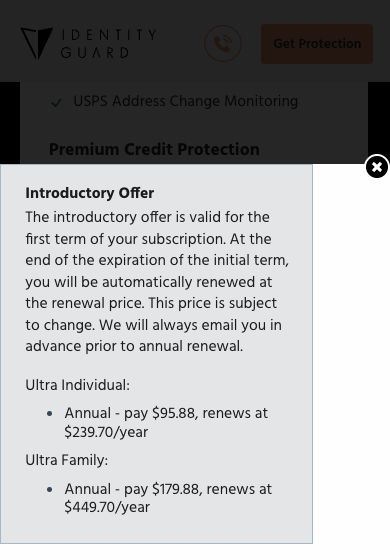
The actual disclosure lists $95.88 for Individual’s first annual term and $239.70 for renewal. Family lists $179.88 up front and $449.70 for renewal. The disclosure allows renewal prices to change and describes an email notice before annual renewal.
These charges are annual, not monthly payments of some displayed equivalent. Keep the selected offer and the renewal disclosure together before you commit.
The offer separates adult and child benefits. Ultra’s monitoring and recovery descriptions do not mean every family member gets identical features or insurance eligibility.
One more thing to know. Identity Guard’s footer says its trademarks belong to Aura Sub, LLC. So compare the two branded offers without treating them as unrelated corporate competitors.
Aura for the selected household and device bundle
Aura offers identity features alongside device tools. Compare the bundle with your household’s actual needs instead of assuming every feature works on every platform.
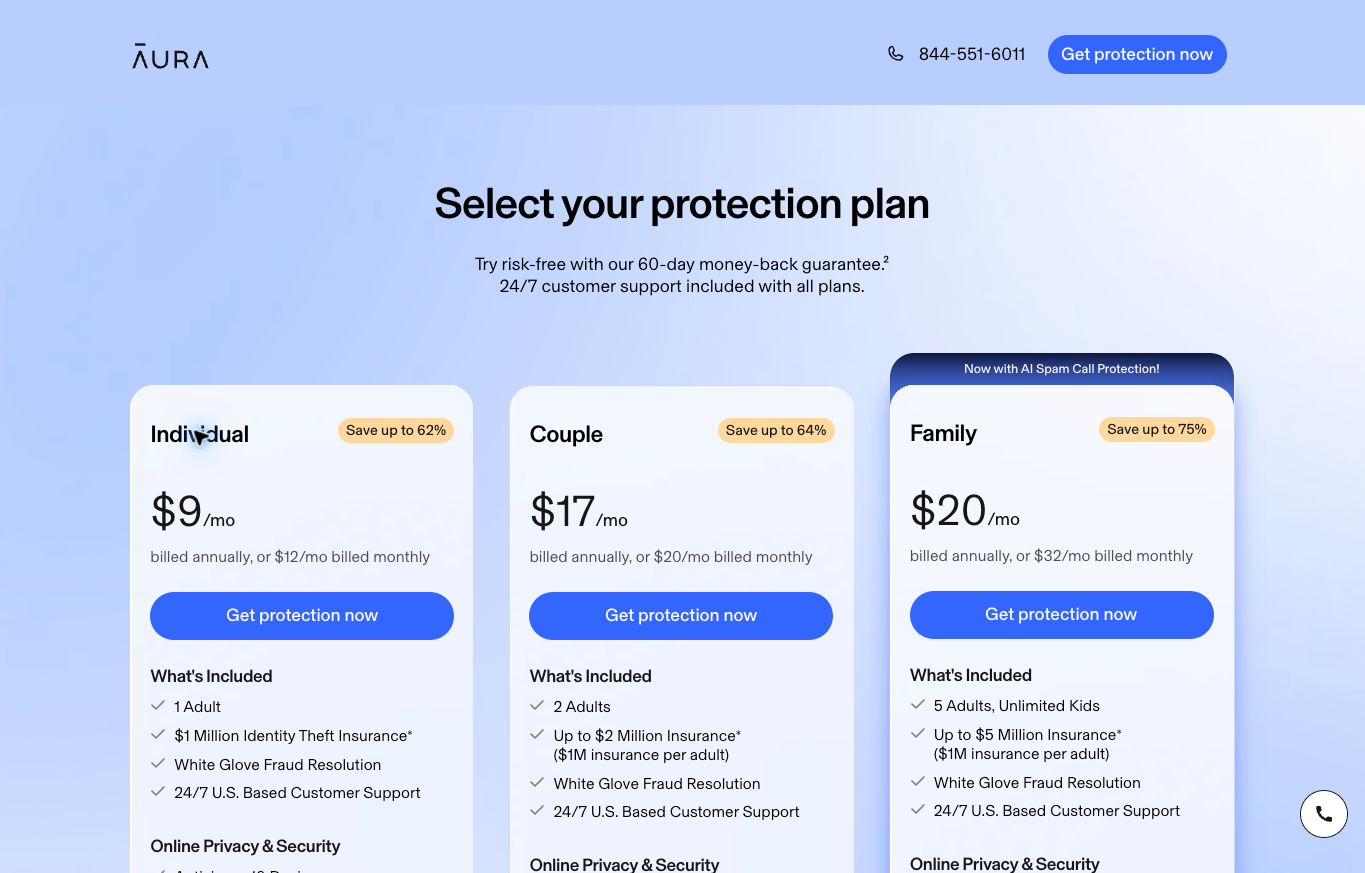
The reviewed referral offer lists Individual, Couple and Family at $9, $17 and $20 monthly equivalents billed annually. Monthly billing is listed separately at $12, $20 and $32.
The cards describe 1 adult, 2 adults and 5 adults with unlimited children. The Family insurance headline is up to $5 million, described as $1 million per adult. The actual policy and eligibility govern coverage, not the headline.
Here’s a detail that matters. The Family card lists child credit monitoring, while the footer describes narrower child benefits. Get confirmation for the selected plan before you rely on a specific child feature, and don’t settle the conflict by picking the bigger claim.
This review did not establish the selected renewal charge or personal eligibility, so confirm both before purchase. Public offer research also does not show a tested alert, a successful recovery or an approved insurance claim.
Understand the free protective baseline
The FTC’s page on credit freezes and fraud alerts explains that US credit freezes are free to place and lift and don’t affect your credit score. A freeze restricts access to your report. You set it up with all 3 nationwide bureaus.
A fraud alert is different from a freeze. Monitoring is a separate function again. None of these labels means every kind of identity misuse is prevented.
My take: keep reviewing your account activity and bills even if you pay for monitoring. Decide whether extra assistance solves a specific need only after you understand the free baseline and any benefits you already have.
Compare the offer and the unresolved terms
| Option | Reviewed price | Job to evaluate | Separate confirmation |
|---|---|---|---|
| Identity Guard Ultra | Individual $95.88 initial annual term, $239.70 renewal. Family $179.88 initial, $449.70 renewal | Selected monitoring and recovery | Current renewal, eligibility and policy |
| Aura referral offer | $9 Individual, $17 Couple, $20 Family monthly equivalents billed annually | Identity features and device bundle | Selected renewal and conflicting child scope |
| Free protective baseline | No charge for US credit freezes | Report-access restrictions and account review | Not universal fraud prevention |
Compare the actual purchase you’d make and the documents that apply to it. These dated references do not establish personal eligibility, permanent promotional pricing or an approved insurance claim.
Separate monitoring, recovery and insurance
Start by naming the job you want help with. Monitoring looks for covered activity and sends notifications. Recovery assistance handles the work after an incident. Insurance deals with eligible loss under a particular policy.
A long feature list blends those jobs together. So ask what information is monitored and which events trigger a notice. A broad financial-protection label does not prove the exact account or activity you care about is included.
For recovery, ask what the specialist does and what stays your responsibility. Explaining a form, preparing letters and talking to an institution on your behalf are 3 different services. Confirm the actual scope before you put a value on the benefit.
I’d review the selected Identity Guard offer against those separate requirements. A premium tier deserves comparison with its own terms, not with a cheaper tier’s price and a bigger tier’s feature list.
Review the policy rather than the maximum number
An insurance limit is not an automatic payment. Ask for the actual policy that applies to the plan, the member and the location. Identify the covered event and the eligible loss before you assume an incident qualifies.
Review exclusions, sublimits, documentation and reporting requirements, with professional help when you need it. A marketing summary is not the governing document. This article does not determine coverage for your situation.
A stolen balance, a scam payment you authorized and recovery expenses are different questions for the provider and the insurer. Don’t assume every dollar lost gets reimbursed just because the plan shows a big maximum.
The Aura offer points to insurance information, but the selected personal policy was not inspected here. The actual plan and jurisdiction still need confirmation. Recovery support and an insurer’s claim decision stay separate.
Keep personal identity coverage separate from other insurance categories. A provider that sells an extra cyber product does not include the same benefits in every identity membership. Compare the actual purchase instead of combining unrelated headlines.
Compare the commitment and renewal
Compare the checkout charge, billing period and next renewal date before you pay. Write down the disclosed renewal price next to the first charge. If the offer shows a monthly equivalent billed annually, budget the full annual charge instead of treating the equivalent as a monthly payment.
Here’s an original hypothetical comparison. Assume one plan costs $15 a month, so 24 months totals $360. Assume another costs $120 for the first year and $240 for the second. The same 2-year period also totals $360.
Those hypothetical prices are not extra provider quotes. Both examples land at $360 over 2 years despite different payment schedules. So compare the 2-year total alongside cancellation terms and the support you need, using the current charges for each offer.
Review the Identity Guard introductory disclosure next to its renewal terms. Save the dated offer in your record instead of assuming an old screenshot locks in permanent pricing.
Check existing benefits separately. A bank, employer or other arrangement deserves its own review for scope and end date. Don’t assume every benefit overlaps, and don’t pay twice without understanding the difference.
Check the cancellation and refund process
A money-back guarantee is different from a free trial. Find out whether payment happens up front, which purchase channels qualify and how to request a refund. Cancelling a future renewal does not automatically count as a refund request.
Aura’s reviewed policy limits its 60-day guarantee to eligible annual purchases made on the website or through support. Monthly and third-party subscriptions are excluded, and later annual renewal payments don’t qualify for a full refund.
The policy treats a trial signup as the purchase date that starts its guarantee window. Switching plans does not reset the deadline. Confirm the actual arrangement before you count on an extension.
Review Aura’s selected purchase terms before you enroll. If you later cancel, save the required process, the date and the response. This guide did not start a trial or submit a refund.
Identity Guard’s public offer also limits its guarantee to eligible annual purchases made on the website or through support. Ask about your selected tier and channel. Don’t copy another promotion’s guarantee onto an unrelated membership.
Keep credit monitoring and report restrictions distinct
A credit-monitoring notice reports an observed change within the service’s scope. A freeze restricts access to the report. A paid lock feature needs its own description and bureau scope, so don’t treat it as the same thing.
Ask which reports the subscription monitors and what the review includes. A change flagged by one service does not mean every institution or transaction is monitored. Reviewing your own activity still matters.
An educational score is yet another function. Don’t assume the dashboard number matches the score a lender uses. Read the provider’s explanation before you interpret the display.
I’d keep the comparison focused on the work the plan actually supports. A tidy dashboard helps with organization, but it is not proof that every risk is handled or every suspicious transaction gets caught.
Confirm every household member’s fit
A family-plan headcount is only the starting point. Check eligibility, required verification and the benefit scope for each person. An adult, a child and another relative should not be assumed to have identical coverage.
Talk about consent before you manage an adult relative’s information. Paying for a household plan does not give you authority over that person’s financial accounts. Ask the provider how the authorized arrangement works.
For children, separate monitoring, recovery and insurance. The conflicting Aura card and footer descriptions need a specific answer for the selected offer. Don’t assume the broadest child benefit shown is the settled one.
If you live abroad or travel a lot, confirm the actual residency and jurisdiction requirements. I’ve been a digital nomad since about 2019, based in Bali, so I know this question comes up. A US-focused landing page is not proof that a particular nomad or household qualifies, and no eligibility check was completed here.
Evaluate the bundled device tools
Write down the devices and tools you already use. A bundle deserves a look when the extra functions actually serve your household. Extra software does not automatically justify the membership or replace tools that do different jobs.
List each household device, its operating system and the feature you plan to use. Match those entries against the plan’s supported systems and allowed-device count. Ask the provider about any missing compatibility detail before you rely on the tool for a particular phone or computer.
Treat the Aura bundle as a specific offer, not a universal device-security result. No antivirus, VPN, password manager or alert performance was tested in this comparison.
Keep account protection separate from identity monitoring. Strong unique passwords and multifactor authentication protect account access, and CISA’s page on multifactor authentication describes MFA as a layered approach to securing your accounts. A monitoring membership does not make those steps unnecessary.
Use a verified channel when an alert arrives
An unexpected message deserves verification before you share anything. Contact the institution or provider through an official channel you already trust. A familiar logo, an urgent tone or someone knowing your name is not proof of an authorized request.
Never give passwords or verification codes to an unexpected caller. Keep sensitive documents out of public posts and shared research sheets. A legitimate provider should explain what information it needs and how to submit it safely.
Record the confirmed incident, the date and the affected institution in a secure place. Separate what you saw from what a caller claimed. That helps you explain the next step without spreading unnecessary personal information.
If you suspect identity theft, the FTC’s IdentityTheft.gov recovery steps walk you through reporting and recovery. Contact affected institutions through verified channels when appropriate. A paid service is another assistance option, not a reason to delay handling an incident.
Ask who owns the next action and what evidence is needed. Don’t treat a notification as a resolution. This review did not trigger alerts or measure how either service handles a real case.
Keep a useful plan-comparison record
For each offer, record the brand, tier, household size and billing period. Add the initial price, the known renewal price and the date you reviewed it. Mark missing terms as unanswered instead of borrowing them from another package.
Record the unmet need, the provider’s answer and the plan feature that addresses it. Compare that with any existing bank, employer or insurance benefits before you pay for another service. Keep unresolved questions visible so the decision rests on a real requirement, not the length of a feature list.
Before committing to the current Identity Guard offer, save the selected package and billing disclosures. Ask for written answers on any missing renewal, household or support terms. Keep those answers with the documents that apply instead of relying on another plan’s description.
If you eventually enroll, store confirmation records securely. Keep renewal dates and support details easy to find without putting account access or identity documents in a public worksheet. No enrollment was performed for this guide.
When you compare two answers from a provider, keep the question and the date beside each one. If a support rep describes a benefit that isn’t in the selected terms, ask for a written explanation before you rely on it. A sales conversation and the governing documents serve different roles.
Record which question is still open, who should answer it and whether the missing information changes your decision. Don’t fill a gap with an unrelated plan’s description.
Separate personal protection from store responsibilities
Review business cyber insurance, customer-data incident response and supplier-payment procedures separately with the right provider or adviser. Decide who handles each responsibility for your store. Keep the personal identity membership in its own comparison instead of counting its consumer benefits as business coverage.
I run my own business through a Wyoming LLC, and the personal and business sides stay separate for exactly this reason. The business foundation checklist covers the broader setup responsibilities. Keep personal memberships and business insurance decisions apart.
Read the high-ticket dropshipping guide for the retail model itself. Running an online store involves a lot more than picking a monitoring tool.
The high-ticket niches list helps you organize category research. The customer and supplier relationships still need a focused operating plan.
Use the supplier research guide before you share business documents or sign an agreement. Verify the actual business and terms through proper channels.
Supplier Paradise is a discovery resource I own. The directory is not an identity-insurance or fraud-recovery service.
Questions before choosing an identity membership
Does a subscription prevent every incident?
No. Monitoring and recovery have defined scopes. No universal prevention or tested alert performance is established here.
Does an insurance headline guarantee the displayed payout?
No. The actual policy, eligible loss, limits, exclusions and claim requirements govern payment.
Is the annual equivalent a monthly bill?
Not automatically. Compare the actual billing period and charge for the selected offer.
Do all family members receive identical benefits?
Nothing here supports that assumption. Confirm the exact adult and child scope, eligibility and applicable terms.
Does a personal membership cover my store?
Don’t assume it does. Consumer identity benefits and business security or insurance are separate decisions.
My bottom line on identity protection
So with that said, here’s the recap. Start with the free baseline, especially credit freezes with all 3 bureaus. Then decide whether you need paid monitoring, recovery help or insurance, because those are 3 different jobs.
If you compare Identity Guard and Aura, line up the first charge, the renewal price and the billing period side by side. Read the actual policy instead of the headline maximum, and confirm every household member’s scope in writing. Pay for the specific help you need, not the longest feature list.
And keep your business protection separate. A personal membership is not store coverage, and your store needs its own plan.
If you’re building an online store and want help with that operating plan, Ecommerce Paradise coaching is a separate paid business-planning service. The Ecommerce Paradise Academy on Skool describes its classroom and enrollment options, with a 7 day free trial before it becomes paid. Neither one replaces incident-specific recovery help, legal advice or insurance documents.
Related business foundation guides
My LLC services comparison helps you compare filing work, extras and renewals when you organize business formation. Review the admin scope and ongoing responsibilities before you pick a service.
The business banking guide covers operating accounts and their conditions. Use it to identify the account requirements and payment workflow you need for ordinary business activity.
Read the business credit card comparison for fees, eligibility and ordinary expenses. Compare a card with your actual spending and the issuer’s requirements. A monitoring score is not lending approval.
The VPN guide covers device, subscription and renewal questions. Use it to review app requirements and plan commitment before you add another tool to your remote-work setup.
My money-transfer comparison focuses on the selected route and quote. Compare a payment’s fees, exchange rate and recipient requirements when you plan a transfer, then review the terms for the actual transaction.

Trevor Fenner is the founder of Ecommerce Paradise. His main projects are Ecommerce Paradise, Supplier Paradise, and Review Paradise, which is currently in development. TrevorFenner.com publishes research-based reviews and practical guides to online business tools and remote-work services, with clear affiliate disclosures.